



Skip to: |

Newegg.ca - A great place to buy computers, computer parts, electronics, software, accessories, and DVDs online. With great prices, fast shipping, and top-rated customer service - once you know, you Newegg.

If you are reading this message, Please click this link to reload this page.(Do not use your browser's "Refresh" button). Please email us if you're running the latest version of your browser and you still see this message.

Newegg.ca - Computer Parts, Laptops, Electronics, HDTVs, Digital Cameras and More!

  • | Wish List
  • Help
Home
Home > 
Computer Hardware > 
Fans & Heatsinks > 
CPU Fans & Heatsinks > 
Thermaltake > 
Item#: N82E16835106150

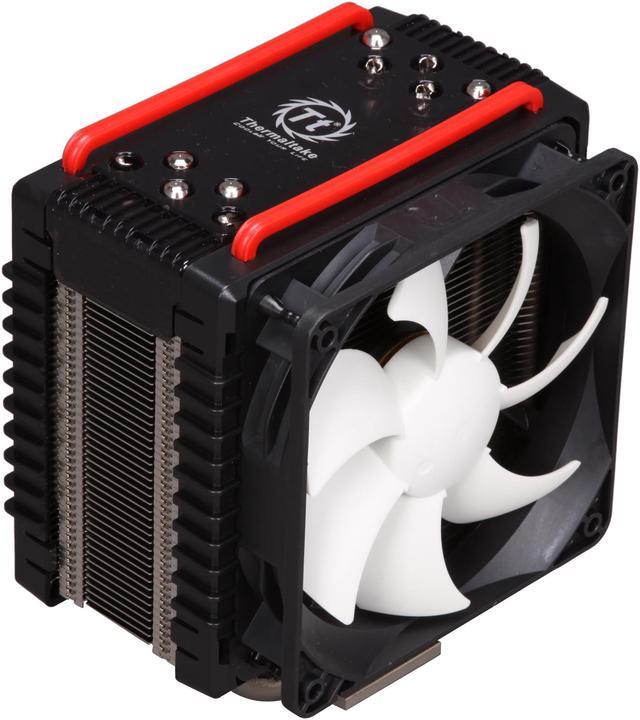
Thermaltake Frio Overclocking-Ready Intel Core i7 (six-core ready) & i5 Compatible Five 8mm Heatpipes Dual 120mm Fans Intel & AMD Universal CPU Cooler CLP0564

In stock.

  • 1,200 - 2,500 RPM
  • 101.6 CFM (Max.)
  • Aluminum & Copper
  • Pin It
  • Email this page
ICON Loading...

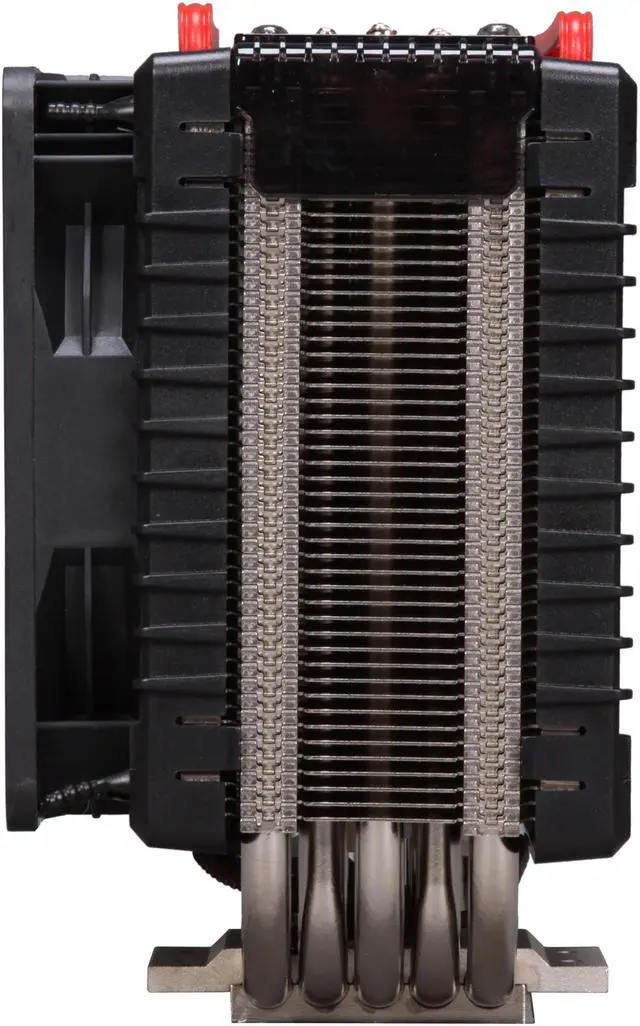
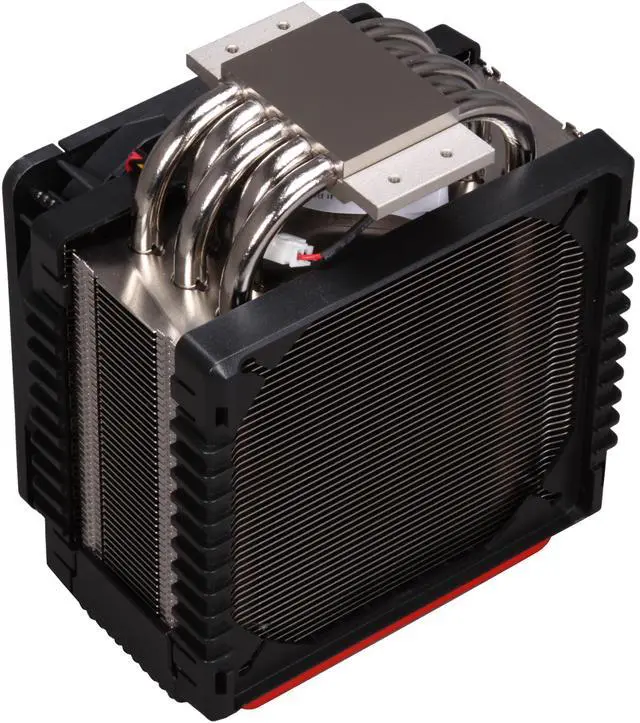
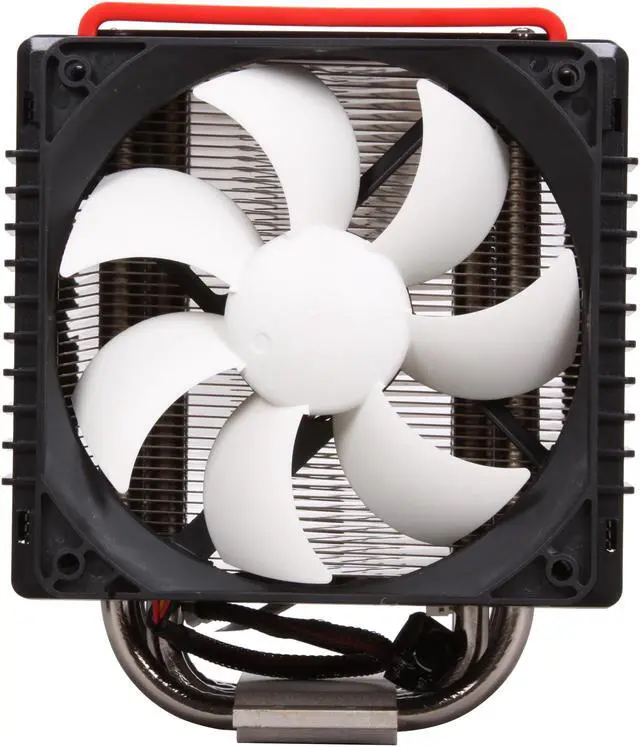
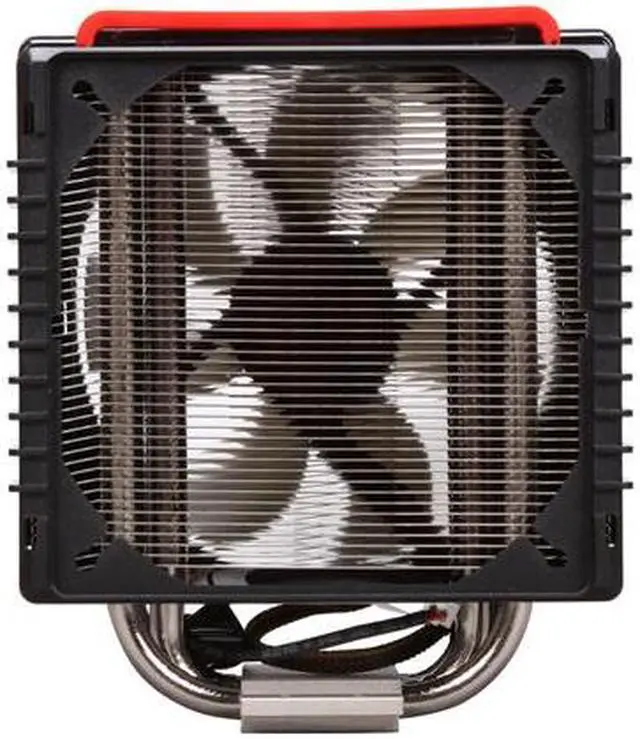
Thermaltake continues to bring innovative solutions to CPU cooling challenges. The CLP0564 overclocking-ready and six-core ready CPU cooler combines multiple features for optimal cooling of high-powered CPUs. The copper base rests directly against the chip to draw away damaging heat. Five seamlessly embedded heatpipes penetrate the cooling fin array above for optimal heat transfer and dissipation. Dual fans, one on each side, move large amount of cooling air over the convection fins at quiet noise level, and a fan control knob allows you to adjust the fan speed to reach a perfect balance between performance and noise.

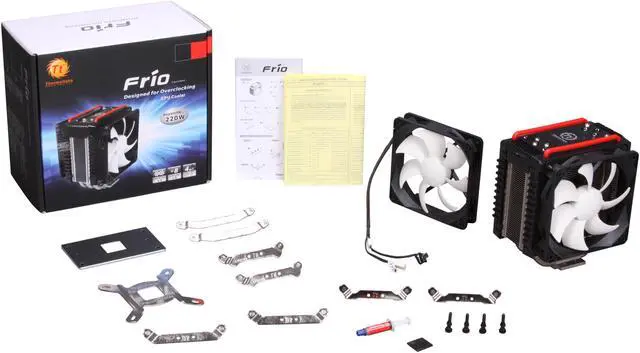
Compatible with Intel CPUs using LGA 1156 / 1366 / 775 socket and AMD CPUs in Socket AM2+ / AM2 / AM3 packaging, this versatile Thermaltake model was designed to work with just about every modern desktop CPU. For ultra-cool protection and forward-thinking style, the Thermaltake Frio blows away the competition.

  • newegg Superior Heat Dissipation The copper base and five 8mm copper heatpipes conduct heat fast; high-density convection fins maximize heat dissipation area, plus dual 120mm fans to deliver optimal cooling performance.
  • newegg Adjustable Fan Speed The Thermaltake CLP0564 features a VR fan controller so you can fine tune the fan speeds for the optimum balance between cooling performance and noise level.
  • newegg Excellent Compatibility The Thermaltake CLP0564 features broad compatibility with AMD Socket AM2+ / AM2 / AM3 and Intel LGA 1156 / 1366 / 775 platforms, providing an all-in-one cooling solution for your PC system.

Learn more about the Thermaltake CLP0564

Model

Brand
Thermaltake
Model
CLP0564

Spec

Type
Fan & Heatsinks
Fan Size
120mm
Compatibility
Intel: LGA 2011 / 1156 / 1155 / 1366 / 775
AMD: Socket AM2+ / AM2 / AM3
RPM
1,200 - 2,500 RPM
Air Flow
101.6 CFM (Max.)
Noise Level
20 - 43 dBA
Power Connector
3 Pin
Heatsink Material
Aluminum & Copper

Physical Spec

Fan Dimensions
120 x 120 x 25 mm
Heatsink Dimensions
139 x 98 x 165 mm
Weight
1042 g

Features

Features
Supports Intel Latest 6-Core Processors

Ultimate Overclocking Thermal Structure Design

Ultra Powerful Dual 120mm VR Fan and Eye-Catching Cover

Universal Socket Compatibility & Accessory Package

Customer Reviews of the Thermaltake CLP0564

Do you own this product? Write a Review

Filter Results

Go
  • Tory
  • 5/8/2013 8:33:33 AM
  • Tech Level: Somewhat High
  • Ownership: 1 month to 1 year
  • Verified Owner

5 out of 5 eggsQuality Product

Pros: As far as air cooling goes, the Frio is a great choice for managing CPU temps. Installation is easy, and it comes is a very wide variety of mounting hardware, making it a available to a wide spectrum of buyers. Before installation I was getting CPU temps around 35 IDLE, and after installing the Frio, it IDLE is at around 28-30.

Cons: None

Other Thoughts: With both fans attached to the Frio it makes it rather large. Make sure to check the amount of space you have available before purchasing, mainly the distance between your CPU and RAM!

1 out of 1 people found this review helpful. Did you? Yes No

  • N/A
  • 5/2/2013 4:31:45 AM
  • Tech Level: High
  • Ownership: 1 day to 1 week
  • Verified Owner

4 out of 5 eggsA Very Large Cooler

Pros: With two 120mm fans, this unit moves heat quickly and effectively.

Cons: However, on a standard ATX LGA 2011 socket board, this heatsink with both fans attached covers memory slots B_2 and D_2. Also, in height, this unit extends from the board to the edge of the case.

Other Thoughts: Although it's bulky and awkward, it's still an amazing unit and I definitely recommend it.

Did you find this review helpful? Yes No

  • beta
  • 4/26/2013 5:56:16 AM
  • Tech Level: Somewhat High
  • Ownership: 1 day to 1 week

5 out of 5 eggsFairly good

Pros: Keeps things cool
comes with 2 fans
has its own thermal paste
easy to mount.

Cons: cant use 2nd fan without losing a dimm slot.
fans are not pwm.
a bit big. (barely fits in my case and had to lose my side fan. this is meant to leave everything fully functional in a full tower or bigger. i have a mid tower.)

Other Thoughts: I havent tried the included thermal paste. I tried some artic mx-4 and this kept my i7 3770k at stock speed at about 38-42c idle. and almost 70 under 70% load.

I decided that it was to hot and changed to cooler masters thermal fusion 400 compound (which has proven itself better in the past) my idle temps dropped to 25-32c. my load temps have yet to reach 60c while running prime 95.

I havent tried much overclocking with the cooler master paste due to stability problems after burning in the components. Ill keep trying for a worth while overclock that is worth keeping and update once i get some numbers.

on the artic mx-4 paste overclocked 3770k @ 4.2 idled at about 50c.

again i havent tried the included thermal paste, though im gonna keep it around to try it out later on.

for as big as the cooler is i would have expected lower OC temps. But it works very well. My judgement isnt great since this is my first build. I just gave you guys the numbers i got to help out your decision.

Did you find this review helpful? Yes No

  • N/A
  • 4/21/2013 3:09:36 PM
  • Tech Level: High
  • Ownership: 1 week to 1 month
  • Verified Owner

2 out of 5 eggsEaster Egg Hunt for Parts

Pros: It looks nice. Not too loud.

Cons: Didn't ship with all CPU mounts, massive size, runs a little warm despite reseating and trying two types of thermal paste (AS-5 & IC Diamond)

Other Thoughts: Setup:
Asus IV Rampage
Intel Core i7-3930K
ATI Gigabyte Radeon 7970
Nvidia GeForce GTX 670

The Frio sounds nice on paper. Reality is a bit different. I am getting about 43°C-51°C (avg 45°C) on a Core i7-3930K (fan at ~1237 RPMs) vcore 1.208V/1.232V avg/max with no overclocking in an idle state. Running Prime95 using In-place large FFTs I plateau at about 79°C max. Over all 6 cores I get approx. #1: 82/84°C, #2: 79/81°C, #3: 78/80°C, #4: 79/81°C, #5: 82/85°C, #6: 88/88°C.

If that weren't bad enough, the box was missing parts. After I installed the first fan I hunted around in the accessory bag for the extra rubber fan mounts. Alas, they were nowhere to be found (all four were missing).

Some people are able to OC to 1.31V and get 68°C in Prime95. So I suppose without the extra fan. It makes sense I am running a bit hot. To be fair (being the reasonable person I am), I contacted Thermaltake's customer support. It's been a week and not a peep. So now I have to buy aftermarket rubber mounts and hope they fit. Not exactly a great experience. Next time I'll get a Noctua.

Manufacturer Response:

Dear Customer,
We at Thermaltake apologize for the inconvenience this may have caused you. Please contact our customer service team about missing parts.
Thermaltake USA Customer Service
email: ttsupport@thermaltakeusa.com
Toll free: 1-800-988-1088 M-F 9:00AM ~ 5:30PM (P.S.T)
011

Did you find this review helpful? Yes No

  • xtraeme
  • 4/21/2013 11:43:47 AM
  • Tech Level: High
  • Ownership: 1 week to 1 month
  • Verified Owner

2 out of 5 eggsMissing Parts

Pros: * Attractive design
* Expected heat dissipation
* Quiet
* Rubber mounts make it easier to seat the fan when tightly packed next to RAM

Cons: * Missing parts
* No reply from customer support

Other Thoughts: The CPU cooler is a perfectly nice design. I am getting about 43°C-51°C (avg 45°C) on a Core i7-3930K (fan at ~1237 RPMs) vcore 1.208V/1.232V avg/max with no overclocking in an idle state. Running Prime95 using In-place large FFTs I plateau at about 79°C max. Over all 6 cores I get approx. #1: 82/84°C, #2: 79/81°C, #3: 78/80°C, #4: 79/81°C, #5: 82/85°C, #6: 88/88°C.

What's not so hot is the box was missing parts. After I installed the first fan I hunted around in the accessory bag for the extra rubber fan mounts. Alas, they were nowhere to be found (all four were missing).

Some people are able to OC to 1.31V and get 68°C in Prime95, but I suppose without the extra fan. It makes sense that I am running a bit hot.

So being the patient person I am. I contacted Thermaltake's support. It's been a week and not a peep. So now I have to buy aftermarket rubber mounts and hope they fit. Not exactly a great experience. Next time I'll get a Noctua.

Did you find this review helpful? Yes No

  • Joel
  • 4/19/2013 3:18:06 PM
  • Tech Level: High
  • Ownership: 1 day to 1 week
  • Verified Owner

4 out of 5 eggsSuper cool!

Pros: keeps my i5 2400 overclocked to 3.8GHz at about 40°C - 50°C while playing skyrim on ultra

Cons: didn't come with the other 4 rubber fan holders, but its not that big of a deal; i just have to use 2 for each fan.

Other Thoughts: Its quite massive, blocks off the first RAM slot, and there is about 2mm space in between the fan and my 2nd RAM slot.

Manufacturer Response:

Hi Joel,
We at Thermaltake apologize for the inconvenience this may have caused you. Please contact our customer service team about the missing fan mounts.
Thermaltake USA Customer Service
email: ttsupport@thermaltakeusa.com
Toll free: 1-800-988-1088 M-F 9:00AM ~ 5:30PM (P.S.T)
011

Did you find this review helpful? Yes No

  • N/A
  • 4/16/2013 10:21:55 PM
  • Tech Level: High
  • Ownership: more than 1 year

5 out of 5 eggsExcellent, no reason to change

Pros: Keeps i5-2500K (mild 4.33GHz overclock) below 60°C during heavy gaming and below 70°C during any CPU stress test for any duration. The stock fans move a lot of air. Two fans keep the CPU super cool, and the cooler manages to work extremely well with just one fan.

Cons: Stock fans a little louder at full RPM than desired for a nearly silent system, but quite acceptable at lower RPMs. High profile memory and the fact that the fans are 25mm thick means running two fans in push pull comes at the cost of the first two DIMM slots unless low profile DIMMs are used.

Other Thoughts: The stock fans work very nicely. One fan is enough to keep a modest 4.33 GHz over-clocked i5 plenty cool. Both fans together perform even better, but at the cost of some noise when temperatures climb. I ran a single fan for a long while, but eventually installed two GELID Solutions Slim 12 PL 120mm fans. These are PWM fans and the thin design allows all RAM slots to be filled even with high profile memory. Lower RPM, less flow than the TTs but a lot quieter.

Good case venting helps. Have used this setup in Antec Three Hundred and Antec Eleven Hundred. With proper case air movement, CPU and motherboard temperatures are very low and this is in a desert climate.

I am not sure why some have difficulty with the installation. It seems no worse than any other large cooler. Hardware is adequate. Installed readily on Z68 and Z77 Asus boards with i5-2500K processor and decent silver bearing paste, zero issues and no reason to change to another thermal solution.

Did you find this review helpful? Yes No

  • Jesse
  • 4/7/2013 1:16:30 PM
  • Tech Level: High
  • Ownership: more than 1 year
  • Verified Owner

5 out of 5 eggsGreat CPU Cooler

Pros: This cooler has been an absolute beast! I purchased this cooler on 7/16/2010 and am still using it today. I have had 0 issues over the last few years, It has been cooling an i5 750 2.66 for the last 1 1/2 years, it kept my CPU at about 21°C and 30°C under load, Now for almost the other 1 1/2 years it has cooled my i5 at 4Ghz, temps about 31-35° idle, and 40-48° under load. The highest temp i have ever seen, was at 52° momentarily. I am still using the stock cooling fans that came w/ the cpu, they have worked very well and are still not what i would consider loud. The reason I ended up writing this review, was because I was looking my cooler up to see if it would be compatitble with my CPU upgrade, I am very happy that it is, because as i have stated it works very well. No issues. With how cheap this heatsink is to purchase now, it is recommended in any build. It is well worth the money and will last you years!

Cons: Not a single con!

Other Thoughts: As stated in other reviews, it is a big cooler, do make sure you have room in your case, The last 3 years i have used a EVGA P55 LE and NZXT Tempest Evo case, and it fits well, but just above the fan on the door. It is a perfect fit in my case, but make sure you have the room to fit it!

Did you find this review helpful? Yes No

  • mr.bob
  • 4/2/2013 5:17:27 PM
  • Tech Level: High
  • Ownership: more than 1 year
  • Verified Owner

5 out of 5 eggsits very big

Pros: Clocking 6 core at over 4gig, this is great! For air cool. fans are full blast and I can't really tell noise difference; however I have loud Msi graphic card and case fan. lol

Cons: be careful of clearances, I barely cleared side cover on case; moreover, I had to take side fan and housing off case to fit.

Other Thoughts: It was easy install; however, I wish my case had cutout on back side of mother board so I did not have to take mother board out to assemble.

Did you find this review helpful? Yes No

  • xex
  • 4/1/2013 2:04:26 AM
  • Tech Level: Somewhat High
  • Ownership: 1 week to 1 month

4 out of 5 eggsWow this thing is huge

Pros: It keeps my cpu cool, it will idle anywhere between 30c and 39c depending if its day or night. It gets up to 38-44c when loading a game and when just playing usually settles around 41c. I have the fans set up in push / pull.

OC'd my phenom x4 965 to 3.8ghz so far and it really didn't raise temps at all. I had briefly tried for 4.2 which also didn't raise the temps but the computer would freeze up on me.

Cons: The main problem with this is that it blocks 1 or 2 of my ram slots. When I first installed my ram I put it in the 2 farthest slots to be sure it would clear the cooler but that made it run in single channel. It looks like I could maybe squeeze one of the sticks in the 3rd slot but it will be very tight against the fan.

The instructions to assemble it were complete garbage. You could tell they were written by an engineer because they made perfect sense but they hurt your brain to try and fully understand them. "Take part A from bag B and attach to part C from bag D while making sure part A is blah blah blah" Even that is written better than the instructions this came with.

Other Thoughts: This thing is gigantic. I knew it was big from the pictures but wow it is a thing to behold when you finally see the box.

1 out of 1 people found this review helpful. Did you? Yes No

ICON Loading...
  • $59.99
  • $56.99
  • Save: $3.00 (5%)
  • $7.99 Shipping
 
Are you an E-Blast Insider? Subscribe Newegg e-Blast

Buzz

Great product

5 out of 5 eggs
Phenom II X4 955 BE OC to 3.8 GHz: core temps 39C Idle, 51C under load, held steady after 15 minutes of Prime95 at lowest ...
— goLAKings 11/27/2010

Fantastic fan

5 out of 5 eggs
First of all, I have owned three Thermaltake fans for each of the last three PCs I have built, and they all still run beautifully. ...
— Vincent 5/1/2010


Home
Home > 
Computer Hardware > 
Fans & Heatsinks > 
CPU Fans & Heatsinks > 
Thermaltake > 
Item#: N82E16835106150
LOADING... LOADING...
Shop by Region: United States | Canada | China
Follow us:   RSS Feeds Youtube
VeriSign Reliability Seal1 PaypalVerify GoldenSeal InteracThis site protected by Trustwave's Trusted Commerce program Inc500

Policy & Agreement | Privacy Policy

 © 2000-2013 Newegg Inc.  As used herein, “Newegg.ca” means Newegg Canada Inc. unless the context specifically refers to the www.newegg.ca web address.
If the Adobe Reader does not appear when you click on a link for a PDF file, you can download Adobe Reader from the Adobe web site. nassau