Newegg.ca - A great place to buy computers, computer parts, electronics, software, accessories, and DVDs online. With great prices, fast shipping, and top-rated customer service - once you know, you Newegg.
If you are reading this message, Please click this link to reload this page.(Do not use your browser's "Refresh" button). Please email us if you're running the latest version of your browser and you still see this message.
WarrantyBeyond any applicable Newegg return policy, this item is warranted independently by the product's Manufacturer or a Third party. Below is a summary provided for convenience only and may not be accurate or current.
Read full details.
Pros: Easy to install. Plugged in the CPU(i5-3470) and all of the power wires and everything worked. Turned it on and started the setup process and windows was installed in no time. Was expecting a dos screen and to my delight there was a graphical interface for setup.
Cons: Not really a con, but all the extra software that loads is kind of annoying. No big deal though.
Other Thoughts: I haven't built a computer in over 12 years since switching to Apple products, so alot has changed since then. I'm sure there are technical tweaks that can be done for performance, I have no idea how to do those, so can't comment.
Did you find this review helpful?
Thanks for the valuable feedback you provided!
N/A
3/22/2013 6:04:38 PM
Tech Level: 5/5
Ownership: 4/5
Verified Owner
Rating: 2/5Gave me problems from the start
Pros: Allowed me to turn on my computer if I performed a special ritual beforehand (see cons).
Cons: Computer would not turn on unless I cleared CMOS by removing battery. Once booted up everything ran fine. Tried everything I could think of using my years of experience with building/troubleshooting PCs, still could not get it to work. Ended up replacing it with a board from a different brand and the problem went away immediately.
Other Thoughts: First time with an AsRock, was doing a shoestring budget build thinking I could save a few bucks by going cheap on the motherboard... definitely learned a lesson there.
Manufacturer Response:
Dear ASRock Customer
We sincerely apologize for any inconvenience this may have caused you. ASRock mainboards are fully tested to assure that they're working before shipped. Unfortunately, due to nature of electronic product, it can happen. For the future reference, pre-trouble shooting can be done by below steps with known good components; Remove the mainboard from inside computer to outside. Place the mainboard on top of the empty mainboard’s box. Clear the CMOS. Set the UEFI BIOS default. Test with 1 stick memory. Mainboard memory support list link "http://www.asrock.com/mb/overview.asp?Model=B75M-DGS". As always, we appreciate your purchase and constructive reviews are welcome.
Thank you
ASRock SUPPORT Tech Support Email: user@ASRockamerica.com
Did you find this review helpful?
Thanks for the valuable feedback you provided!
mr9865
3/13/2013 10:52:46 AM
Tech Level: 4/5
Ownership: 2/5
Verified Owner
Rating: 5/5Good Motherboard
Pros: Price, size, features, bios
Cons: came with bios 1.1, updated to 1.2 from website
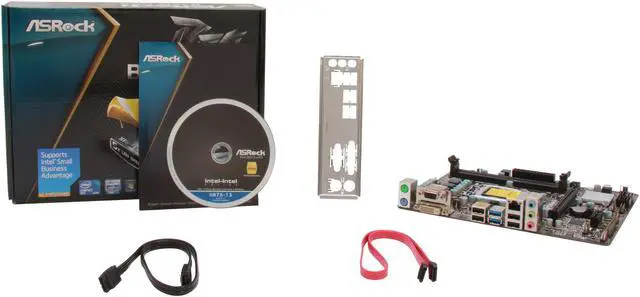
Other Thoughts: This is an exellent motherboard for the money. I thought this bios was very user friendly. Flashing to the latest was easy too! Included is one SATA III cable and one SATA II cable. Also has a header for USB3.0! I had one issue using the onboard vga. The drivers will crash your system until you update windows 7 to service pack 1.
Noticed they have a revision 2 version now which swaps the pci-e 1x with a standard pci slot.
Did you find this review helpful?
Thanks for the valuable feedback you provided!
Shane
3/8/2013 7:58:05 AM
Tech Level: 4/5
Ownership: 3/5
Verified Owner
Rating: 4/5Small
Pros: Small Cheap Does the job.
Cons: Lack of ports, but, you get what you pay for.
Other Thoughts: For 60 bucks, this is an awesome board.
Pros: i like the small design board, fit perfectly with my CPU casing, front USB3 header, SATA6
Cons: my setup : CPU -> intel dual core g2120, Memory -> Corsair CMZ8GX3M2A1866C9R (2x4Gb) Vengeance Red DDR3 (dual channel)
but when in BIOS, why memory speed only detect 1333 dual channel ?
pls advice
Manufacturer Response:
Dear ASRock Customer
We sincerely apologize that you having difficulty with memory setting. Please set the XMP setting under BIOS, OC Tweaker, DRAM Configuration, XMP Setting [Profile1], save and exit. However, we recommend to using the mainboard's memory support list at "http://www.asrock.com/mb/Intel/B75M-DGS/?cat=Memory" to avoid compatible issues. If you have any technical questions please contact us at http://www.ASRock.com/support/tsd.asp. We can assist you shortly.
Thank you
ASRock SUPPORT Tech Support Email: user@ASRockamerica.com
0 out of 2 people found this review helpful.
Did you?
Thanks for the valuable feedback you provided!
Chris
3/4/2013 10:55:55 AM
Tech Level: 4/5
Ownership: 3/5
Verified Owner
Rating: 2/5First review from a system builder.
Pros: Bought 4, 2 worked.
The 2 that worked, well, they worked.....
Cons: Bought 4, 2 worked.
Had 1 arrive completely DoA. Friend had burnt the box, so I ordered another one and RMA'ed the original and Newegg wouldn't take the DoA one back in the new box.
Other arrived with a bad RAM slot. First slot next to processor would send 4 beeps on startup, but second slot worked fine. It's my sister's PC, and she don't need 8GB of RAM anyhow, so she is stuck with 1 4GB stick and now I have a spare.
Other Thoughts: For the price, I figured I would start using these mobo's for builds. I have never had a bad part, or any bad experiences through Newegg, so I figured I would write my first review.
Manufacturer Response:
Dear ASRock Customer
We sincerely apologize that you having difficulty with mainboard. For the RAM slot issue, please remove the CPU to check if the mainboard's CPU socket pins should not be bent. Reseat the CPU and cooler if the pins are normal. Clear the CMOS (required power off). Test 1 stick memory on particular RAM slot to eliminate the issue. If you have any technical questions please contact us at http://www.ASRock.com/support/tsd.asp. We can assist you shortly.
Thank you
ASRock SUPPORT Tech Support Email: user@ASRockamerica.com
Did you find this review helpful?
Thanks for the valuable feedback you provided!
Severilous
3/4/2013 6:40:47 AM
Tech Level: 5/5
Ownership: 2/5
Rating: 5/5ASRock B75M-DGS
Pros: Got this board because it was $53 and it had everything I was looking for and it was MicroATX. BIOS is awesome, was able to perform update from first boot, just need a fat32 formatted usb drive. Software that came with board is ok as well, still testing some of it, don't run the auto install because you will get some av and other trial software, but the lan, usb and smart connect software is neat.
Cons: When clipping in the CPU you can hear the board creak, which can be unnerving if this is a first time build. not enough to take off an egg
Other Thoughts: Was looking for a budget board with PCI Express 3.0, usb 3.0 and at least 1 sata3 6gbs, this board delivered and gave me no problems during installation. Currently loving the ASRock brand!!
Did you find this review helpful?
Thanks for the valuable feedback you provided!
N/A
2/27/2013 5:00:34 PM
Tech Level: 4/5
Ownership: 4/5
Verified Owner
Rating: 5/5Awesome board
Pros: Great board. Easy install, love the bios. I have setup a couple of computers with this board now and have had zero problems with them. Ordering a few more right now!
Cons: none
Other Thoughts: For the price you can't go wrong.
Did you find this review helpful?
Thanks for the valuable feedback you provided!
N/A
2/26/2013 9:52:31 AM
Tech Level: 5/5
Ownership: 2/5
Verified Owner
Rating: 5/5ASRock Impresses
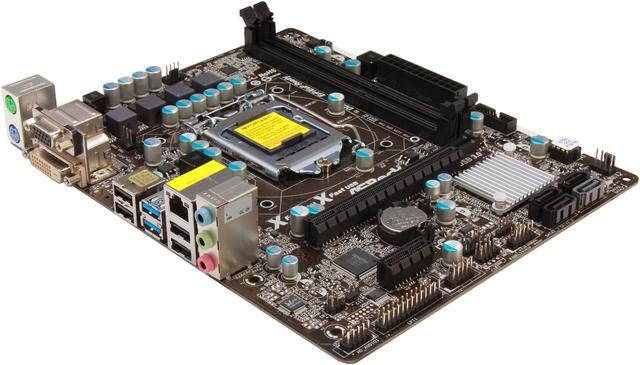
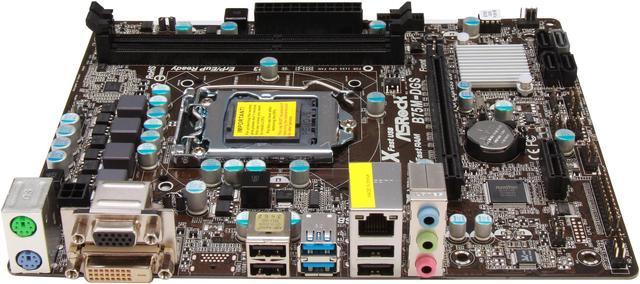
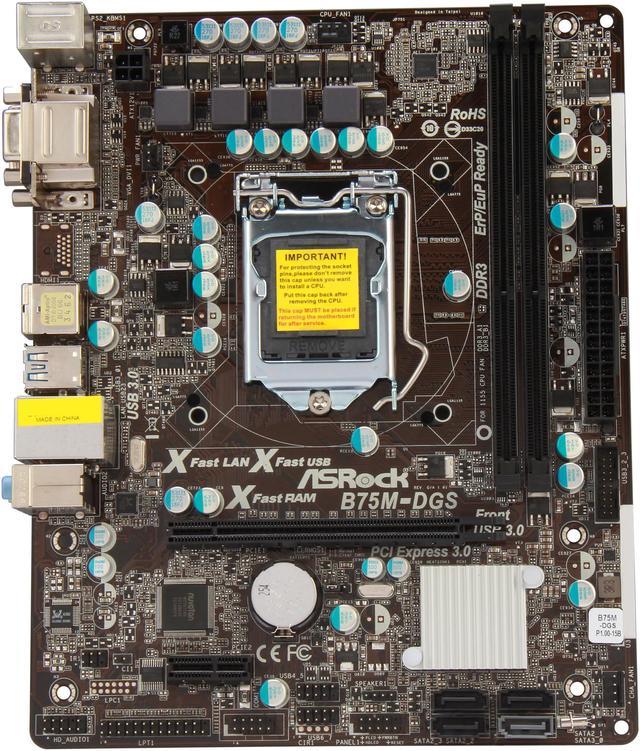
Pros: My first Build contained an ASRock, that was way back in '03 or so. I remembered thinking, "I've never heard of this company, I hope I'm making a good decision." That machine was a workhorse, and it went the distance, it lasted nearly 8 years before a power surge finally blew out everything inside it. Now that I have been building PC's for almost 12 years i've come to realize that, this is a quality company with outstanding units. This unit in particular has several key pros. For starters, it's not for overclockers. People who are interested in such should invest in Z77 chipsets or go with the FM3 sockets and stick to the AMD series up to the 8300 series vishera. It has plenty of sata controllers for a very simplistic build. This MOBO is ideal for an HTPC. You can toss a SATA III SSD in here with a generic blue ray player and get some outstanding quality for minimal price. Best of all, the size and layout of the board is ideal for smaller cases where size is an issue, but there is enough lee way that it can be used in larger cases with fancier components without feeling cramped. I tested this with two cases, a micro ATX Thermaltake and a mid tower Corsair. I have to say, this unit fit nicely into both with all the components fitting in with ease. The HD audio is a nice addition to this as a step up from the h61 chipsets and is a great middle of the road choice for people looking to add an increase in graphics without looking to crossfire. Overall, if you are a builder planning on getting a nice unit tossed together for someone on the cheap you can do it with this motherboard and still present your buyer with plenty of options for improvement.
the two builds i used are pentium g850 4gb ram 1600 ddr3 asrock b75m dgs thermaltake lanbox customized radeon 6870 seagate 500gb baracuda
budget system total price 389$
Intel i5 3450 asrock b75m dgs corsair 200r xfx radeon 7850 samsung 840 pro 120 gb seagate baracude 1 tb hdd 8 gb ddr3 1600 ram asus wifi link TCP/IP Wireless lan card
mid range gaming rig total price 594$
this really is an outstanding mobo with great features and at this price range cannot be beat.
Cons: The only quam with the ASRock boards i have noticed is that in the 10 years since i first started using them, they still require an IDEE floppy drive installed to create a bootable driver disk. It's not a major concern, and certainly no reason to take an egg off, but at some point these guys need to just stop being lazy and put the driver on the disc included with the MOBO.
Other Thoughts: the 4 pin power on the mobo was too short for the power supply i originally purchased for the corsair case, i couldn't wait several days for an extension and no where locally had one, so I had to replace it with another, a thermal take that had a much longer sleeve. note that this 4 pin is located at the top left of the board, and those units with bottom mounted pws may need to get extension cables depending on the size of the case and length of the PSU rails.
1 out of 1 people found this review helpful.
Did you?
Thanks for the valuable feedback you provided!
Daniel
2/21/2013 1:39:26 PM
Tech Level: 3/5
Ownership: 2/5
Verified Owner
Rating: 5/5
Pros: Great little budget build board for the price paid, easy to use UEFI BIOS, and the ability to update the BIOS while in the BIOS. Fairly well designed UI for the BIOS, and board boots pretty quickly.
Cons: Not many overclocking options, but this is a budget board after all. DDR3 1600 RAM runs at 1333 because of the Intel Celeron installed on the board, but that's not the fault of the motherboard.
Other Thoughts: I've never seen a board do this before, but after saving changes in the BIOS and the BIOS reboots the computer, it will turn off the computer, turn it on for a second or two, turn off and then turn back on.
Did you find this review helpful?
Thanks for the valuable feedback you provided!
Through the Newegg EggXpert Review Program, Newegg invites its best reviewers, known as EggXperts, to post opinions about new and pre-release products to help their fellow customers make informed buying decisions.Click here for more details.
Loading...
Discontinued
This item is currently out of stock and it may or may not be restocked.
$10.74 Shipping
Discontinued
Thank you for subscribing
Your request will be processed within the next 24 hours.
Please add "promo@e.newegg.com" to your address book to ensure delivery.