Newegg.ca - A great place to buy computers, computer parts, electronics, software, accessories, and DVDs online. With great prices, fast shipping, and top-rated customer service - once you know, you Newegg.

If you are reading this message, Please click this link to reload this page.(Do not use your browser's "Refresh" button). Please email us if you're running the latest version of your browser and you still see this message.

Newegg.ca - Computers, Computer Parts and Electronics

My Account
All prices shown in Canadian dollars unless otherwise specified. 

About UsBrowse Entire SiteShop All BrandsHelp & Info
topNavRowBottom  
Home
Home. > 
Computer Hardware0_. > 
Motherboards1_. > 
Intel Motherboards2_. > 
ASUS3_. > 
Item#: N82E16813131296

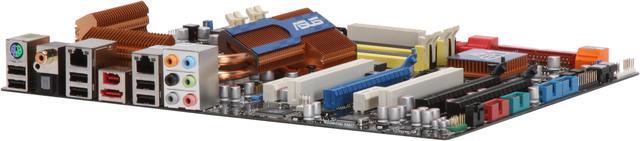
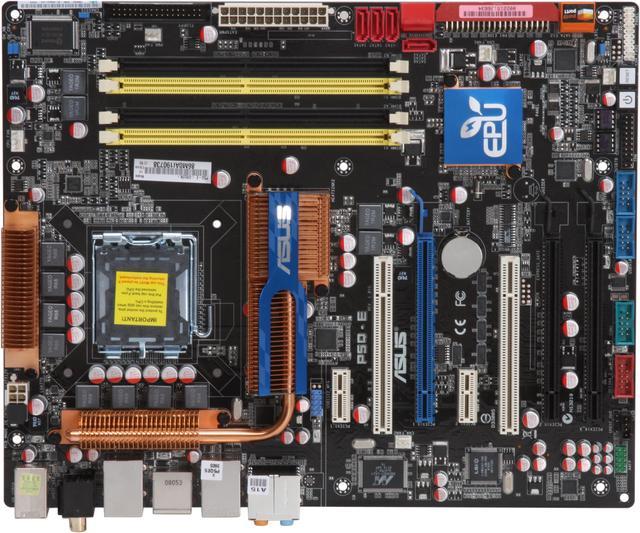
ASUS P5Q-E LGA 775 Intel P45 ATX Intel Motherboard

Average Rating

4 out of 5 eggs(224 reviews)

OUT OF STOCK.

Deactivated. This item is currently out of stock and it may or may not be restocked.
Free Shipping
Buzz
Happy so far
4 out of 5 eggs
Very happy. Running E2180 plus G.Skill 1066 Ram. Runs the RAM stable at 4-4-4-15 @DDR1066. I got a 1 GHz overclock ...
— Smoothmole 7/13/2008
6 months later....
5 out of 5 eggs
Super stable, easy to overclock. Takes four G Skill 2Gb sticks of memory without hickups like some other boards. Copper cooling ...
— Matthew 6/28/2009


Quick Info
Manufacturer Warranty
  • Manufacturer Limited Warranty period (parts): 3 years
  • Manufacturer Limited Warranty period (labor): 3 years


Return Policies

This item is covered by Newegg.ca's Limited Replacement Only Return Policy.

  • Return for refund within: Non-Refundable
  • Return for replacement within: 30 days

Learn more about the ASUS P5Q-E

Model
Brand
ASUS
Model
P5Q-E
Supported CPU
CPU Socket Type
LGA 775
CPU Type
Core 2 Quad / Core 2 Extreme / Core 2 Duo
FSB
1600/1333MHz
Chipsets
North Bridge
Intel P45
South Bridge
Intel ICH10R
Memory
Number of Memory Slots
4×240pin
Memory Standard
DDR2 1200
Maximum Memory Supported
16GB
Channel Supported
Dual Channel
Expansion Slots
PCI Express 2.0 x16
2 x PCI Express 2.0 x16 slots, support ATI CrossFireX technology, at x8 link
(black at max. x8 link)
PCI Express x4
1 x PCI Express x16 slot at max. x4 link(black)
PCI Express x1
2
PCI Slots
2
Storage Devices
PATA
1 x ATA100 2 Dev. Max
SATA 3Gb/s
8
SATA RAID
0/1/5/10
Onboard Video
Onboard Video Chipset
None
Onboard Audio
Audio Chipset
ADI AD2000B
Audio Channels
8 Channels
Onboard LAN
LAN Chipset
Marvell 88E8056
Second LAN Chipset
Marvell 88E8001
Max LAN Speed
Dual 10/100/1000Mbps
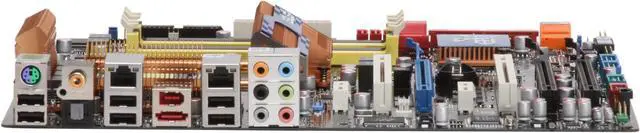
Rear Panel Ports
PS/2
1
USB 1.1/2.0
6 x USB 2.0
IEEE 1394
1 x IEEE 1394a
eSATA
1 x eSATA 3Gb/s
S/PDIF In
1 x Optical, 1 x Coaxial
Audio Ports
6 Ports
Onboard USB
Onboard USB
3 x USB connectors support additional 6 USB ports
Onboard 1394
Onboard 1394
1 x 1394a
Physical Spec
Form Factor
ATX
Dimensions
12.0" x 9.6"
Power Pin
24 Pin
Features
Features
ATI CrossFireX Technology ~ Exceptional 3D Experience
EPU-6 Engine ~ System Level Energy Saving
Drive Xpert ~ Enhance Data Backup or HDD performance
Express Gate ~ 5 Secs from Bootup to Online!
100% Japan-made Solid Capacitor ~ Best Quality
Packaging
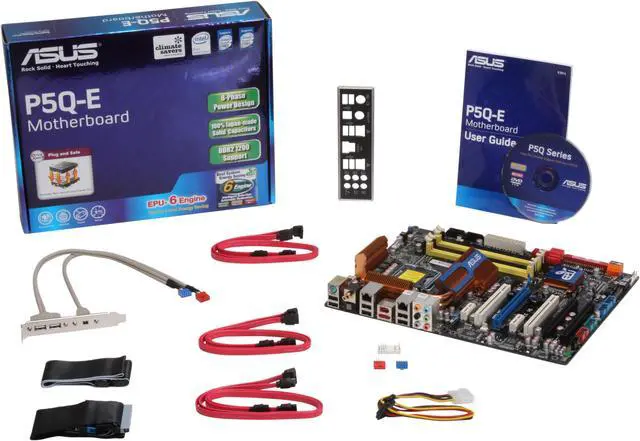
Package Contents
P5Q-E
Driver Disk
User Manual
Rear I/O Panel Shield
IDE/PATA Cable
FDD Cable
SATA Cable
4-pin to SATA Power Cable
IEEE 1394 & USB Bracket
Manufacturer Warranty
Parts
3 years limited
Labor
3 years limited

Customer Reviews of the ASUS P5Q-E

Do you own this product? Write a Review
Filter Results
Go
  • Roland
  • 8/13/2009 8:05:14 PM
  • Tech Level: above average
  • Ownership: 1 week to 1 month
4 out of 5 eggsgreat

Pros: great mobbo, runs cool and really look's nice

Cons: i have an IDE DVD burner and a IDE Hard drive when i plug both at the same time they have a conflict and only one of them works. have to use my dad's Sata HDD until i get a new HDD. really wish it would have 2 IDE connections.

Other Thoughts: really a must. work's great no problems yet and i really love it.

Did you find this review helpful? Yes No

  • N/A
  • 8/10/2009 3:31:42 AM
  • Tech Level: above average
  • Ownership: 1 week to 1 month
  • Verified Owner
5 out of 5 eggsowner

Pros: Great board for my small business.Does what I want it to do.

Cons: none

Did you find this review helpful? Yes No

  • TazarZero
  • 8/9/2009 2:57:56 AM
  • Tech Level: above average
  • Ownership: 1 month to 1 year
  • Verified Owner
5 out of 5 eggsA great board to test your patience with!

Pros: I bought this motherboard months ago, but have only been actually USING it for around a month and a half, and needless to say it's a solid board. It looks great, I love its RAM capacity, it will team up with a Q9550 Quad-core CPU without any hassles, and it will support a Crossfire setup with two Radeon 4870's beautifully.

Cons: The only 'Con' I can think of about this board is that it is NOT for everyone! You really have to know your stuff in order to get this board to work right with certain RAM. While I do have decent knowledge about hardware, I'm still a newbie to tweaking BIOS settings for RAM, CPU, FSB, NorthBridge, and so on. Depending on the kind of hardware you get, you may have to adjust settings a bit to acquire a stable system. I learned this the hard way. !!Be sure to update your BIOS to Revision 2101 when you get your system up and running!!

Other Thoughts: In my current setup, in which ALL parts were bought here on Newegg over time, I teamed this motherboard up with two(2) 4GB sets of OCZ Fatality 1 Gaming RAM for a total of 8GB. However, I had to tweak the Timings and Voltage a bit to get only 4GB stable at a time (I removed two of the four RAM chips). In the BIOS, for this particular RAM, the Timings were set to 5-4-4-15; Voltage to 2.0 (even though the chips say 2.1), and adjusted DRAM Frequency = DDR2-800mhz - DRAM Static Read Control = Disabled - DRAM Read Training = Disabled - Mem. OC Charger = Enabled - A.I. Clock Twister = Lighter, and then left everything else set to AUTO. Again, this has proven stable on two 4GB sets of OCZ Fatality 1 Gaming Series RAM at 800Mhz used one at a time. Haven't tested both sets yet, but it looks promising. So, like I said in the title, this board will test your patience with your RAM if nothing else, so be aware that you COULD have difficulties (BSOD's) if your BIOS isn't configured right.

1 out of 1 people found this review helpful. Did you? Yes No

  • Ben
  • 8/6/2009 3:59:17 AM
  • Tech Level: above average
  • Ownership: 1 month to 1 year
  • Verified Owner
4 out of 5 eggsA generally solid board

Pros: Overall this is a very solid board. Running with a Q6600 ( 2.4ghz quad core ), and 8GB of RAM this is like a rock. For the most part, everything works as it should.

Cons: There are only a few minor issues I have with this board.

First it seems that of the 8 SATA ports, you can really only use 6. The other 2 are only to be used in what seems to boil down to over-hyped hardware RAID 0.

Second is a bit more of an annoyance, every so often maybe 1/4 of boots. The hard drive detection takes a good 5 or 6 minutes during POST. I have 5 hard disks and 1 SATA cd/dvd but regardless it takes much longer than it should.

The only other very minor issue is that the Dual Gigabit uses two different network interface chips. One kept randomly resetting during use, but since I switched to the other one no problems.

Other Thoughts: Despite it's few annoyances this is a very good board. I haven't had any major issues with it which could not be worked around. ASUS did good here. With this board I have, a Q6600, 2 x ( 2 x 2GB ) RAM, 4 500GB WD Blacks, a 73GB Raptor, and a 7900GS running both Linux 2.6 and Windows 7. All the operating systems I have tried on here (Linux 2.4, 2.6, Windows 7, OpenSolaris, and FreeBSD) had full support for all this boards components out of the box.

Did you find this review helpful? Yes No

  • Greg
  • 8/5/2009 5:17:19 PM
  • Tech Level: above average
  • Ownership: 1 month to 1 year
  • Verified Owner
4 out of 5 eggsSolid Board, Good Performer

Pros: It worked the first time, right out of the box. No BIOS updates. No tweaking. It just worked.

Lots of IO. From USB ports to SATA ports.

Cons: I haven't yet achieved a working overclock. That comes down more to my overclocking knowledge, and lack thereof, the the board. But it does have the easy overclock settings in the BIOS, and so far, none have worked.

Other Thoughts: I'm running Windows 7 RC, so have had a difficult time getting drivers for the ASUS utilities. Hopefully the will be out with, or before, the release to market.

Did you find this review helpful? Yes No

  • Night Gamer
  • 8/4/2009 12:28:30 PM
  • Tech Level: above average
  • Ownership: 1 month to 1 year
  • Verified Owner
5 out of 5 eggsGamers Must Have This

Pros: Tons of slots for DDR2 Ram. 16gigs worth. PCI-e and expansion slots are great. Fits perfect in just about any case you can get. Using this Mobo specifically for gaming. This board is CRAZY. If you are serious about gaming, this is a must have Mobo.

Cons: NON.

Other Thoughts: This board is supporting the following:
Wolfdale E8500 3.16mhz Duo Core processor
8 gigs of OCZ 1066mhz Platinum RAM
BFG GTX 275 Video Card
without any issues at all.

Did you find this review helpful? Yes No

  • N/A
  • 7/27/2009 2:06:14 PM
  • Tech Level: above average
  • Ownership: 1 month to 1 year
  • Verified Owner
1 out of 5 eggsThis Board works but Died sooner than expected

Pros: Not sure if I can say that there are many pros to this board. Lots of USB ports, dual network ports, decent onboard sound card.

Cons: Got this motherboard back in November of 2008 and it has worked with a few minor glitches, mostly with BIOS resets. This past weekend (July 2009) I turned the computer on and i got no video and no hard drive activity. My first thought was video card was dead. After trying other components and just trying to get the BIOS to boot I realized it was the motherboard that had stopped functioning. I wouldn't recommend this board at all. Also ASUS tech support, the only good thing is that they are open on weekends. As for now im without my gaming rig and will know in 48 business hours if im getting an RMA or not. Unfourntunently I can't request an advanced RMA which has me concerned, Do not buy this board, there are others out there that will have the same features that are more reliable.

Other Thoughts: Asus needs to wake up and take care of the customer, Ive read the horror stories here about RMA's and recieving new non working motherboards. Again I dont reccomend this board at all and until i see how this RMA process works out I would stay away from ASUS for the time being. Very displeased with this product.

Manufacturer Response:

Dear Valued Customer,

We are sorry for this inconvenience. Please contact our Technical Support Department at http://vip.asus.com/eservice/techserv.aspx and reference case number "NE436231" so that we may get more details about your system configuration and assist you in resolving these issues you are experiencing.

Best Regards,

ASUS Support Team

0 out of 2 people found this review helpful. Did you? Yes No

  • Chuck
  • 7/25/2009 12:38:19 AM
  • Tech Level: above average
  • Ownership: 1 day to 1 week
  • Verified Owner
4 out of 5 eggsDecent Motherboard

Pros: This motherboard has a cool design with good heat sinks allowing the board to cool properly. The BIOS is very easy to use to overclock and still runs stable.

Cons: Like all MoBos (Motherboards) it has some quirks. The quirk I had was incompatibility with my USB 2.0 keyboard.
When I started the MoBo with my USB keyboard plugged in, the computer would FREEZE at boot time at the BIOS screen ("Press Tab to see the post messages, Del to enter setup") and it would never post. IT WOULD NOT POST AT ALL. First I thought it was something bad with the motherboard or the other hardware and i tried everything and got nothing. Finally, by cheer luck (I was about to send my MoBo back), I accidentally unplugged my USB keyboard and my MoBo started working fine. After playing and testing with the MoBo, I found two ways to make it work. To plug the USB keyboard after the system booted, OR to disable USB 2.0 support on the BIOS. The issue with the second approach is that all devices on my system are now considered USB 1.1 rather than 2.0.

0 out of 1 people found this review helpful. Did you? Yes No

  • ftwhound
  • 7/24/2009 2:49:14 PM
  • Tech Level: above average
  • Ownership: more than 1 year
  • Verified Owner
5 out of 5 eggsGreat Board!

Pros: This has been the best board that I've owned thus far! It's stable even when OC. If I needed another 775 board I would certainly get this one again! It's also easy to update the bios using the update program in the bios settings.

Cons: Like all boards it has some quirks. The only quirk on mine is that when you unplug the board and then plug it back in and then start it up it starts up then shuts down for about 2 to 3 sec. and then it boots as it should. It only happens if the board is unplugged though.

Other Thoughts: It's been a great board for me!

1 out of 1 people found this review helpful. Did you? Yes No

  • N/A
  • 7/21/2009 12:15:11 PM
  • Tech Level: above average
  • Ownership: 1 week to 1 month
  • Verified Owner
5 out of 5 eggsp5q-e great for overclocking

Pros: Getting an e8500 to overclock to 4.2 with standard cooling.

Cons: n/a

0 out of 1 people found this review helpful. Did you? Yes No

Home
Home. > 
Computer Hardware0_. > 
Motherboards1_. > 
Intel Motherboards2_. > 
ASUS3_. > 
Item#: N82E16813131296
Shop by Region: United States | Canada | China
Affiliated Sites:
EggXpert.com
Newegg Community
VeriSignReliability Seal1PaypalVerify GoldenSealThis site protected by Trustwave's Trusted Commerce program

Policy & Agreement | Privacy Policy

 © 2000-2010 Newegg Inc.  As used herein, “Newegg.ca” means Newegg Canada Inc. unless the context specifically refers to the www.newegg.ca web address.
If the Adobe Reader does not appear when you click on a link for a PDF file, you can download Adobe Reader from the Adobe web site. nassau