Skip to: |

Newegg.ca - A great place to buy computers, computer parts, electronics, software, accessories, and DVDs online. With great prices, fast shipping, and top-rated customer service - once you know, you Newegg.

If you are reading this message, Please click this link to reload this page.(Do not use your browser's "Refresh" button). Please email us if you're running the latest version of your browser and you still see this message.

Newegg.ca - Computer Parts, Laptops, Electronics, HDTVs, Digital Cameras and More!

  • | Wish List
  • Help
Search all
Search
Home
Home > 
Computer Hardware > 
Motherboards > 
Intel Motherboards > 
Intel > 
Item#: N82E16813121606

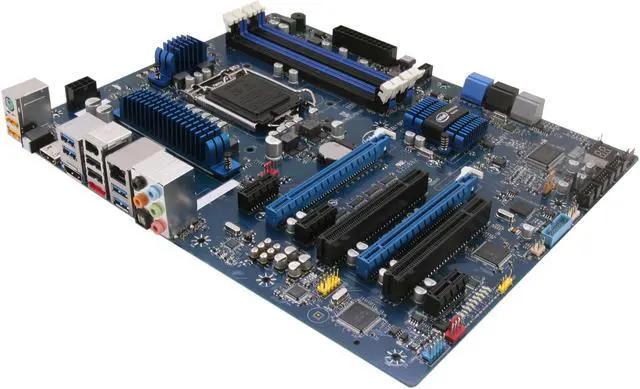
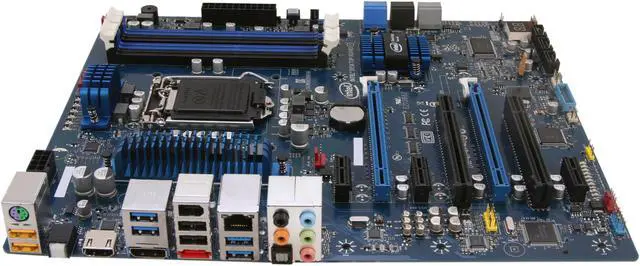
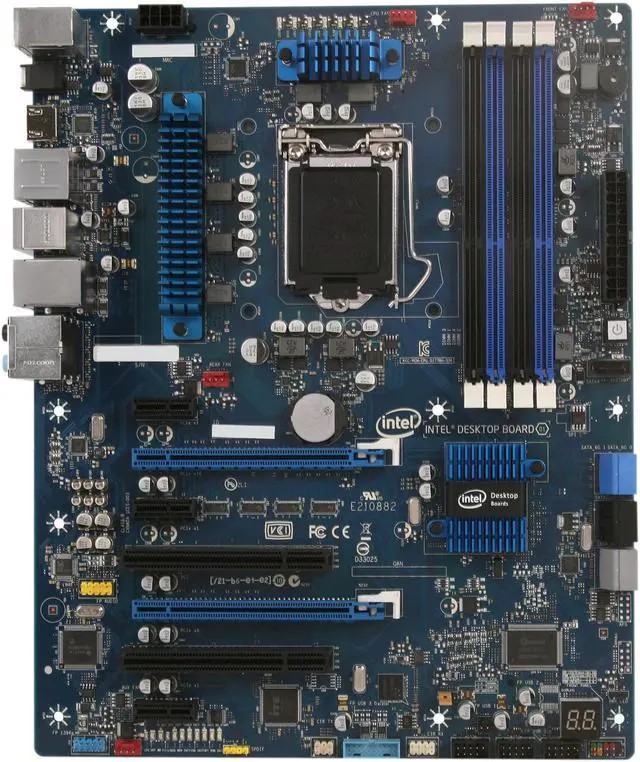
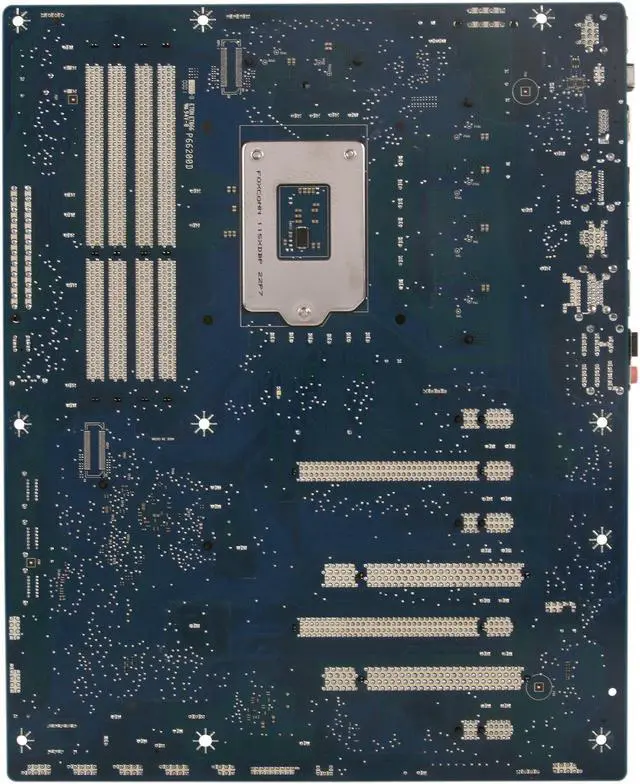
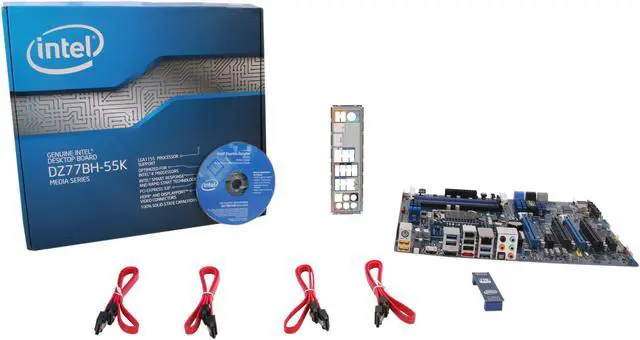
Intel BOXDZ77BH55K LGA 1155 Intel Z77 HDMI, DP, SATA 6Gb/s USB 3.0 ATX Intel Motherboard

In stock.

  • LGA 1155
  • Intel Z77
  • 4×240pin DDR31600/1333/1066
  • Note: DDR3 1600 MHz DIMMs are only supported by 3rd generation Intel Core processor family processors
  • Pin It
  • Email this page
ICON Loading...


The Intel BOXDZ77BH55K is a great foundation for your next PC build based on the state-of-the-art Intel 3rd generation Core processors. The Z77 chipset natively supports USB 3.0 technology bringing the USB peripherals data transfer to a new level at up to 5Gbps. Intel Smart Connect Technology keeps you always up to date with social networking even when system is asleep, while Intel Rapid Start Technology allows your PC to resume from deepest sleep in a flash.

  • newegg INTEL OVERCLOCKING ASSISTANT Single-step overclocking boosts performance to quickly maximize your gaming advantage.
  • newegg BIOS VAULT TECHNOLOGY Virtually incorruptible BIOS that provides fault-tolerant and secure firmware operating and upgrade environments.
  • newegg INTELLIGENT PHASE SHEDDING TECHNOLOGY Intel’s Turbo mode features (power-when-you-need-it), Intel motherboards provide a unique feature where the CPU regulation dynamically turns power phases in the CPU VR on and off depending on the power required by the CPU, keeping energy consumption to a minimum.
  • newegg FAST BOOT TECHNOLOGY Speed through system boot times and eliminate unnecessary delays. From power off to desktop in seconds.
  • newegg USB 3.0 and SATA III The USB 3.0 technology is natively built into the chipset to provide up to 5Gbps bandwidth for blazing fast data transfer. The SATA III interface enables up to 6Gbps link speed - twice the speed of SATA revision II to take full advantage of the latest SSD storage technology.
  • newegg Intel Rapid Storage Technology Intel Rapid Storage Technology offers new levels of protection, performance and expandability for desktop and mobile platforms. Whether using one or multiple hard drives, users can take advantage of enhanced performance and lower power consumption. When using more than one drive, the user can have added protection against data loss in the event of a hard drive failure.

Learn more about the Intel BOXDZ77BH55K

Model

Brand
Intel
Model
BOXDZ77BH55K

Supported CPU

CPU Socket Type
LGA 1155
CPU Type
Core i7 / i5 / i3 (LGA1155)

Chipsets

North Bridge
Intel Z77

Memory

Number of Memory Slots
4×240pin
Memory Standard
DDR31600/1333/1066
Note: DDR3 1600 MHz DIMMs are only supported by 3rd generation Intel Core processor family processors
Maximum Memory Supported
32GB
Channel Supported
Dual Channel

Expansion Slots

PCI Express 3.0 x16
2
PCI Express x1
3
PCI Slots
2

Storage Devices

SATA 3Gb/s
3
SATA 6Gb/s
4 x SATA 6Gb/s

Onboard Video

Onboard Video Chipset
Supported only by CPU with integrated graphic

Onboard Audio

Audio Chipset
Realtek ALC892
Audio Channels
10-channel (8 + 2)

Onboard LAN

LAN Chipset
Intel 82579V
Max LAN Speed
10/100/1000Mbps

Rear Panel Ports

PS/2
1
HDMI
1 x HDMI
DisplayPort
1 x DisplayPort
USB 1.1/2.0
4 x USB 2.0 (2 hi-current/fast charging USB)
USB 3.0
4 x USB 3.0
IEEE 1394
1 x IEEE 1394a
eSATA
1 x eSATA 6Gb/s
S/PDIF Out
1 x Optical
Audio Ports
5 Ports

Internal I/O Connectors

Onboard USB
2 x USB 3.0 + 6 x USB 2.0

Physical Spec

Form Factor
ATX
Dimensions
12.0" x 9.6"
Power Pin
24 Pin

Quick Info

Warranty

  • Limited Warranty period (parts): 3 years
  • Limited Warranty period (labor): 3 years


Customer Reviews of the Intel BOXDZ77BH55K

Do you own this product? Write a Review

Filter Results

Go
  • HouTech
  • 6/18/2013 12:58:54 PM
  • Tech Level: High
  • Ownership: 1 day to 1 week
  • Verified Owner

1 out of 5 eggsWont Boot

Pros: It's a nice blue color.

Cons: It won't boot. The last 4 Intel mobo I have bought, wont boot unless you have THE ram they have tested with THE fan they have tested, etc, etc. Bottom line, buy another brand

Did you find this review helpful? Yes No

  • Hardware man
  • 6/11/2013 2:23:02 PM
  • Tech Level: High
  • Ownership: 1 month to 1 year
  • Verified Owner

5 out of 5 eggsIntel Board

Pros: I have ordered over thirteen of these boards so far (and plan to continue to buy them). Out of the thirteen ia have had to send one back due to a bad memory slot. Support wasn't all that nice, but I did get my board there and back again in a pretty timely manner. All of these issues people seem to be having with the bios update is strange to me. I have updated the bios in everyone of them and everytime, things run like a champ. Couldln't be an easier process in my opinion. I guess I should buy a lottery ticket as lucky as it seems I have been with these boards.

Cons: None at all.

Did you find this review helpful? Yes No

  • Steve17
  • 6/11/2013 12:03:36 PM
  • Tech Level: Somewhat High
  • Ownership: 1 month to 1 year
  • Verified Owner

4 out of 5 eggsI like it

Pros: It has two monitor ports. Almost everything works with the BIOS rev 0099. The front panel USB3 ports work now and the Marvell SATA ports work now.

Cons: Some people have trouble upgrading the BIOS but I didn't.

There is now a minor bug in the BIOS 0099. It ignores the user specified hard drive boot order. It seems to boot from the Marvell drives first and then SATA 0, etc.

Don't try to use a VGA monitor. The adapter probably won't work when using the GUI BIOS. If you don't have a HDMI or Display Port monitor, the best bet is a HDMI-DVI converter, because the signals are the same. I also have a Display Port to DVI converter that works well.

Other Thoughts: I used the BIOS update procedure recommended in Intel's desktop forum. (F7/recovery method). Put the XXXX.BIO BIOS file on a flash drive. Press F7 at startup. I upgraded from 0057 to 0085, then upgraded to 0099.

I have the Intel core i5 -3570 processor. I have Kingston 16GB 1600MHz DDR3. KVR16N11K2/16 It runs well with no problems.

I have another one of these boards that has been running for 8 months. It has the 0070 BIOS. That computer is too important to attempt a BIOS upgrade. It runs well but I can't use the Marvell SATA ports or the front panel USB3.

Did you find this review helpful? Yes No

  • John
  • 6/3/2013 11:08:51 PM
  • Tech Level: Somewhat High
  • Ownership: less than 1 day
  • Verified Owner

1 out of 5 eggs2nd board, same problem

Pros: None.

Cons: Got my replacement board today and the same problem persists. BIOS update bricks board. Recovery is not an option, tried to no avail.

Other Thoughts: This time I attempted to do incremental updates instead of going straight to the latest BIOS. First update bricked board same as last. Got store credit for this one. I'll be buying an ASUS this time. BTW, this board is now obsolete anyway since the Gen4 processors just came out. Newegg was nice enough to take my Gen3 i5 back so I can upgrade to Gen4. Thank you Newegg.

Did you find this review helpful? Yes No

  • John
  • 5/29/2013 9:37:44 PM
  • Tech Level: Somewhat High
  • Ownership: less than 1 day
  • Verified Owner

1 out of 5 eggsNo POST

Pros: None.

Cons: Will not POST. Memory error 32. Tried different memory in different configurations to no avail.

Other Thoughts: Do not buy. This board is all over the forums about error 32 and no POST.

Did you find this review helpful? Yes No

  • Engineer
  • 5/22/2013 8:31:13 AM
  • Tech Level: High
  • Ownership: 1 month to 1 year
  • Verified Owner

1 out of 5 eggsBIOS update bricks motherboard.

Pros: Great board while it worked... needed to update BIOS to use GTX Titan.

Cons: Motherboard now bricked trying to use the Intel Windows BIOS update utility. Now on the phone >10mins wait time for Intel customer support...

Did you find this review helpful? Yes No

  • N/A
  • 4/30/2013 12:53:09 PM
  • Tech Level: High
  • Ownership: less than 1 day
  • Verified Owner

1 out of 5 eggsAbsolute Garbage

Pros: None

Cons: Windows Bios Update bricks motherboard.
Front panel speaker connects next to PCI express and is definitely in the way. No Bios Recovery. No MEMOK like ASUS has. This board is poorly designed.
Unable to rate with 0 eggs.

Did you find this review helpful? Yes No

  • Jessie
  • 2/21/2013 10:20:26 AM
  • Tech Level: High
  • Ownership: 1 month to 1 year
  • Verified Owner

5 out of 5 eggsExcellent

Pros: I absolutely love this board.

I had no problems whatsoever updating the Bios to the latest.

The USB 3.0 internal header to the Case front USB 3.0 ports works excellent with no modifications to either board or Case...just had to install the Renesas Electronics USB 3.0 Drivers is all.

I was afraid to get this board with all the reviews with problems. I researched everything I could over at the Intel forums to be informed first.
I crossed my fingers and ordered it, been using it for a while now, and in the end I couldn't be more happy.
I feel bad others had problems though, it seems mostly to do with updating the bios, but as they recommend over there to use the Recovery method to give the best chance of success, etc,
For me, first try, within 20 seconds, success.
I had bought two of these boards, and again on the second board, success. Thank heaven for that !!!

Cons: Everything works excellent. yeah!

One Con thing I can say though is on 'one' of the boards out of the box I noticed some of the CPU pins were bent sideways a good amount... and I carrrrrfully re-aligned them back onto position. Every build I do I always always always look the board over, especially the pin alignment. In this case if I hadn't noticed the pins and straightened them First before seating the CPU on them - there would of Definitely been problems here, but thankfully I averted any because of that vigilance. You're right, I should not of had to fix them being retail fresh unopened from the factory, but having been around awhile, in electronics, cars, whatever, sometimes things aren't perfect.
Actually having fixed it myself helped me bond with the MB's even more...kindof of like when you change your own oil, filter, brakes on your car... helps you get in tune with it somehow.

Other Thoughts: Wish Intel would give better discounts

1 out of 1 people found this review helpful. Did you? Yes No

  • N/A
  • 2/7/2013 6:46:26 PM
  • Tech Level: Somewhat High
  • Ownership: 1 month to 1 year
  • Verified Owner

1 out of 5 eggsDo not buy this board

Pros: Nothing. At this point nothing.

Cons: Second board failure. Endless problems in between failures. I'm probably wasting more money in shipping than I'm saving with the warranty. I've never owned a worse product.

Other Thoughts: They have no step up program. They will only send back the same junk.

Did you find this review helpful? Yes No

  • N/A
  • 1/23/2013 7:28:28 AM
  • Tech Level: Average
  • Ownership: 1 day to 1 week
  • Verified Owner

1 out of 5 eggsDon't buy this motherboard

Pros: I liked the features which is why I bought it, but it was a different story when it arrived.

Cons: The board did not work. It kept freezing at the Intel screen and would not go any further. I updated the bios and got three beeps indicating that the memory was no good, except it is brand new and worked before updating the bios. Turns out this is a known issue and there are several issues with this model. This line of boards is plagued with issues so much that I have asked NewEgg to stop selling it. They said they would take it into consideration. What a waste of time and money to mail me something that doesn't work and make me mail it back. Even worse they won't let me swap it for a different model because of the return policy it defect exchanges for the same product (with the same issues). So I mailed it back and if it works I will be surprised but most likely it will not and I will have to mail it back again. I did not realize the return policy at the time, I have never bought something that could not be returned before. Shame on NewEgg for having an awful return policy for something they shouldn't be selling in the first place.

Other Thoughts: I'm disappointed in Intel for trying to sell this motherboard when so many people have clearly had issues with it. They obviously did not test this thing before selling it and now all these people are wasting time and money on a motherboard from a "reputable company."

1 out of 1 people found this review helpful. Did you? Yes No

ICON Loading...
  • $193.99
  • $155.99
  • Save: $38.00 (20%)
  • $11.49 Shipping
 
Are you an E-Blast Insider? Subscribe Newegg e-Blast

Buzz

4 out of 5 eggs
Has a great mix of integrated peripherals - firewire, a great sound chip (see note below), plenty of USB 3.0 ports, ...
— 5/14/2012

Board with many problems

1 out of 5 eggs
This is an update to my previous 1 egg review. The first board I received was faulty in that it would not recognize a video ...
— 7/30/2012


Home
Home > 
Computer Hardware > 
Motherboards > 
Intel Motherboards > 
Intel > 
Item#: N82E16813121606
LOADING... LOADING...
Shop by Region: United States | Canada | China
VeriSign Click for the BBB Business Review of this Computers - Supplies & Parts in Whittier CA PaypalVerify GoldenSeal InteracThis site protected by Trustwave's Trusted Commerce program Inc500

Policy & Agreement | Privacy Policy

 © 2000-2013 Newegg Inc.  As used herein, “Newegg.ca” means Newegg Canada Inc. unless the context specifically refers to the www.newegg.ca web address.
If the Adobe Reader does not appear when you click on a link for a PDF file, you can download Adobe Reader from the Adobe web site. nassau