Skip to: |

Newegg.ca - A great place to buy computers, computer parts, electronics, software, accessories, and DVDs online. With great prices, fast shipping, and top-rated customer service - once you know, you Newegg.

If you are reading this message, Please click this link to reload this page.(Do not use your browser's "Refresh" button). Please email us if you're running the latest version of your browser and you still see this message.

Newegg.ca - Computer Parts, Laptops, Electronics, HDTVs, Digital Cameras and More!

  • | Wish List
  • Help
Home
Home > 
Computer Hardware > 
Computer Cases > 
Computer Cases > 
Lian-Li > 
Item#: N82E16811112300

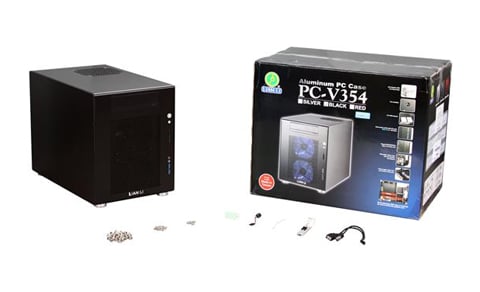
LIAN LI PC-V354B Black Aluminum MicroATX Mini Tower Computer Case

In stock.

  • Aluminum MicroATX Mini Tower
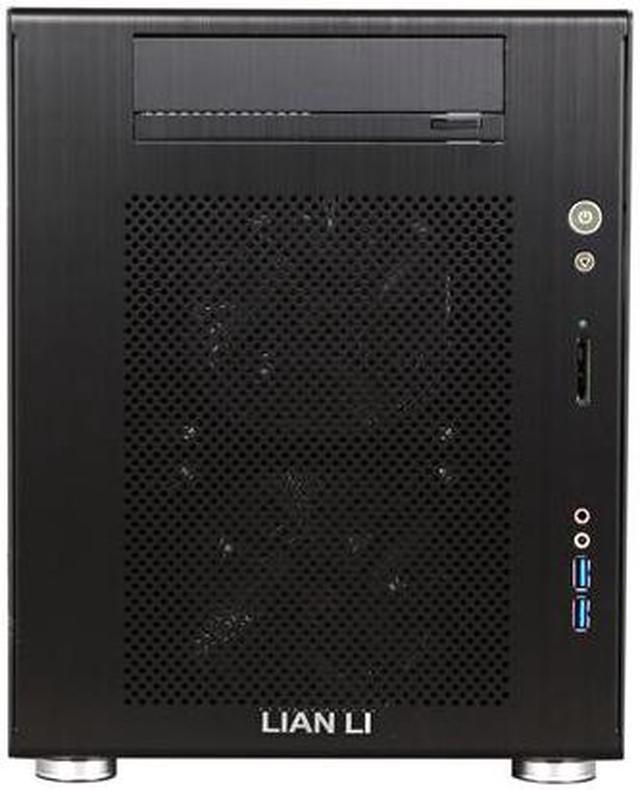
  • USB3.0 x 2 / HD Audio /card reader (MS/SD, SDHC) Front Ports
  • 1 External 5.25" Drive Bays
  • 7 Internal 3.5" Drive Bays
  • Pin It
  • Email this page
ICON Loading...

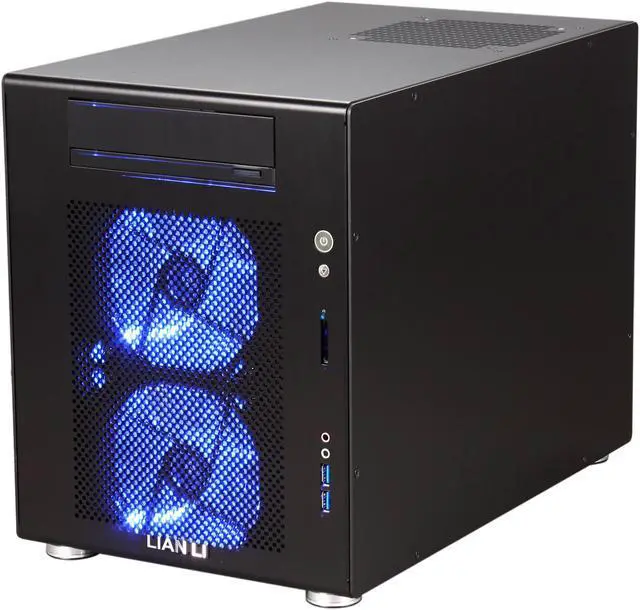
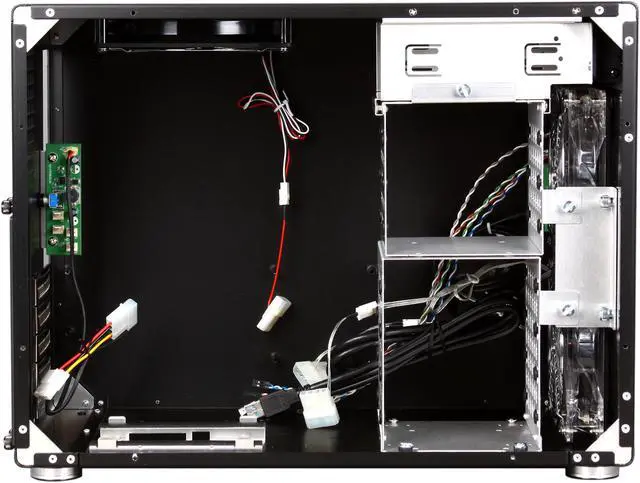
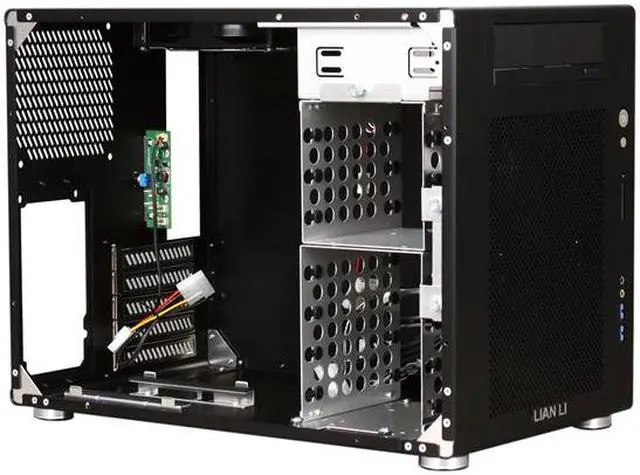
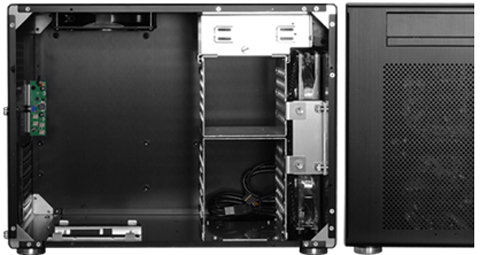
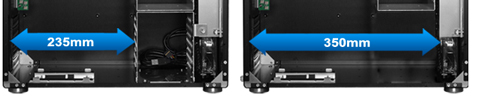
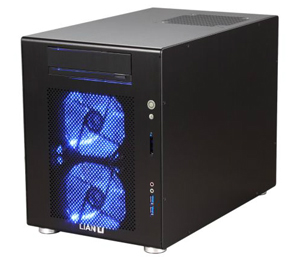
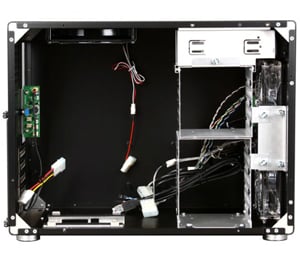
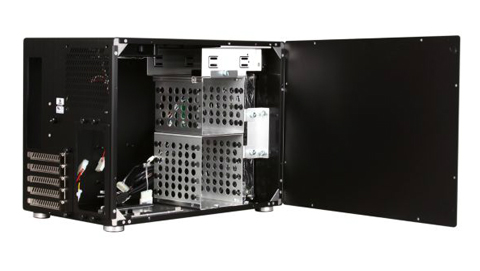
Handcrafted with high quality aluminum sheet material, this case is simple, minimalistic design art work. The PC-V354 carries Lian Li quality standard and has removed all the sharp edges to protect users’ hands. It comes with two 120mm LED front fans and one 140mm top fan to provide excellent airflow, and supports up to seven 3.5’" HDDs and 23.5cm long graphics card. Best of all, its front panel has two USB 3.0 ports, one card reader (MS/SD, SDHC), and one fan speed controller for convenient access. This powerful mini tower chassis is a great choice for your living room.

  • newegg Standard PC Components Standard Micro-ATX / Mini-ITX / Mini-DTX motherboard, 5.25-inch optical drive, 3.5-inch / 2.5-inch hard drives, standard ATX PS/2 power supply units. Also, it would be easy to upgrade and service in the future.
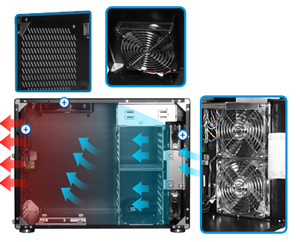
  • newegg Thermal-Flow Two 120mm LED fans (front) and one 140mm fan (top) prevent hot air from damaging your hardware.
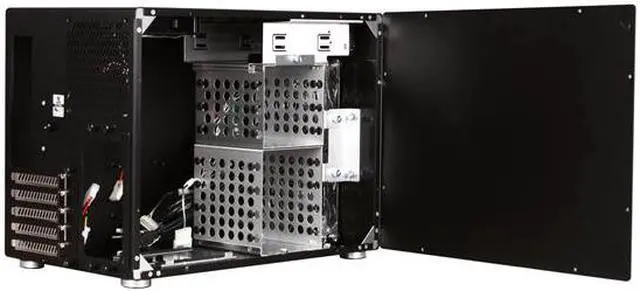
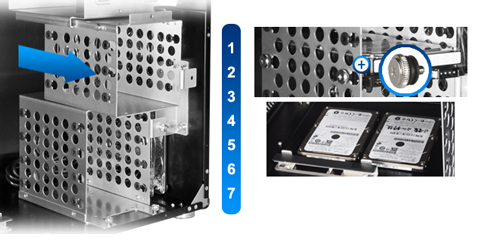
  • newegg Up to Seven 3.5-inch and Four 2.5-inch HDDs Its HDD cage uses thumb screws with rubber suspension, supporting up to seven 3.5-inch HDDs.
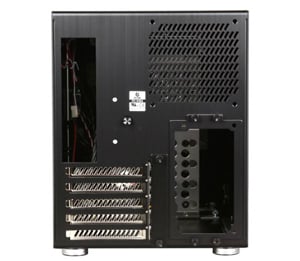
  • newegg Supports Standard ATX PS/2 PSU This chassis supports standard ATX PS/2 power supply unit with a 120mm cooling fan, and it can be facing the motherboard which are passive cooled.
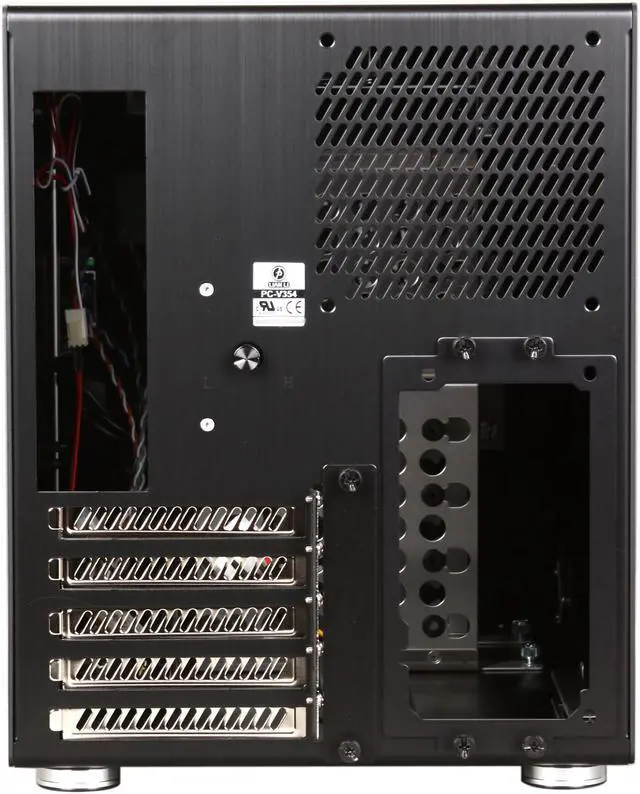
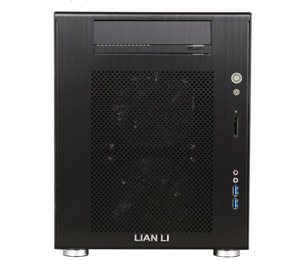
  • newegg I/O Ports & Fan Speed Controller Users can easily access two USB 3.0 and HD Audio ports, a MS / SD (SDHC) memory card reader, plus a fan speed controller supporting four fans.
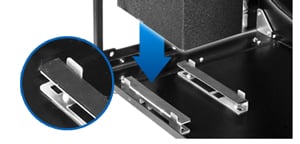
  • newegg Maximum Video Card Length Up to a 35cm long graphics card is supported when the lower HDD cage is removed.

Learn more about the Lian-Li PC-V354B

Model

Brand
LIAN LI
Model
PC-V354B

Spec

Type
MicroATX Mini Tower
Color
Black
Case Material
Aluminum
With Power Supply
No
Motherboard Compatibility
MicroATX

Expansion

External 5.25" Drive Bays
1
Internal 3.5" Drive Bays
7
Internal 2.5" Drive Bays
4
Expansion Slots
5

Front Ports

Front Ports
USB3.0 x 2 / HD Audio /card reader (MS/SD, SDHC)

Cooling System

120mm Fans
2 x 120mm front fans

Physical Spec

Dimensions
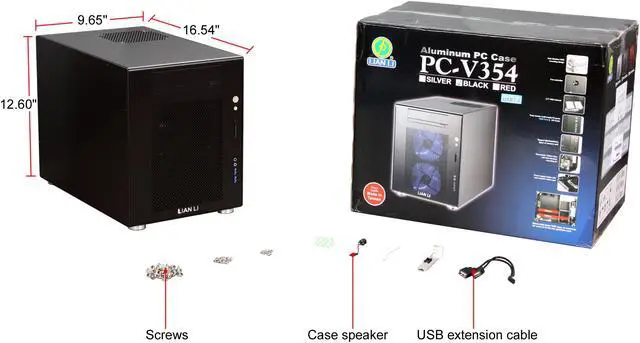
9.65" x 12.60" x 16.54" (W x H x D)
Weight
9.2 lbs.

Manufacturer Warranty

Parts
1 year limited
Labor
1 year limited

Quick Info

Warranty

  • Limited Warranty period (parts): 1 year
  • Limited Warranty period (labor): 1 year


Customer Reviews of the Lian-Li PC-V354B

Do you own this product? Write a Review

Filter Results

Go
  • N/A
  • 5/20/2013 9:07:33 AM
  • Tech Level: Somewhat High
  • Ownership: 1 week to 1 month
  • Verified Owner

5 out of 5 eggsVery Nice Case with Quiet Fans

Pros: I have to mirror what others have said about this case. It is larger than you might expect from looking at the picture (the website dimensions are accurate). In my mind I thought I would have more trouble getting everything inside, but in fact everything fit, but it was tighter than my previous build. My cabinet the computer fits in dictated this, however, and now my new build tucks quietly inside my cabinet instead of under my feet. It is also very quiet. I have a cabinet fan that pulls air through the cabinet, and it makes just enough noise that I cannot hear the actual computer inside the cabinet at all. For now I am using the stock fans, and not overclocking, and the temps inside are fine. More than adequate airflow. The case is very well made and very sturdy with no vibrations. There are two HDD cages that can each be removed, the lower one removed if you wanted a longer graphics card, but I did not need to remove either and kept them both. The LED fans look good, but since my build is in a cabinet, it's a waste of blue light.

Cons: I won't dock any eggs for these items, because most of them are related to the size of the case limiting a better solution, but if you are building with this case, I think these are things you need to expect....

1. Cable management is going to be sloppy. Next to impossible to be tidy because there is no place to hide things inside. You will never know this once the case is closed up, though.
2. Yes, the screws that hold the case sides on are very short and small, which makes them hard to screw in. They are so short with fine threads they are hard to "start" into their holes without rolling on their sides. I used a small magnetic screwdriver with a smaller than normal Phillips head and that pretty much eliminated this.
3. Installing the optical drive was a PITA. This was the only time I had to remove the right side of the case, so it would have been nice if you could drop that cage out without having to disassemble the right side of the case (8 tiny screws, then more tiny screws that hold the cage in). What is worse is that you have the have the drive adjusted pretty close fore/aft so that it operates the drive button and door. Which you won't know if you have done correctly until the drive is running. Which means if you get it wrong you have to take both sides off the computer to adjust it. So I was careful to seat the drive right up against the drop down door assembly as far as I could without having the door open. Hopefully I am making sense, but by doing this my drive operated perfectly the first time.
4. In the back of the case, there is a little circuit board with places to attach up to 4 case fan leads. This is great, but it kind of sticks out into the case and you have to get around this when you drop your MOBO into place. Additionally, the cables from the two front fans are barely long enough to reach where they plug into, and so I had to work around these two cables for everything else. Maybe for you would be better to just attach these two cables to the MOBO fan headers and bypass the ability to control the case fan speeds with the case rheostat??

5. There are 3 places where you can attach your SSD drive in the bottom of the case. 2 of these would have you attach to the actual case floor, and the 3rd is in the bottom of the lower removable drive cage. I hooked my SSD into the removable cage drive, because I tried every conceivable combination of the others, but every time I had wire issues. The bracket that holds the power supply steady in the bottom of the case blocks your power and SATA cables from being hooked to the SSD's. And that bracket is not removable. Probably best if you have a 3.5 to 2.5 inch drive cage converter ready so you can mount your SSD in a regular cage if you run into the same issues. I was able to mount mine in the bottom cage to the cage itself, but the SATA cable attachment is not as secure as it should be (doesn't quite lock in place).

Other Thoughts: I will list here my build combination so you will know for a fact that the following hardware combinations fit inside the case. I was guessing that mine would, and it worked out. You should know that once you drop your MOBO into place, it's difficult to get your big hands down inside there to hook stuff up, so do everything you can to your mobo before you drop it into place...(processor, cooler, memory, cooler wires...) One of the MOBO mounting screws hides down under the optical drive cage and is difficult to get to. Again, all these issues are because of the size of the case. I have no regrets that it was worth dealing with these issues to have this case size for my build.

Here is my build...

Lian Li PC-V354B CASE

ASUS P8Z77-M LGA 1155 Intel Z77 Micro ATX Intel Motherboard

ASUS GT430 Video Card (no fan, single card width)

Intel Core i5-3570K Ivy Bridge 3.4GHz

COOLER MASTER GeminII S524

Kingston HyperX 16GB (2 x 8GB) 240-Pin DDR3 SDRAM

Corsair Force Series GS 360GB SSD

Two Western Digital 2 TB drives in Raid 1

All these items fit into the case, and the system is smoking fast for an office computer. Windows loads before it can make it's logo, and Microsoft Word is on the screen before you lift up on your mouse finger.

The case looks great, is quiet, allows for great cooling, most importantly, fits into my cabinet and I don't even need to know it's there...

Best of luck to your build

Did you find this review helpful? Yes No

  • ss
  • 5/12/2013 3:23:12 AM
  • Tech Level: Low
  • Ownership: 1 month to 1 year
  • Verified Owner

4 out of 5 eggsNOT 9.65"w

Pros: Looks: Clean, simple, nice.

Functionality: This is my first build and I did not really assemble anything but watched every moment, and it seemed to be much easier to work in compared to my prebuilt HP pc from ~6 years ago.

USB3.0 on the front i nice (and why I bought this cas). No idea what the difference between "HD" and non-HD audio is... but that's nice too. The memory card reader was 1 of the 4 reasons I got this case, but I've changed my mind and now have no use for it lol (buying different phone).

Cons: 1. BIG DEAL!!!: The case is NOT!!! 9.65" (w). I don't know if this is newegg's or Lian Li's fault, but as a result of the case being 9.95" I had to buy a new desk - not happy.

2. 8 small side panel screws. Why is this necessary?

3. Personal preference: Would have liked the headphone jack on top of whatever the pink/red hole is; since my case is going under me, I'm having concerns my headphone cord will not be comfortably long.

4. Brightness of power button: What? Why's it so bright? Before building my own you see complaints about the brightness of the power button on virtually every case... but seriously, it is bright. No problem for me as my new desk has a door for the case area, but yanno.

Other Thoughts: I haven't tried it yet but wanted to, and someone else's review saying the SSd slots aren't in a usable area is a bummer. Someone else also said the front 2 fans can't reach the fan control on the back... but there was no problem for the person who put my pc together?

0 out of 1 people found this review helpful. Did you? Yes No

  • CyberMage
  • 5/6/2013 8:32:10 AM
  • Tech Level: High
  • Ownership: 1 week to 1 month
  • Verified Owner

1 out of 5 eggsExpected more from Lian Li

Pros: All black aluminum. Holds a lot of old 3 1/2" drives with reasonable cooling for them.

Cons: Let's see, there's a bunch: * Impossible to use the SSD mounting locations because they are flush with the bottom of the case and once installed it is impossible to connect the cables. Also, your power supply probably covers part of one of them. * No good airflow for the power supply. * 8 tiny screws hold the side on. Don't even think about quickly opening the case! Not to mention one of the screws stripped out on my second time opening the side. I thought for a minute I'd have to get a hacksaw to open it back up. * Includes a nice multi-fan speed control on the back of the case, but the two fans in the front of the case won't reach it, so what's the point? * It's a LOT bigger than it looks. * Too easy to shove your fingers through the DVD cover plate while moving it if you don't install a DVD drive and the only way to fix it is to remove the side panel - which requires removing the 8 tiny screws. * Installing everything required removing both side panels - with 16 tiny screws. * You have to play motherboard Tetris to get everything installed. * Don't think about putting it in your bedroom or it lights up the entire room. Why would you design a sleek unobtrusive black case and then make it glow like a full moon? * WAAAAY too expensive for all of the drawbacks, despite being all aluminum. * And probably a problem with my specific case, but one of the two USB 3.0 ports on the front does not work. They both appear to run from the same cable connected to the motherboard, so it doesn't appear to be anything I did while connecting it.

Other Thoughts: I've owned a Lian Li case for years and love it, but this one is the worst design I've ever seen in any quality case from any vendor. I read all of the other reviews before buying, but thought that the Lian Li quality would overcome people nitpicking the case. I was wrong. My recommendation: Don't buy this case. Lian Li produces some excellent cases, go look at a different model.

0 out of 1 people found this review helpful. Did you? Yes No

  • infinite4ever
  • 4/22/2013 1:52:22 PM
  • Tech Level: Average
  • Ownership: 1 month to 1 year
  • Verified Owner

3 out of 5 eggsBeautiful case but poor after-market cooler support

Pros: -Simple Design: I love the way it looks. It's neat and clean and doesn't have any excess elaboration.

-Compact: not as tall as other MicroATX case. Though a bit cramped, you need to expect it when you buy a compact case.

-Dust Filter and USB 3.0: It has dust filter on all fans, and USB 3.0 support.

-Fan Controller: You can control the speed of the fan up to 4 of them.

-Drive Bay Door: Yes, I want a case with Front Door or Drive Bay Door to cover up the optical drive, so that it will look clean and in harmony with the design 8D

Cons: -AfterMarket Cooler: This is the biggest fault of the design... it doesn't support aftermarket cooling. I bought a Cooler Master Seidon 120XL. I can't mount the radiator on the back of the case because of the PSU (can mount it horizontally but you won't be able to close the side panel...). I can't mount it on top because the motherboard will hinder it. Front is completely out of the option because you simply can't screw your fan on it. The case have enough space for water cooling but design fault leads to render those space useless.

-No Ventilation hole of PSU: They could have drill some holes on the side of the case of PSU to suck air... like they did for PC-Q08B.

-Screw-ful side panel: YES, You need to unscrew 8 times of take off one side of panel... Or 16 times for both.

Other Thoughts: Overall I love this case, with the complaint on the lack of support for liquid cooling.

For anyone who wants to install an after-market air cooling, I saw someone posting a photo on other site saying that this case can be installed with Cooler Master Hyper 212 Plus air cooling. I believe you can install the Cooler Master Hyper 212 Evo with it also since they are fundamentally have the same dimension (I never try it so do it at your own risk).

If you are using the liquid cooling inside the case with the side panel closed. My suggestion is... get yourself a Command Picture Hanging Strips. I remove the lower HDD cage and stick my radiator on it. So that it won't juggle around when I move the case. Since the Picture Hanging Strips is consisted of two strips fastening together, you can also detach your radiator and have access on your front fan dust filter for cleaning.


To Lian Li, I love your design of the case and you have taken the 13" video card into account when you design it. I would hope that next time you will also take into account of aftermarket cooling system into account when you design them.

0 out of 1 people found this review helpful. Did you? Yes No

  • N/A
  • 4/19/2013 2:46:14 PM
  • Tech Level: High
  • Ownership: 1 month to 1 year
  • Verified Owner

5 out of 5 eggsQuiet, unubtrusive

Pros: It doesn't look like a computer. Can be turned into a formidable, yet unobtrusive file server.

Cons: I found assembly to be an exercise in trial and error. I feel like I spent most of the time in my last build dealing with case. This is my first small form factor build.

Other Thoughts: I don't even hook up any lights.

Did you find this review helpful? Yes No

  • N/A
  • 3/16/2013 1:13:57 PM
  • Tech Level: High
  • Ownership: 1 day to 1 week
  • Verified Owner

4 out of 5 eggsLooks great

Pros: Fits everything a micro atx system could need. Has room for a dedicated GPU and possibly a decent sized cooler.

Fits plenty of hard drive spots and the included fans (3 120mm fans) are quiet and move a decent amount of air. They also have their own fan guards.

This system looks great sitting in the corner of my desk. The blue fans are not super bright and they look good. The build quality is pretty good too.

Cons: Side panel is just dumb. Its held in by 8 little screws. Its not fun when you take it on and off a few times when getting things dialed in. I would not buy this for a gaming rig or something you plan on opening up often.

Other Thoughts: This is the first case I have ever spent more than $50 on and I am satisfied. It looks great and was worth the money. I am using it to house a server system for my personal files. Quiet and good looking is all I need out of this build.

This case also includes a fan controller, however, it seems to only have a limited amount of fan speed adjustable.

Did you find this review helpful? Yes No

  • N/A
  • 2/19/2013 12:22:07 AM
  • Tech Level: High
  • Ownership: 1 week to 1 month
  • Verified Owner

5 out of 5 eggsIt's pretty

Pros: It's metal, lots of metal.

Cons: Not exceptionally functional or accessible. Small, annoying bits of plastic.

Other Thoughts: If you dislike plastic and don't access your case very often, this a fine choice. It's probably bigger than you think by looking at the photo, a little wider than the Silverstone TJ08 and a bit shorter, though still not "big". Nice clean design, the only angles and curves present are those that are necessary. The 5 1/4" drive bay cover looks and functions well. The light embedded in the power switch and HD lights are perfect. Cooling is probably better than the Silverstone with two intake and two exhaust. I'm using an Antec 620 water cooler with the radiator mounted on the lower front fan port. I cant testify as to the noise of the stock blue LED fans as I'm not using them, but even with all five fans spinning (have two on the radiator) the case operates with a pleasant quiet purr.

As for issues, assembling and disassembling this case is something that you want to do once and only once. The side is held on by microscopic Philips flat head screws that required me to fetch the #1 screwdriver from my watch repair set. There's 8 of them. I've seen people replace them with thumb screws but that looks a little ridiculous. Cable management is also rough with no practical way to conceal all your cabling as there's no space behind the motherboard. Your air cooler height is restricted by the PSU and radiator mounting point is limited to the front without modification. The only two places that are plastic on this case (I'm not counting the inside of the USB ports and front audio jacks) are the bottom 2mm of the feet and the Lian Li logo (I think). The case is eye level on my desk so seam in the feet is an annoyance and seems kind of unnecessary (how hard would it have been to make the entire foot metal?). As for the logo, I'd like to have seen something a little more subtle, though it's not bad. The only other downsides are the glowing blue stock fans (unless you like that sort of thing) and the price. If you want something portable to carry around get another case, you're going to scratch it which isn't the right thing to do with this case. Really I'd like to replace all my computers with this one but it's pricey and some computers I need to swap parts out on more than once every five years. If you're building a computer as a gift this case will suggest to the giftee that you are a person of good taste and refinement and you hold them in high regard. Get one for yourself too.

2 out of 2 people found this review helpful. Did you? Yes No

  • N/A
  • 12/8/2012 8:05:56 PM
  • Tech Level: Somewhat High
  • Ownership: 1 month to 1 year
  • Verified Owner

5 out of 5 eggsNice Micro ATX Case

Pros: I wanted to shrink down from a standard ATX Mid Tower when I built the new family computer system. The material is nice and the case looks fantastic. The fans are not very loud, and the rear has a fan speed controller for whichever case fans you connect in-line with it.

The best part in my opinion was the removable hard drive trays that made it real easy to mount the drives and run the cables to the motherboard. Also was helpful to be able to remove both sides of the case.

Lots of room for a real big video card too, especially if the lower hard drive bay is removed.

Cons: None

Other Thoughts: Make sure you have all your PCI cards installed before installing the power supply because it is seated in front of them in the case.

2 out of 2 people found this review helpful. Did you? Yes No

  • reiththestud
  • 8/9/2012 3:38:46 PM
  • Tech Level: High
  • Ownership: more than 1 year

5 out of 5 eggsCooler Master Hyper TX3

Pros: I bought this case over a year ago (the red one) and did a review then, this is simply a followup to say that the Cooler Master Hyper TX3 cooler DOES fit in this case. I had heard conflicting reports so I went ahead and ordered one just to see. It just clears the power supply. So if you want to put a decent aftermarket cooler like the TX3 in here, it WILL fit.

Cons: None

Other Thoughts: My computer is MUCH quieter now that I have added the Hyper TX3

2 out of 2 people found this review helpful. Did you? Yes No

  • N/A
  • 6/5/2012 5:47:01 AM
  • Tech Level: Average
  • Ownership: 1 month to 1 year
  • Verified Owner

1 out of 5 eggsWant to love it

Pros: It's a great case in theory. Quiet, stylish, great compact size, fairly lightweight. I wanted to give this about 4 eggs.

Cons: Build wasn't as easy as it could have been. Need to remove the back ("bottom") panel to install the CD/DVD drive - which is non-trivial if you've already installed the motherboard. That's not well thought-out. Also, get terrible noisy vibration when the DVD is in use - fortunately, these days, that rarely happens.

Two other issues with the build: it came missing one tiny black screw to hold on one of the side panels, and the front headphone jack doesn't "lock in" the headphone plug correctly. I've contacted Lian-Li tech support via their online support page TWICE to get these two small parts corrected, and have been ignored so far. TERRIBLE SUPPORT FROM THE MANUFACTURER!!!!

2 out of 9 people found this review helpful. Did you? Yes No

ICON Loading...
  • $159.99
  • $139.99
  • Save: $20.00 (13%)
  • $29.99 Shipping
 
Are you an E-Blast Insider? Subscribe Newegg e-Blast

Buzz

Fine case, some oversights.

4 out of 5 eggs
I don't have a place under my desk for a tower, so I was looking for a decent smaller case that could go on my desktop, ...
— Randatola 10/1/2010

Awesome

5 out of 5 eggs
Incredibly high build quality, I am simply amazed.
If you want mATX, buy this case!
— 3/12/2011


Home
Home > 
Computer Hardware > 
Computer Cases > 
Computer Cases > 
Lian-Li > 
Item#: N82E16811112300
LOADING... LOADING...
Shop by Region: United States | Canada | China
Follow us:   RSS Feeds Youtube
VeriSign Reliability Seal1 PaypalVerify GoldenSeal InteracThis site protected by Trustwave's Trusted Commerce program Inc500

Policy & Agreement | Privacy Policy

 © 2000-2013 Newegg Inc.  As used herein, “Newegg.ca” means Newegg Canada Inc. unless the context specifically refers to the www.newegg.ca web address.
If the Adobe Reader does not appear when you click on a link for a PDF file, you can download Adobe Reader from the Adobe web site. nassau