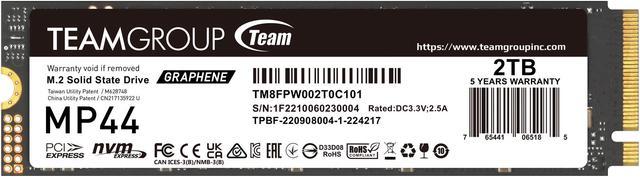
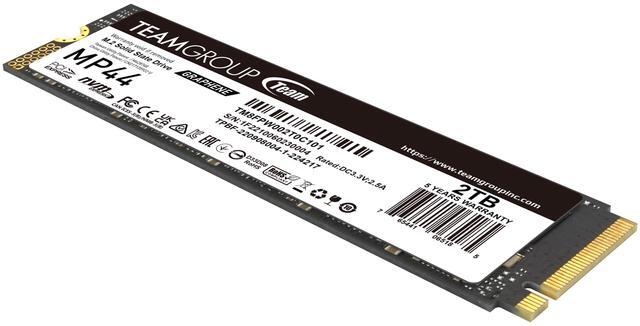
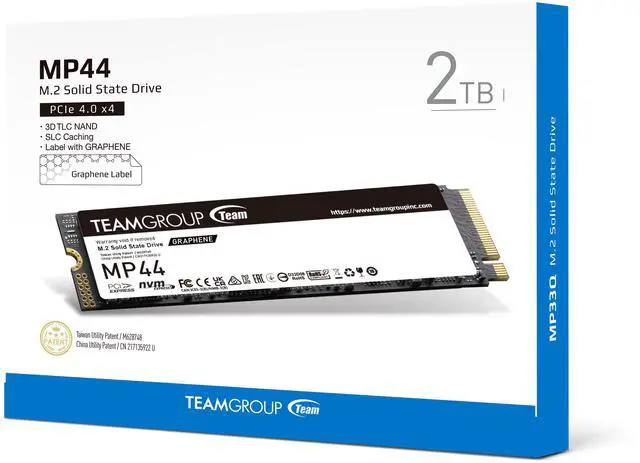
The Team Group MP44 is a 2TB M.2 2280 PCIe 4.0 NVMe SSD for compatible desktops, laptops, NUCs, NAS devices, and PS5 setups, with sequential speeds of up to 7,400 MB/s read and 7,000 MB/s write for fast storage and transfers.
Recommended For
- PC gamers expanding a desktop’s M.2 storage for a large game library or quicker game installs and file transfers; independent testing found fast real-world transfers from the MP44.
- Laptop owners upgrading a system with an available M.2 2280 PCIe 4.0 slot who want a high-capacity internal drive; the MP44’s thin graphene label can fit under many existing M.2 covers, but check the laptop’s slot and clearance first.
- Desktop users moving large media or project files who want fast sequential transfers; reviews measured strong throughput and sustained writing in their test setups.
- PS5 owners adding internal game storage who can install a suitable M.2 heatsink; a reviewer reported using the MP44 successfully, while noting that the drive itself does not include a heatsink.
Real-World Use Scenarios
- When building a gaming PC with a large game library, use the MP44 as the system or game drive to keep games and everyday apps on one 2TB SSD; reviewers found its gaming and application performance competitive with other fast PCIe 4.0 drives.
- When upgrading a compatible PS5, install the MP44 in the M.2 expansion slot to add room for more games; plan to use a suitable heatsink, since this model has a thin graphene label rather than a full heatsink.
- For a laptop or compact desktop with a compatible M.2 2280 slot, use the MP44 to add fast storage for games, apps, and files; testing of the 2TB model found it efficient and cool-running under review workloads.
- When moving a large folder of project files or media between drives, use the MP44 as a fast working or destination drive; a 2TB review tested transfers of a 250GB mixed-file folder, including a large compressed file.
- For a new desktop build or storage upgrade, use the MP44 for the operating system and frequently used programs; reviewers tested everyday application traces and found the drive suited to laptop and general-purpose system use.
Spec Summary
| Attribute | Value |
|---|
| Best For | Adding high-speed internal storage to consumer laptops and desktops, with stated compatibility for Sony PlayStation 5 |
|---|
| Capacity | 2TB (2,000GB) |
|---|
| Interface And Form Factor | M.2 2280 SSD with PCIe 4.0 x4 and NVMe |
|---|
| Sequential Performance | Up to 7,400 MB/s read and 7,000 MB/s write |
|---|
| Random Performance | Up to 650,000 IOPS random read and 660,000 IOPS random write at 4KB |
|---|
| NAND And Cache | 3D NAND with no DRAM cache; uses HMB |
|---|
| Endurance And Reliability | 1,000TB TBW endurance and 1,600,000-hour MTBF |
|---|
| Platform Compatibility | For PC and Linux platforms; listed as compatible with laptops, desktops, and Sony PlayStation 5 |
|---|
| Thermal Design | Thin graphene heat-dissipating label designed to work with an onboard M.2 heatsink |
|---|
| Physical Specifications | 80 × 22 × 3.7 mm; weighs 7 g |
|---|
| Operating Environment And Resilience | Operating temperature: 0°C to 70°C; storage temperature: −40°C to 85°C; operating humidity: up to 90% RH below 40°C; shock resistance: 1,500G at 0.5 ms; vibration resistance: 20G at 80–2,000 Hz |
|---|
| Model Identifiers | Team Group MP44; model TM8FPW002T0C101 |
|---|
Reference Q&A
Q: Should I get the TeamGroup MP44 or MP44L for a 2TB gaming SSD?
A: Choose the MP44 if you want the higher-performance model on paper and the price difference is small. Choose the MP44L if it costs noticeably less and the drive is mainly for games and everyday use; reviews describe it as a capable budget PCIe 4.0 SSD, and its peak-speed advantage is unlikely to matter for every workload.
Q: TeamGroup MP44 or Samsung 980 Pro: which 2TB SSD should I buy?
A: The MP44 is a reasonable choice when it costs less and you want a fast PCIe 4.0 drive: Notebookcheck’s 2TB test found performance comparable to the 980 Pro, with no throttling in its sustained-read test. Choose between them based on current price, warranty terms, and preferred software or support rather than assuming the Samsung will always be faster.
Q: Is the TeamGroup MP44 better than the Lexar NM790?
A: Neither is a clear performance winner across all workloads: a 2TB comparison found the drives very close, with each edging the other in different tests. If both fit your system, compare their current prices and the exact capacity and heatsink versions; choose the MP44 when its price or thin graphene label suits your setup better.
Q: Is this SSD compatible with a PS5?
A: The MP44 is listed as PS5 compatible and has a 2TB capacity, M.2 2280 form factor, and PCIe 4.0 x4 NVMe interface. It uses a thin graphene label rather than a conventional built-in heatsink, so check the console’s fit and cooling requirements before installation; a compatible heatsink may be needed.
Q: Will this SSD work in my laptop or desktop?
A: It can fit a device with an available M.2 2280 slot that supports PCIe NVMe SSDs. Check the device manual for slot compatibility and physical clearance first; an M.2 slot may support a different drive type or size.
Q: Does the MP44 need a separate heatsink?
A: The MP44 has a graphene heat-dissipating label under 1 mm thick, not a conventional built-in heatsink. The product says the label is designed to work with a motherboard’s M.2 heatsink; check your device’s cooling setup and clearance, especially for a PS5 installation.
Q: Is this SSD suitable for gaming and large file transfers?
A: It is suitable for systems that support PCIe 4.0 x4 NVMe and benefit from fast storage: the 2TB drive is rated for sequential reads up to 7,400 MB/s and writes up to 7,000 MB/s. Those are maximum ratings; actual speeds depend on the device, workload, and cooling.
Q: Is the 2TB MP44 a sensible choice for a gaming PC?
A: It is a suitable option if you want 2TB of PCIe 4.0 storage. A Reddit discussion comparing it with another SSD for gaming noted that most games may show little practical benefit from higher-end SSD speeds, so capacity and price may matter more than peak sequential speeds. The MP44 is rated for up to 7,400/7,000 MB/s read/write.
Q: Is the MP44’s lack of onboard DRAM a concern for a boot drive?
A: The MP44 has no onboard DRAM and uses HMB. In a Reddit discussion about using an MP44 as a boot drive, one owner reported a good experience; that is anecdotal and does not establish long-term reliability.
Q: Will the MP44 work in a PCIe 3.0 system?
A: A Reddit discussion about the MP44’s PCIe 3.0 compatibility says it can be used in a Gen 3 system, where transfer speeds are limited by that interface rather than reaching the drive’s PCIe 4.0 rated maximum. Check that the device has a compatible M.2 NVMe slot.
Q: Is the MP44 a reasonable choice for frequent writes compared with a QLC SSD?
A: The provided specifications list TLC NAND and a 1,000 TBW endurance rating. In a Reddit comparison of MP44 and QLC options for a write-intensive data-storage use case, commenters favored the MP44’s TLC version. The discussion concerned a different capacity, so it does not establish the exact performance of this 2TB model.