
Your Browsing History
- Free 30-day Returns
$312.99
Ships from Hong Kong.
Sold by CITY BUSINESS Official
Shipped by CITY BUSINESS Official

Meet Your Seller




USB C Docking Station,12 in 1 Displaylink USB 3.0 to USB-C Dock Dual Monitor with HDMI,VGA,USB A 3.0,PD3.0, Laptop Docking Station for MacBook Pro&Air/M1/M2/M3/HP and More USB Ports Laptops
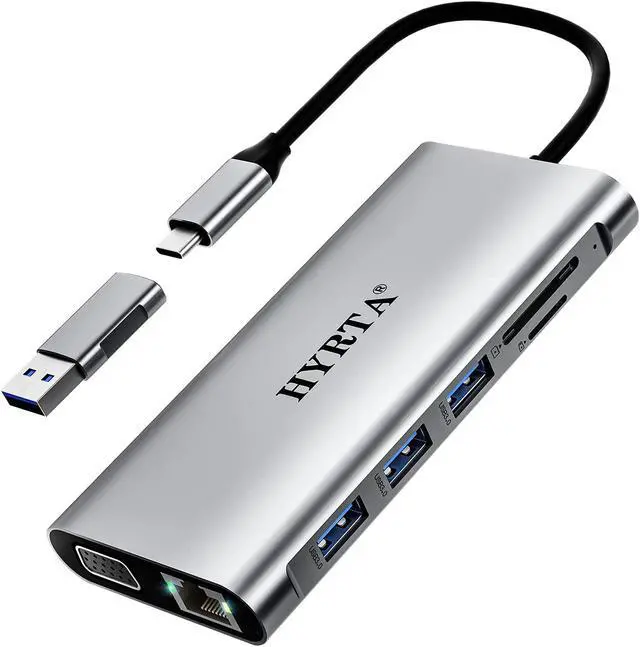
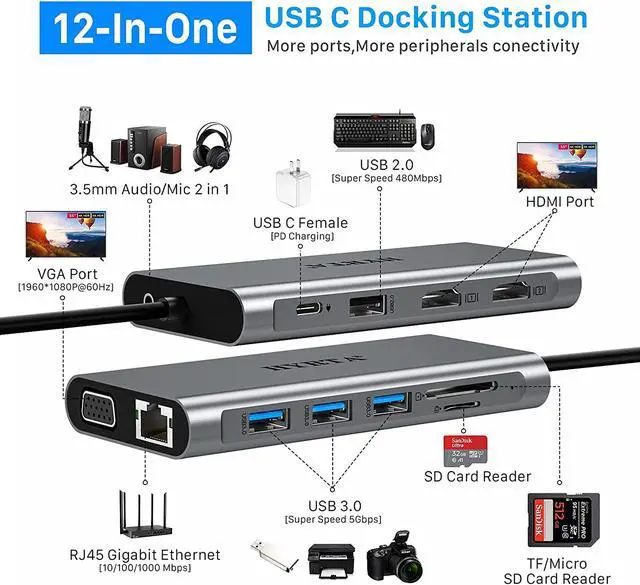
- 12-in-1 USB C Docking Station: The HYRTA 12-in-1 USB C Docking Station integrates 12 essential ports in one sleek aluminum hub 2 HDMI, 1 VGA, Gigabit Ethernet, 3 USB 3.0 (5Gbps), 1 USB 2.0, 100W PD, SD/TF card readers, and 3.5mm Audio/Mic jack. Comes with a USB-C to USB-A OTG adapter, compatible with USB C and USB A laptops including MacBook, Dell, HP, Lenovo, and more
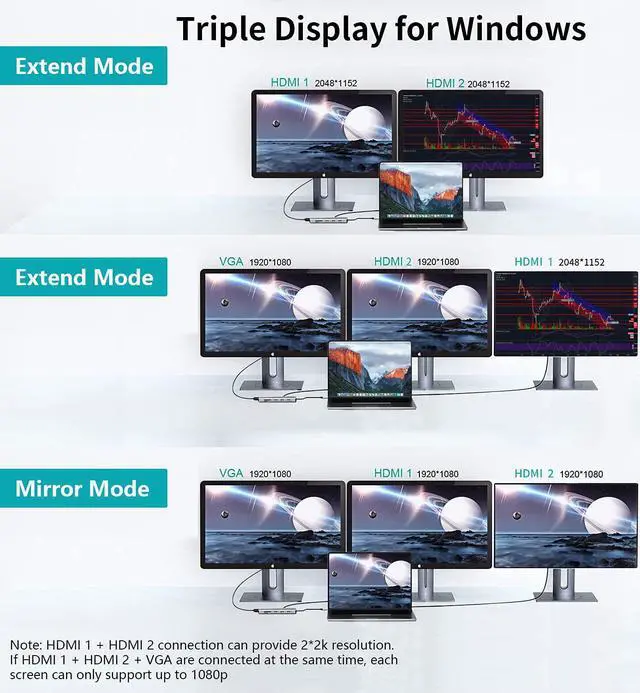
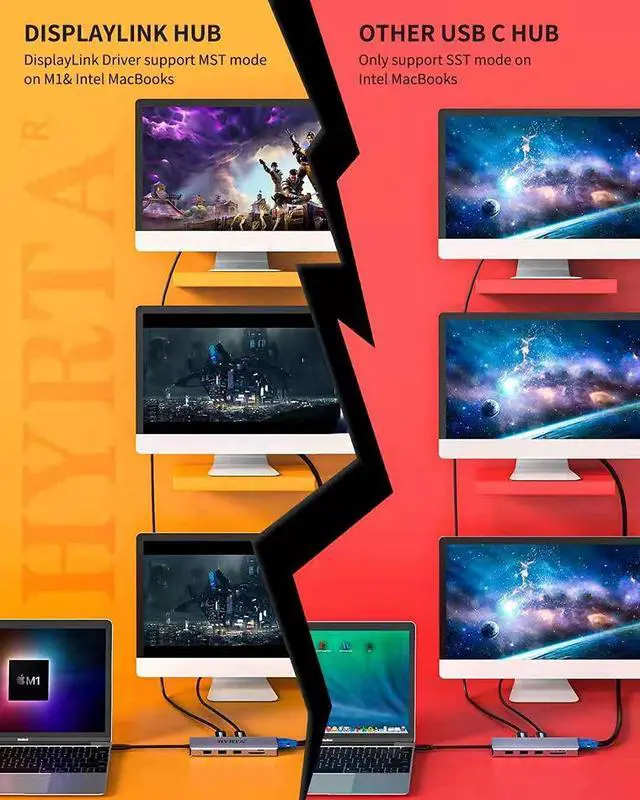
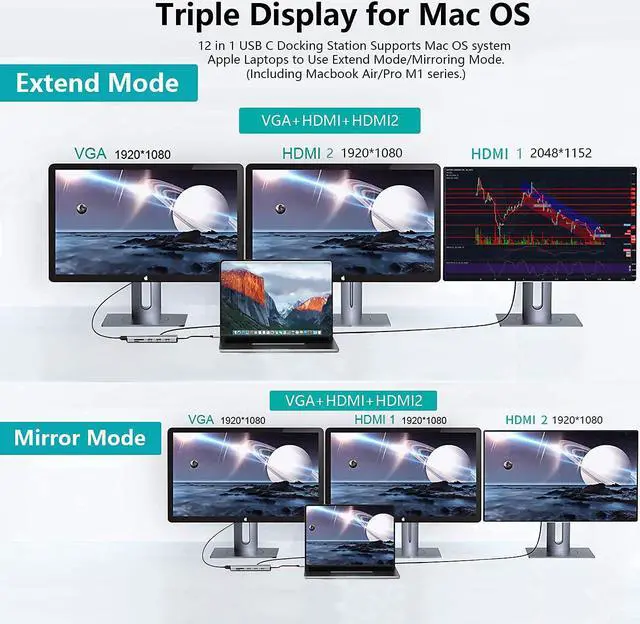
- Triple Display Docking Station: Expand your laptop to dual or triple monitors for improved productivity. Supports up to 2 HDMI (2048×1152@60Hz) and 1 VGA (1920×1080@60Hz). On macOS, breaks the single-stream limitation with DisplayLink docking station technology, making multi-screen expansion possible on M1/M2/M3 MacBook docking station. Note: For Mac OS, in extended mode you can only get two identical screen images
- High-Speed Data Transfer & Stable Network: This laptop docking station features with 3 USB 3.0 ports (5Gbps), quickly transfer movies, photos, and large files within seconds. The additional USB 2.0 po
+
+
Overview
Specs
Reviews
12-in-1 USB C Docking Station: The HYRTA 12-in-1 USB C Docking Station integrates 12 essential ports in one sleek aluminum hub 2 HDMI, 1 VGA, Gigabit Ethernet, 3 USB 3.0 (5Gbps), 1 USB 2.0, 100W PD, SD/TF card readers, and 3.5mm Audio/Mic jack. Comes with a USB-C to USB-A OTG adapter, compatible with USB C and USB A laptops including MacBook, Dell, HP, Lenovo, and more
Triple Display Docking Station: Expand your laptop to dual or triple monitors for improved productivity. Supports up to 2 HDMI (2048×1152@60Hz) and 1 VGA (1920×1080@60Hz). On macOS, breaks the single-stream limitation with DisplayLink docking station technology, making multi-screen expansion possible on M1/M2/M3 MacBook docking station. Note: For Mac OS, in extended mode you can only get two identical screen images
High-Speed Data Transfer & Stable Network: This laptop docking station features with 3 USB 3.0 ports (5Gbps), quickly transfer movies, photos, and large files within seconds. The additional USB 2.0 port is ideal for wireless mouse/keyboard. Built-in Gigabit Ethernet port(10/100/1000Mbps) ensures a stable wired Internet connection, while SD/TF card reader slots provide fast and flexible file access for photographers and designers
100W PD Fast Charging & Audio Port: Keep your laptop fully powered with the Power Delivery docking station supporting up to 100W. This DisplayLink dock also features a 3.5mm headphone/microphone jack, delivering clear audio sync for online meetings, gaming, or entertainment. (Note: Audio output is valid only via HDMI2 port.)
Portable & Multi-Functional Design: This USB C hub docking station is compact and powerful, crafted for work and travel. Compatible with USB-A docking station and USB-C docking station laptops, its the perfect solution to expand your laptop ports, improve desktop efficiency, and replace multiple dongles with one all-in-one hub
Wide Compatibility & DisplayLink Support: Works with Mac OS X 10.6 or later, Windows XP/7/10/11, Ubuntu, Chrome OS, and Android. Equipped with DisplayLink chip, ensuring stable performance for extended displays. (Note: Please download the DisplayLink driver before first use. For M1/M2/M3 MacBook users, install the dedicated driver to enable multiple displays.)
Triple Display Docking Station: Expand your laptop to dual or triple monitors for improved productivity. Supports up to 2 HDMI (2048×1152@60Hz) and 1 VGA (1920×1080@60Hz). On macOS, breaks the single-stream limitation with DisplayLink docking station technology, making multi-screen expansion possible on M1/M2/M3 MacBook docking station. Note: For Mac OS, in extended mode you can only get two identical screen images
High-Speed Data Transfer & Stable Network: This laptop docking station features with 3 USB 3.0 ports (5Gbps), quickly transfer movies, photos, and large files within seconds. The additional USB 2.0 port is ideal for wireless mouse/keyboard. Built-in Gigabit Ethernet port(10/100/1000Mbps) ensures a stable wired Internet connection, while SD/TF card reader slots provide fast and flexible file access for photographers and designers
100W PD Fast Charging & Audio Port: Keep your laptop fully powered with the Power Delivery docking station supporting up to 100W. This DisplayLink dock also features a 3.5mm headphone/microphone jack, delivering clear audio sync for online meetings, gaming, or entertainment. (Note: Audio output is valid only via HDMI2 port.)
Portable & Multi-Functional Design: This USB C hub docking station is compact and powerful, crafted for work and travel. Compatible with USB-A docking station and USB-C docking station laptops, its the perfect solution to expand your laptop ports, improve desktop efficiency, and replace multiple dongles with one all-in-one hub
Wide Compatibility & DisplayLink Support: Works with Mac OS X 10.6 or later, Windows XP/7/10/11, Ubuntu, Chrome OS, and Android. Equipped with DisplayLink chip, ensuring stable performance for extended displays. (Note: Please download the DisplayLink driver before first use. For M1/M2/M3 MacBook users, install the dedicated driver to enable multiple displays.)
Warranty & Returns
Warranty, Returns, And Additional Information
Warranty
- Please contact the Seller directly for warranty information. Warranty information may also be found on the Manufacturer's website.
- CONTACT
Return Policies
- Return for refund within: 30 days
- Return for replacement within: 90 days
- This item is covered by CITY BUSINESS Official Return Policy
Manufacturer Contact Info
- For a directory of all our manufacturers, please click below.
- Manufacturers Directory
LOADING...