
Your Browsing History
- Free 30-day Returns
$100.99
Ships from Hong Kong.
Sold by CITY BUSINESS Official
Shipped by CITY BUSINESS Official

Meet Your Seller

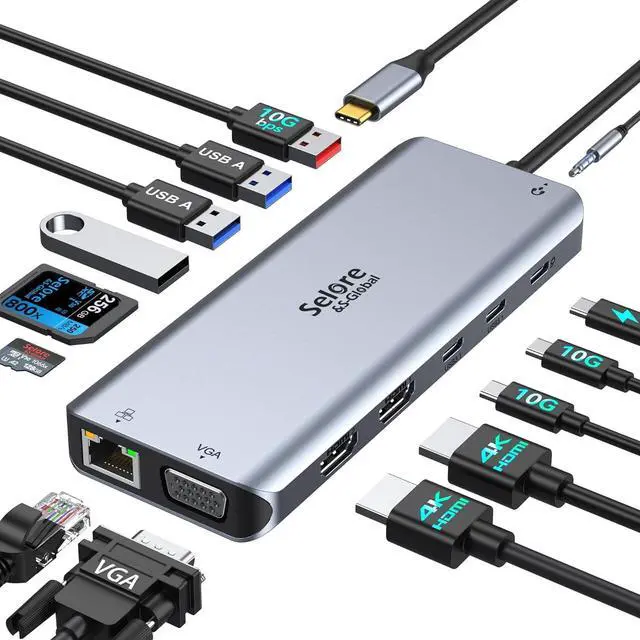


Selore USB C Docking Station for Laptop Dual Monitors, Upgrade Triple Docking Station USB C Hub Adapter Dongle with 2HDMI, VGA, Ethernet, USB-C/A Port, SD/MicroSD, Audio/Mic for Dell/HP/Lenovo/Surface
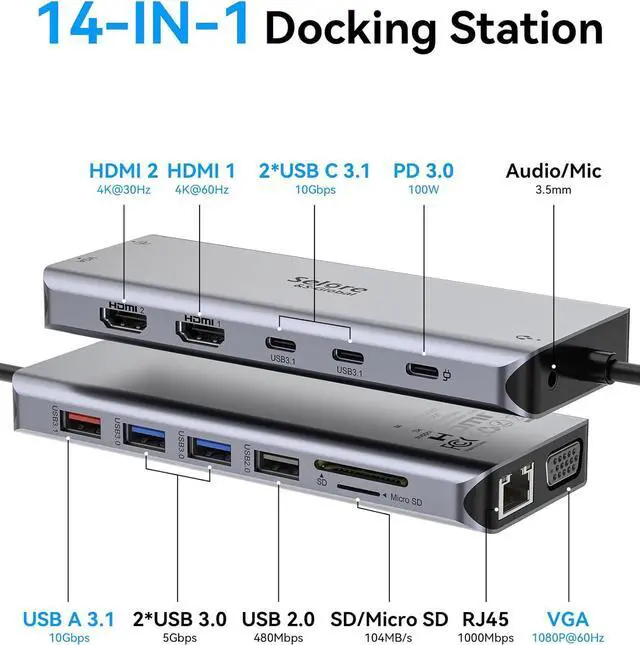
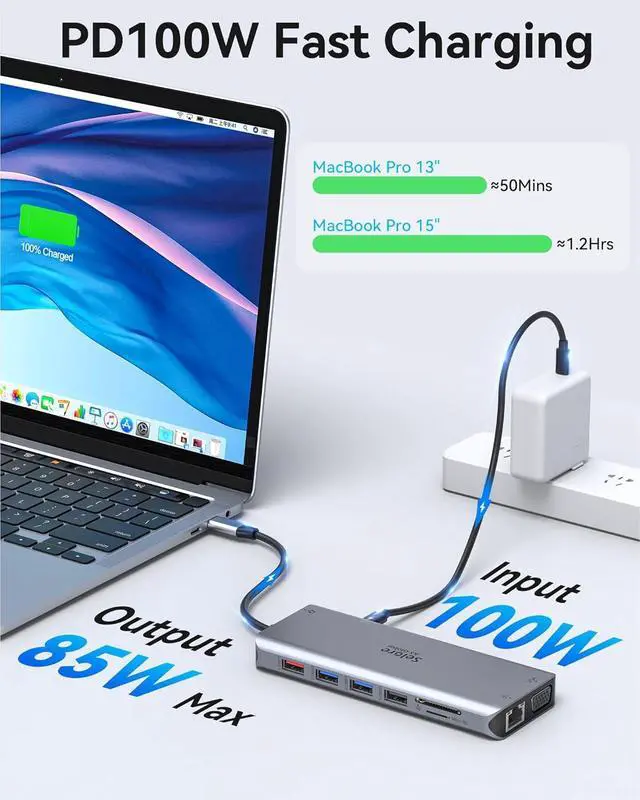
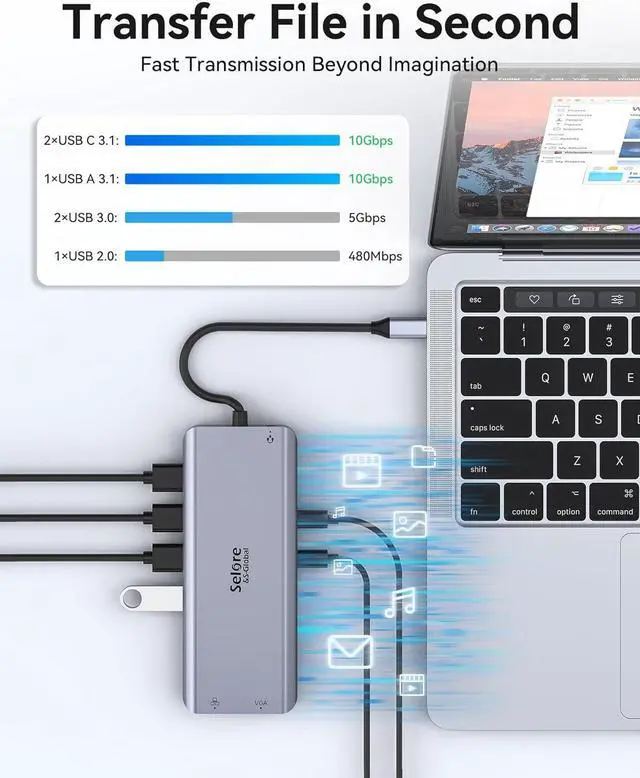
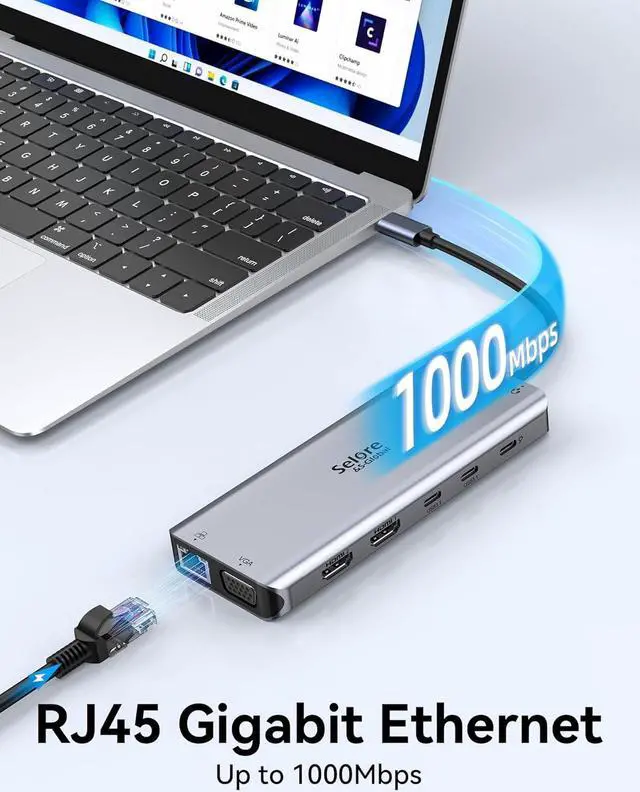
- 14 IN 1 Upgrade USB C Hub USB C Docking Station for Laptop Dual Monitor: Selore docking station triple monitor is equipped with dual 4K HDMI ports,VGA ports,3 x 10Gbps USB-C / USB-A,4 x USB A ports,100W PD Fast Charging,SD/Micro SD card readers and 3.5mm Audio/Mic port. Plug and play, no need to install any drivers or software. Just connect to your laptop and monitors, enjoy the multiport needed solution
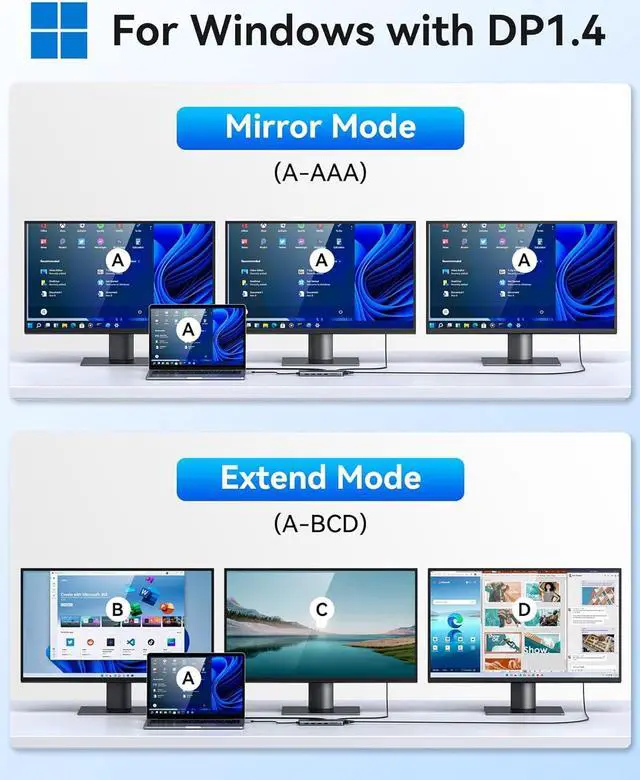
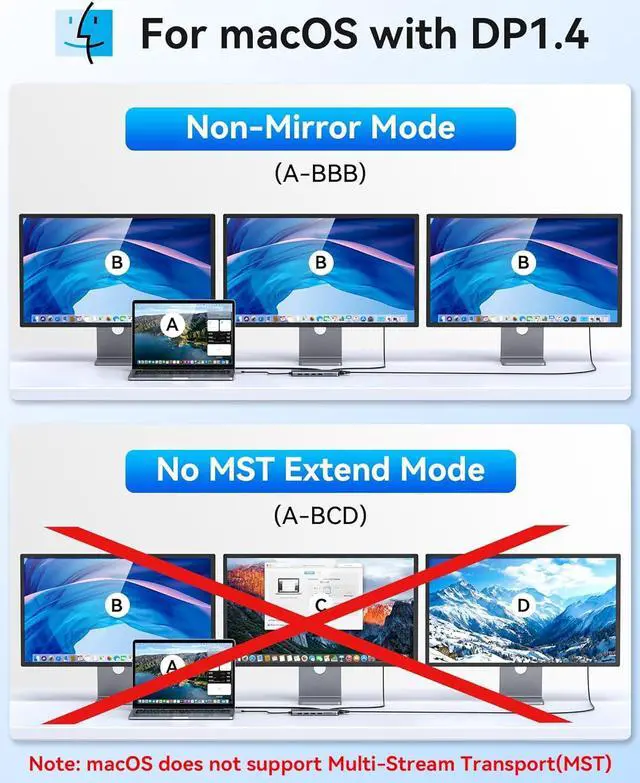
- USB C Hub Docking Station Dual HDMI Monitor Ultra HD 4K output & Triple Display: Selore usb c docking station for laptop dual monitor extend to dual HDMI + VGA. Windows laptop support mirror mode and extend mode(Display three different screens simultaneously), Mac ONLY support Mirror mode (M1 and M2 Chip supports displaying three identical screens). All of the above mode is based on DP1.4 laptop and monitor
- 10Gbps USB 3.1& 2*USB C Data Transfer USB C Hub : This laptop docking station with a USB 3.1 port and 2* USB C port that transfer files at speeds up to 10Gbps.You can con
+
+
Overview
Specs
Reviews
Why this USB C docking station output is not 4k displayed on my monitor?
Please make sure your host laptop and monitor support 4K display and DP 1.4 protocol, otherwise it won't reach 4K.
What to do if the HDMI/VGA monitor is not recognized by your laptop?
Make sure your laptop's USB C port supports DisplayPort/Video output. Check your HDMI/VGA cable and monitor. (Plug the monitor directly into the laptop to see if it works). Ensure adapter power is supplied from the USB-C docking station.
Why does the external monitor sometimes have noise or a black screen?
1.The power of the power adapter used to connect to the external power supply is too low, lower than 65W
2. There are too many files running on the laptop, and the load is too heavy, CPU temperature will be too high, and may cause a splash screen.
How to do when the monitors won't wake up from sleep mode?
Make sure your laptop's USB C port supports DisplayPort/Video Out, and check if your laptop's sleep mode is enabled (in this mode, the monitor will sleep when it is not working)
Lenovo Laptops:(Note: ThinkPad series may have Intel and AMD graphics card,and the AMD graphics card may not be compatible with this product.) Support ThinkPad X1 Carbon Gen 7/ThinkPad X1 Carbon Gen 8/ThinkPad X1 Carbon Gen 10 (14 Intel) Laptop/ThinkPad X1 Carbon Gen 11 (14 Intel) Laptop/ThinkPad X1 Extreme Gen 5 (16 Intel) Laptop/ThinkPad X1 Yoga Gen 5/ThinkPad X1 Yoga Gen 7 (14 Intel) 2 in 1 Laptop/ThinkPad X1 Yoga Gen 8 (14 Intel) 2 in 1 Laptop/ThinkPad X1 Carbon Gen 12 (14 Intel) LaptopLenovo Laptops: ThinkPad X1 Nano Gen 3 (13 Intel) Laptop/ThinkPad X1 Fold (16 Intel) PC/ThinkPad T14s Gen 4 (14 Intel) Laptop/ThinkPad T14 Gen 3 (14 Intel) Laptop/ThinkPad T14 Gen 4 (14 Intel) Laptop/ThinkPad T14s Gen 3 (14 Intel) Laptop/Lenovo ThinkPad t15 Gen 1/Lenovo ThinkPad t16 Gen 1/ThinkPad T16 (16 Intel) Laptop/ThinkPad T16 Gen 2 (16 Intel) Laptop/Lenovo ThinkPad e14 Gen 2/ThinkPad E14 Gen 2 (14 AMD) Laptop/ThinkPad E14 Gen 5 (14 AMD) Laptop/ThinkPad E14 Gen 4 (14 AMD) Laptop ,etc.Lenovo Laptops: ThinkPad E14 Gen 5 (14 Intel) Laptop/ThinkPad E15 Gen 4 (15 Intel) Laptop/ThinkPad E16 Gen 1 (16 Intel) Laptop/ThinkPad E16 Gen 1 (16 AMD) Laptop/ThinkPad P1 Gen 5 (16 Intel) Mobile Workstation/ThinkPad P1 Gen 6 (16 Intel) Mobile Workstation/ThinkPad P14s Gen 4 (14 Intel) Mobile Workstation/ThinkPad P14s Gen 3 (14 AMD) Mobile Workstation/ThinkPad P16 Gen 2 (16 Intel) Mobile Workstation/ThinkPad P16s Gen 2 (16 Intel) Mobile Workstation/ThinkPad P16v (16 Intel) Mobile Workstation ,etc.Apple Laptops: 12" MacBook 2015/2016/ 13"/15"/16" MacBook Pro intel m1 m2 m3 2016 2017 2018 2019 2020 2021 2022 2023 or Newer Version/13" MacBook Air intel m1 m2 m3 2018 2019 2022 2023 or Newer Version/Mac mini 2018/2019 2020 2021 2022 2023/iMac 2018 2019 2020 2021 2022 2023 or Newer Version. (please note,it won't support mst for apple: if you use 2/3/4 display port(hdmi/vga/dp),all monitore will be same image.Dell Laptops: XPS 12 2-IN-1 9250/XPS 13 Laptop 9315 9340 9315 9350 9360 9370 9380 9320/XPS 14 Laptop 9440/XPS 15 Laptop 9530 9550 9560/XPS 16 Laptop 9640/XPS 13 Plus Laptop 9315 2-IN-1/XPS 17 Laptop 9730 9710 ,etc.Dell Laptops: Latitude 3540 Laptop Model/Latitude 3440 / 3340 or 2-in-1/ 3450 / 3550 / 3110/ 3140/ 3420/ 3445/ 3510/ 3500/ 3520/ 3540/ 3571/ 5550 Model5550/ 5540 Model5540/ 5440 Model5440/ 5340 or 2-in-1/ 5450 / 5350 or 2-in-1/ 5320/ 5530/ 5310/ 5411/ 5420/ 5421/ 5430/ 5400/ 5510/ 5520/ 5580/ 7440 / 7340 or 2-in-1/ 7640 / 7450 or 2-in-1 7450/ 7320 Detachable/ 7350 or 2-in-1/ 7650 / 7480/ 7230/Latitute 7280/ 7300/ 7330/ 7400/ 7410/ 7420/ 7430/ 7440/ 7480/ 7490/ 7530/ 9440 2-in-1, etc.Dell Laptops: Latitude 9450 2-IN-1/ 9330 2-in-1/ 9420/ 9430/ 5521/ 5290 2 in 1/5285/5480/7280/ E7470/Latitude 3140/3440/7330/7230/7280/7640/9430/Latitude 9440 2-in-1/5310 2-in-1 ,etc. Dell Laptops: Alienwarex14/x15/x16/x17 R2 Gaming Laptop/Alienware
Please make sure your host laptop and monitor support 4K display and DP 1.4 protocol, otherwise it won't reach 4K.
What to do if the HDMI/VGA monitor is not recognized by your laptop?
Make sure your laptop's USB C port supports DisplayPort/Video output. Check your HDMI/VGA cable and monitor. (Plug the monitor directly into the laptop to see if it works). Ensure adapter power is supplied from the USB-C docking station.
Why does the external monitor sometimes have noise or a black screen?
1.The power of the power adapter used to connect to the external power supply is too low, lower than 65W
2. There are too many files running on the laptop, and the load is too heavy, CPU temperature will be too high, and may cause a splash screen.
How to do when the monitors won't wake up from sleep mode?
Make sure your laptop's USB C port supports DisplayPort/Video Out, and check if your laptop's sleep mode is enabled (in this mode, the monitor will sleep when it is not working)
Lenovo Laptops:(Note: ThinkPad series may have Intel and AMD graphics card,and the AMD graphics card may not be compatible with this product.) Support ThinkPad X1 Carbon Gen 7/ThinkPad X1 Carbon Gen 8/ThinkPad X1 Carbon Gen 10 (14 Intel) Laptop/ThinkPad X1 Carbon Gen 11 (14 Intel) Laptop/ThinkPad X1 Extreme Gen 5 (16 Intel) Laptop/ThinkPad X1 Yoga Gen 5/ThinkPad X1 Yoga Gen 7 (14 Intel) 2 in 1 Laptop/ThinkPad X1 Yoga Gen 8 (14 Intel) 2 in 1 Laptop/ThinkPad X1 Carbon Gen 12 (14 Intel) LaptopLenovo Laptops: ThinkPad X1 Nano Gen 3 (13 Intel) Laptop/ThinkPad X1 Fold (16 Intel) PC/ThinkPad T14s Gen 4 (14 Intel) Laptop/ThinkPad T14 Gen 3 (14 Intel) Laptop/ThinkPad T14 Gen 4 (14 Intel) Laptop/ThinkPad T14s Gen 3 (14 Intel) Laptop/Lenovo ThinkPad t15 Gen 1/Lenovo ThinkPad t16 Gen 1/ThinkPad T16 (16 Intel) Laptop/ThinkPad T16 Gen 2 (16 Intel) Laptop/Lenovo ThinkPad e14 Gen 2/ThinkPad E14 Gen 2 (14 AMD) Laptop/ThinkPad E14 Gen 5 (14 AMD) Laptop/ThinkPad E14 Gen 4 (14 AMD) Laptop ,etc.Lenovo Laptops: ThinkPad E14 Gen 5 (14 Intel) Laptop/ThinkPad E15 Gen 4 (15 Intel) Laptop/ThinkPad E16 Gen 1 (16 Intel) Laptop/ThinkPad E16 Gen 1 (16 AMD) Laptop/ThinkPad P1 Gen 5 (16 Intel) Mobile Workstation/ThinkPad P1 Gen 6 (16 Intel) Mobile Workstation/ThinkPad P14s Gen 4 (14 Intel) Mobile Workstation/ThinkPad P14s Gen 3 (14 AMD) Mobile Workstation/ThinkPad P16 Gen 2 (16 Intel) Mobile Workstation/ThinkPad P16s Gen 2 (16 Intel) Mobile Workstation/ThinkPad P16v (16 Intel) Mobile Workstation ,etc.Apple Laptops: 12" MacBook 2015/2016/ 13"/15"/16" MacBook Pro intel m1 m2 m3 2016 2017 2018 2019 2020 2021 2022 2023 or Newer Version/13" MacBook Air intel m1 m2 m3 2018 2019 2022 2023 or Newer Version/Mac mini 2018/2019 2020 2021 2022 2023/iMac 2018 2019 2020 2021 2022 2023 or Newer Version. (please note,it won't support mst for apple: if you use 2/3/4 display port(hdmi/vga/dp),all monitore will be same image.Dell Laptops: XPS 12 2-IN-1 9250/XPS 13 Laptop 9315 9340 9315 9350 9360 9370 9380 9320/XPS 14 Laptop 9440/XPS 15 Laptop 9530 9550 9560/XPS 16 Laptop 9640/XPS 13 Plus Laptop 9315 2-IN-1/XPS 17 Laptop 9730 9710 ,etc.Dell Laptops: Latitude 3540 Laptop Model/Latitude 3440 / 3340 or 2-in-1/ 3450 / 3550 / 3110/ 3140/ 3420/ 3445/ 3510/ 3500/ 3520/ 3540/ 3571/ 5550 Model5550/ 5540 Model5540/ 5440 Model5440/ 5340 or 2-in-1/ 5450 / 5350 or 2-in-1/ 5320/ 5530/ 5310/ 5411/ 5420/ 5421/ 5430/ 5400/ 5510/ 5520/ 5580/ 7440 / 7340 or 2-in-1/ 7640 / 7450 or 2-in-1 7450/ 7320 Detachable/ 7350 or 2-in-1/ 7650 / 7480/ 7230/Latitute 7280/ 7300/ 7330/ 7400/ 7410/ 7420/ 7430/ 7440/ 7480/ 7490/ 7530/ 9440 2-in-1, etc.Dell Laptops: Latitude 9450 2-IN-1/ 9330 2-in-1/ 9420/ 9430/ 5521/ 5290 2 in 1/5285/5480/7280/ E7470/Latitude 3140/3440/7330/7230/7280/7640/9430/Latitude 9440 2-in-1/5310 2-in-1 ,etc. Dell Laptops: Alienwarex14/x15/x16/x17 R2 Gaming Laptop/Alienware
Warranty & Returns
Warranty, Returns, And Additional Information
Warranty
- Please contact the Seller directly for warranty information. Warranty information may also be found on the Manufacturer's website.
- CONTACT
Return Policies
- Return for refund within: 30 days
- Return for replacement within: 90 days
- This item is covered by CITY BUSINESS Official Return Policy
Manufacturer Contact Info
- For a directory of all our manufacturers, please click below.
- Manufacturers Directory
LOADING...