


- Free 30-day Returns
$180.99
Ships from Hong Kong.
Sold by E-Transit Limited
Shipped by E-Transit Limited

Meet Your Seller

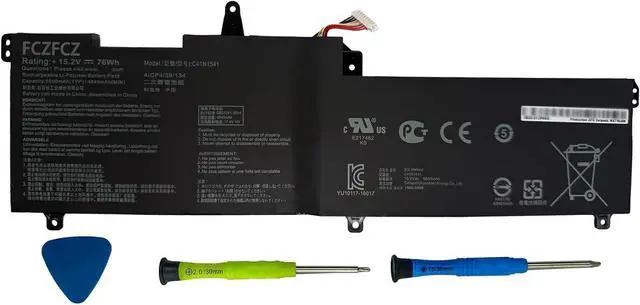
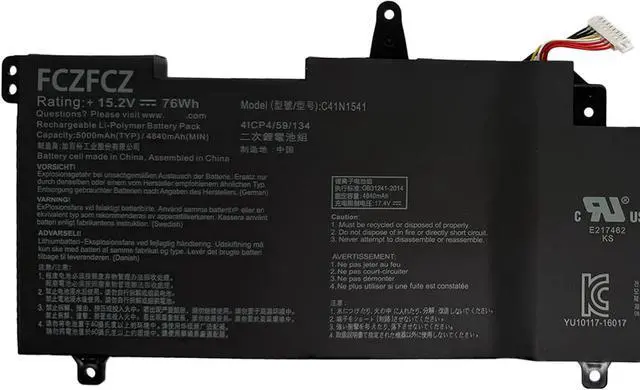
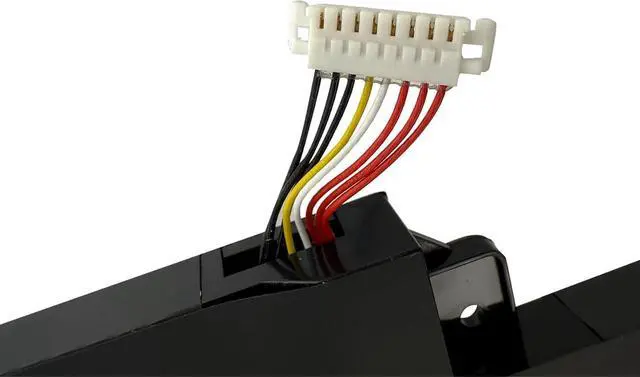
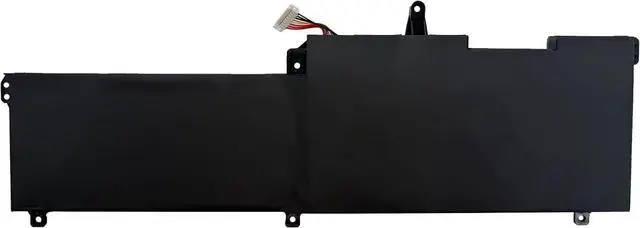


C41N1541 Battery 76Wh 4840mAh Replacement for ASUS Rog Strix GL702V GL702VM GL702VMK GL702VS GL702VSK GL702VSK-R GL702VT GL702ZC Series C41PP91 0B200-02070000 0B200-02070200 15.2V
- SpecificationsBattery Model: C41N1541 // Voltage:15.2V // Capacity:76Wh 4840mAh // Color:Black // Condition:Brand New.
- Replacement for Part NumberC41N1541 C41PP91 0B200-02070000 0B200-02070200 0B200-02070300 0B200-02070400 4ICP4/59/134 BATTGL702
- Compatible with Machine Modelsfor ASUS Rog STRIX GL702V Series; for ASUS Rog STRIX GL702VM Series: GL702VM-BA131T GL702VM-BA135T GL702VM-BA195T GL702VM-BA300T GL702VM-BHI7N09 GL702VM-DB71 GL702VM-DS74 GL702VM-GB161R GL702VM-GC003T GL702VM-GC004T GL702VM-GC010T GL702VM-GC073D GL702VM-GC102D GL702VM-GC142T GL702VM-GC156T GL702VM-GC182T GL702VM-GC185T GL702VM-GC186T GL702VM-GC225TGL702VM-BA135T GL702VM-BA195T GL702VM-BA230T GL702VM-BA323T GL702VM-BA324 GL702VM-BA325T GL702VM-BA414
- Compatible with Machine Modelsfor ASUS Rog STRIX GL702VM Series: GL702VM-DB71 GL702VM-DB74 GL702VM-GB031T GL702VM-GB032T GL702VM-GC280T GL702VM-GC100T GL702VM-1A GL702VM-GC301T GL702VM-GC279T GL702VM-GC017T GL702VM-GC020T GL702VM-GC035T. for ASUS Rog STRIX GL
+
+
Overview
Specs
Reviews
SpecificationsBattery Model: C41N1541 // Voltage:15.2V // Capacity:76Wh 4840mAh // Color:Black // Condition:Brand New.
Replacement for Part NumberC41N1541 C41PP91 0B200-02070000 0B200-02070200 0B200-02070300 0B200-02070400 4ICP4/59/134 BATTGL702
Compatible with Machine Modelsfor ASUS Rog STRIX GL702V Series; for ASUS Rog STRIX GL702VM Series: GL702VM-BA131T GL702VM-BA135T GL702VM-BA195T GL702VM-BA300T GL702VM-BHI7N09 GL702VM-DB71 GL702VM-DS74 GL702VM-GB161R GL702VM-GC003T GL702VM-GC004T GL702VM-GC010T GL702VM-GC073D GL702VM-GC102D GL702VM-GC142T GL702VM-GC156T GL702VM-GC182T GL702VM-GC185T GL702VM-GC186T GL702VM-GC225TGL702VM-BA135T GL702VM-BA195T GL702VM-BA230T GL702VM-BA323T GL702VM-BA324 GL702VM-BA325T GL702VM-BA414
Compatible with Machine Modelsfor ASUS Rog STRIX GL702VM Series: GL702VM-DB71 GL702VM-DB74 GL702VM-GB031T GL702VM-GB032T GL702VM-GC280T GL702VM-GC100T GL702VM-1A GL702VM-GC301T GL702VM-GC279T GL702VM-GC017T GL702VM-GC020T GL702VM-GC035T. for ASUS Rog STRIX GL702VMK Series; for ASUS Rog STRIX GL702VS Series: GL702VS-BA023T GL702VS-BA101 GL702VS-BA181T GL702VS-BA207T GL702VS-BA222T GL702VS-BA230T GL702VS-BI7N12 GL702VS-GC066T GL702VS-GC079T GL702VS-RS71 GL702VS-AH73 GL702VS-BA002T
Compatible with Machine Modelsfor ASUS Rog STRIX GL702VS Series: GL702VS-1A GL702VS-1C. for ASUS Rog STRIX GL702VSK GL702VSK-R Series; for ASUS Rog STRIX GL702VT Series: GL702VT-GC018T GL702VT-GC023T GL702VT-GC024T GL702VT-GC025T GL702VT-GC033T GL702VT-GC090TC GL702VT-GC109T GL702VT-GC061T GL702VT-1A GL702VT-GC057T. for ASUS Rog STRIX GL702ZC Series: GL702ZC-GC006T GL702ZC-GC007T GL702ZC-GC098T GL702ZC-GC104T GL702ZC-GC105T GL702ZC-GC174T GL702ZC-GC177T GL702ZC-GC178T GL702ZC-GC179T
Compatible with Machine Modelsfor ASUS Rog STRIX GL702ZC Series: GL702ZC-GC204. for ASUS Rog STRIX G702VM Series: G702VM-GC172T G702VM-GC002T G702VM-GC054T G702VMK-BA246T G702VMK-BA367T G702VMK-GC284T. for ASUS Rog STRIX G702VMK Series: G702VMK-BA246T G702VMK-BA326T G702VMK-BA326T. for ASUS Rog STRIX G702VT G702VT-GC006T Series; for ASUS Rog STRIX G702VS Series; for ASUS Rog STRIX G702VSK Series; for ASUS Rog S7V S7VT6700 S7VM6700 S7VM7700 Series; for ASUS Rog STRIX S7ZC Series
SafetyAll FCZFCZ products are Certified by CE, UL for safety. Each battery is factory tested before shipment and at good condition, and have its mark. Built-in circuit protection ensures both safety and stability. Each battery has high capacity to provide enduring, continual use.
InstructionsPlease open the back cover of the laptop before purchasing and confirm that the original battery type is the same as the picture. Please read the battery instruction manual carefully before installing the battery. Please install the battery correctly and ensure that the battery interface and the motherboard are firmly connected. Please use the original charger to charge the laptop. After battery installation, discharge the new battery to 5% (not 0%), then charge and cycle 3-4 times to wake up the new battery.
Replacement for Part NumberC41N1541 C41PP91 0B200-02070000 0B200-02070200 0B200-02070300 0B200-02070400 4ICP4/59/134 BATTGL702
Compatible with Machine Modelsfor ASUS Rog STRIX GL702V Series; for ASUS Rog STRIX GL702VM Series: GL702VM-BA131T GL702VM-BA135T GL702VM-BA195T GL702VM-BA300T GL702VM-BHI7N09 GL702VM-DB71 GL702VM-DS74 GL702VM-GB161R GL702VM-GC003T GL702VM-GC004T GL702VM-GC010T GL702VM-GC073D GL702VM-GC102D GL702VM-GC142T GL702VM-GC156T GL702VM-GC182T GL702VM-GC185T GL702VM-GC186T GL702VM-GC225TGL702VM-BA135T GL702VM-BA195T GL702VM-BA230T GL702VM-BA323T GL702VM-BA324 GL702VM-BA325T GL702VM-BA414
Compatible with Machine Modelsfor ASUS Rog STRIX GL702VM Series: GL702VM-DB71 GL702VM-DB74 GL702VM-GB031T GL702VM-GB032T GL702VM-GC280T GL702VM-GC100T GL702VM-1A GL702VM-GC301T GL702VM-GC279T GL702VM-GC017T GL702VM-GC020T GL702VM-GC035T. for ASUS Rog STRIX GL702VMK Series; for ASUS Rog STRIX GL702VS Series: GL702VS-BA023T GL702VS-BA101 GL702VS-BA181T GL702VS-BA207T GL702VS-BA222T GL702VS-BA230T GL702VS-BI7N12 GL702VS-GC066T GL702VS-GC079T GL702VS-RS71 GL702VS-AH73 GL702VS-BA002T
Compatible with Machine Modelsfor ASUS Rog STRIX GL702VS Series: GL702VS-1A GL702VS-1C. for ASUS Rog STRIX GL702VSK GL702VSK-R Series; for ASUS Rog STRIX GL702VT Series: GL702VT-GC018T GL702VT-GC023T GL702VT-GC024T GL702VT-GC025T GL702VT-GC033T GL702VT-GC090TC GL702VT-GC109T GL702VT-GC061T GL702VT-1A GL702VT-GC057T. for ASUS Rog STRIX GL702ZC Series: GL702ZC-GC006T GL702ZC-GC007T GL702ZC-GC098T GL702ZC-GC104T GL702ZC-GC105T GL702ZC-GC174T GL702ZC-GC177T GL702ZC-GC178T GL702ZC-GC179T
Compatible with Machine Modelsfor ASUS Rog STRIX GL702ZC Series: GL702ZC-GC204. for ASUS Rog STRIX G702VM Series: G702VM-GC172T G702VM-GC002T G702VM-GC054T G702VMK-BA246T G702VMK-BA367T G702VMK-GC284T. for ASUS Rog STRIX G702VMK Series: G702VMK-BA246T G702VMK-BA326T G702VMK-BA326T. for ASUS Rog STRIX G702VT G702VT-GC006T Series; for ASUS Rog STRIX G702VS Series; for ASUS Rog STRIX G702VSK Series; for ASUS Rog S7V S7VT6700 S7VM6700 S7VM7700 Series; for ASUS Rog STRIX S7ZC Series
SafetyAll FCZFCZ products are Certified by CE, UL for safety. Each battery is factory tested before shipment and at good condition, and have its mark. Built-in circuit protection ensures both safety and stability. Each battery has high capacity to provide enduring, continual use.
InstructionsPlease open the back cover of the laptop before purchasing and confirm that the original battery type is the same as the picture. Please read the battery instruction manual carefully before installing the battery. Please install the battery correctly and ensure that the battery interface and the motherboard are firmly connected. Please use the original charger to charge the laptop. After battery installation, discharge the new battery to 5% (not 0%), then charge and cycle 3-4 times to wake up the new battery.
Warranty & Returns
Warranty, Returns, And Additional Information
Warranty
- Please contact the Seller directly for warranty information. Warranty information may also be found on the Manufacturer's website.
- CONTACT
Return Policies
- Return for refund within: 30 days
- Return for replacement within: 90 days
- This item is covered by E-Transit Limited Return Policy
Manufacturer Contact Info
- For a directory of all our manufacturers, please click below.
- Manufacturers Directory
LOADING...