
Your Browsing History
- Free 30-day Returns
$653.99
Ships from Hong Kong.
Sold by CITY BUSINESS Official
Shipped by CITY BUSINESS Official

Meet Your Seller

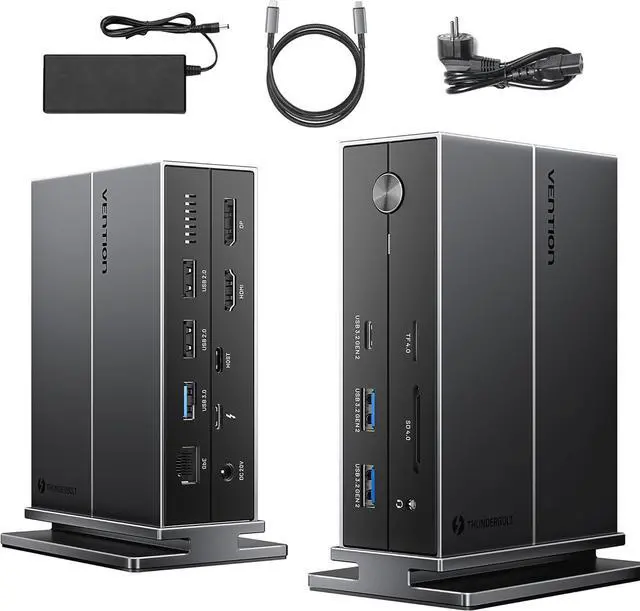


VENTION Thunderbolt 4 Dock Docking Station Triple Monitor with 135W Charger, 8K/4K Display for MacBook Pro/Air, Thunderbolt 4/3 Windows PC (8K HDMI, 8K DP, 3xUSB 3.2, SD/TF4.0, 3.5mm, Ethernet)
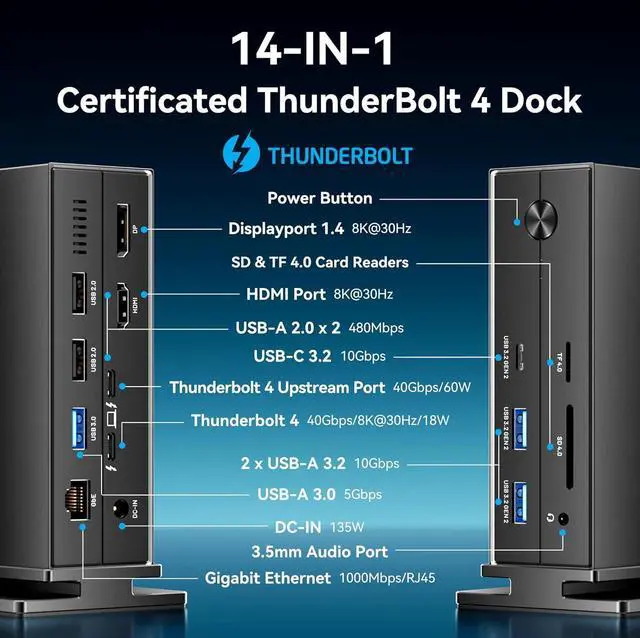
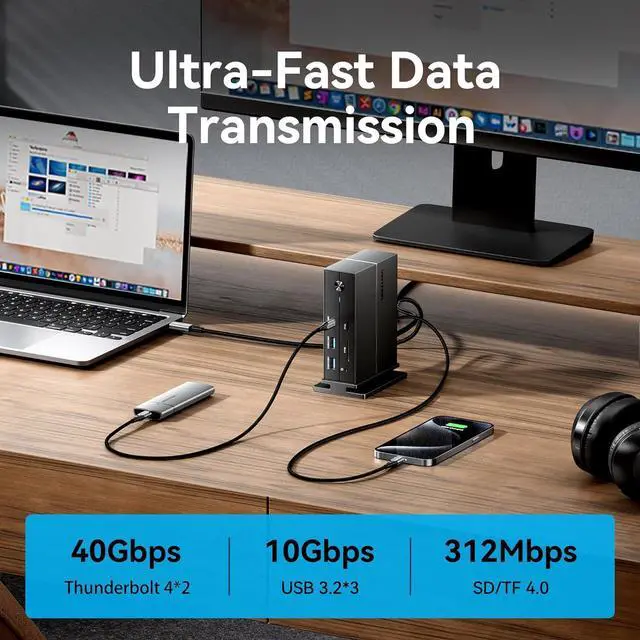
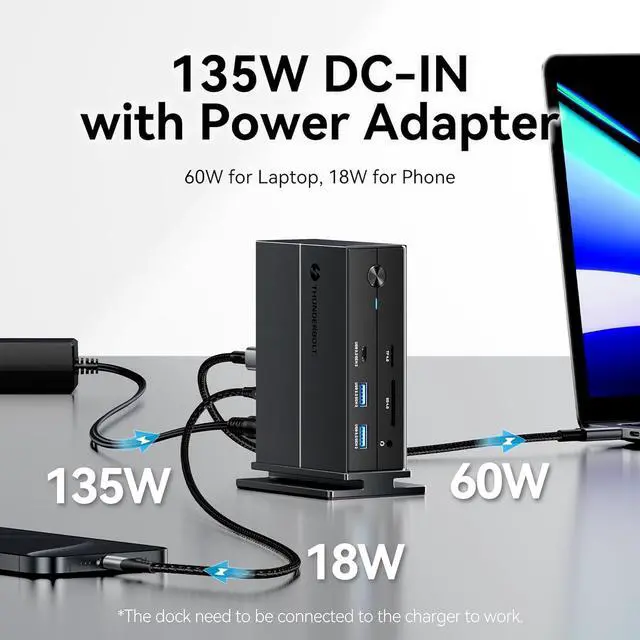
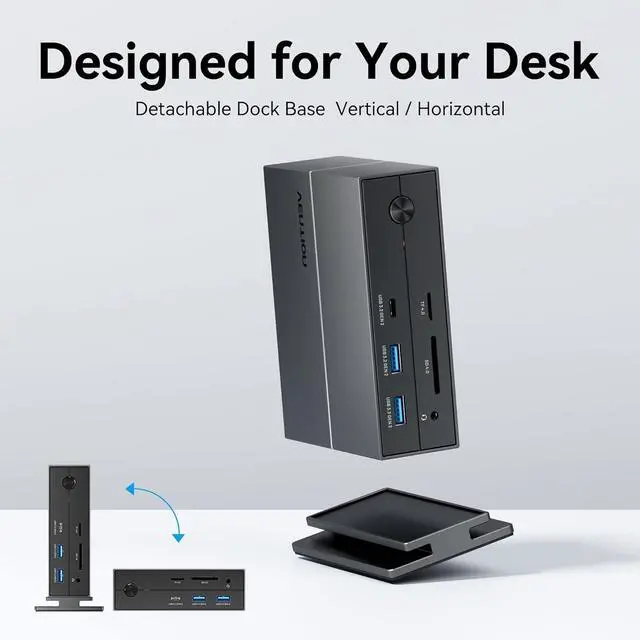
- 14 IN 1 THUNDERBOLT 4 DOCK - VENTION Thunderbolt 4 docking station includes: 8K@30Hz HDMI port, 8K@30Hz Displayport 1.4, Thunderbolt 4 port (8K@30Hz, 40Gb/s, 18W Charge), Thunderbolt 4 upstream port (40Gb/s, 60W Charge), 10 Gbps USB-C, 2 x USB-A 10 Gbps, SD & TF 4.0 card reader, 3.5mm trrs audio port, 1000 Mbps Gigabit ethernet, 5 Gbps USB-A 3.0, USB-A 2.0 x 2, power switch, 135W DC-IN port
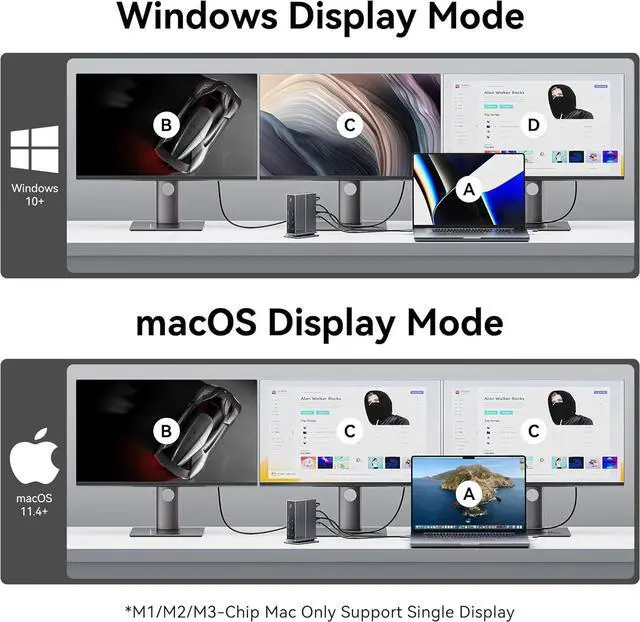
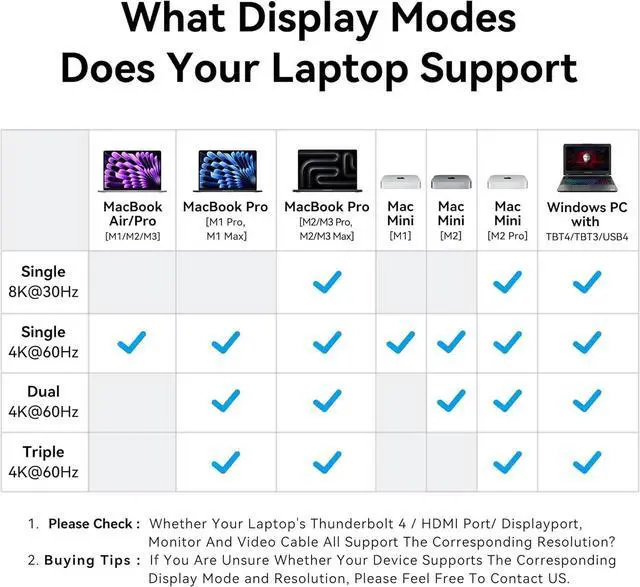
- DOCKING STATION DUAL/TRIPLE MONITORS - MacOS 11+ laptops support up to dual monitors (ABC Mode) or triple monitors (ABCC Mode). Windows 10+ laptops support up to triple monitors (ABCD Mode). The exact number of supported external monitors & output resolutions depend on your laptop model. You can consult us for assistance
- SPECIFIC DISPLAY MODES - Up to single displays AB mode: MacBook Air/Pro M1/M2/M3 & Mac Mini M1, Windows PC with full-function USB-C port, iPad Pro M4. Up to dual displays ABC mode: MacBook Pro M2 Pro/M3 Pro/M2 Max/M3 Max/M1 Pro/M1 Max, Mac Mini M2/M2 Pro. Up to
+
+
Overview
Specs
Reviews
1macOS Display Modes2Windows Display Modes1Detachable Stand2What You Get Is my laptop compatiable with this dock?
Please ensure your laptop with built-in thunderolt4/thunderolt3/usb 4 port, meanwhile running Windws 10+ or macOS 11+. You can consult us for assistance or check on the laptops official website.
Why can't my external monitors reach 4k or 8k resolution?
You need to ensure that your monitor, laptop, HDMI cable, DP cable support the 4K/8K resolution.
How to deal with black screen / display flickering when connecting to an external monitor?
1. Try to lower the resolution rate/ refresh rate.
2. Plug and unplug laptop's ports more than 5 seconds.
3. Try another HMDI/DP/Thunderbolt cable.
4. Restart your laptop.
Why is there only one display work when two or three monitors are connected?
1. M1/M2/M3 MacBook/mini or full-function usb-c laptop only support single display.
2. Please ensure your laptop's Thunderbolt/HDMI/Displayport/USB-C port support video output.
Will this dock work without charger?
No, it will be used with the supplied charging unit.
VENTION FUTURE-ORIENTED 14-IN-1 THUNDERBOLT 4 DOCKING STATION Is my laptop compatiable with this dock?
Why can't my external monitors reach 4k or 8k resolution?
How to deal with black screen / display flickering when connecting to an external monitor?
Why is there only one display work when two or three monitors are connected?
Will this dock work without charger?
Please ensure your laptop with built-in thunderolt4/thunderolt3/usb 4 port, meanwhile running Windws 10+ or macOS 11+. You can consult us for assistance or check on the laptops official website.
Why can't my external monitors reach 4k or 8k resolution?
You need to ensure that your monitor, laptop, HDMI cable, DP cable support the 4K/8K resolution.
How to deal with black screen / display flickering when connecting to an external monitor?
1. Try to lower the resolution rate/ refresh rate.
2. Plug and unplug laptop's ports more than 5 seconds.
3. Try another HMDI/DP/Thunderbolt cable.
4. Restart your laptop.
Why is there only one display work when two or three monitors are connected?
1. M1/M2/M3 MacBook/mini or full-function usb-c laptop only support single display.
2. Please ensure your laptop's Thunderbolt/HDMI/Displayport/USB-C port support video output.
Will this dock work without charger?
No, it will be used with the supplied charging unit.
VENTION FUTURE-ORIENTED 14-IN-1 THUNDERBOLT 4 DOCKING STATION Is my laptop compatiable with this dock?
Why can't my external monitors reach 4k or 8k resolution?
How to deal with black screen / display flickering when connecting to an external monitor?
Why is there only one display work when two or three monitors are connected?
Will this dock work without charger?
Warranty & Returns
Warranty, Returns, And Additional Information
Warranty
- Please contact the Seller directly for warranty information. Warranty information may also be found on the Manufacturer's website.
- CONTACT
Return Policies
- Return for refund within: 30 days
- Return for replacement within: 90 days
- This item is covered by CITY BUSINESS Official Return Policy
Manufacturer Contact Info
- For a directory of all our manufacturers, please click below.
- Manufacturers Directory
LOADING...