
Your Browsing History
- Free 15-day Returns
$91.25
Ships from China.

Meet Your Seller



Visit Hetai Store
FOLLOW
Capture Analog to Digital Video Recorder 272 Anolog Video Recorder Audio Video input HDMI Output to Micro TF Card
- Good Quality
+
+
Overview
Specs
Reviews
Ezcap 272 Anolog Video Recorder Capture Analog to Digital Video Recorder Audio Video input HDMI Output to Micro TF Card
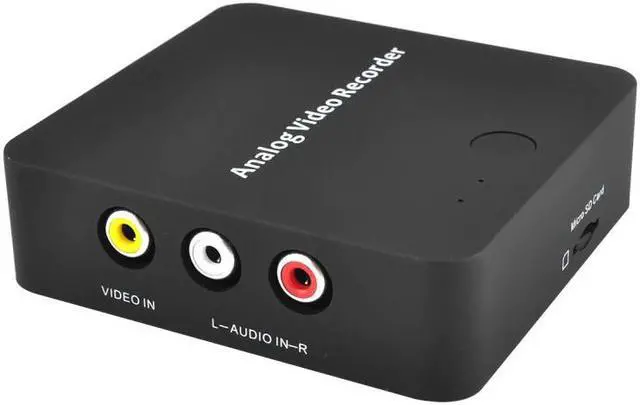
With ezcap272 Analog Video Recorder, you can convert your old video tapes or camcorder tapes to digital format with one click of button, record and digitalize video from VHS, VCR's, DVD Players, DVR's, Camcorders,Hi8,and Gaming Systems. Ezcap272 Analog Video Recorder records video directly, no computer required.
Connection:
Interface: USB 2.0
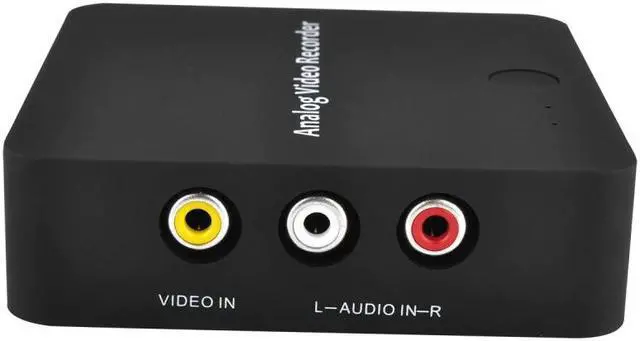
Video Input: RCA Composite yellow port
Audio Input: RCA L/R Audio white / red port
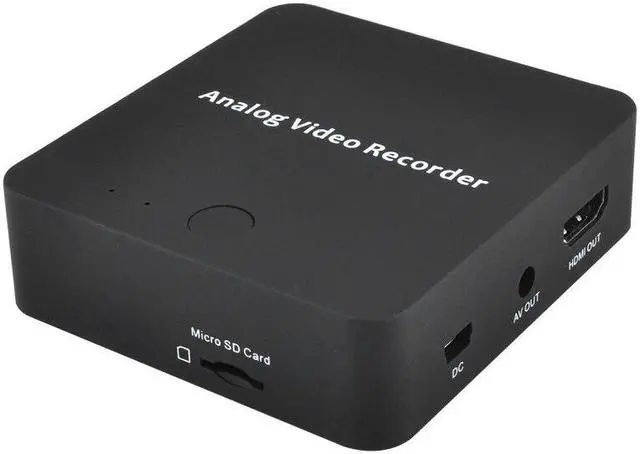
Video Output: 3.5mm cable, HDMI
Audio Output: 3.5mm cable, HDMI
Applicable Connections
Video:Video Tape, Camcorder Tape, VHS, VCR, DVD Player, DVR, Hi8, Game
Player ...
Specfication:
Storage Media:Micro card Max,16GB, doesn't support NTSF format
Record Format :Video: .i
Record Quality: 480 30fps, PAL:720×576, NTSC: 720×480
Record File: Video: about 9.3MB/Minute, 0.56GB/Hour
Power Supply: 5V/1A
Package Contents:
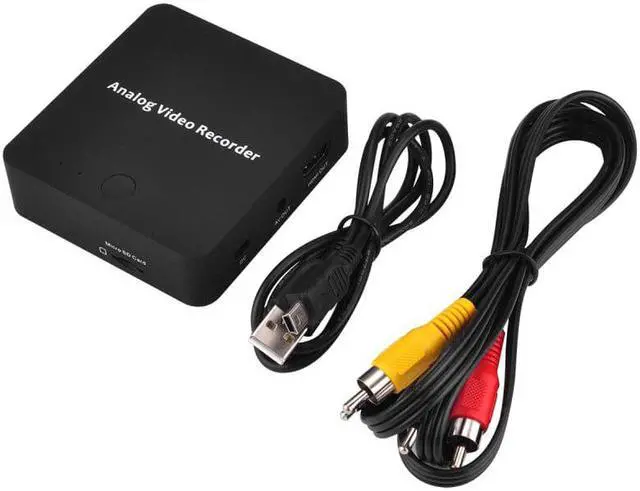
1 x Device ezcap272 Recorder
1 x USB Cable
1 x RCA Cable
Operating step:
1. VIDEO AUDIO IN RCA Composite video and L/R audio input from video source device. Yellow = video, white = audio left channel, red = audio right channel.
2. OUT Connect to TV monitor displaying with included Cable.
3. HDMI OUT Connect to TV monitor displaying with HDMI Cable. (HDMI Cable is not included.)
4. DC Connect to 5V DC power with mini USB cable. Or connect to computers USB port to manage files or update firmware.
5. Micro card slot Plug Micro card sing record file.
With ezcap272 Analog Video Recorder, you can convert your old video tapes or camcorder tapes to digital format with one click of button, record and digitalize video from VHS, VCR's, DVD Players, DVR's, Camcorders,Hi8,and Gaming Systems. Ezcap272 Analog Video Recorder records video directly, no computer required.
Connection:
Interface: USB 2.0
Video Input: RCA Composite yellow port
Audio Input: RCA L/R Audio white / red port
Video Output: 3.5mm cable, HDMI
Audio Output: 3.5mm cable, HDMI
Applicable Connections
Video:Video Tape, Camcorder Tape, VHS, VCR, DVD Player, DVR, Hi8, Game
Player ...
Specfication:
Storage Media:Micro card Max,16GB, doesn't support NTSF format
Record Format :Video: .i
Record Quality: 480 30fps, PAL:720×576, NTSC: 720×480
Record File: Video: about 9.3MB/Minute, 0.56GB/Hour
Power Supply: 5V/1A
Package Contents:
1 x Device ezcap272 Recorder
1 x USB Cable
1 x RCA Cable
Operating step:
1. VIDEO AUDIO IN RCA Composite video and L/R audio input from video source device. Yellow = video, white = audio left channel, red = audio right channel.
2. OUT Connect to TV monitor displaying with included Cable.
3. HDMI OUT Connect to TV monitor displaying with HDMI Cable. (HDMI Cable is not included.)
4. DC Connect to 5V DC power with mini USB cable. Or connect to computers USB port to manage files or update firmware.
5. Micro card slot Plug Micro card sing record file.
Warranty & Returns
Warranty, Returns, And Additional Information
Warranty
- Please contact the Seller directly for warranty information. Warranty information may also be found on the Manufacturer's website.
- CONTACT
Return Policies
- Return for refund within: 15 days
- Return for replacement within: 30 days
- This item is covered by Hetai Return Policy
Manufacturer Contact Info
- For a directory of all our manufacturers, please click below.
- Manufacturers Directory
LOADING...