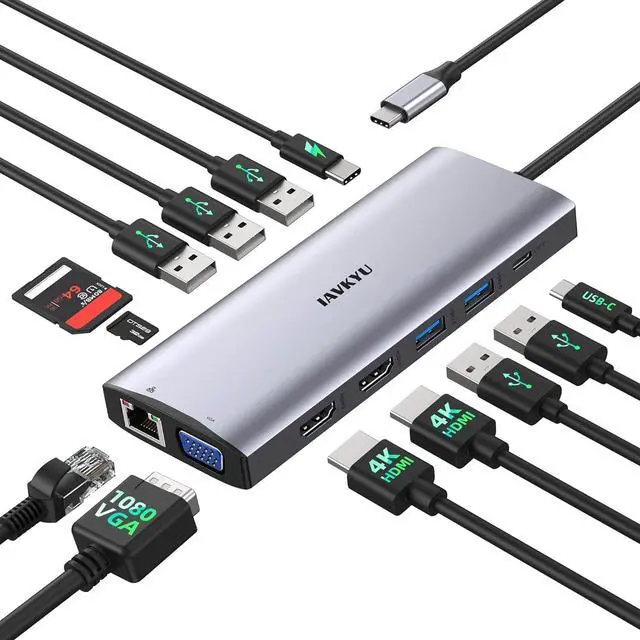
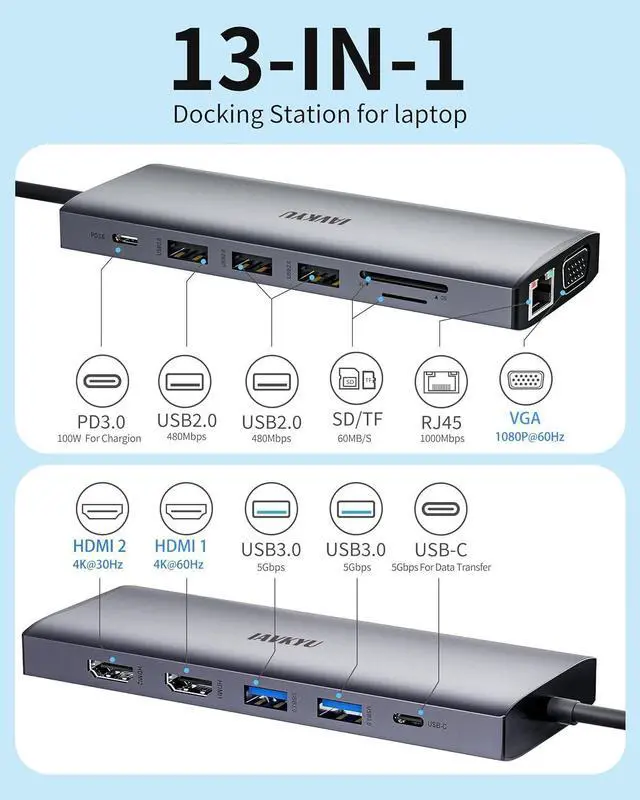
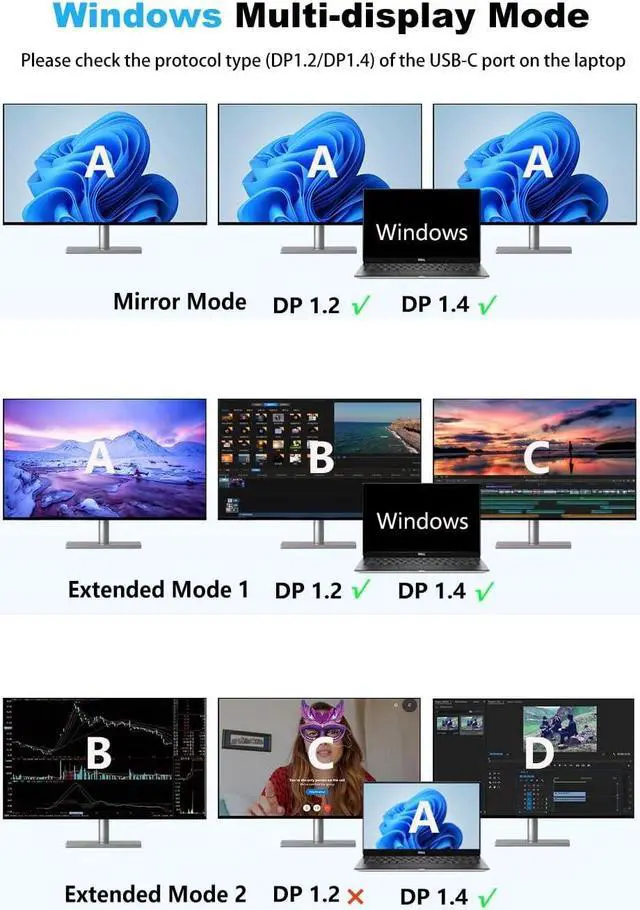
1Dual 4K Displays2Fast Charging3Data Transfer4Gigabit Ethernet5dock hub1Dual Display for Windows2Triple Display Windows3Dual Display for MacOS4Triple Display MacOS Is this USB-C docking station compatible with my laptop?
Only when the USB-C port on your laptop supports charging, data transfer, and video output simultaneously, can you fully utilize the functionality of this USB-C docking station, including USB4, Thunderbolt 3/4, Type C 3.1/3.2 Gen 2.
My docking station not charging my laptop?
1.Please check if your laptop has multiple USB-C ports and identify the one that supports PD charging.
2. Ensure that the external power input charges through the PD charging port on the docking station.
Why is there no video output?
1.Please make sure your host supports DisplayPort video output functionality!
2.Please use standard HDMI/DP cables.
3.Check if the cables are well connected.
4.Ensure you select the correct input source for your HDMI and DP monitors.
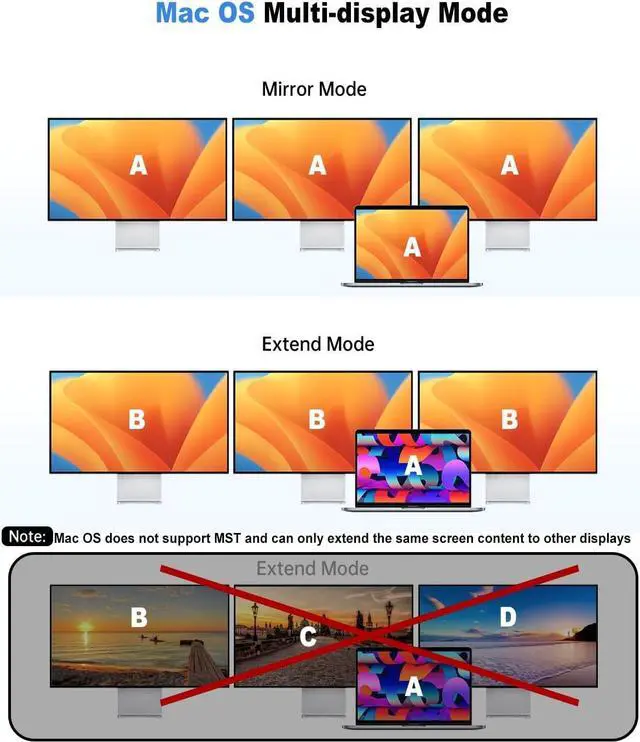
How to Set Up Displays on Windows and Mac Operating Systems? Mac OS does not support extending multiple display scenes
Windows OS: Right-click on the desktop > Graphics Settings > Display > Extend Desktop
Mac OS: Apple logo > System Preferences > Display > Mirror Display
Note: Mac OS does not support extending multiple display scenes (Extended Mode).
Is there advice on power connection and adapter usage?
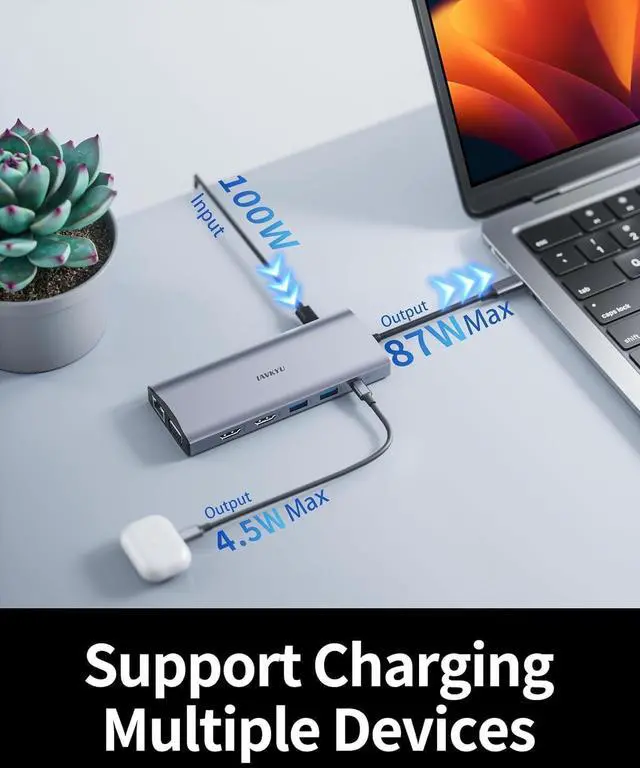
1.It is recommended to connect to power during use, with a power input of 65-100W for optimal performance.
2.We do not recommend using any other adapters with the docking station as compatibility cannot be guaranteed
For Dell LaptopsDell Inspiron 7420/7425/7430/7435/7506 /7610/7620/7630/7635/7791/3420/5420/5425/5430/5620/5625/5630/5635;Dell Latitute 7320/7340/7400/7410/7420/7430/7440/7480/7490/7530/7640/9420/9430/9440/7230/7280/7300/7330/5310 /5340 /5411/5420 /5421 /5430 /5400 /5440 /3110/3140/3420/3440/3445/3510 /3520 /3540/5491/5510/5520/5540/5530/5580; Dell Vostro 5620/5410; XPS 9380/13/15/17;Dell G15-5530/G16-7630; Dell Precision 7780/7770/7680/7670/7750/7730/3551/3470/3480/3570/3571/3580/3581/5470/5480/5570/5680;For Dell LaptopsPrecision Workstation Model 5570/5680/5690/5490/7780/7680/5480/3591/3581/3480/3580/3590/3490;Inspiron 16 5630; Inspiron 16 2-in-1 Laptop 7630/7635 2-IN-1;Inspiron 14 Model5430/3420; Inspiron 14 2-in-1 Laptop Model 7435;Inspiron 16 Plus 7630/7640;Alienware m16/m16 R2/m18/m18 R2 Gaming Laptop;Alienware x15 R2 Gaming Laptop/ x15 R7 Gaming Laptop/ x14 R2 Gaming Laptop;Gaming Laptop G16 Model7630/G15 Model 5530 5535;x16/x16 R2 Gaming/ x17 R2 Gaming Laptop;Updating... For Lenovo LaptopsLenovo Yoga 900/920/720/730;ThinkPad t490;Lenovo Yoga 9ThinkPad t15/t16 Gen 1;T16 (16 Intel);ThinkPad T14/T14s Gen 4 /3 (14 Intel) ;ThinkPad P16/s Gen 2 (16 Intel) ;ThinkBook 14 Gen 6/4 (14 Intel) Laptop;ThinkPad L390/ L13 /X390/X380 Yoga(13") Laptop;ThinkPad P1 Gen 5/6 (16 Intel);ThinkPad P14s Gen 4 (14 Intel); ThinkPad X1 Carbon Gen 7/Gen8/Gen 10 Gen 12 (14 Intel) Laptop/Gen 11 (14 Intel) Laptop;ThinkPad X1 Yoga Gen 5/Yoga Gen 7/8 (14 Intel) 2 in 1;T16 Gen 2 (16 Intel) ;For Hp LaptopsHP Elitebook ( 735 G6/745 G5/800 G4/830 G5/840 G5 series/6850 G5/850 G7/850 G8/845 G7/840 G8 845 G8/830 G6),HP Zbook ( 15 G5/ 17 G4/ 16 G6 ),HP robook (450 G7/450 G6/440 G7/ 450 g5/640 G5/ 650 G5),HP Spectre( 13/ 360/ X360-13T/ 15T/ X369),HP Envy( Geforce MX250/ 17T/ X360)For Hp LaptopsHP Elitebook 650 G9/830 G9 Pro/830 G9 13.3in/830 G10 13.3 in/830 G8/840 G7/840 G8/840 G9 14 in/840 G10 14 in/850 G5/855 G8/860 G10 16 inch/860 G9 16inch/1040 G9 14inch/1040 G10 14 in;HP ProBook 450 G5 G6 G7/440 G9/450 G9/455 G8/470 G5/455 15.6 inch G10/450 G10 15.6 inch/440 G10 14 inch;ZBook 17 G4/ 15 G3/FURY 16 in G10/Fury 15.6 in G10/ STUDIO 16 in G10/FIREFLY 16 inch G10/Power 15.6 inch G10/ Firefly 14 inch G10/Firefly 14 g7/Firefly g8 Laptop;For Hp LaptopsEnvy x360 13-bd0080ng/X360 2-IN-1


 We‘re shipping as usual! The Canada Post strike only affects certain remote deliveries and PO Boxes. Details
 Holiday Shipping Details & Extended Holiday Returns


