To provide great value to users, to increase employee happiness, and to make a difference to the society.
Note:
1. MacBook with M1/M2 chips only support one monitor extend!!!
2. USB C data port does not support video/audio output.
3. Monitor blinks when installed, please change HDMI cable.
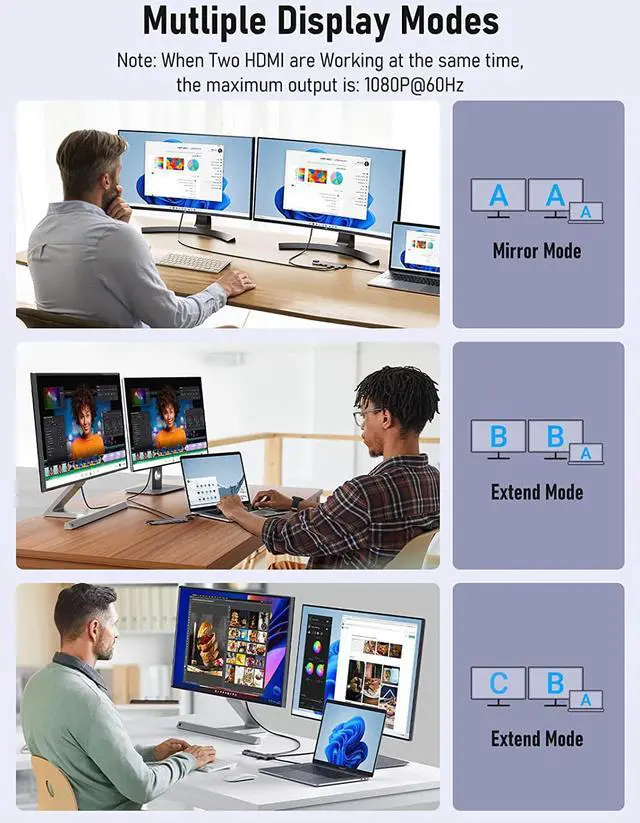
Mirror Mode (AAA Mode):
Laptop shows same images with dual external displays.
Extend Mode (ABB and ABC Mode):
Laptop shows different images with dual external displays.
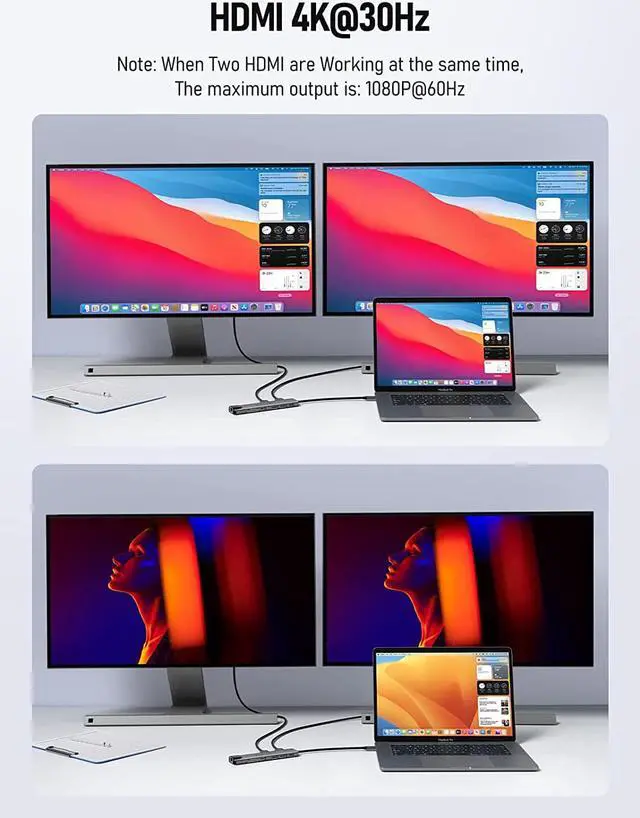
HDMI Output Resolution:
Single hdmi output: you can enjoy 4k@30hz videos, games etc., crystal clear with zero lag.
Dual hdmi output: if 2 hdmi work simutaneously, hdmi output will be 1080p@60hz.
How to extend monitor on Windows:
When the HUB is connected to the laptop and connected to the display with an HDMI cable, you can use the shortcut key combination Win+P to select other modes such as expansion and copy, and support multiple expansion combinations such as ABC. In Windows Settings-System-Screen Settings, you can select the display order and resolution of the secondary screen through the settings, and you can change the refresh rate of the secondary screen in advanced display settings.
Mirror Mode (AAA Mode):
Laptop shows same images with displays.
Extend Mode (ABB Mode):
2 external screen display same images but different with laptop.
Note:
Macbook with M1/M2 chip only can extend one monitor. ON MacOS only SST supported due to MacOS limitation.
How to extend monitor on Mac:
When the HUB is connected to the laptop and connected to the display with an HDMI cable, you can change the resolution, refresh rate, mirroring and extension mode of the secondary screen in System Preferences-Display Settings, and support ABBs extension mode and AAAs copy mode.
For Dell: XPS 9380, 13 9365, 15 2018, 9350, 13 9300, New XPS 15; Latitude 7490, 7480, 7280, 7390, 7389, 7300, 5500, 5490, 3500, 5310, 5290, 7400, 5480, 5400, 5410, 3400/ Precision 5530, 5540, 5550, 7520, 7730, 7750; Laptop 5590, Inspiron 7573, 7300, G7 7790
For Lenovo: Yoga 370, 720-13IKB, 730, 900-13ISK, 910, 920, 930, 940-14IIL, 3rd generation Thinkpad Yoga, 15 Ultrabook Pro,C930, c940, C740-15IML, 7i, Thinkpad E590, P72, T470, T470s, T490, T490s, X1 Carbon (2019 model) , Thinkpad Carbon X1 Gen6, X1 Extreme, x1 Carbon Gen 8 - 20U9002NUS, P52/ ThinkPad E14
For HP: Spectre Laptop 13-af001TU, x360 13t, x360 15, x360 15t, Folio (13t-ak000cto), 360 laptop, x369, x360 Convertible 15-eb0xxx; Elitebook 840 G5 series, X2, x360 1030 G3, 745 g6, 830 g6, 2018 Elite 800 G4, 850 g5
For Samsung: Galaxy S10+, S10, S9+, S9, S8+, S8 Plus; Note 10, 9, 8; Galaxy Book Flex Alpha 2-in-1 13.3" QLED Touch-Screen Laptop; Galaxy Tab S5e, S4; Galaxy S20 Ultra
For Apple: MacBook/ MacBook Pro (2021/2020/2019/2018/2017/2016), Macbook Air 2018-2020, Mac mini 2018-2020, iPad Pro 2018, iMac 27 2019 Extended HDMI Monitor/ iMAC 2020
For Dell: Inspiron 17 5000 series/ Inspiron 15 5000 series/ Inspiron 17 3793 Business Laptop/ Latitude E7270/ Latitude 7470/ Vostro MT 3671
For Lenovo: T570/ Y520/ Yoga 520/ Ideapad Flex (15IWL)/ Flex 14 2-in-1 81SS000DUS/ Flex 15.6" 2-in-1 Touchscreen Laptop/ Ideapad flex 5-1570/ ideapad flex 15 iml/ Ideapad Flex 6 14IKB/ Ideapad L340/ Ideapad 330/ Ideapad 5 2-in-1 15"/ IdeaPad S340/ Ideapad 130s/ Thinkpad l490
For HP: Pavilion series/ Elitebook 840 G4 series/ Elitebook 840 G3 series/ Elitebook 745 G6/ Elitebook 820 G4/ Elitebook Bang and Olufsen/ 2020 Model 14/ Newer Envy 15/ EVGA SC15/ Model 15-dy1076nr S/N 5CDO137PLL/ 15-dw2025cl laptop/ 15-y1751ms/ 15-dw0037wm/ 15-dy1076nr/ 15-dy1xxx/ 15-dy1071wm/ 15-dy1023dx/ 15-dy1059ms/ Prodesk 600 G2/ 15T Laptop/
For Acer: Vivobook series/ Zenbook UX330UA-AH55/ ZenBook Flip 14 UX461FN-DH74T laptop/ ZenBook UX333FN/ ZenBook Flip 14 UX463FL/ Q547/ Q503U/ Q526f USB-C 3.1 Gen 1/ TUF 17.3 Full HD Gaming Laptop/ L203MA Laptop
Others: Acer Aspire A5 /


 We‘re shipping as usual! The Canada Post strike only affects certain remote deliveries and PO Boxes. Details
 Holiday Shipping Details & Extended Holiday Returns


