


- Free 30-day Returns
$496.22
Best Sellers
 Hot Seller
- $533.96
- + FREE SHIPPING

- $566.40
- + $19.00 Shipping

Meet Your Seller

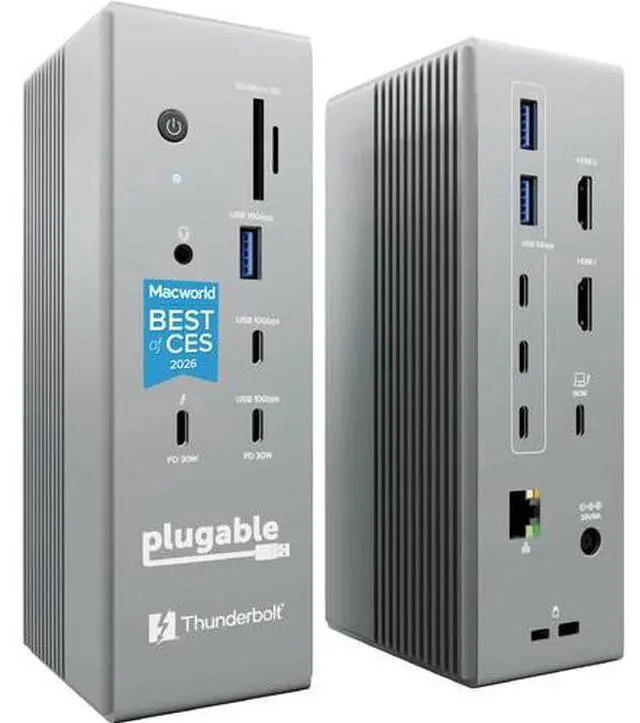

Plugable Thunderbolt 5 Docking Station Model TBT-UDH2
- 1 x Thunderbolt 5 Host Port (140W)
- 1 x Thunderbolt 5 Port (30W)
- 1 x USB-C 3.2 Gen 2 Port (30W)
- USB-C 3.2 Gen 2 | USB-A 3.2 Gen 2
- USB-C 3.2 Gen 1 | USB-A 3.2 Gen 1
- 2 x HDMI 2.1 Ports
- 2.5GbE RJ45 Port | 3.5mm In/Out
- UHS-II SDXC and microSDXC Card Readers
- Supports up to Dual 8K/60 Hz Displays
- Windows and Mac Compatible
+
+
Overview
Specs
Reviews
The Thunderbolt 5 Docking Station from Plugable is a 16-in-1 productivity powerhouse that delivers 140W of laptop charging, plus Thunderbolt, USB-C, USB-A, 2.5GbE, HDMI 2.1, and 3.5mm connectivity, plus UHS-II SDXC and microSDXC card readers, all using a single cable. Built for modern IT and hybrid work setups, no drivers are required for use.
Connectivity with your host system is established using an 80 Gb/s Thunderbolt 5 port, which provides up to 140W of charging power, and an included Thunderbolt 5 cable. Also available is one 80 Gb/s Thunderbolt 5 port that support 30W of power and DisplayPort 1.4, one 10 Gb/s USB-C 3.2 Gen 2 port that supports 30W of power, one 10 Gb/s USB-C 3.2 Gen 2 port, one 10 Gb/s USB-A 3.2 Gen 2 port, three 5 Gb/s USB-C 3.2 Gen 1 ports, two 5 Gb/s USB-A 3.2 Gen 1 ports, one 3.5mm input/output, a UHS-I SDXC card reader, and a UHS-I microSDXC card reader. Dual HDMI 2.1 ports support two 8K/60 Hz or 4K/144 Hz displays and network connectivity is achieved using a 2.5GbE RJ45 port.
This dock is compatible with Windows and Mac. Aside from the 240W Thunderbolt 5 cable, a 180W PSU, a power cable, and two rubber feet with adhesive are included. While it operates using the Thunderbolt 5 standard, it is backward compatible with Thunderbolt 4 and USB4, but Thunderbolt 3 and earlier are not supported.
Power and Performance
This laptop docking station is a 16-in-1 productivity powerhouse with 140W laptop charging, six USB-C ports including two front-facing 30W charging ports (one Thunderbolt 5 and one USB-C), dual HDMI 2.1 ports (no adapters needed), 2.5 Gb/s Ethernet, and dedicated SDXC and microSDXC card readers, all in a TAA-compliant, driverless dock built for modern IT and hybrid work setups.
Dual 8K
This Thunderbolt dock's dual native HDMI 2.1 ports deliver up to 8K/60 Hz or 4K/144 Hz with Thunderbolt 5 hosts, and dual 4K/120 Hz with Thunderbolt 4. No adapters, just pure pixel performance. It's the clean, plug-and-play setup your MacBook Pro or Thunderbolt 5 laptop deserves.
More USB-C Ports
This Windows and MacBook docking station has six USB-C connections, including two front ports that each deliver up to 30W charging (one Thunderbolt 5 and one USB-C). Connect everything from SSDs to phones to capture cards.
Works With
Compatible with Thunderbolt 5, Thunderbolt 4, and USB4 systems running Windows 11 or newer, and macOS 13+. MacBooks with M4, M5, and all Pro or Max chips support dual displays. Base M1/M2/M3 chips support only a single external display. Intel Thunderbolt 4 hosts must be 12th Gen or newer and will support up to dual 4K/120 Hz.
Downstream Thunderbolt Port
A downstream Thunderbolt port can provide up to 120 Gb/s via Bandwidth Boost. It can be used to connect up to one display via USB-C/Thunderbolt or via USB-C to HDMI or USB-C to DisplayPort, with cables and adapters sold separately. Additionally, connect USB-C and Thunderbolt peripherals such as external drives, AI enclosures, and external GPUs (eGPUs, currently not supported in macOS).
Display Capabilities
This dock has dual HDMI 2.1 ports and one downstream Thunderbolt port that can support a Thunderbolt or USB-C Alt Mode display. External display capabilities are dependent on the host system's external display capability:
- Connect up to two 8K/60 Hz displays with M5 Max and M4 Max Macs running macOS 26 and later via Thunderbolt 5
- Connect up to two 6K/60 Hz or 4K/144 Hz with M5 Pro, M4 Pro, M3 Pro, M3 Max, M2 Pro, M2 Max, Base M5, Base M4, and Base M3 Macs running macOS 26 and later with the lid closed
- Connect up to two 6K/6 0Hz with M1 Pro and M1 Max Macs running macOS 26 and later
- Connect a single display up to 6K/60 Hz with Base M1 and M2 Macs running macOS 26 and later
- Connect up to two 8K/60 Hz or two 4K/144 Hz with Windows 11 systems via Thunderbolt 5
- Connect up to two 4K/120 Hz displays on 40 Gb/s Thunderbolt 4 or USB4 on Windows 11 systems (Intel 12th Gen and newer)
Note: Actual resolution and refresh rate support depends on the specific host model, OS version, display, cable, adapter, and overall display configuration. M5 Pro and M5 Max systems may also support triple-display configurations, and M5 Max can support up to four displays via Thunderbolt daisy-chaining, but those configurations are more dependent on the exact setup.
Warranty & Returns
Warranty, Returns, And Additional Information
Warranty
- Please contact the Seller directly for warranty information. Warranty information may also be found on the Manufacturer's website.
- CONTACT
Return Policies
- Return for refund within: 30 days
- Return for replacement within: 30 days
- This item is covered by Deal Targets Return Policy
Manufacturer Contact Info
- For a directory of all our manufacturers, please click below.
- Manufacturers Directory
LOADING...
LOADING...