
Your Browsing History

Meet Your Seller

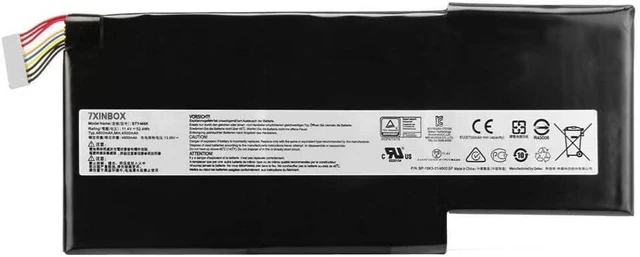

11.4V 52.4WH BTY-M6K Laptop Battery Compatible with MSI Stealth Pro GS63VR 7RG 7RG-005 GF63 Thin 8RC 8RD 9SC 9SCXR 8RD-050NL 010ES GF75 Thin 3RD 8SC 8RD 8RC 8RX 9SC
- Battery type: Li-ion, capacity: 52.4WH, voltage: 11.4V.
- Compatible Part Number: BTY-M6K MS-17B4 MS-16K3 MS-16W1 MS-16R4 MS-16R1 MS-16R3 MS-17F1 MS-17F2 MS-17B7
- Compatible models: for MSI GS63VR 7RG Stealth Pro GF63 Thin 8RD 8RC 9SC GS73VR 7RG GF75 Thin 3RD 8SC 8RD 8RC 8RX 9SC, for MSI GF65 Thin 10SDR 9SEX 9SEXR 9SD WS63VR 7RL-023US Bravo 15 A. 4DCR Bravo 17 A4DDR GS73 8RF 8RF-011 WP65 9TH
- All our products are CE & ROHS certified. 100% compatible as original battery. Grade A cells ensure fast charges and low power consumption. Built-in protection ensures safety and stability.
- 30 days money back and 12 months warranty. 24/7 email support and friendly customer service.
+
+
Overview
Specs
Reviews
About Us:
A professional manufacturer in the field of power tool batteries, laptop batteries and charger.
provides high-quality, real capacity power products with excellent customer service.
Specification:
Battery type: Li-ion;
Capacity:52.4WH
Voltage: 11.4V;
Certificate: CE,RoHS,FCC
Condition: 100% compatible as original battery, Grade A Cell
Compatible with following the Part Number:
BTY-M6K MS-17B4 MS-16K3 MS-16W1 MS-16R4 MS-16R1 MS-16R3 MS-17F1 MS-17F2 MS-17B7
Compatible with Models (Use "Ctrl + F" to quickly find your model)
For MSI GS63VR 7RG Stealth Pro GF63 Thin 8RD 8RC 9SC GS73VR 7RG GF75 Thin 3RD 8SC 8RD 8RC 8RX 9SC
For MSI GF65 Thin 10SDR 9SEX 9SEXR 9SD WS63VR 7RL-023US Bravo 15 A4DCR Bravo 17 A4DDR GS73 8RF 8RF-011 WP65 9TH
Note:
1. Please make sure the product you are about to buy fits the brand number, model and part.
2.Download the new battery at 5% (not 0%), then charge up to 95% and scroll 3-4 times.
3.The first use of the battery, the battery voltage may be too low, it is necessary to recharge the standby 24 hours before normal use.
4. Do not connect the adapter for a long time while using the battery, as it may damage it.
5. If you remove the battery for a long time, charge more than 80% at least once within a month.
6. The computer does not recognize the battery, the battery connector may be in bad contact with the computer socket. At this time it is necessary to check if the copper battery connector is exposed.
We have always been trying our best to provide the best service and reliable products for every customer. Please contact us via message to resolve the issue.
Warranty & Returns
Warranty, Returns, And Additional Information
Warranty
- Please contact the Seller directly for warranty information. Warranty information may also be found on the Manufacturer's website.
- CONTACT
Return Policies
- Return for refund within: 30 days
- Return for replacement within: 90 days
- This item is covered by Solides Home Return Policy
Manufacturer Contact Info
- For a directory of all our manufacturers, please click below.
- Manufacturers Directory
LOADING...