
Your Browsing History
- Free 15-day Returns
$211.49
Ships from Hong Kong.

Meet Your Seller

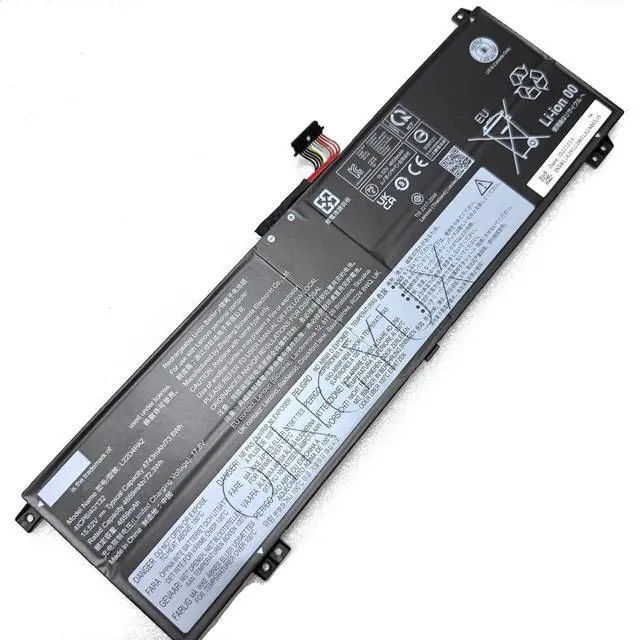

New L22D4PA2 L22M4PA2 L22L4PA2 L22B4PA2 L22C4PA2 Laptop Battery Compatible with Lenovo Legion Slim 5 14APH8 82Y5 Legion S7 16IRH8 82Y3 Legion S7 16APH8 82Y4 Series Notebook
- Battery Type: Li-ion Condition: New Voltage: 15.52V Capacity: 73.6Wh 4743mAh Color: Black
- Replace Part Number: L22D4PA2 5B11N46019 SB11N45951 5B11K39113 SB11K39110 L22M4PA2 5B11K39112 SB11K39111 L22L4PA2 L22B4PA2 SB11K39108 5B11K39109 L22C4PA2 5B11N45950 SB11N45942 4ICP6/40/132
- Fit For Laptop Machine Models: for Lenovo Legion Slim 5 14APH8 82Y5 Legion S7 16IRH8 82Y3 Legion S7 16APH8 82Y4 82Y50000MZ 82Y50001FR 82Y50002FR 82Y50003FR 82Y50004FR 82Y50005FR 82Y50006FR 82Y50007MX 82Y50008MX 82Y50009US 82Y5000AUS 82Y5000BUS 82Y5000CBM 82Y5000DBM 82Y5000ERM Series Notebook
- The Package Includes: 1X L22D4PA2 battery. Before purchasing, please open the back cover of the laptop to confirm the battery model and capacity.
- Raise the battery life:1:After receiving the battery,Please charge it fully, then discharge it to around 10% ,and do it as three times. 2:If you don't use the battery for a long time, please charge and discharge it once a month.
+
+
Overview
Specs
Reviews
Condition: New
Voltage: 15.52V
Capacity: 73.6Wh/4743mAh
Color: Black
Replace Part Number:
L22D4PA2 5B11N46019 SB11N45951 5B11K39113 SB11K39110 L22M4PA2 5B11K39112 SB11K39111 L22L4PA2 L22B4PA2 SB11K39108 5B11K39109 L22C4PA2 5B11N45950 SB11N45942 4ICP6/40/132
Fit for Laptop Machine Models:
Fit for Lenovo Legion Slim 5 14APH8 82Y5 Series;
Fit for Legion S7 16IRH8 82Y3 Series;
Fit for Legion S7 16APH8 82Y4 82Y50000MZ 82Y50001FR 82Y50002FR 82Y50003FR 82Y50004FR 82Y50005FR 82Y50006FR 82Y50007MX 82Y50008MX 82Y50009US 82Y5000AUS 82Y5000BUS 82Y5000CBM 82Y5000DBM 82Y5000ERM Series Notebook
The Package Includes:
1X L22D4PA2 battery. Before purchasing, please open the back cover of the laptop to confirm the battery model and capacity.
Raise the battery life:
1:After receiving the battery,Please charge it fully, then discharge it to around 10% ,and do it as three times.
2:If you don't use the battery for a long time, please charge and discharge it once a month
Voltage: 15.52V
Capacity: 73.6Wh/4743mAh
Color: Black
Replace Part Number:
L22D4PA2 5B11N46019 SB11N45951 5B11K39113 SB11K39110 L22M4PA2 5B11K39112 SB11K39111 L22L4PA2 L22B4PA2 SB11K39108 5B11K39109 L22C4PA2 5B11N45950 SB11N45942 4ICP6/40/132
Fit for Laptop Machine Models:
Fit for Lenovo Legion Slim 5 14APH8 82Y5 Series;
Fit for Legion S7 16IRH8 82Y3 Series;
Fit for Legion S7 16APH8 82Y4 82Y50000MZ 82Y50001FR 82Y50002FR 82Y50003FR 82Y50004FR 82Y50005FR 82Y50006FR 82Y50007MX 82Y50008MX 82Y50009US 82Y5000AUS 82Y5000BUS 82Y5000CBM 82Y5000DBM 82Y5000ERM Series Notebook
The Package Includes:
1X L22D4PA2 battery. Before purchasing, please open the back cover of the laptop to confirm the battery model and capacity.
Raise the battery life:
1:After receiving the battery,Please charge it fully, then discharge it to around 10% ,and do it as three times.
2:If you don't use the battery for a long time, please charge and discharge it once a month
Warranty & Returns
Warranty, Returns, And Additional Information
Warranty
- Please contact the Seller directly for warranty information. Warranty information may also be found on the Manufacturer's website.
- CONTACT
Return Policies
- Return for refund within: 15 days
- Return for replacement within: 30 days
- This item is covered by Qixingitech Return Policy
Manufacturer Contact Info
- For a directory of all our manufacturers, please click below.
- Manufacturers Directory
LOADING...