
Your Browsing History
- Free 15-day Returns
$198.64
Ships from Hong Kong.

Meet Your Seller

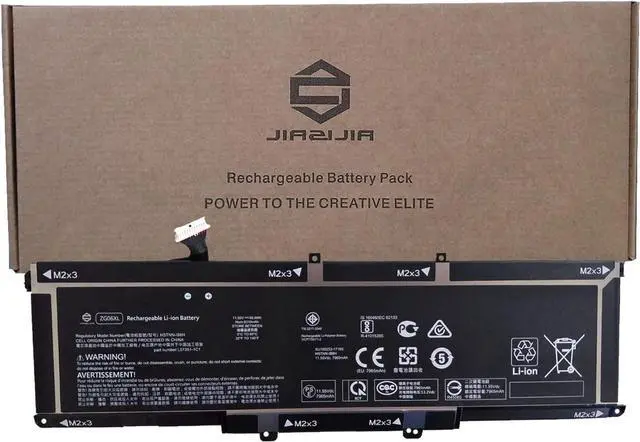
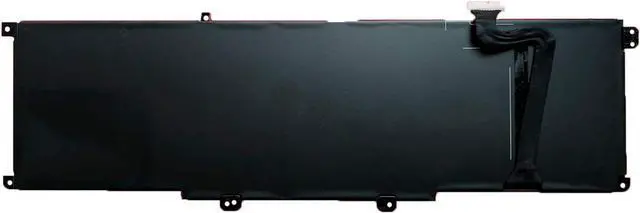


JIAZIJIA ZG06XL Laptop Battery Replacement for Hp ZBook Studio X360 G5 Elitebook 1050 G1 Series Notebook HSTNN-IB8H L07351-1C1 L07045-855 Black 11.55V 95.9Wh 8310mAh
- Model: ZG06XL // Voltage: 11.55V // Capacity: 95.9Wh 8310mAh // Color: Black // Type: Plug & Play Li-ion Battery.
- Replacement for Part Number: ZG06XL HSTNN-IB8H L07351-1C1 L07045-855.
- Compatible Models: Fit for Hp ZBook Studio X360 G5 // ZBook Studio G5 // Elitebook 1050 G1 Series.
- Note 1: In order to find the right model, please open the back case of your laptop and check the model number of your original battery.
- Note 2: Before installing the replacement battery, please read the manual carefully.
+
+
Overview
Specs
Reviews
<1>.Type: Plug & Play Rechargeable Li-ion Battery
<2>.Model: ZG06XL
<3>.Voltage: 11.55V
<4>.Capatity: 95.9Wh 8310mAh
<5>.Interface:Refer to the picture! Please check it!
<6>.Color:Black
<7>.Warranty: 1 year warranty , 30 days' money back guarantee !
<8>.Replacement for Part Number:
ZG06XL HSTNN-IB8H L07351-1C1 L07045-855
<9>.Compatible Models (use "Ctrl+F to find your model quickly")
Fit for Hp ZBook Studio G5 Series
Fit for Hp ZBook Studio X360 G5 Series
Fit for Hp Elitebook 1050 G1 Series
Not all the compatible laptop models have been listed, please open the back case of your laptop and choose the right battery model according to your laptop's origibal battery.
<10>.Package included:
1X ZG06XL Battery
<11>.Note:
1.Before placing your order, we highly suggest you to open the back case of your latptop and check out the exact part number of your laptop's original battery.
2.Discharge the new battery use to 5%(not to 0%) and then charge to 95%, and cycle 3-4 times.
3.Do not disassemble, crush or puncture. Do not dispose of in fire or water.
4.If you remove battery for a long time, charge more than 80% at least one time within one months.
5.Don't connect adapter for a long time while using the battery. It may damage the battery.
6.When using the battery, care should be taken to prevent exposure and moisture.
<2>.Model: ZG06XL
<3>.Voltage: 11.55V
<4>.Capatity: 95.9Wh 8310mAh
<5>.Interface:Refer to the picture! Please check it!
<6>.Color:Black
<7>.Warranty: 1 year warranty , 30 days' money back guarantee !
<8>.Replacement for Part Number:
ZG06XL HSTNN-IB8H L07351-1C1 L07045-855
<9>.Compatible Models (use "Ctrl+F to find your model quickly")
Fit for Hp ZBook Studio G5 Series
Fit for Hp ZBook Studio X360 G5 Series
Fit for Hp Elitebook 1050 G1 Series
Not all the compatible laptop models have been listed, please open the back case of your laptop and choose the right battery model according to your laptop's origibal battery.
<10>.Package included:
1X ZG06XL Battery
<11>.Note:
1.Before placing your order, we highly suggest you to open the back case of your latptop and check out the exact part number of your laptop's original battery.
2.Discharge the new battery use to 5%(not to 0%) and then charge to 95%, and cycle 3-4 times.
3.Do not disassemble, crush or puncture. Do not dispose of in fire or water.
4.If you remove battery for a long time, charge more than 80% at least one time within one months.
5.Don't connect adapter for a long time while using the battery. It may damage the battery.
6.When using the battery, care should be taken to prevent exposure and moisture.
Warranty & Returns
Warranty, Returns, And Additional Information
Warranty
- Please contact the Seller directly for warranty information. Warranty information may also be found on the Manufacturer's website.
- CONTACT
Return Policies
- Return for refund within: 15 days
- Return for replacement within: 30 days
- This item is covered by haoyuzeshang Return Policy
Manufacturer Contact Info
- For a directory of all our manufacturers, please click below.
- Manufacturers Directory
LOADING...