
Your Browsing History
- Free 15-day Returns
$135.64
Ships from Hong Kong.

Meet Your Seller

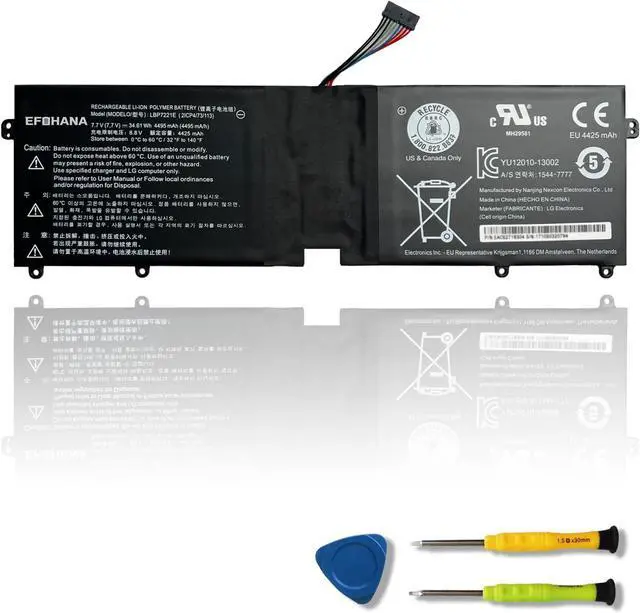


efohana LBP7221E Laptop Battery Replacement for LG Gram 13Z940 13ZD940 14Z950 14Z950-A 14Z960 15Z960 15Z975 15ZD975 Series Notebook LBM722YE LBG722VH EAC62718304 EAC62198201 7.7V 34.61Wh 4495mAh
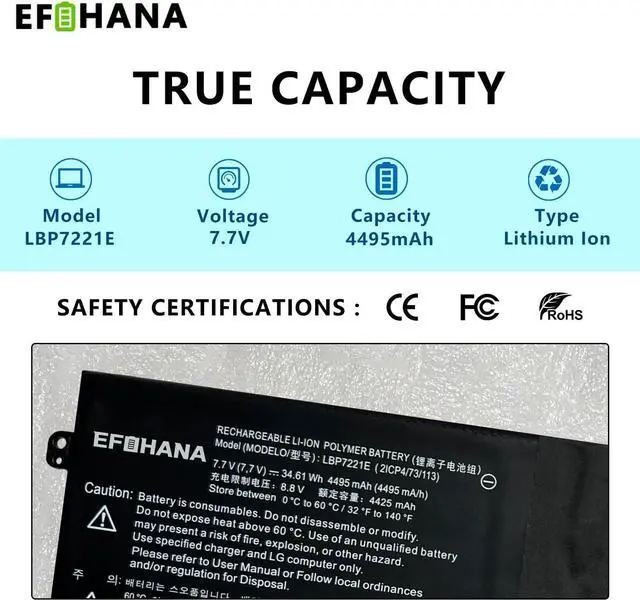
- Type:LBP7221E // Voltage:7.7V // Capatity:34.61Wh 4495mAh // Condition:Brand New
- Compatible Part Numbers: LBP7221E LBG722VH LBM722YE EAC62718304 EAC62198201
- Compatible Machine Models: LG Gram 13Z940 13Z940-G.BK71P1 13Z940-G.DK71P1 13Z940-GH30K 13ZD940 13ZD940-GX58K 14Z950 14Z950-A 14Z960 15Z960 15Z975 15ZD975 Series
- Note: Please refer to the picture before purchasing to ensure that the original battery is the same as the picture. Although the laptop models are the same, the models of the batteries used inside the computers may be different. Though the battery models are the same, the appearance and interface of the battery may be different. Though they may be compatible with each other but the connecting wire lengths and batteries sizes may be different so the batteries may not be installed.
- Working Instructions: Please use the original charger to charge the laptop. Don't discharge the battery to 0%. Please charge the laptop when the battery is used up to 5%. Don't fully charge th
+
+
Overview
Specs
Reviews
Battery ModelLBP7221EBattery Voltage7.7 VBattery Capacity34.61 Wh / 4495 mAhBattery TypeLi-ionBattery ConditionBrand New From Manufacturer DirectlyPackaging Included1* battery + 1* instruction manual + 1* tool kits Important Note Before Purchasing
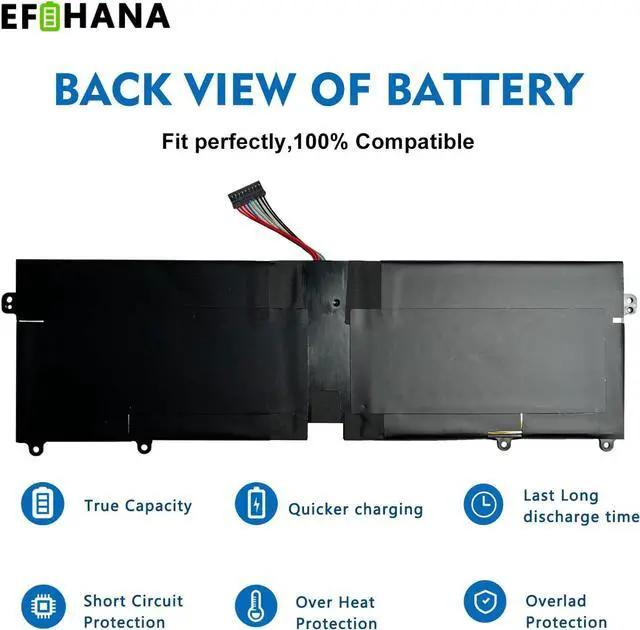
Please open your laptop case to check and confirm your original battery model and appearance, compared with our battery image, especially the connector location and type, the cable length (long or short etc). Make sure that you choose the right battery and save your time.
Replacement for Part Number
LBP7221E
LBG722VH LBM722YE
EAC62718304 EAC62198201
LG Gram 13Z940 13Z940-G.BK71P1 13Z940-G.DK71P1 13Z940-GH30K Series
LG Gram 13ZD940 13ZD940-GX58K Series
LG Gram 14Z950 14Z950-A 14Z960 Series
LG Gram 15Z960 15Z975 15ZD975 Series
When new battery received, discharge the battery to 5% (not 0%) for the fist use, then charge and cycle 3-4 times to wake up the new battery.
The important point is to perform a full discharge and charge every other month to extend the battery life.
Do not connect adapter for a long time while using the battery. It may damage the battery.
Avoid artificial shocks, disassembly, crush or puncture. Do not dispose of it in fire or water.
Battery Installation is easy, but we also recommend you to watch related installation video on the web in advance, or just find a repair technician for help.
Please be careful when install battery. Any damage caused by improper operation will be your own responsibility, hope understand. Pay special attention to the installation of the battery interface.
For your convenience, installation tools are shipped with the battery for most battery models ( Please see the main image and check if it includes the tools ) For b attery cannot be identified by your laptop or it doesn't seem to work, please refer to below severial points first:
Could be caused by battery loose. Remove the battery and try to reinstall more than once.
May be due to conductive material damaged which the laptop motherboard and battery anode and cathode contact position, you can try to confirm it with your original battery.
Check whether the battery drive is in normal condition, if not, download the corresponding driver software to update.
Take out the battery and press the power button for about 15 seconds to consume the internal residual power (Do not connect the power cord), and then reinstall the battery. You can try several times.
We dedicated to supply a battery that does not only last long, but also safe for use. We adopt Grade "A" battery cells to ensure longer battery life, durability, and lower power consumption. All of our batteries offer 500+ recharge cycles over battery life.
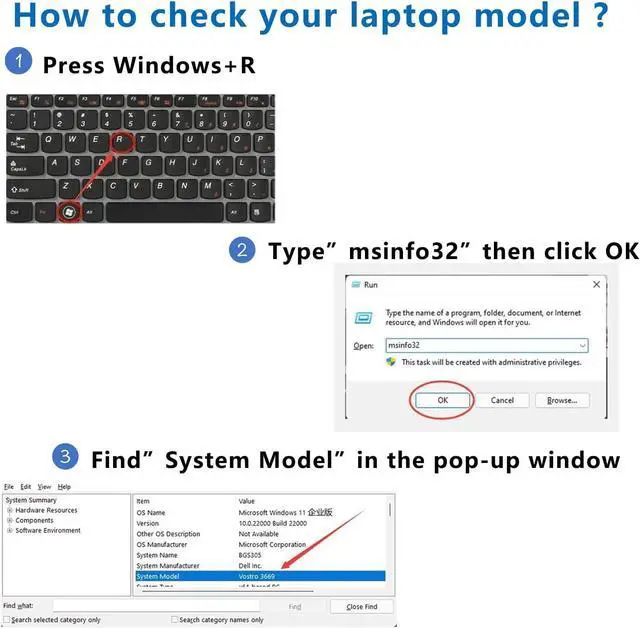
Step 1: Press Windows + R to open Run window.
Step 2: Input "msinfo32" in the empty box and click OK to open System Information.
Step 3: Keep in the System Summary section, and you will find the System Model item in the right pane.
All of our batteries are brand new and are 100% compatible to meet OEM specifications. Same size as original battery, no installation and adaptation issues.
BATTERY SPECIFICATION Compatible Laptop Models Battery Maintenance Guide Installation Suggestion Troubleshooting Methods for Usual Issue Grade "A" Cells Confirm Laptop Model 100% Compatible
Please open your laptop case to check and confirm your original battery model and appearance, compared with our battery image, especially the connector location and type, the cable length (long or short etc). Make sure that you choose the right battery and save your time.
Replacement for Part Number
LBP7221E
LBG722VH LBM722YE
EAC62718304 EAC62198201
LG Gram 13Z940 13Z940-G.BK71P1 13Z940-G.DK71P1 13Z940-GH30K Series
LG Gram 13ZD940 13ZD940-GX58K Series
LG Gram 14Z950 14Z950-A 14Z960 Series
LG Gram 15Z960 15Z975 15ZD975 Series
When new battery received, discharge the battery to 5% (not 0%) for the fist use, then charge and cycle 3-4 times to wake up the new battery.
The important point is to perform a full discharge and charge every other month to extend the battery life.
Do not connect adapter for a long time while using the battery. It may damage the battery.
Avoid artificial shocks, disassembly, crush or puncture. Do not dispose of it in fire or water.
Battery Installation is easy, but we also recommend you to watch related installation video on the web in advance, or just find a repair technician for help.
Please be careful when install battery. Any damage caused by improper operation will be your own responsibility, hope understand. Pay special attention to the installation of the battery interface.
For your convenience, installation tools are shipped with the battery for most battery models ( Please see the main image and check if it includes the tools ) For b attery cannot be identified by your laptop or it doesn't seem to work, please refer to below severial points first:
Could be caused by battery loose. Remove the battery and try to reinstall more than once.
May be due to conductive material damaged which the laptop motherboard and battery anode and cathode contact position, you can try to confirm it with your original battery.
Check whether the battery drive is in normal condition, if not, download the corresponding driver software to update.
Take out the battery and press the power button for about 15 seconds to consume the internal residual power (Do not connect the power cord), and then reinstall the battery. You can try several times.
We dedicated to supply a battery that does not only last long, but also safe for use. We adopt Grade "A" battery cells to ensure longer battery life, durability, and lower power consumption. All of our batteries offer 500+ recharge cycles over battery life.
Step 1: Press Windows + R to open Run window.
Step 2: Input "msinfo32" in the empty box and click OK to open System Information.
Step 3: Keep in the System Summary section, and you will find the System Model item in the right pane.
All of our batteries are brand new and are 100% compatible to meet OEM specifications. Same size as original battery, no installation and adaptation issues.
BATTERY SPECIFICATION Compatible Laptop Models Battery Maintenance Guide Installation Suggestion Troubleshooting Methods for Usual Issue Grade "A" Cells Confirm Laptop Model 100% Compatible
Warranty & Returns
Warranty, Returns, And Additional Information
Warranty
- Please contact the Seller directly for warranty information. Warranty information may also be found on the Manufacturer's website.
- CONTACT
Return Policies
- Return for refund within: 15 days
- Return for replacement within: 30 days
- This item is covered by haoyuzeshang Return Policy
Manufacturer Contact Info
- For a directory of all our manufacturers, please click below.
- Manufacturers Directory
LOADING...