
Your Browsing History
- Free 30-day Returns
$45.69
Ships from China.

Meet Your Seller



Visit Xuanlan Store
FOLLOW
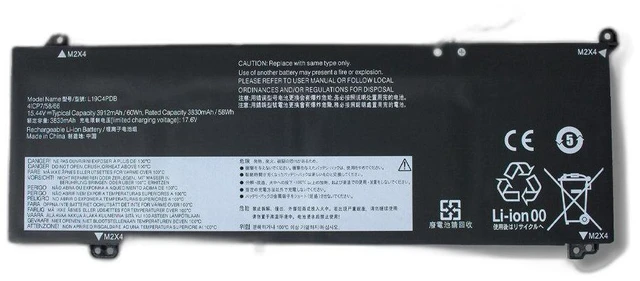
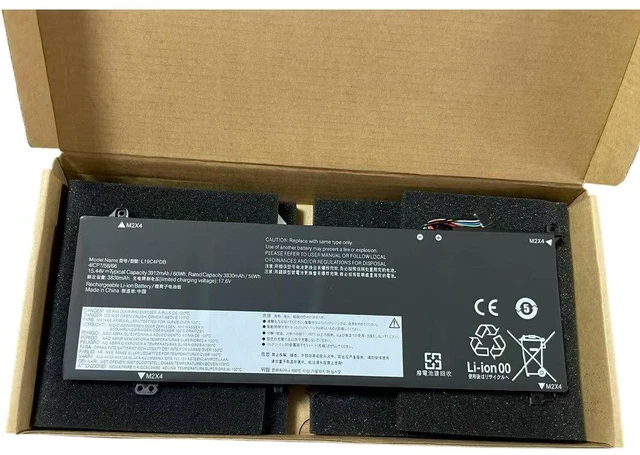
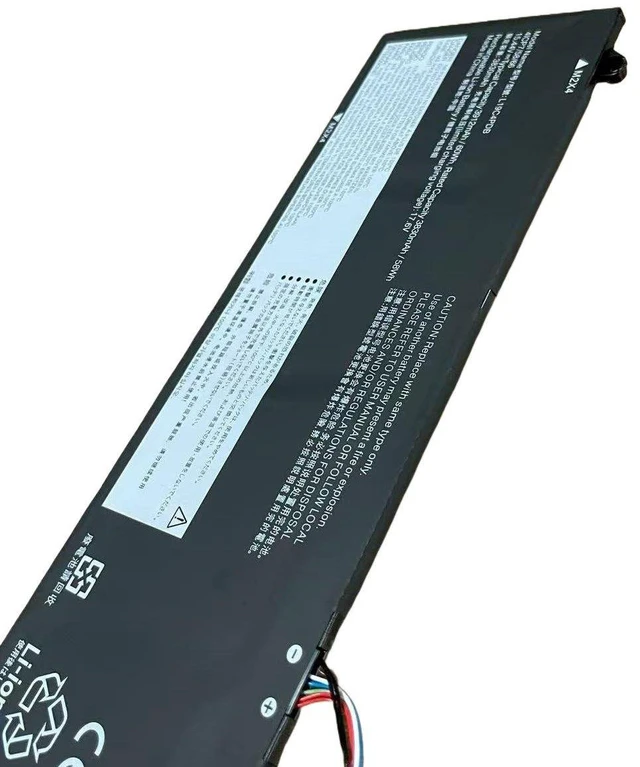
Laptop Battery for Lenovo IdeaPad 14 15 G2 G3 ITL/ARE/ACL, V14 V15, Legion 5 15ARH05, Xiaoxin 15, L19C4PDB, 11.55V 45Wh, High Capacity, 2-Year Warranty
- High Capacity 45Wh / 11.55V Li-ion battery, engineered to match or exceed original runtime for Lenovo IdeaPad 14/15 G2 G3 series.
- Direct replacement for OEM models L19C4PDB, L19M4PDB, L19L4PDB, ensuring perfect fit and compatibility.
- Compatible with a wide range of Lenovo models: IdeaPad 14ITL6, 15ITL6, 14ARE6, 15ARE6, V14 G2 ITL, V15 G2 ITL, Legion 5 15ARH05, Xiaoxin 15, and more.
- Built-in overcharge, over-discharge, short circuit, and over-temperature protection for safe and stable performance.
- Year Warranty & 30-Day Money-Back Guarantee buy with confidence and enjoy reliable power on the go.
+
+
Overview
Specs
Reviews
**Product Overview**
Upgrade or replace your worn-out Lenovo laptop battery with this premium L19C4PDB compatible battery. Designed for the IdeaPad 14/15 G2 G3 series, V14/V15, Legion 5, and Xiaoxin 15 models, this 11.55V 45Wh battery delivers consistent power for work, study, and entertainment. Say goodbye to sudden shutdowns and low battery warnings.
**Important Voltage Warning**
Please verify your original battery voltage before purchasing. This battery is 11.55V (3-cell series). Do not use with 7.6V, 7.7V, or 15.4V systems. Using an incorrect voltage may damage your laptop or cause safety hazards.
**Compatible Models (Partial List) **
- Lenovo IdeaPad 14ITL6, 15ITL6, 14ARE6, 15ARE6
- Lenovo IdeaPad 14 G2 ITL, 15 G2 ITL, 14 G3 ITL, 15 G3 ITL
- Lenovo IdeaPad 14 G2 ARE, 15 G2 ARE, 14 G3 ARE, 15 G3 ARE
- Lenovo IdeaPad 14 G2 ACL, 15 G2 ACL, 14 G3 ACL, 15 G3 ACL
- Lenovo V14 G2 ITL, V15 G2 ITL, V14 G3 ITL, V15 G3 ITL
- Lenovo V14 G2 ARE, V15 G2 ARE, V14 G3 ARE, V15 G3 ARE
- Lenovo Legion 5 15ARH05, Legion 5 15ACH6
- Lenovo Xiaoxin 15, Xiaoxin Air 15, Xiaoxin 14
- Lenovo ThinkBook 14 G2 ITL, ThinkBook 15 G2 ITL
*Note: Not all models are listed. Please check your laptop model and battery part number before ordering. *
**Replacement Part Numbers**
L19C4PDB, L19M4PDB, L19L4PDB, L19C4PD, L19M4PD, L19L4PD, 5B10W13977, 5B10W13978, 5B10W13979, 5B10W13980, 5B10W13981, 5B10W13982
**Specifications**
| Parameter | Value |
|-----------|-------|
| Battery Type | Li-ion (Rechargeable) |
| Voltage | 11.55V ( 11.55V typical, 10.8V compatible) |
| Capacity | 45Wh (3900mAh typical) |
| Cells | 3-cell series |
| Color | Black |
| Weight | Approx. 220g |
| Dimensions | 270 x 50 x 5.5 mm (please confirm with your original) |
| Certification | CE, FCC, RoHS |
**Comparison Table**
| Feature | Our Battery | Original Lenovo | Generic No-Name |
|---------|-------------|----------------|-----------------|
| Capacity | 45Wh (Full) | 45Wh | Often 30-40Wh |
| Voltage Accuracy | 11.55V ± 0.1V | 11.55V | May vary ± 0.5V |
| Safety Protections | 6-layer PCB | Standard | Minimal |
| Warranty | 2 Years | 1 Year | 30 Days |
| Price | Affordable | Expensive | Cheap but risky |
**Installation Tips**
1. Power off your laptop and unplug the AC adapter.
2. Remove the bottom cover (screws may vary by model).
3. Disconnect the old battery cable and remove the battery.
4. Insert the new battery, connect the cable, and secure the cover.
5. Charge the battery to 100% before first use for optimal calibration.
6. If your laptop does not detect the battery, try
a hard reset: unplug AC, remove battery, hold power button for 15 seconds, then reinstall.
**Package Includes**
1 x L19C4PDB Replacement Battery
**Warranty & Support**
We stand behind our product with a 2-year warranty and 30-day hassle-free return policy. If you have any questions about compatibility or installation, please contact us anytime. Your satisfaction is our priority.
Upgrade or replace your worn-out Lenovo laptop battery with this premium L19C4PDB compatible battery. Designed for the IdeaPad 14/15 G2 G3 series, V14/V15, Legion 5, and Xiaoxin 15 models, this 11.55V 45Wh battery delivers consistent power for work, study, and entertainment. Say goodbye to sudden shutdowns and low battery warnings.
**Important Voltage Warning**
Please verify your original battery voltage before purchasing. This battery is 11.55V (3-cell series). Do not use with 7.6V, 7.7V, or 15.4V systems. Using an incorrect voltage may damage your laptop or cause safety hazards.
**Compatible Models (Partial List) **
- Lenovo IdeaPad 14ITL6, 15ITL6, 14ARE6, 15ARE6
- Lenovo IdeaPad 14 G2 ITL, 15 G2 ITL, 14 G3 ITL, 15 G3 ITL
- Lenovo IdeaPad 14 G2 ARE, 15 G2 ARE, 14 G3 ARE, 15 G3 ARE
- Lenovo IdeaPad 14 G2 ACL, 15 G2 ACL, 14 G3 ACL, 15 G3 ACL
- Lenovo V14 G2 ITL, V15 G2 ITL, V14 G3 ITL, V15 G3 ITL
- Lenovo V14 G2 ARE, V15 G2 ARE, V14 G3 ARE, V15 G3 ARE
- Lenovo Legion 5 15ARH05, Legion 5 15ACH6
- Lenovo Xiaoxin 15, Xiaoxin Air 15, Xiaoxin 14
- Lenovo ThinkBook 14 G2 ITL, ThinkBook 15 G2 ITL
*Note: Not all models are listed. Please check your laptop model and battery part number before ordering. *
**Replacement Part Numbers**
L19C4PDB, L19M4PDB, L19L4PDB, L19C4PD, L19M4PD, L19L4PD, 5B10W13977, 5B10W13978, 5B10W13979, 5B10W13980, 5B10W13981, 5B10W13982
**Specifications**
| Parameter | Value |
|-----------|-------|
| Battery Type | Li-ion (Rechargeable) |
| Voltage | 11.55V ( 11.55V typical, 10.8V compatible) |
| Capacity | 45Wh (3900mAh typical) |
| Cells | 3-cell series |
| Color | Black |
| Weight | Approx. 220g |
| Dimensions | 270 x 50 x 5.5 mm (please confirm with your original) |
| Certification | CE, FCC, RoHS |
**Comparison Table**
| Feature | Our Battery | Original Lenovo | Generic No-Name |
|---------|-------------|----------------|-----------------|
| Capacity | 45Wh (Full) | 45Wh | Often 30-40Wh |
| Voltage Accuracy | 11.55V ± 0.1V | 11.55V | May vary ± 0.5V |
| Safety Protections | 6-layer PCB | Standard | Minimal |
| Warranty | 2 Years | 1 Year | 30 Days |
| Price | Affordable | Expensive | Cheap but risky |
**Installation Tips**
1. Power off your laptop and unplug the AC adapter.
2. Remove the bottom cover (screws may vary by model).
3. Disconnect the old battery cable and remove the battery.
4. Insert the new battery, connect the cable, and secure the cover.
5. Charge the battery to 100% before first use for optimal calibration.
6. If your laptop does not detect the battery, try
a hard reset: unplug AC, remove battery, hold power button for 15 seconds, then reinstall.
**Package Includes**
1 x L19C4PDB Replacement Battery
**Warranty & Support**
We stand behind our product with a 2-year warranty and 30-day hassle-free return policy. If you have any questions about compatibility or installation, please contact us anytime. Your satisfaction is our priority.
Warranty & Returns
Warranty, Returns, And Additional Information
Warranty
- Please contact the Seller directly for warranty information. Warranty information may also be found on the Manufacturer's website.
- CONTACT
Return Policies
- Return for refund within: 30 days
- Return for replacement within: 90 days
- This item is covered by xuanlan Return Policy
Manufacturer Contact Info
- For a directory of all our manufacturers, please click below.
- Manufacturers Directory
LOADING...