


- Free 30-day Returns
$48.09
Ships from China.

Meet Your Seller



Visit Xuanlan Store
FOLLOW
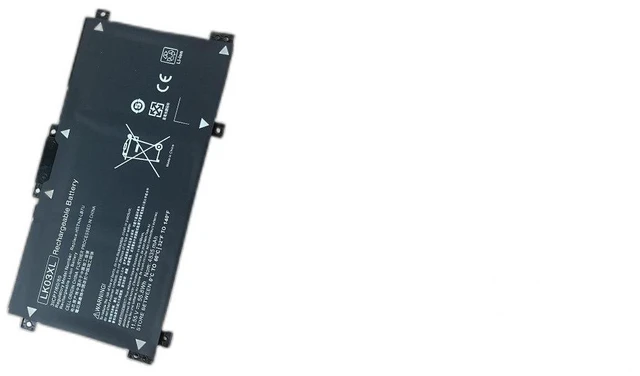
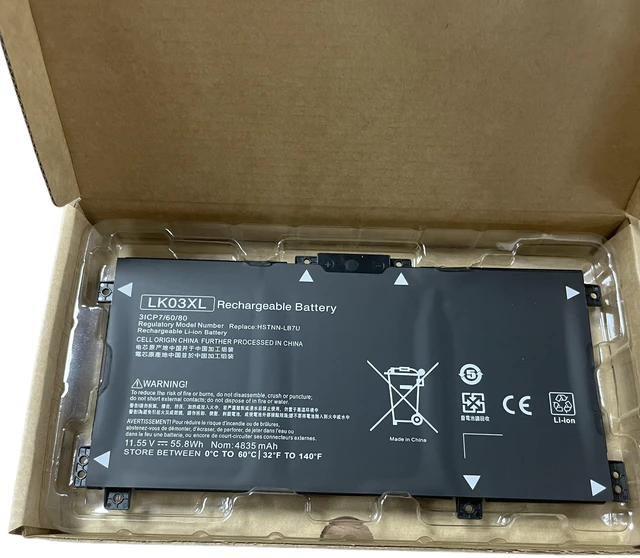
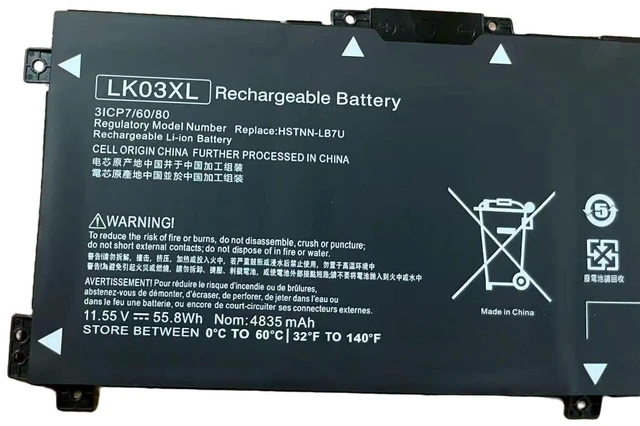
Battery for HP Envy 15 X360 15-cn0005TX 15-bp103TX LK03 Series 11.55V 55Wh 4-Cell, Compatible with HSTNN-LB8S, LK03XL, 924047-855, 1-Year Warranty
- High-Capacity 55Wh 4-Cell Lithium-Ion Battery Delivers up to 4-5 hours of runtime for HP Envy 15 X360, ensuring reliable power for work, study, and entertainment.
- Precision Compatibility Designed specifically for HP Envy 15-cn0005TX, 15-bp103TX, and LK03 series laptops; replaces OEM models HSTNN-LB8S, LK03XL, 924047-855, 924047-421, and TPN-CA09.
- Built-in Overcharge & Short-Circuit Protection Multi-layer safety chip prevents overheating, overvoltage, and overcurrent, extending battery lifespan and protecting your device.
- Easy Plug-and-Play Installation No driver or software required; simply remove the old battery and install this one in minutes (compatible with original screws and connectors).
- Year Warranty & 30-Day Money-Back Guarantee Risk-free purchase with dedicated customer support for any issues.
+
+
Overview
Specs
Reviews
**Product Overview**
Upgrade or replace your worn-out HP Envy 15 X360 battery with this high-performance 11.55V 55Wh replacement. Perfectly matched for the 15-cn0005TX, 15-bp103TX, and LK03 series, it restores your laptops portability and eliminates the frustration of constant charging.
** Voltage Warning**
Please confirm your original battery voltage is 11.55V (or 11.4V / 11.55V range) before ordering. Using an incorrect voltage may cause charging failure or system damage. This battery is NOT compatible with 14.4V or 15.2V models.
**Compatible Laptop Models**
- HP Envy 15 X360 15-cn0005TX
- HP Envy 15 X360 15-bp103TX
- HP Envy 15 X360 LK03 Series (e. g., LK03XL, LK03UA)
- HP Envy 15 X360 15-cn0000 to 15-cn0999
- HP Envy 15 X360 15-bp0000 to 15-bp1999
**Replaces OEM Part Numbers**
HSTNN-LB8S, HSTNN-LB8U, LK03XL, 924047-855, 924047-421, 924047-422, TPN-CA09, TPN-CA10, 923040-855, 923040-421
**Specifications**
| Parameter | Value |
|-----------|-------|
| Voltage | 11.55V ( 11.4V - 11.55V compatible) |
| Capacity | 55Wh / 4800mAh |
| Cells | 4-Cell Lithium-Ion |
| Color | Black |
| Weight | ~280g |
| Dimensions| 270 x 50 x 5.5 mm (approx. ) |
| Warranty | 1 Year |
**Comparison Table**
| Feature | This Battery | Generic/Cheap Alternatives |
|---------|--------------|----------------------------|
| Capacity | 55Wh (original spec) | Often 40-45Wh (shorter runtime) |
| Safety Certifications | CE, FCC, RoHS | May lack certifications |
| Cell Quality | Grade A cells | Unknown or recycled cells |
| Compatibility | Exact fit for listed models | May require adapter or modification |
**Installation Tips**
1. Power off your laptop and unplug the AC adapter.
2. Remove the bottom panel screws (refer to your laptops service manual).
3. Disconnect the old battery cable and remove the battery.
4. Insert the new battery, reconnect the cable, and secure the panel.
5. Charge fully (3-4 hours) before first use for optimal calibration.
**Note: ** If your laptop does not charge or detect the battery, try
a hard reset: disconnect AC power, remove battery, hold power button for 30 seconds, then reinstall and charge.
**Package Includes**
1 x Replacement Battery
1 x Installation Guide
**Customer Support**
We stand behind our product. If you have any questions about compatibility or installation, contact us anytime. Your satisfaction is our priority.
Upgrade or replace your worn-out HP Envy 15 X360 battery with this high-performance 11.55V 55Wh replacement. Perfectly matched for the 15-cn0005TX, 15-bp103TX, and LK03 series, it restores your laptops portability and eliminates the frustration of constant charging.
** Voltage Warning**
Please confirm your original battery voltage is 11.55V (or 11.4V / 11.55V range) before ordering. Using an incorrect voltage may cause charging failure or system damage. This battery is NOT compatible with 14.4V or 15.2V models.
**Compatible Laptop Models**
- HP Envy 15 X360 15-cn0005TX
- HP Envy 15 X360 15-bp103TX
- HP Envy 15 X360 LK03 Series (e. g., LK03XL, LK03UA)
- HP Envy 15 X360 15-cn0000 to 15-cn0999
- HP Envy 15 X360 15-bp0000 to 15-bp1999
**Replaces OEM Part Numbers**
HSTNN-LB8S, HSTNN-LB8U, LK03XL, 924047-855, 924047-421, 924047-422, TPN-CA09, TPN-CA10, 923040-855, 923040-421
**Specifications**
| Parameter | Value |
|-----------|-------|
| Voltage | 11.55V ( 11.4V - 11.55V compatible) |
| Capacity | 55Wh / 4800mAh |
| Cells | 4-Cell Lithium-Ion |
| Color | Black |
| Weight | ~280g |
| Dimensions| 270 x 50 x 5.5 mm (approx. ) |
| Warranty | 1 Year |
**Comparison Table**
| Feature | This Battery | Generic/Cheap Alternatives |
|---------|--------------|----------------------------|
| Capacity | 55Wh (original spec) | Often 40-45Wh (shorter runtime) |
| Safety Certifications | CE, FCC, RoHS | May lack certifications |
| Cell Quality | Grade A cells | Unknown or recycled cells |
| Compatibility | Exact fit for listed models | May require adapter or modification |
**Installation Tips**
1. Power off your laptop and unplug the AC adapter.
2. Remove the bottom panel screws (refer to your laptops service manual).
3. Disconnect the old battery cable and remove the battery.
4. Insert the new battery, reconnect the cable, and secure the panel.
5. Charge fully (3-4 hours) before first use for optimal calibration.
**Note: ** If your laptop does not charge or detect the battery, try
a hard reset: disconnect AC power, remove battery, hold power button for 30 seconds, then reinstall and charge.
**Package Includes**
1 x Replacement Battery
1 x Installation Guide
**Customer Support**
We stand behind our product. If you have any questions about compatibility or installation, contact us anytime. Your satisfaction is our priority.
Warranty & Returns
Warranty, Returns, And Additional Information
Warranty
- Please contact the Seller directly for warranty information. Warranty information may also be found on the Manufacturer's website.
- CONTACT
Return Policies
- Return for refund within: 30 days
- Return for replacement within: 90 days
- This item is covered by xuanlan Return Policy
Manufacturer Contact Info
- For a directory of all our manufacturers, please click below.
- Manufacturers Directory
LOADING...