


- Free 30-day Returns
$45.69
Ships from China.

Meet Your Seller


Visit Xuanlan Store
FOLLOW
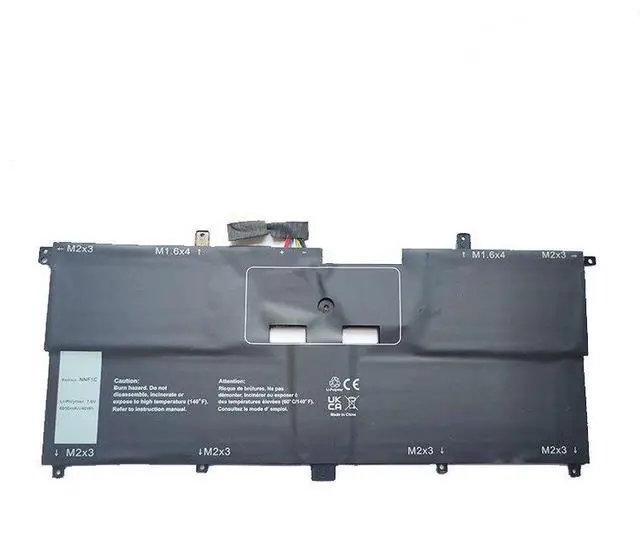
Battery for Dell XPS 13 9365 13-9365-D1605TS D1805TS NNF1C 7.6V 39Wh Li-ion, Compatible with 0NNF1C, High Capacity, 12-Month Warranty
- Perfect Fit for Dell XPS 13 9365 Series Specifically designed for models 13-9365-D1605TS, D1805TS, and original part NNF1C (0NNF1C).
- High-Capacity 39Wh / 7.6V Delivers reliable power for extended work, streaming, and browsing; matches OEM specifications.
- Premium Li-ion Cells & Safety Protection Built with Grade A cells, overcharge/discharge protection, and short-circuit prevention for long battery life.
- Easy Installation Direct plug-and-play replacement; no modification or extra tools required (follow our step-by-step guide).
- Month Warranty & 30-Day Money-Back Risk-free purchase with responsive customer support.
+
+
Overview
Specs
Reviews
**Product Overview**
Upgrade or replace your worn-out Dell XPS 13 9365 battery with this high-performance 39Wh replacement. Designed to match the original NNF1C (0NNF1C) battery, its the ideal solution for models 13-9365-D1605TS and D1805TS. Whether your current battery wont hold a charge, drains quickly, or causes unexpected shutdowns, this drop-in replacement restores your laptops portability and performance.
**Important Voltage & Compatibility Warning**
Please verify your original battery voltage before purchasing. This battery is rated at ** 7.6V **. If your original battery is 11.4V or 15.2V, this product will NOT be compatible and may damage your device. Always check the voltage printed on your old battery or in your system BIOS.
**Compatible Models & Part Numbers**
- Dell XPS 13 9365 (2-in-1)
- Model Numbers: 13-9365-D1605TS, 13-9365-D1805TS
- Original Part Number: NNF1C, 0NNF1C
- Also compatible with other XPS 13 9365 variants using the same battery form factor (verify voltage and connector).
**Specifications**
| Parameter | Value |
|-----------|-------|
| Voltage | 7.6V |
| Capacity | 39Wh (5100mAh) |
| Cell Type | Li-ion (Grade A) |
| Color | Black |
| Weight | Approx. 200g |
| Warranty | 12 Months |
**Comparison Table: Old vs. New Battery**
| Feature | Old/Degraded Battery | Our Replacement |
|---------|---------------------|----------------|
| Charge Retention | Poor (drains quickly) | Excellent (holds charge) |
| Cycle Life | Worn out | Fresh Grade A cells |
| Safety Protection | May swell or overheat | Built-in BMS & protection |
| Warranty | None | 12-month coverage |
**Installation Tips**
1. Power off your laptop and unplug the AC adapter.
2. Remove the bottom case screws (use a Phillips #0 screwdriver).
3. Carefully disconnect the old battery cable from the motherboard.
4. Remove the old battery (adhesive may hold it gently pry if needed).
5. Connect the new battery cable firmly until it clicks.
6. Place the new battery in the compartment and secure the screws.
7. Reattach the bottom case, plug in the charger, and let the battery charge to 100% before first use.
8. For best lifespan, avoid complete discharge; keep between 20%-80% charge.
**Package Includes**
- 1x Replacement Battery for Dell XPS 13 9365
- (if applicable)
- (digital)
**Note**
This is a third-party replacement product, not an OEM Dell item. It is fully tested for compatibility and performance. If you have any questions about fitment, please contact us with your laptops service tag or original battery part number.
Upgrade or replace your worn-out Dell XPS 13 9365 battery with this high-performance 39Wh replacement. Designed to match the original NNF1C (0NNF1C) battery, its the ideal solution for models 13-9365-D1605TS and D1805TS. Whether your current battery wont hold a charge, drains quickly, or causes unexpected shutdowns, this drop-in replacement restores your laptops portability and performance.
**Important Voltage & Compatibility Warning**
Please verify your original battery voltage before purchasing. This battery is rated at ** 7.6V **. If your original battery is 11.4V or 15.2V, this product will NOT be compatible and may damage your device. Always check the voltage printed on your old battery or in your system BIOS.
**Compatible Models & Part Numbers**
- Dell XPS 13 9365 (2-in-1)
- Model Numbers: 13-9365-D1605TS, 13-9365-D1805TS
- Original Part Number: NNF1C, 0NNF1C
- Also compatible with other XPS 13 9365 variants using the same battery form factor (verify voltage and connector).
**Specifications**
| Parameter | Value |
|-----------|-------|
| Voltage | 7.6V |
| Capacity | 39Wh (5100mAh) |
| Cell Type | Li-ion (Grade A) |
| Color | Black |
| Weight | Approx. 200g |
| Warranty | 12 Months |
**Comparison Table: Old vs. New Battery**
| Feature | Old/Degraded Battery | Our Replacement |
|---------|---------------------|----------------|
| Charge Retention | Poor (drains quickly) | Excellent (holds charge) |
| Cycle Life | Worn out | Fresh Grade A cells |
| Safety Protection | May swell or overheat | Built-in BMS & protection |
| Warranty | None | 12-month coverage |
**Installation Tips**
1. Power off your laptop and unplug the AC adapter.
2. Remove the bottom case screws (use a Phillips #0 screwdriver).
3. Carefully disconnect the old battery cable from the motherboard.
4. Remove the old battery (adhesive may hold it gently pry if needed).
5. Connect the new battery cable firmly until it clicks.
6. Place the new battery in the compartment and secure the screws.
7. Reattach the bottom case, plug in the charger, and let the battery charge to 100% before first use.
8. For best lifespan, avoid complete discharge; keep between 20%-80% charge.
**Package Includes**
- 1x Replacement Battery for Dell XPS 13 9365
- (if applicable)
- (digital)
**Note**
This is a third-party replacement product, not an OEM Dell item. It is fully tested for compatibility and performance. If you have any questions about fitment, please contact us with your laptops service tag or original battery part number.
Warranty & Returns
Warranty, Returns, And Additional Information
Warranty
- Please contact the Seller directly for warranty information. Warranty information may also be found on the Manufacturer's website.
- CONTACT
Return Policies
- Return for refund within: 30 days
- Return for replacement within: 90 days
- This item is covered by xuanlan Return Policy
Manufacturer Contact Info
- For a directory of all our manufacturers, please click below.
- Manufacturers Directory
LOADING...