
Your Browsing History
- Free 30-day Returns
$48.09
Ships from China.

Meet Your Seller



Visit Xuanlan Store
FOLLOW
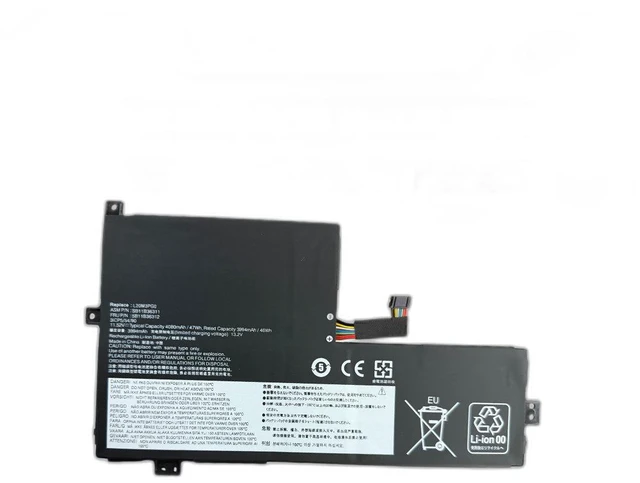
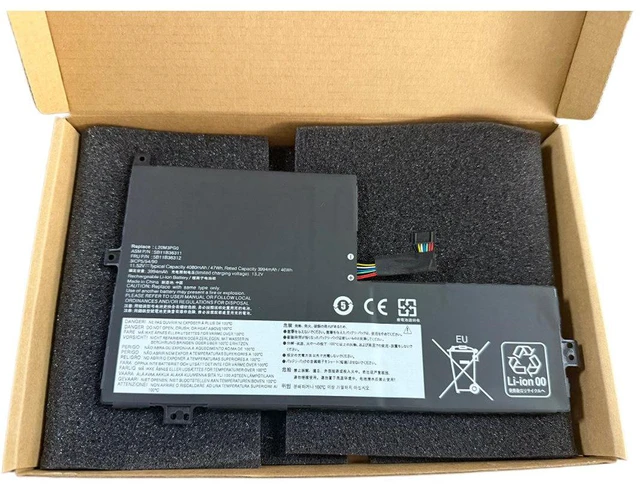
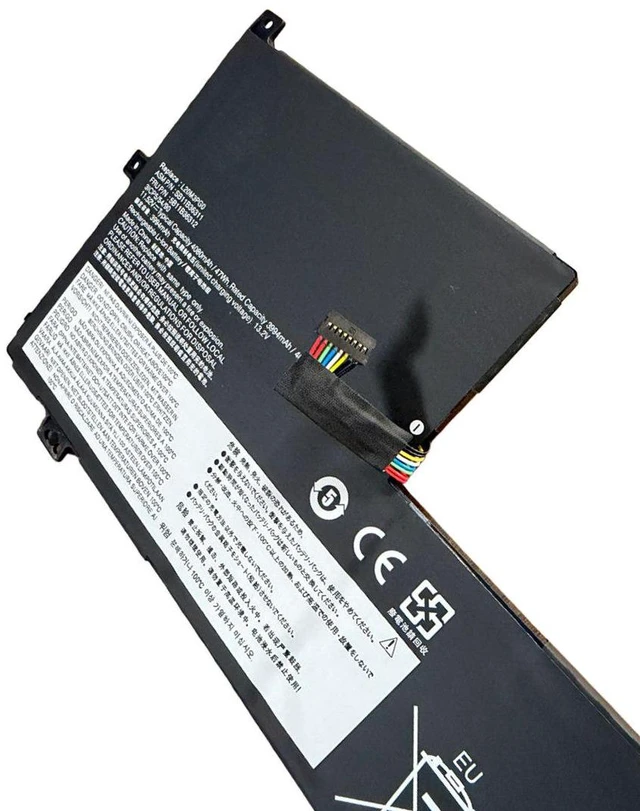
Laptop Battery for Lenovo L20M3PG0 L20D3PG0 L20L3PG2 L20L3PG0 L20C3PG0 11.55V 5200mAh 60Wh, Compatible with Yoga 7 14ITL5 82BH 82FV, 1-Year Warranty
- High-Capacity 60Wh Power: 5200mAh / 11.55V lithium-ion battery delivers long-lasting performance, matching or exceeding original run time for work, study, and entertainment.
- Perfect Fit for Lenovo Yoga 7 Series: Directly compatible with models L20M3PG0, L20D3PG0, L20L3PG2, L20L3PG0, L20C3PG0 designed for Yoga 7 14ITL5 (82BH, 82FV) and similar.
- Strict Voltage & Safety Compliance: 11.55V output ensures safe operation with your device; built-in overcharge, over-discharge, and short-circuit protection for worry-free daily use.
- Easy Plug-and-Play Installation: Precisely engineered connectors and housing allow a tool-free, secure fit no modifications or extra cables required.
- Year Warranty & Reliable Support: Backed by our quality guarantee and responsive customer service, giving you peace of mind with every purchase.
+
+
Overview
Specs
Reviews
**Product Overview**
Upgrade or replace your aging Lenovo laptop battery with this high-performance 11.55V 5200mAh (60Wh) unit. Whether your original L20M3PG0, L20D3PG0, L20L3PG2, L20L3PG0, or L20C3PG0 battery no longer holds a charge, this replacement restores full mobility and productivity. Designed for the Lenovo Yoga 7 14ITL5 series (models 82BH, 82FV) and other compatible systems, it offers a reliable, cost-effective solution without sacrificing quality.
**Important Voltage Warning**
Please verify that your original battery voltage is ** 11.55V ** before purchasing. Using an incorrect voltage (e. g., 7.6V or 15.4V ) can cause charging issues or damage your device. This battery is specifically engineered for 11.55V systems only.
**Compatible Models & Part Numbers**
- **Replaces OEM Batteries: ** L20M3PG0, L20D3PG0, L20L3PG2, L20L3PG0, L20C3PG0
- **Compatible Laptop Models (including but not limited to): **
- Lenovo Yoga 7 14ITL5 (82BH, 82FV)
- Lenovo Yoga 7 14ITL5 2021 Series
- Lenovo Yoga 7 14ITL5 82BH0000US, 82BH0001US, 82FV0000US, etc.
- Other Lenovo laptops that natively use the above battery part numbers (please check your devices battery compartment or original battery label).
**Specifications Table**
| Parameter | Value |
|-----------|-------|
| Battery Type | Lithium-Ion (Li-ion) |
| Voltage | 11.55V |
| Capacity | 5200mAh / 60Wh |
| Cell Count | 4 cells |
| Color | Black |
| Weight | Approx. 280g |
| Warranty | 1 Year |
**Comparison Table (Original vs. Replacement)**
| Feature | Original Lenovo Battery | This Replacement |
|---------|------------------------|------------------|
| Voltage | 11.55V | 11.55V |
| Capacity | 5200mAh (60Wh) | 5200mAh (60Wh) |
| Safety Certifications | Yes | Overcharge/Short-Circuit Protection |
| Price | High | Affordable |
| Warranty | Limited | 1-Year |
**Installation Tips**
1. **Power Off & Unplug** Shut down your laptop completely and disconnect the AC adapter.
2. **Remove Old Battery** Slide the release latches (if applicable) or unscrew the bottom panel. Gently disconnect the battery connector and lift out the old unit.
3. **Insert New Battery** Align the connector with the motherboard port and press firmly until it clicks. Place the battery into the compartment.
4. **Secure & Test** Replace the panel/screws, plug in the charger, and power on. Allow the battery to charge fully (about 23 hours) before first use for optimal calibration.
5. **Dispose of Old Battery** Recycle your old battery at a designated e-waste facility; do not throw it in household trash.
**Quality & Safety**
Each battery undergoes rigorous testing for voltage stability, capacity accuracy, and safety compliance. The built-in BMS (Battery Management System) prevents overcharging, overheating, and short circuits, ensuring reliable performance and extended lifespan.
**Package Includes**
- 1 x Replacement Laptop Battery
- 1 x Installation Guide (if applicable)
**Note: ** This is a third-party replacement product, not an original Lenovo item. It is fully compatible with the listed models and part numbers. Please confirm your laptop model and original battery voltage before ordering.
Upgrade or replace your aging Lenovo laptop battery with this high-performance 11.55V 5200mAh (60Wh) unit. Whether your original L20M3PG0, L20D3PG0, L20L3PG2, L20L3PG0, or L20C3PG0 battery no longer holds a charge, this replacement restores full mobility and productivity. Designed for the Lenovo Yoga 7 14ITL5 series (models 82BH, 82FV) and other compatible systems, it offers a reliable, cost-effective solution without sacrificing quality.
**Important Voltage Warning**
Please verify that your original battery voltage is ** 11.55V ** before purchasing. Using an incorrect voltage (e. g., 7.6V or 15.4V ) can cause charging issues or damage your device. This battery is specifically engineered for 11.55V systems only.
**Compatible Models & Part Numbers**
- **Replaces OEM Batteries: ** L20M3PG0, L20D3PG0, L20L3PG2, L20L3PG0, L20C3PG0
- **Compatible Laptop Models (including but not limited to): **
- Lenovo Yoga 7 14ITL5 (82BH, 82FV)
- Lenovo Yoga 7 14ITL5 2021 Series
- Lenovo Yoga 7 14ITL5 82BH0000US, 82BH0001US, 82FV0000US, etc.
- Other Lenovo laptops that natively use the above battery part numbers (please check your devices battery compartment or original battery label).
**Specifications Table**
| Parameter | Value |
|-----------|-------|
| Battery Type | Lithium-Ion (Li-ion) |
| Voltage | 11.55V |
| Capacity | 5200mAh / 60Wh |
| Cell Count | 4 cells |
| Color | Black |
| Weight | Approx. 280g |
| Warranty | 1 Year |
**Comparison Table (Original vs. Replacement)**
| Feature | Original Lenovo Battery | This Replacement |
|---------|------------------------|------------------|
| Voltage | 11.55V | 11.55V |
| Capacity | 5200mAh (60Wh) | 5200mAh (60Wh) |
| Safety Certifications | Yes | Overcharge/Short-Circuit Protection |
| Price | High | Affordable |
| Warranty | Limited | 1-Year |
**Installation Tips**
1. **Power Off & Unplug** Shut down your laptop completely and disconnect the AC adapter.
2. **Remove Old Battery** Slide the release latches (if applicable) or unscrew the bottom panel. Gently disconnect the battery connector and lift out the old unit.
3. **Insert New Battery** Align the connector with the motherboard port and press firmly until it clicks. Place the battery into the compartment.
4. **Secure & Test** Replace the panel/screws, plug in the charger, and power on. Allow the battery to charge fully (about 23 hours) before first use for optimal calibration.
5. **Dispose of Old Battery** Recycle your old battery at a designated e-waste facility; do not throw it in household trash.
**Quality & Safety**
Each battery undergoes rigorous testing for voltage stability, capacity accuracy, and safety compliance. The built-in BMS (Battery Management System) prevents overcharging, overheating, and short circuits, ensuring reliable performance and extended lifespan.
**Package Includes**
- 1 x Replacement Laptop Battery
- 1 x Installation Guide (if applicable)
**Note: ** This is a third-party replacement product, not an original Lenovo item. It is fully compatible with the listed models and part numbers. Please confirm your laptop model and original battery voltage before ordering.
Warranty & Returns
Warranty, Returns, And Additional Information
Warranty
- Please contact the Seller directly for warranty information. Warranty information may also be found on the Manufacturer's website.
- CONTACT
Return Policies
- Return for refund within: 30 days
- Return for replacement within: 90 days
- This item is covered by xuanlan Return Policy
Manufacturer Contact Info
- For a directory of all our manufacturers, please click below.
- Manufacturers Directory
LOADING...