


- Free 30-day Returns
$45.21
Ships from China.

Meet Your Seller



Visit Xuanlan Store
FOLLOW
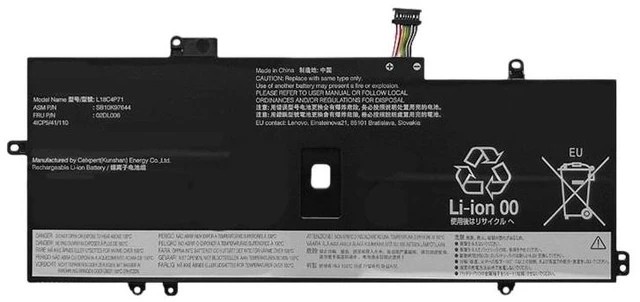
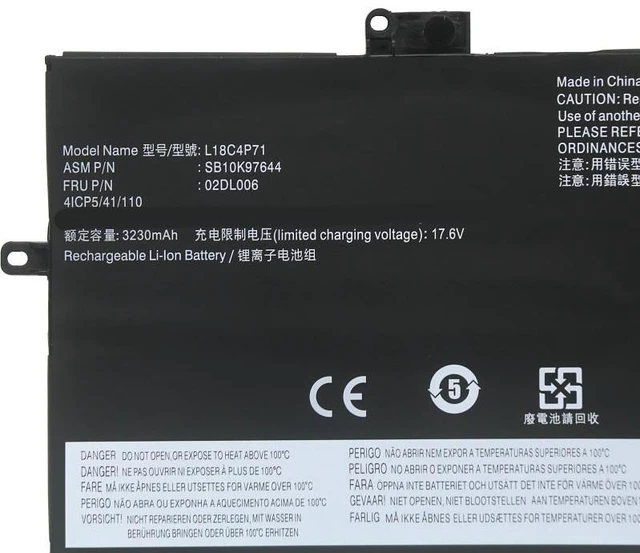
Battery for Lenovo ThinkPad X1 Carbon Gen 8 L18C4P71 TP00109A TP00109B 14.4V 51Wh High Capacity, Fast Shipping, 12-Month Warranty
- High-Capacity 51Wh / 3550mAh: Provides long-lasting power for your ThinkPad X1 Carbon Gen 8, supporting up to 8-10 hours of typical office use.
- % Compatible Models: Directly replaces L18C4P71, L18M4P71, TP00109A, TP00109B, and all X1 Carbon Gen 8 (8th Gen) variants.
- Smart IC & Multi-Protection: Built-in overcharge, over-discharge, short circuit, and over-temperature protection for safe and stable performance.
- Easy Plug-and-Play Installation: No driver or software required simply install and charge. Precisely fits original battery slot with no modification needed.
- Month Warranty & 30-Day Money-Back: We stand behind our quality. If you have any issues, our support team will respond within 24 hours.
+
+
Overview
Specs
Reviews
**Product Overview**
Upgrade or replace your aging Lenovo ThinkPad X1 Carbon Gen 8 battery with this high-performance L18C4P71 / TP00109A / TP00109B compatible battery. Designed to meet or exceed OEM specifications, it delivers reliable power and extended runtime for your daily work, travel, or remote meetings.
** Voltage Compatibility Warning**
Please confirm your original battery voltage before purchasing. This battery is ** 14.4V ** (4-cell series). If your original battery is 11.4V or 15.2V, it will NOT be compatible and may cause damage. Check your battery label or system info to verify voltage.
**Compatible Models & Part Numbers**
- Laptop Series: Lenovo ThinkPad X1 Carbon Gen 8 (8th Gen)
- Battery Part Numbers: L18C4P71, L18M4P71, TP00109A, TP00109B, TP00109
- Also compatible with: X1 Carbon Gen 8 (20U9, 20UA, 20UB, 20UC, 20UD, 20UE, 20UF, 20UG, 20UH, 20UJ, 20UK, 20UL, 20UM, 20UN, 20UO, 20UP, 20UQ, 20UR, 20US, 20UT, 20UU, 20UV, 20UW, 20UX, 20UY, 20UZ)
**Specifications**
| Parameter | Value |
|-----------|-------|
| Battery Type | Li-ion |
| Voltage | 14.4V (nominal) |
| Capacity | 51Wh / 3550mAh |
| Cells | 4 cells |
| Color | Black |
| Weight | Approx. 220g |
| Dimensions | 270 x 60 x 5.5 mm (matches original) |
| Warranty | 12 months |
**Comparison: OEM vs Our Replacement**
| Feature | OEM Battery | Our Battery |
|---------|-------------|-------------|
| Capacity | 51Wh | 51Wh (same) |
| Voltage | 14.4V | 14.4V (exact match) |
| Safety Certifications | CE, FCC, RoHS | CE, FCC, RoHS (certified) |
| Price | High | Affordable |
| Warranty | 12 months | 12 months |
**Installation Tips**
1. Power off your laptop and disconnect the AC adapter.
2. Remove the bottom case screws (Phillips #0) and carefully lift the cover.
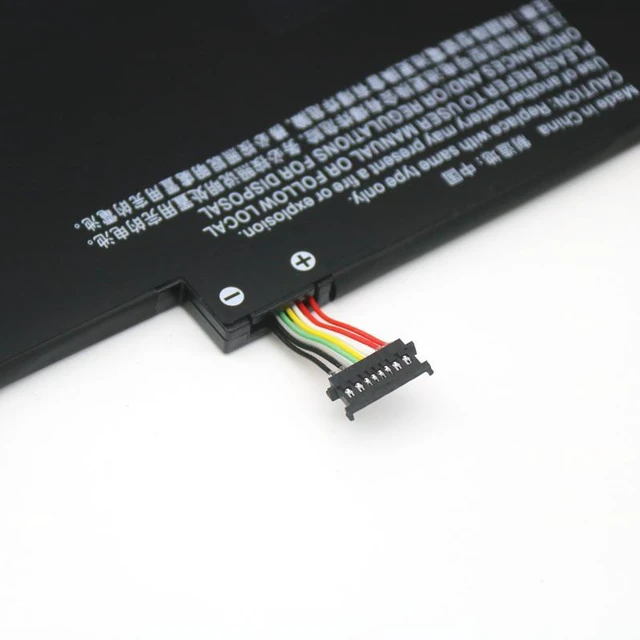
3. Disconnect the old battery cable from the motherboard connector.
4. Remove the screws securing the old battery, then lift it out.
5. Place the new battery in the same position, secure with screws, and reconnect the cable.
6. Replace the bottom cover and screws.
7. Plug in the charger and allow the battery to charge fully before first use.
**Important Notes**
- Use only with the original Lenovo AC adapter (20V / 45W or 65W).
- Do not disassemble, puncture, or expose to high temperatures.
- If the battery does not charge, check the connector alignment and ensure the laptop BIOS is updated.
- For optimal lifespan, avoid deep discharge (below 10%) and store at 50% charge if unused for long periods.
**Package Includes**
- 1 x Replacement Battery
-
- 1 x Installation Guide
**Customer Support**
We offer 12-month warranty and 30-day hassle-free returns. If you have any questions about compatibility or installation, please contact us were here to help!
Upgrade or replace your aging Lenovo ThinkPad X1 Carbon Gen 8 battery with this high-performance L18C4P71 / TP00109A / TP00109B compatible battery. Designed to meet or exceed OEM specifications, it delivers reliable power and extended runtime for your daily work, travel, or remote meetings.
** Voltage Compatibility Warning**
Please confirm your original battery voltage before purchasing. This battery is ** 14.4V ** (4-cell series). If your original battery is 11.4V or 15.2V, it will NOT be compatible and may cause damage. Check your battery label or system info to verify voltage.
**Compatible Models & Part Numbers**
- Laptop Series: Lenovo ThinkPad X1 Carbon Gen 8 (8th Gen)
- Battery Part Numbers: L18C4P71, L18M4P71, TP00109A, TP00109B, TP00109
- Also compatible with: X1 Carbon Gen 8 (20U9, 20UA, 20UB, 20UC, 20UD, 20UE, 20UF, 20UG, 20UH, 20UJ, 20UK, 20UL, 20UM, 20UN, 20UO, 20UP, 20UQ, 20UR, 20US, 20UT, 20UU, 20UV, 20UW, 20UX, 20UY, 20UZ)
**Specifications**
| Parameter | Value |
|-----------|-------|
| Battery Type | Li-ion |
| Voltage | 14.4V (nominal) |
| Capacity | 51Wh / 3550mAh |
| Cells | 4 cells |
| Color | Black |
| Weight | Approx. 220g |
| Dimensions | 270 x 60 x 5.5 mm (matches original) |
| Warranty | 12 months |
**Comparison: OEM vs Our Replacement**
| Feature | OEM Battery | Our Battery |
|---------|-------------|-------------|
| Capacity | 51Wh | 51Wh (same) |
| Voltage | 14.4V | 14.4V (exact match) |
| Safety Certifications | CE, FCC, RoHS | CE, FCC, RoHS (certified) |
| Price | High | Affordable |
| Warranty | 12 months | 12 months |
**Installation Tips**
1. Power off your laptop and disconnect the AC adapter.
2. Remove the bottom case screws (Phillips #0) and carefully lift the cover.
3. Disconnect the old battery cable from the motherboard connector.
4. Remove the screws securing the old battery, then lift it out.
5. Place the new battery in the same position, secure with screws, and reconnect the cable.
6. Replace the bottom cover and screws.
7. Plug in the charger and allow the battery to charge fully before first use.
**Important Notes**
- Use only with the original Lenovo AC adapter (20V / 45W or 65W).
- Do not disassemble, puncture, or expose to high temperatures.
- If the battery does not charge, check the connector alignment and ensure the laptop BIOS is updated.
- For optimal lifespan, avoid deep discharge (below 10%) and store at 50% charge if unused for long periods.
**Package Includes**
- 1 x Replacement Battery
-
- 1 x Installation Guide
**Customer Support**
We offer 12-month warranty and 30-day hassle-free returns. If you have any questions about compatibility or installation, please contact us were here to help!
Warranty & Returns
Warranty, Returns, And Additional Information
Warranty
- Please contact the Seller directly for warranty information. Warranty information may also be found on the Manufacturer's website.
- CONTACT
Return Policies
- Return for refund within: 30 days
- Return for replacement within: 90 days
- This item is covered by xuanlan Return Policy
Manufacturer Contact Info
- For a directory of all our manufacturers, please click below.
- Manufacturers Directory
LOADING...