
Your Browsing History
- Free 30-day Returns
$73.34
Ships from China.

Meet Your Seller



Visit Xuanlan Store
FOLLOW
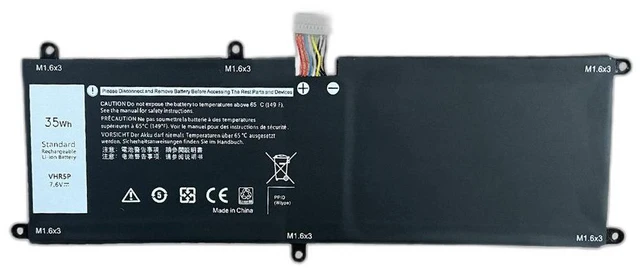
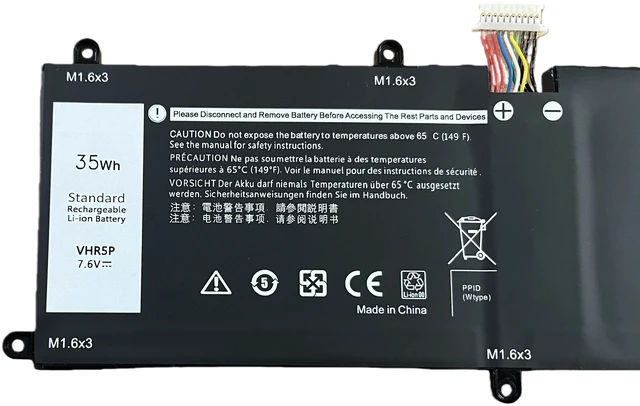
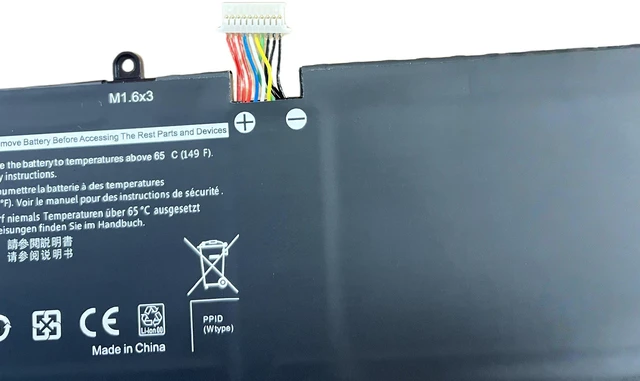
Battery for Dell Latitude 5175 11 5179 XRHWG VHR5P RHF3V 7.6V 30Wh, High Capacity, 1-Year Warranty
- High Compatibility: Designed specifically for Dell Latitude 5175 and 5179 2-in-1 tablets, replacing original models XRHWG, VHR5P, and RHF3V.
- Reliable Power Output: 7.6V, 30Wh (or equivalent 3900mAh) ensures stable performance for daily work, streaming, and light gaming.
- Safety & Durability: Built with Grade A lithium-ion cells, overcharge/over-discharge protection, and short-circuit prevention for long-lasting use.
- Easy Installation: Drop-in replacement with no modification needed just remove the back cover and swap the battery in minutes.
- Year Warranty: Backed by our satisfaction guarantee free replacement if any defect occurs within 12 months.
+
+
Overview
Specs
Reviews
**Product Overview**
This replacement battery is the perfect solution for your Dell Latitude 5175 or 5179 tablet. Whether you are experiencing rapid battery drain, unexpected shutdowns, or the battery no longer holds a charge, this high-quality replacement restores your devices mobility and performance.
**Important Voltage Warning**
Please confirm your original battery voltage before purchasing. This battery is rated at ** 7.6V ** (nominal). Using an incorrect voltage may damage your device or cause safety hazards. If your original battery is 7.6V, this is the correct match.
**Compatible Models**
- Dell Latitude 5175
- Dell Latitude 5179
**Replaces Original Part Numbers**
- XRHWG
- VHR5P
- RHF3V
**Specifications**
| Parameter | Value |
|-----------|-------|
| Voltage | 7.6V (nominal) |
| Capacity | 30Wh / 3900mAh (typical) |
| Cell Type | Lithium-ion |
| Color | Black |
| Weight | Approx. 180g |
| Warranty | 1 Year |
**Comparison Table**
| Feature | Our Battery | Old/Worn Battery |
|---------|-------------|------------------|
| Capacity | 30Wh (full capacity) | Degraded (often <50%) |
| Cycle Life | 500+ cycles | Unknown |
| Safety Protection | Overcharge, over-discharge, short-circuit | None or worn out |
| Warranty | 1 Year | No warranty |
**Installation Tips**
1. Power off your tablet and disconnect any charger.
2. Remove the back cover (use a plastic pry tool to avoid damage).
3. Locate the battery connector and gently disconnect it from the motherboard.
4. Remove the old battery (adhesive may hold it use gentle heat if needed).
5. Place the new battery in position, connect the cable, and secure the back cover.
6. Charge the device fully before first use for optimal calibration.
**Note: ** If you are not comfortable with internal repairs, please consult a professional technician.
**Package Includes**
- 1 x Replacement Battery
- 1 x Installation Guide
**Why Choose Us? **
We specialize in laptop and tablet batteries for eBay and Newegg sellers. Every battery is tested for voltage, capacity, and safety before shipping. Your satisfaction is our priority contact us if you have any questions.
This replacement battery is the perfect solution for your Dell Latitude 5175 or 5179 tablet. Whether you are experiencing rapid battery drain, unexpected shutdowns, or the battery no longer holds a charge, this high-quality replacement restores your devices mobility and performance.
**Important Voltage Warning**
Please confirm your original battery voltage before purchasing. This battery is rated at ** 7.6V ** (nominal). Using an incorrect voltage may damage your device or cause safety hazards. If your original battery is 7.6V, this is the correct match.
**Compatible Models**
- Dell Latitude 5175
- Dell Latitude 5179
**Replaces Original Part Numbers**
- XRHWG
- VHR5P
- RHF3V
**Specifications**
| Parameter | Value |
|-----------|-------|
| Voltage | 7.6V (nominal) |
| Capacity | 30Wh / 3900mAh (typical) |
| Cell Type | Lithium-ion |
| Color | Black |
| Weight | Approx. 180g |
| Warranty | 1 Year |
**Comparison Table**
| Feature | Our Battery | Old/Worn Battery |
|---------|-------------|------------------|
| Capacity | 30Wh (full capacity) | Degraded (often <50%) |
| Cycle Life | 500+ cycles | Unknown |
| Safety Protection | Overcharge, over-discharge, short-circuit | None or worn out |
| Warranty | 1 Year | No warranty |
**Installation Tips**
1. Power off your tablet and disconnect any charger.
2. Remove the back cover (use a plastic pry tool to avoid damage).
3. Locate the battery connector and gently disconnect it from the motherboard.
4. Remove the old battery (adhesive may hold it use gentle heat if needed).
5. Place the new battery in position, connect the cable, and secure the back cover.
6. Charge the device fully before first use for optimal calibration.
**Note: ** If you are not comfortable with internal repairs, please consult a professional technician.
**Package Includes**
- 1 x Replacement Battery
- 1 x Installation Guide
**Why Choose Us? **
We specialize in laptop and tablet batteries for eBay and Newegg sellers. Every battery is tested for voltage, capacity, and safety before shipping. Your satisfaction is our priority contact us if you have any questions.
Warranty & Returns
Warranty, Returns, And Additional Information
Warranty
- Please contact the Seller directly for warranty information. Warranty information may also be found on the Manufacturer's website.
- CONTACT
Return Policies
- Return for refund within: 30 days
- Return for replacement within: 90 days
- This item is covered by xuanlan Return Policy
Manufacturer Contact Info
- For a directory of all our manufacturers, please click below.
- Manufacturers Directory
LOADING...