


- Free 30-day Returns
$48.09
Ships from China.

Meet Your Seller



Visit Xuanlan Store
FOLLOW
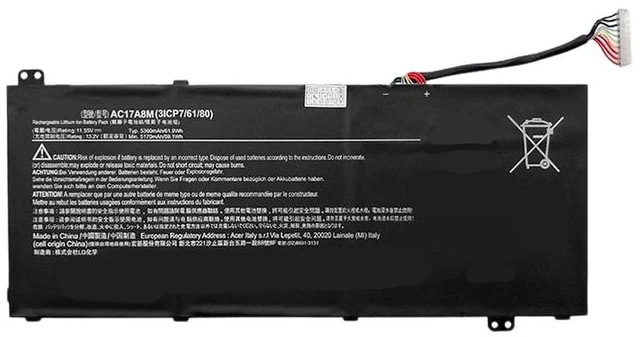
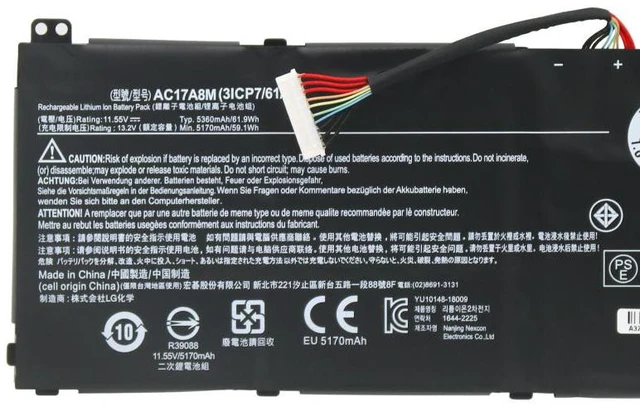
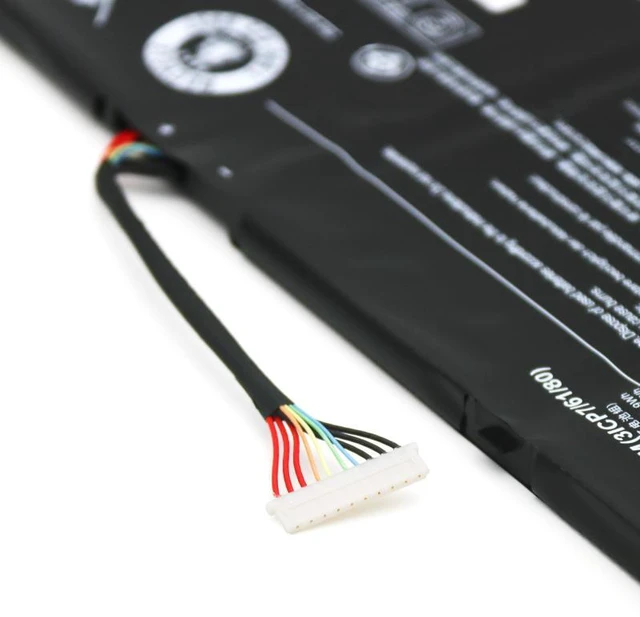
Battery for Acer Aspire SP314-52, TMX30, TMX40-51N, N1811, AC17A8M 11.4V 36Wh, High Capacity, 1-Year Warranty
- Perfect Fit for Acer Models: Compatible with Aspire SP314-52, TMX30, TMX40-51N, N1811, and original battery part AC17A8M.
- High Capacity & Long Life: 11.4V 36Wh Li-ion battery delivers reliable power for work, study, and entertainment.
- Smart Safety Protection: Built-in overcharge, over-discharge, and short circuit protection for safe daily use.
- Easy Installation: Plug-and-play design, no extra tools or drivers needed just remove the old battery and insert the new one.
- Month Warranty & 30-Day Money-Back: Buy with confidence we stand behind our product quality.
+
+
Overview
Specs
Reviews
**Product Overview**
This replacement battery is specifically designed for select Acer laptop models, including the Aspire SP314-52, TMX30, TMX40-51N, and N1811 series. It replaces the original AC17A8M battery and provides a reliable power source for your daily computing needs.
**Important Voltage Warning**
Please confirm your original battery voltage before purchasing. This battery is 11.4V. Using an incorrect voltage may cause charging issues or damage your device. If your original battery is 7.6V or 15.2V, this product is NOT compatible.
**Compatible Models & Part Numbers**
- Acer Aspire SP314-52
- Acer Aspire TMX30
- Acer Aspire TMX40-51N
- Acer N1811
- Original Battery Part: AC17A8M
**Specifications**
- Battery Type: Li-ion (Lithium-ion)
- Voltage: 11.4V
- Capacity: 36Wh
- Color: Black
- Cell Count: 2 cells
- Certification: CE, RoHS, FCC
**Comparison Table**
| Feature | This Battery | Generic Low-Cost Battery |
|---------|--------------|--------------------------|
| Voltage | 11.4V (exact match) | May vary (risk of damage) |
| Capacity | 36Wh (standard) | Often lower (shorter runtime) |
| Safety Protection | Overcharge, over-discharge, short circuit | Basic or none |
| Warranty | 12 months | Usually 3-6 months |
| Compatibility | Tested for listed models | May not fit properly |
**Installation Tips**
1. Power off your laptop and disconnect the AC adapter.
2. Remove the bottom panel screws (refer to your laptop manual if needed).
3. Carefully disconnect the old battery connector and remove the battery.
4. Insert the new battery, connect the cable, and secure the panel.
5. Charge the battery fully before first use for optimal performance.
**Package Includes**
- 1 x Replacement Battery
**Note**
This is a third-party replacement product, not an original Acer item. It is fully tested and guaranteed to work with the listed models. If you have any compatibility questions, please contact us before purchasing.
This replacement battery is specifically designed for select Acer laptop models, including the Aspire SP314-52, TMX30, TMX40-51N, and N1811 series. It replaces the original AC17A8M battery and provides a reliable power source for your daily computing needs.
**Important Voltage Warning**
Please confirm your original battery voltage before purchasing. This battery is 11.4V. Using an incorrect voltage may cause charging issues or damage your device. If your original battery is 7.6V or 15.2V, this product is NOT compatible.
**Compatible Models & Part Numbers**
- Acer Aspire SP314-52
- Acer Aspire TMX30
- Acer Aspire TMX40-51N
- Acer N1811
- Original Battery Part: AC17A8M
**Specifications**
- Battery Type: Li-ion (Lithium-ion)
- Voltage: 11.4V
- Capacity: 36Wh
- Color: Black
- Cell Count: 2 cells
- Certification: CE, RoHS, FCC
**Comparison Table**
| Feature | This Battery | Generic Low-Cost Battery |
|---------|--------------|--------------------------|
| Voltage | 11.4V (exact match) | May vary (risk of damage) |
| Capacity | 36Wh (standard) | Often lower (shorter runtime) |
| Safety Protection | Overcharge, over-discharge, short circuit | Basic or none |
| Warranty | 12 months | Usually 3-6 months |
| Compatibility | Tested for listed models | May not fit properly |
**Installation Tips**
1. Power off your laptop and disconnect the AC adapter.
2. Remove the bottom panel screws (refer to your laptop manual if needed).
3. Carefully disconnect the old battery connector and remove the battery.
4. Insert the new battery, connect the cable, and secure the panel.
5. Charge the battery fully before first use for optimal performance.
**Package Includes**
- 1 x Replacement Battery
**Note**
This is a third-party replacement product, not an original Acer item. It is fully tested and guaranteed to work with the listed models. If you have any compatibility questions, please contact us before purchasing.
Warranty & Returns
Warranty, Returns, And Additional Information
Warranty
- Please contact the Seller directly for warranty information. Warranty information may also be found on the Manufacturer's website.
- CONTACT
Return Policies
- Return for refund within: 30 days
- Return for replacement within: 90 days
- This item is covered by xuanlan Return Policy
Manufacturer Contact Info
- For a directory of all our manufacturers, please click below.
- Manufacturers Directory
LOADING...