


- Free 30-day Returns
$52.90
Ships from China.

Meet Your Seller


Visit Xuanlan Store
FOLLOW
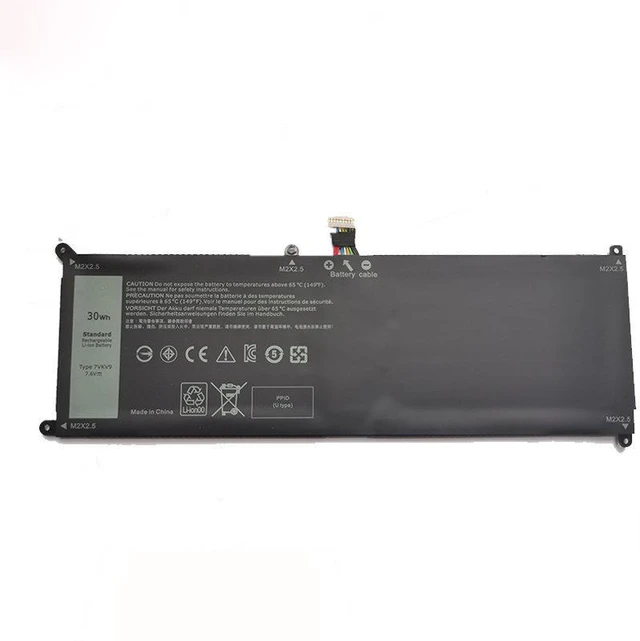
Battery for Dell XPS 12 9Q23 7275 9250 7VKV9 9TV5X 7.6V 39Wh High Capacity, 12-Month Warranty
- High-Performance 7.6V 39Wh Lithium-Ion Battery Designed specifically for Dell XPS 12 9Q23, 7275, and 9250 series, ensuring stable power delivery and long-lasting runtime.
- Direct Replacement for OEM Part Numbers 7VKV9 & 9TV5X Perfect fit for your original battery slot, no modification needed.
- Multi-Layer Safety Protection Built-in overcharge, over-discharge, short circuit, and over-temperature protection for safe daily use.
- Easy Installation Plug-and-play design with pre-installed connector; includes simple step-by-step guide for quick replacement.
- Month Warranty & 30-Day Money-Back Guarantee Buy with confidence; we stand behind the quality of every battery.
+
+
Overview
Specs
Reviews
**Product Overview**
This high-quality replacement battery is engineered to restore your Dell XPS 12 9Q23, 7275, or 9250 laptop to its original battery life. Whether you are a student, remote worker, or frequent traveler, this battery provides reliable portable power for your daily tasks.
**Important Voltage & Compatibility Note**
Please verify that your original battery is rated at ** 7.6V ** before purchasing. Using an incorrect voltage battery may cause charging failure or damage to your device. This battery is NOT compatible with 11.4V or 14.8V models.
**Compatible Laptop Models**
- Dell XPS 12 9Q23
- Dell XPS 12 7275
- Dell XPS 12 9250
**Compatible OEM Part Numbers**
- 7VKV9
- 9TV5X
**Battery Specifications**
| Specification |
|---------------|---------|
| Chemistry | Lithium-Ion (Li-ion) |
| Voltage | 7.6V |
| Capacity | 39Wh (approx. 5100mAh) |
| Cell Count | 2 cells |
| Color | Black |
| Connector | 4-pin (compatible with original) |
| Certification | CE, FCC, RoHS |
**Comparison Table: New Battery vs. Old/Degraded Battery**
| Feature | Our Replacement Battery | Old/Degraded Battery |
|---------|------------------------|----------------------|
| Runtime (typical) | 46 hours (light use) | 0.51. 5 hours (if any) |
| Charge Cycles | 500+ cycles | Already worn out |
| Safety Protection | Overcharge/Over-discharge/Short circuit | Often missing or degraded |
| Warranty | 12 months | None |
**Installation Tips**
1. Power off your laptop and disconnect the AC adapter.
2. Remove the bottom cover (refer to your devices service manual).
3. Disconnect the old battery cable and remove the screws holding it in place.
4. Insert the new battery, secure with screws, and reconnect the cable.
5. Replace the bottom cover, plug in the charger, and let the battery charge fully before first use.
6. If the battery is not detected, check the connector alignment and ensure it is firmly seated.
**Package Includes**
- 1 x Replacement Battery (7VKV9 / 9TV5X)
- 1 x Installation Guide
**Customer Support**
We offer 12-month warranty and 30-day hassle-free returns. If you have any questions about compatibility or installation, please contact us we are happy to help.
This high-quality replacement battery is engineered to restore your Dell XPS 12 9Q23, 7275, or 9250 laptop to its original battery life. Whether you are a student, remote worker, or frequent traveler, this battery provides reliable portable power for your daily tasks.
**Important Voltage & Compatibility Note**
Please verify that your original battery is rated at ** 7.6V ** before purchasing. Using an incorrect voltage battery may cause charging failure or damage to your device. This battery is NOT compatible with 11.4V or 14.8V models.
**Compatible Laptop Models**
- Dell XPS 12 9Q23
- Dell XPS 12 7275
- Dell XPS 12 9250
**Compatible OEM Part Numbers**
- 7VKV9
- 9TV5X
**Battery Specifications**
| Specification |
Details
||---------------|---------|
| Chemistry | Lithium-Ion (Li-ion) |
| Voltage | 7.6V |
| Capacity | 39Wh (approx. 5100mAh) |
| Cell Count | 2 cells |
| Color | Black |
| Connector | 4-pin (compatible with original) |
| Certification | CE, FCC, RoHS |
**Comparison Table: New Battery vs. Old/Degraded Battery**
| Feature | Our Replacement Battery | Old/Degraded Battery |
|---------|------------------------|----------------------|
| Runtime (typical) | 46 hours (light use) | 0.51. 5 hours (if any) |
| Charge Cycles | 500+ cycles | Already worn out |
| Safety Protection | Overcharge/Over-discharge/Short circuit | Often missing or degraded |
| Warranty | 12 months | None |
**Installation Tips**
1. Power off your laptop and disconnect the AC adapter.
2. Remove the bottom cover (refer to your devices service manual).
3. Disconnect the old battery cable and remove the screws holding it in place.
4. Insert the new battery, secure with screws, and reconnect the cable.
5. Replace the bottom cover, plug in the charger, and let the battery charge fully before first use.
6. If the battery is not detected, check the connector alignment and ensure it is firmly seated.
**Package Includes**
- 1 x Replacement Battery (7VKV9 / 9TV5X)
- 1 x Installation Guide
**Customer Support**
We offer 12-month warranty and 30-day hassle-free returns. If you have any questions about compatibility or installation, please contact us we are happy to help.
Warranty & Returns
Warranty, Returns, And Additional Information
Warranty
- Please contact the Seller directly for warranty information. Warranty information may also be found on the Manufacturer's website.
- CONTACT
Return Policies
- Return for refund within: 30 days
- Return for replacement within: 90 days
- This item is covered by xuanlan Return Policy
Manufacturer Contact Info
- For a directory of all our manufacturers, please click below.
- Manufacturers Directory
LOADING...