


- Free 30-day Returns
$43.28
Ships from China.

Meet Your Seller


Visit Xuanlan Store
FOLLOW
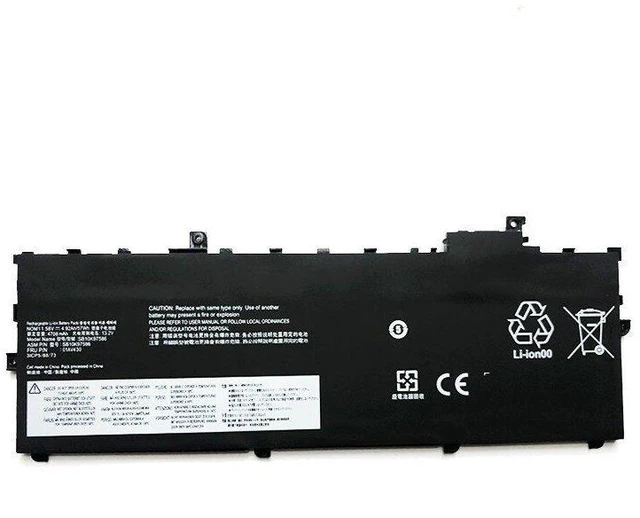
Battery for Lenovo ThinkPad X1 Carbon 2017 2018 6th Gen 01AV494 01AV430 01AV432 01AV433 15.2V 57Wh Li-ion High Capacity, Fast Shipping, 12-Month Warranty
- High Capacity & Long Life: 57Wh / 3700mAh, 15.2V Li-ion battery ensures stable power output and extended runtime for your X1 Carbon 2017/2018.
- Perfect Compatibility: Designed specifically for Lenovo ThinkPad X1 Carbon 6th Gen (2017 & 2018 models) replaces OEM part numbers 01AV494, 01AV430, 01AV432, 01AV433, SB10K97561, SB10K97562.
- Safety & Reliability: Built-in overcharge, over-discharge, short-circuit, and over-temperature protection circuits. CE, FCC, and RoHS certified for worry-free use.
- Easy Installation: Direct drop-in replacement no modification or extra tools required. Comes with all necessary connectors and pre-installed protective circuit board.
- Month Warranty & Fast Shipping: We stand behind our product quality. Free replacement or refund within 12 months if any defect occurs. Ships from local warehouse within 24 hours.
+
+
Overview
Specs
Reviews
**Product Overview**
This high-performance replacement battery is specifically engineered for the Lenovo ThinkPad X1 Carbon 6th Generation (2017 & 2018 models). It is a direct OEM replacement for part numbers 01AV494, 01AV430, 01AV432, 01AV433, SB10K97561, and SB10K97562. With a capacity of 57Wh and voltage of 15.2V, it restores your laptops original battery life and provides reliable power for work, study, or entertainment on the go.
**Important Voltage Warning**
Please confirm your original battery voltage before purchasing. This battery is rated at 15.2V (4-cell series). It is NOT compatible with 11.4V, 11.55V, or 7.6V batteries. Using an incorrect voltage may damage your laptop or cause safety hazards. If you are unsure, please check the label on your current battery or contact us with your laptops serial number.
**Compatible Laptop Models**
- Lenovo ThinkPad X1 Carbon 6th Gen (2017)
- Lenovo ThinkPad X1 Carbon 6th Gen (2018)
- Lenovo ThinkPad X1 Carbon 20KH, 20KJ, 20KG, 20KF series
**Replaces OEM Part Numbers**
01AV494, 01AV430, 01AV432, 01AV433, SB10K97561, SB10K97562, SB10K97563, SB10K97564, 5B10W13907, 5B10W13908, 5B10W13909, 5B10W13910
**Specifications Table**
| Specification | Value |
| --- | --- |
| Battery Type | Li-ion (Lithium-ion) |
| Voltage | 15.2V (nominal) |
| Capacity | 57Wh / 3700mAh |
| Cells | 4 cells |
| Color | Black |
| Weight | Approx. 230g |
| Dimensions | 270 x 80 x 6 mm (approx. ) |
| Warranty | 12 months |
| Certifications | CE, FCC, RoHS |
**Comparison Table OEM vs Our Replacement**
| Feature | OEM Battery | Our Replacement Battery |
| --- | --- | --- |
| Voltage | 15.2V | 15.2V (exact match) |
| Capacity | 57Wh | 57Wh (same or higher) |
| Cell Quality | Original cells | Grade A+ cells (tested) |
| Safety Protections | Yes | Yes (overcharge, short circuit, etc. ) |
| Price | High | Affordable |
| Warranty | 12 months (limited) | 12 months (full replacement) |
**Installation Tips**
1. Power off your laptop and disconnect the AC adapter.
2. Remove the bottom cover (screws may be hidden under rubber feet use a plastic pry tool to avoid damage).
3. Locate the battery connector and gently disconnect the old battery cable.
4. Remove the old battery (held by screws or adhesive).
5. Insert the new battery, connect the cable firmly, and replace the bottom cover.
6. Charge the battery fully before first use (about 3-4 hours).
7. For best performance, calibrate the battery once a month: charge to 100%, then discharge to 5% before recharging.
**Package Includes**
- 1 x Replacement Battery
-
(with installation guide)
**Customer Support**
If you have any questions about compatibility, installation, or product performance, please contact us via eBay/Newegg messages. We typically respond within 24 hours. Your satisfaction is our top priority.
This high-performance replacement battery is specifically engineered for the Lenovo ThinkPad X1 Carbon 6th Generation (2017 & 2018 models). It is a direct OEM replacement for part numbers 01AV494, 01AV430, 01AV432, 01AV433, SB10K97561, and SB10K97562. With a capacity of 57Wh and voltage of 15.2V, it restores your laptops original battery life and provides reliable power for work, study, or entertainment on the go.
**Important Voltage Warning**
Please confirm your original battery voltage before purchasing. This battery is rated at 15.2V (4-cell series). It is NOT compatible with 11.4V, 11.55V, or 7.6V batteries. Using an incorrect voltage may damage your laptop or cause safety hazards. If you are unsure, please check the label on your current battery or contact us with your laptops serial number.
**Compatible Laptop Models**
- Lenovo ThinkPad X1 Carbon 6th Gen (2017)
- Lenovo ThinkPad X1 Carbon 6th Gen (2018)
- Lenovo ThinkPad X1 Carbon 20KH, 20KJ, 20KG, 20KF series
**Replaces OEM Part Numbers**
01AV494, 01AV430, 01AV432, 01AV433, SB10K97561, SB10K97562, SB10K97563, SB10K97564, 5B10W13907, 5B10W13908, 5B10W13909, 5B10W13910
**Specifications Table**
| Specification | Value |
| --- | --- |
| Battery Type | Li-ion (Lithium-ion) |
| Voltage | 15.2V (nominal) |
| Capacity | 57Wh / 3700mAh |
| Cells | 4 cells |
| Color | Black |
| Weight | Approx. 230g |
| Dimensions | 270 x 80 x 6 mm (approx. ) |
| Warranty | 12 months |
| Certifications | CE, FCC, RoHS |
**Comparison Table OEM vs Our Replacement**
| Feature | OEM Battery | Our Replacement Battery |
| --- | --- | --- |
| Voltage | 15.2V | 15.2V (exact match) |
| Capacity | 57Wh | 57Wh (same or higher) |
| Cell Quality | Original cells | Grade A+ cells (tested) |
| Safety Protections | Yes | Yes (overcharge, short circuit, etc. ) |
| Price | High | Affordable |
| Warranty | 12 months (limited) | 12 months (full replacement) |
**Installation Tips**
1. Power off your laptop and disconnect the AC adapter.
2. Remove the bottom cover (screws may be hidden under rubber feet use a plastic pry tool to avoid damage).
3. Locate the battery connector and gently disconnect the old battery cable.
4. Remove the old battery (held by screws or adhesive).
5. Insert the new battery, connect the cable firmly, and replace the bottom cover.
6. Charge the battery fully before first use (about 3-4 hours).
7. For best performance, calibrate the battery once a month: charge to 100%, then discharge to 5% before recharging.
**Package Includes**
- 1 x Replacement Battery
-
(with installation guide)
**Customer Support**
If you have any questions about compatibility, installation, or product performance, please contact us via eBay/Newegg messages. We typically respond within 24 hours. Your satisfaction is our top priority.
Warranty & Returns
Warranty, Returns, And Additional Information
Warranty
- Please contact the Seller directly for warranty information. Warranty information may also be found on the Manufacturer's website.
- CONTACT
Return Policies
- Return for refund within: 30 days
- Return for replacement within: 90 days
- This item is covered by xuanlan Return Policy
Manufacturer Contact Info
- For a directory of all our manufacturers, please click below.
- Manufacturers Directory
LOADING...