


- Free 30-day Returns
$45.69
Ships from China.

Meet Your Seller


Visit Xuanlan Store
FOLLOW
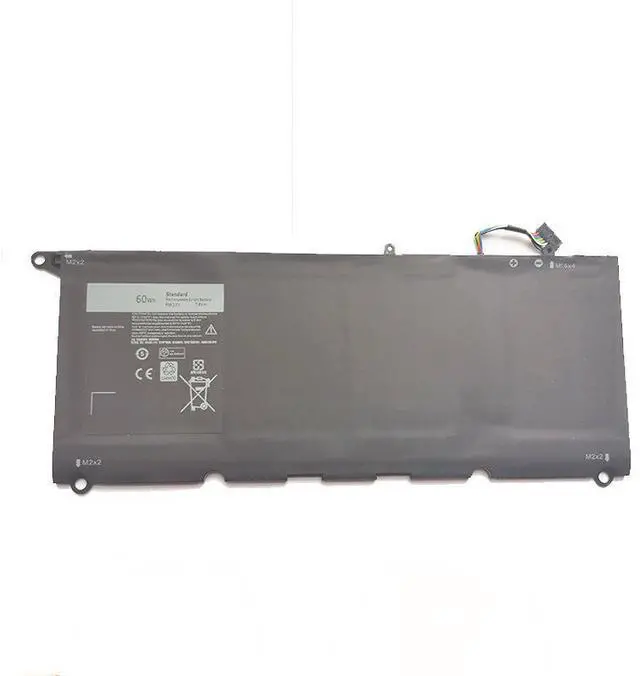
Battery for Dell RNP72 TP1GT XPS 13 9360 PW23Y 60WH 7.6V 11.4V Laptop Battery High Capacity, Long Life, 2-Year Warranty
- High Capacity 60WH / 7.6V (11.4V) Matches original Dell specifications for XPS 13 9360, providing up to 8-10 hours of reliable runtime.
- Compatible with Dell RNP72, TP1GT, PW23Y, 0RNP72, 0TP1GT, 0PW23Y Perfect fit for XPS 13 9360, 9350, 9343 series.
- Premium Grade A Cells Built with certified Li-ion cells, overcharge/over-discharge protection, and short circuit safety.
- Easy Installation Direct drop-in replacement, no additional drivers or software needed. Includes necessary screw kit.
- Year Warranty & 30-Day Money-Back Guarantee Buy with confidence, backed by responsive customer support.
+
+
Overview
Specs
Reviews
**Product Overview**
This high-performance replacement battery is specifically designed for Dell XPS 13 9360, 9350, and 9343 series laptops. It replaces original part numbers RNP72, TP1GT, PW23Y, 0RNP72, 0TP1GT, and 0PW23Y. With a capacity of 60WH and voltage of 7.6V (also compatible with 11.4V systems), it delivers stable power for your daily work, study, and entertainment.
**Important Voltage Warning**
Please confirm your original battery voltage before purchasing. This battery is rated at 7.6V (compatible with 11.4V systems that use 2-series cell configuration). If your original battery is 7.6V or 11.4V, this battery will work. If your original battery is 14.8V or higher, please do not purchase this model. Always check the voltage label on your old battery.
**Compatibility List**
- Dell XPS 13 9360 (all configurations)
- Dell XPS 13 9350 (select models)
- Dell XPS 13 9343 (select models)
- Compatible with Dell part numbers: RNP72, TP1GT, PW23Y, 0RNP72, 0TP1GT, 0PW23Y
**Specifications**
| Parameter | Value |
|-----------|-------|
| Battery Type | Li-ion |
| Voltage | 7.6V (compatible with 11.4V systems) |
| Capacity | 60WH / 7800mAh |
| Cell Count | 4 cells |
| Color | Black |
| Weight | Approx. 250g |
| Warranty | 2 Years |
**Comparison Table**
| Feature | Our Battery | Generic Battery |
|---------|-------------|----------------|
| Capacity | 60WH (original spec) | Often lower (45-55WH) |
| Cell Grade | Grade A (Japanese/Korean cells) | Grade B or recycled cells |
| Safety Protections | Overcharge, over-discharge, short circuit, temperature control | Basic or none |
| Warranty | 2 Years | 6-12 months |
| Compatibility | Full tested for XPS 13 9360/9350/9343 | May require adapter or not fit |
**Installation Tips**
1. Power off your laptop and disconnect the AC adapter.
2. Remove the bottom cover (Phillips #0 screwdriver required).
3. Disconnect the old battery cable from the motherboard.
4. Remove the old battery (usually held by 4-6 screws).
5. Insert the new battery, reconnect the cable, and secure with screws.
6. Replace the bottom cover and power on your laptop.
7. For best performance, fully charge the battery (to 100%) and then fully discharge it once before normal use.
**Package Includes**
- 1x Replacement Battery
-
**Note**
- This battery is not an original Dell product but a high-quality compatible replacement.
- Do not expose to high temperature, water, or fire.
- If your laptop does not recognize the battery, try
a hard reset: disconnect AC, remove battery, hold power button for 30 seconds, then reconnect.
**Customer Support**
We offer 24/7 customer service. If you have any questions about compatibility or installation, please contact us before purchase. Your satisfaction is our priority.
This high-performance replacement battery is specifically designed for Dell XPS 13 9360, 9350, and 9343 series laptops. It replaces original part numbers RNP72, TP1GT, PW23Y, 0RNP72, 0TP1GT, and 0PW23Y. With a capacity of 60WH and voltage of 7.6V (also compatible with 11.4V systems), it delivers stable power for your daily work, study, and entertainment.
**Important Voltage Warning**
Please confirm your original battery voltage before purchasing. This battery is rated at 7.6V (compatible with 11.4V systems that use 2-series cell configuration). If your original battery is 7.6V or 11.4V, this battery will work. If your original battery is 14.8V or higher, please do not purchase this model. Always check the voltage label on your old battery.
**Compatibility List**
- Dell XPS 13 9360 (all configurations)
- Dell XPS 13 9350 (select models)
- Dell XPS 13 9343 (select models)
- Compatible with Dell part numbers: RNP72, TP1GT, PW23Y, 0RNP72, 0TP1GT, 0PW23Y
**Specifications**
| Parameter | Value |
|-----------|-------|
| Battery Type | Li-ion |
| Voltage | 7.6V (compatible with 11.4V systems) |
| Capacity | 60WH / 7800mAh |
| Cell Count | 4 cells |
| Color | Black |
| Weight | Approx. 250g |
| Warranty | 2 Years |
**Comparison Table**
| Feature | Our Battery | Generic Battery |
|---------|-------------|----------------|
| Capacity | 60WH (original spec) | Often lower (45-55WH) |
| Cell Grade | Grade A (Japanese/Korean cells) | Grade B or recycled cells |
| Safety Protections | Overcharge, over-discharge, short circuit, temperature control | Basic or none |
| Warranty | 2 Years | 6-12 months |
| Compatibility | Full tested for XPS 13 9360/9350/9343 | May require adapter or not fit |
**Installation Tips**
1. Power off your laptop and disconnect the AC adapter.
2. Remove the bottom cover (Phillips #0 screwdriver required).
3. Disconnect the old battery cable from the motherboard.
4. Remove the old battery (usually held by 4-6 screws).
5. Insert the new battery, reconnect the cable, and secure with screws.
6. Replace the bottom cover and power on your laptop.
7. For best performance, fully charge the battery (to 100%) and then fully discharge it once before normal use.
**Package Includes**
- 1x Replacement Battery
-
**Note**
- This battery is not an original Dell product but a high-quality compatible replacement.
- Do not expose to high temperature, water, or fire.
- If your laptop does not recognize the battery, try
a hard reset: disconnect AC, remove battery, hold power button for 30 seconds, then reconnect.
**Customer Support**
We offer 24/7 customer service. If you have any questions about compatibility or installation, please contact us before purchase. Your satisfaction is our priority.
Warranty & Returns
Warranty, Returns, And Additional Information
Warranty
- Please contact the Seller directly for warranty information. Warranty information may also be found on the Manufacturer's website.
- CONTACT
Return Policies
- Return for refund within: 30 days
- Return for replacement within: 90 days
- This item is covered by xuanlan Return Policy
Manufacturer Contact Info
- For a directory of all our manufacturers, please click below.
- Manufacturers Directory
LOADING...