
Your Browsing History
- Free 30-day Returns
$40.88
Ships from China.

Meet Your Seller



Visit Xuanlan Store
FOLLOW
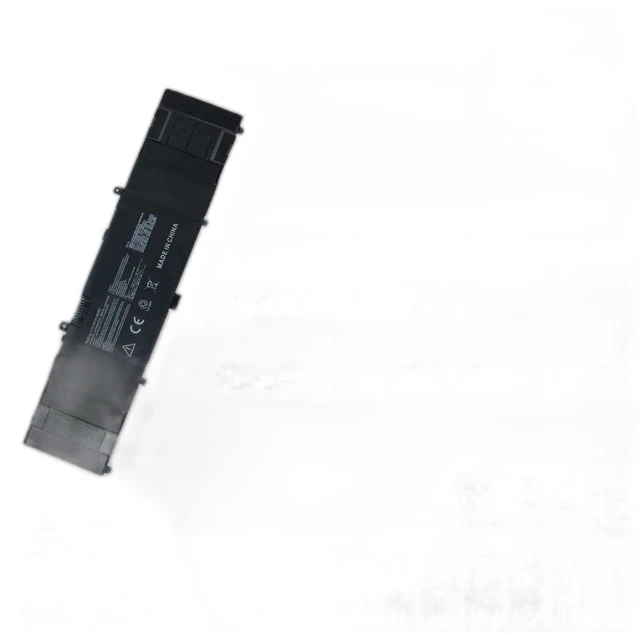
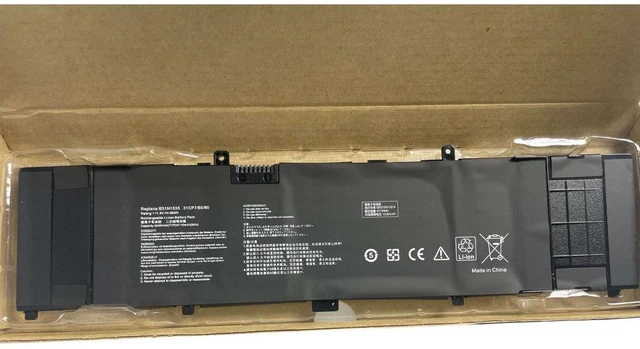
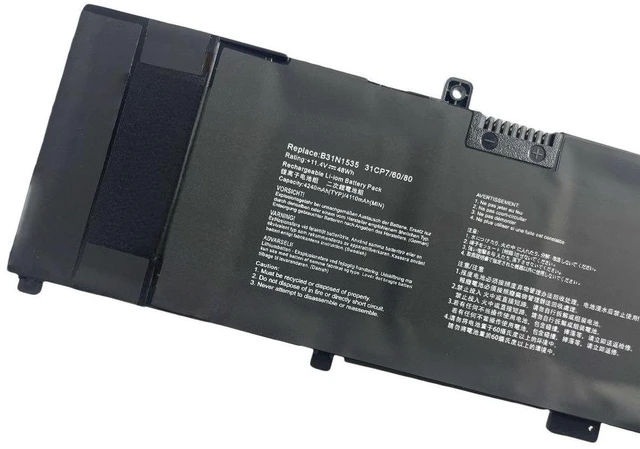
Battery for ASUS U3000U U4000U U4000UQ UX410UQK RX410U B31N1535 11.4V 48Wh Li-ion, High Capacity, 2-Year Warranty
- High Capacity 48Wh / 4200mAh Matches original performance, providing long-lasting power for your ASUS laptop.
- % Compatible with ASUS U3000U, U4000U, U4000UQ, UX410UQK, RX410U, and B31N1535 models.
- Premium Grade A Cells Built with overcharge, over-discharge, and short circuit protection for safe daily use.
- Easy Plug-and-Play Installation No driver or software needed; fits perfectly in your original battery slot.
- Year Warranty & 30-Day Money-Back Guarantee Buy with confidence and reliable after-sales support.
+
+
Overview
Specs
Reviews
**Product Overview**
This high-performance replacement battery is specifically designed for ASUS U3000U, U4000U, U4000UQ, UX410UQK, RX410U, and B31N1535 series laptops. With a voltage of 11.4V and capacity of 48Wh (4200mAh), it delivers reliable power to keep your device running through work, study, or entertainment.
**Important Voltage Warning**
Please verify that your original battery voltage is 11.4V before purchasing. Using an incorrect voltage may cause damage to your laptop or battery. This battery is NOT compatible with 7.6V, 14.4V, or 15.2V models.
**Compatible Models & Part Numbers**
- ASUS U3000U Series
- ASUS U4000U / U4000UQ Series
- ASUS UX410UQK Series
- ASUS RX410U Series
- Replacement for B31N1535 battery part number
**Specifications**
- Battery Type: Li-ion
- Voltage: 11.4V
- Capacity: 48Wh / 4200mAh
- Cells: 3-cell
- Color: Black
- Connector: Original matching plug
- Certification: CE, FCC, RoHS
**Comparison Table**
| Feature | Our Battery | Generic Low-Cost Battery |
|---------|-------------|--------------------------|
| Capacity | 48Wh (4200mAh) | Often 36-40Wh (lower) |
| Cell Quality | Grade A certified | Unknown or recycled cells |
| Safety Protection | Overcharge/Discharge/Short circuit | Basic or none |
| Warranty | 2 Years | Usually 6-12 months |
| Compatibility | 100% fit for listed models | May require modification |
**Installation Tips**
1. Power off your laptop and unplug the AC adapter.
2. Remove the back cover (screws may be required).
3. Disconnect the old battery cable and gently lift it out.
4. Insert the new battery, connect the cable, and secure the cover.
5. Charge the battery fully before first use for optimal performance.
**Note**
- This battery is a compatible replacement, not an original ASUS product.
- Do not disassemble, puncture, or expose to high temperatures.
- If you experience any issues, contact us immediately for support.
**Package Includes**
1 x Replacement Battery
1 x Installation Guide
Order now to restore your ASUS laptops mobility and productivity!
This high-performance replacement battery is specifically designed for ASUS U3000U, U4000U, U4000UQ, UX410UQK, RX410U, and B31N1535 series laptops. With a voltage of 11.4V and capacity of 48Wh (4200mAh), it delivers reliable power to keep your device running through work, study, or entertainment.
**Important Voltage Warning**
Please verify that your original battery voltage is 11.4V before purchasing. Using an incorrect voltage may cause damage to your laptop or battery. This battery is NOT compatible with 7.6V, 14.4V, or 15.2V models.
**Compatible Models & Part Numbers**
- ASUS U3000U Series
- ASUS U4000U / U4000UQ Series
- ASUS UX410UQK Series
- ASUS RX410U Series
- Replacement for B31N1535 battery part number
**Specifications**
- Battery Type: Li-ion
- Voltage: 11.4V
- Capacity: 48Wh / 4200mAh
- Cells: 3-cell
- Color: Black
- Connector: Original matching plug
- Certification: CE, FCC, RoHS
**Comparison Table**
| Feature | Our Battery | Generic Low-Cost Battery |
|---------|-------------|--------------------------|
| Capacity | 48Wh (4200mAh) | Often 36-40Wh (lower) |
| Cell Quality | Grade A certified | Unknown or recycled cells |
| Safety Protection | Overcharge/Discharge/Short circuit | Basic or none |
| Warranty | 2 Years | Usually 6-12 months |
| Compatibility | 100% fit for listed models | May require modification |
**Installation Tips**
1. Power off your laptop and unplug the AC adapter.
2. Remove the back cover (screws may be required).
3. Disconnect the old battery cable and gently lift it out.
4. Insert the new battery, connect the cable, and secure the cover.
5. Charge the battery fully before first use for optimal performance.
**Note**
- This battery is a compatible replacement, not an original ASUS product.
- Do not disassemble, puncture, or expose to high temperatures.
- If you experience any issues, contact us immediately for support.
**Package Includes**
1 x Replacement Battery
1 x Installation Guide
Order now to restore your ASUS laptops mobility and productivity!
Warranty & Returns
Warranty, Returns, And Additional Information
Warranty
- Please contact the Seller directly for warranty information. Warranty information may also be found on the Manufacturer's website.
- CONTACT
Return Policies
- Return for refund within: 30 days
- Return for replacement within: 90 days
- This item is covered by xuanlan Return Policy
Manufacturer Contact Info
- For a directory of all our manufacturers, please click below.
- Manufacturers Directory
LOADING...