


- Free 30-day Returns
$44.97
Ships from China.

Meet Your Seller



Visit Xuanlan Store
FOLLOW
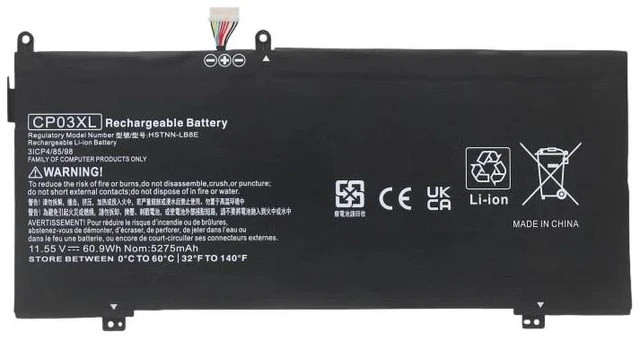
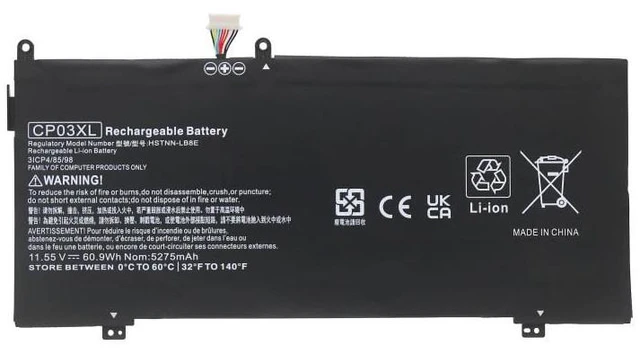
Battery for HP Spectre x360 13-ae000 Series, CP03XL TPN-Q199, 11.55V 55.6Wh, Compatible with HSN-I19C-3, HSN-I19C-5, HSN-I19C-7, 1-Year Warranty
- High-Capacity 55.6Wh / 4800mAh Li-ion Battery: Matches original specifications for reliable, long-lasting power, ensuring your HP Spectre x360 runs smoothly through work, study, or entertainment.
- Precise Compatibility: Designed for HP Spectre x360 13-ae000, 13-ae001, 13-ae002, 13-ae003, 13-ae004, 13-ae005, 13-ae006, 13-ae007, 13-ae008, 13-ae009, and models using CP03XL, TPN-Q199, HSTNN-LB8U, HSTNN-DB8U, HSTNN-IB8U.
- Smart Safety Protection: Built-in overcharge, over-discharge, short circuit, and over-temperature protection circuits prevent damage to your device and battery, extending overall lifespan.
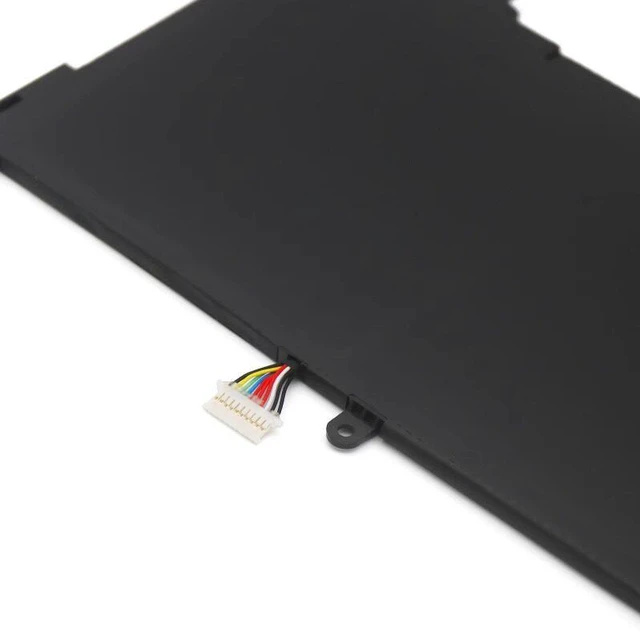
- Easy Plug-and-Play Installation: No drivers or software needed. Simply remove your old battery, connect the new one, and secure it in place. Fits perfectly in the original battery compartment.
- Month Warranty & Reliable Support: We stand behind our product with a full 1-year warranty and responsive customer service. If you have any issues, were here to help.
+
+
Overview
Specs
Reviews
**Product Description**
Upgrade your HP Spectre x360 13-ae000 series laptop with this high-performance replacement battery. Designed to meet or exceed OEM specifications, this CP03XL battery provides a reliable power source for your daily tasks, from video conferencing to creative projects.
**Important Voltage Warning**
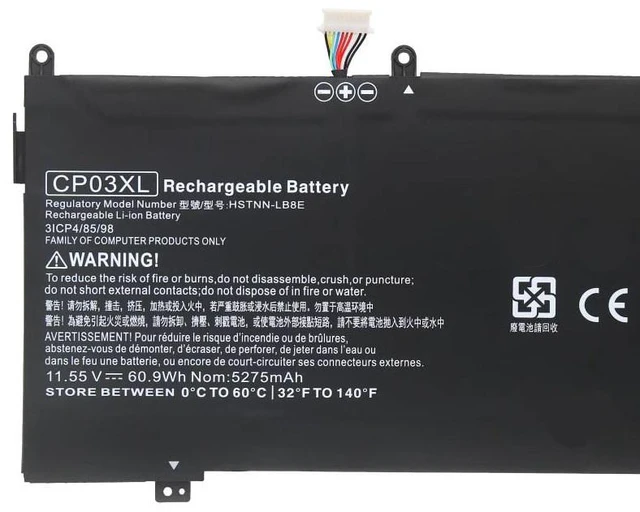
Please verify your original batterys voltage before purchasing. This battery is rated at 11.55V. If your original battery has a different voltage (e. g., 7.6V or 15.2V ), it is NOT compatible and may cause damage. Check the label on your current battery for exact voltage and model number.
**Compatible Models & Part Numbers**
This battery works with the following HP Spectre x360 13-ae000 series models (and their sub-variants):
- HP Spectre x360 13-ae000, 13-ae001, 13-ae002, 13-ae003, 13-ae004, 13-ae005, 13-ae006, 13-ae007, 13-ae008, 13-ae009
- HP Spectre x360 13-ae010, 13-ae011, 13-ae012, 13-ae013, 13-ae014, 13-ae015, 13-ae016, 13-ae017, 13-ae018, 13-ae019
- HP Spectre x360 13-ae020, 13-ae021, 13-ae022, 13-ae023, 13-ae024, 13-ae025, 13-ae026, 13-ae027, 13-ae028, 13-ae029
- HP Spectre x360 13-ae030, 13-ae031, 13-ae032, 13-ae033, 13-ae034, 13-ae035, 13-ae036, 13-ae037, 13-ae038, 13-ae039
- HP Spectre x360 13-ae040, 13-ae041, 13-ae042, 13-ae043, 13-ae044, 13-ae045, 13-ae046, 13-ae047, 13-ae048, 13-ae049
- HP Spectre x360 13-ae050, 13-ae051, 13-ae052, 13-ae053, 13-ae054, 13-ae055, 13-ae056, 13-ae057, 13-ae058, 13-ae059
- HP Spectre x360 13-ae060, 13-ae061, 13-ae062, 13-ae063, 13-ae064, 13-ae065, 13-ae066, 13-ae067, 13-ae068, 13-ae069
- HP Spectre x360 13-ae070, 13-ae071, 13-ae072, 13-ae073, 13-ae074, 13-ae075, 13-ae076, 13-ae077, 13-ae078, 13-ae079
- HP Spectre x360 13-ae080, 13-ae081, 13-ae082, 13-ae083, 13-ae084, 13-ae085, 13-ae086, 13-ae087, 13-ae088, 13-ae089
- HP Spectre x360 13-ae090, 13-ae091, 13-ae092, 13-ae093, 13-ae094, 13-ae095, 13-ae096, 13-ae097, 13-ae098, 13-ae099
Replacement Part Numbers: CP03XL, TPN-Q199, HSTNN-LB8U, HSTNN-DB8U, HSTNN-IB8U, HSTNN-UB8U, HSTNN-PB8U, HSTNN-QB8U, HSTNN-RB8U, HSTNN-SB8U, HSTNN-TB8U, HSTNN-VB8U, HSTNN-WB8U, HSTNN-XB8U, HSTNN-YB8U, HSTNN-ZB8U
**Specifications Table**
| Specification | Value |
|: --- |: --- |
| Battery Type | Li-ion |
| Voltage | 11.55V |
| Capacity | 55.6W h / 4800mAh |
| Cells | 4 cells |
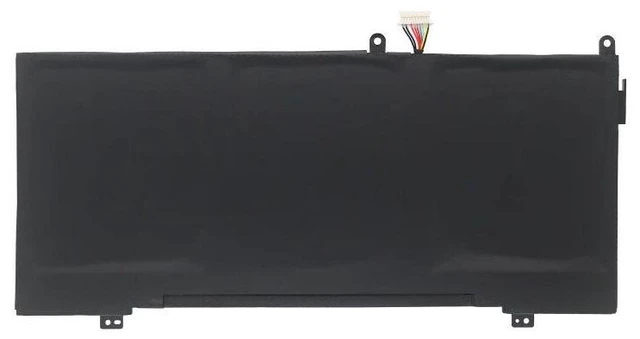
| Color | Black |
| Warranty | 12 Months |
**Comparison Table: Original vs. Replacement**
| Feature | Original HP Battery | This Replacement |
|: --- |: --- |: --- |
| Voltage | 11.55V | 11.55V (Exact Match) |
| Capacity | 55.6W h | 55.6W h (Equal) |
| Safety Certifications | OEM | CE, RoHS |
| Price | High | Affordable |
| Warranty | 1 Year (limited) | 1 Year (full) |
**Installation Tips**
1. **Power
Off & Unplug: ** Shut down your laptop completely and disconnect the AC adapter.
2. **Remove
Old Battery: ** Locate the battery compartment (usually on the bottom). Unscrew the screws securing the battery cover or the battery itself. Gently disconnect the battery cable from the motherboard.
3. **Install
New Battery: ** Connect the new battery cable firmly. Place the battery into the compartment and secure it with screws.
4. **Test: ** Power on your laptop. The system should recognize the new battery automatically. For best results, fully charge the battery before first use.
5. **Disposal: ** Please recycle your old battery responsibly at a local e-waste facility.
**Note: ** If your laptop does not detect the battery, try resetting the system by holding the power button for 15 seconds with the battery and AC adapter disconnected. If issues persist, contact our support team.
**Package Includes: **
- 1 x Replacement Battery for HP Spectre x360 13-ae000
-
-
**Satisfaction Guarantee**
We are confident in the quality of our batteries. If you are not satisfied for any reason, contact us within 30 days for a full refund or replacement. Our dedicated support team is available to assist you with any questions or concerns.
Upgrade your HP Spectre x360 13-ae000 series laptop with this high-performance replacement battery. Designed to meet or exceed OEM specifications, this CP03XL battery provides a reliable power source for your daily tasks, from video conferencing to creative projects.
**Important Voltage Warning**
Please verify your original batterys voltage before purchasing. This battery is rated at 11.55V. If your original battery has a different voltage (e. g., 7.6V or 15.2V ), it is NOT compatible and may cause damage. Check the label on your current battery for exact voltage and model number.
**Compatible Models & Part Numbers**
This battery works with the following HP Spectre x360 13-ae000 series models (and their sub-variants):
- HP Spectre x360 13-ae000, 13-ae001, 13-ae002, 13-ae003, 13-ae004, 13-ae005, 13-ae006, 13-ae007, 13-ae008, 13-ae009
- HP Spectre x360 13-ae010, 13-ae011, 13-ae012, 13-ae013, 13-ae014, 13-ae015, 13-ae016, 13-ae017, 13-ae018, 13-ae019
- HP Spectre x360 13-ae020, 13-ae021, 13-ae022, 13-ae023, 13-ae024, 13-ae025, 13-ae026, 13-ae027, 13-ae028, 13-ae029
- HP Spectre x360 13-ae030, 13-ae031, 13-ae032, 13-ae033, 13-ae034, 13-ae035, 13-ae036, 13-ae037, 13-ae038, 13-ae039
- HP Spectre x360 13-ae040, 13-ae041, 13-ae042, 13-ae043, 13-ae044, 13-ae045, 13-ae046, 13-ae047, 13-ae048, 13-ae049
- HP Spectre x360 13-ae050, 13-ae051, 13-ae052, 13-ae053, 13-ae054, 13-ae055, 13-ae056, 13-ae057, 13-ae058, 13-ae059
- HP Spectre x360 13-ae060, 13-ae061, 13-ae062, 13-ae063, 13-ae064, 13-ae065, 13-ae066, 13-ae067, 13-ae068, 13-ae069
- HP Spectre x360 13-ae070, 13-ae071, 13-ae072, 13-ae073, 13-ae074, 13-ae075, 13-ae076, 13-ae077, 13-ae078, 13-ae079
- HP Spectre x360 13-ae080, 13-ae081, 13-ae082, 13-ae083, 13-ae084, 13-ae085, 13-ae086, 13-ae087, 13-ae088, 13-ae089
- HP Spectre x360 13-ae090, 13-ae091, 13-ae092, 13-ae093, 13-ae094, 13-ae095, 13-ae096, 13-ae097, 13-ae098, 13-ae099
Replacement Part Numbers: CP03XL, TPN-Q199, HSTNN-LB8U, HSTNN-DB8U, HSTNN-IB8U, HSTNN-UB8U, HSTNN-PB8U, HSTNN-QB8U, HSTNN-RB8U, HSTNN-SB8U, HSTNN-TB8U, HSTNN-VB8U, HSTNN-WB8U, HSTNN-XB8U, HSTNN-YB8U, HSTNN-ZB8U
**Specifications Table**
| Specification | Value |
|: --- |: --- |
| Battery Type | Li-ion |
| Voltage | 11.55V |
| Capacity | 55.6W h / 4800mAh |
| Cells | 4 cells |
| Color | Black |
| Warranty | 12 Months |
**Comparison Table: Original vs. Replacement**
| Feature | Original HP Battery | This Replacement |
|: --- |: --- |: --- |
| Voltage | 11.55V | 11.55V (Exact Match) |
| Capacity | 55.6W h | 55.6W h (Equal) |
| Safety Certifications | OEM | CE, RoHS |
| Price | High | Affordable |
| Warranty | 1 Year (limited) | 1 Year (full) |
**Installation Tips**
1. **Power
Off & Unplug: ** Shut down your laptop completely and disconnect the AC adapter.
2. **Remove
Old Battery: ** Locate the battery compartment (usually on the bottom). Unscrew the screws securing the battery cover or the battery itself. Gently disconnect the battery cable from the motherboard.
3. **Install
New Battery: ** Connect the new battery cable firmly. Place the battery into the compartment and secure it with screws.
4. **Test: ** Power on your laptop. The system should recognize the new battery automatically. For best results, fully charge the battery before first use.
5. **Disposal: ** Please recycle your old battery responsibly at a local e-waste facility.
**Note: ** If your laptop does not detect the battery, try resetting the system by holding the power button for 15 seconds with the battery and AC adapter disconnected. If issues persist, contact our support team.
**Package Includes: **
- 1 x Replacement Battery for HP Spectre x360 13-ae000
-
-
**Satisfaction Guarantee**
We are confident in the quality of our batteries. If you are not satisfied for any reason, contact us within 30 days for a full refund or replacement. Our dedicated support team is available to assist you with any questions or concerns.
Warranty & Returns
Warranty, Returns, And Additional Information
Warranty
- Please contact the Seller directly for warranty information. Warranty information may also be found on the Manufacturer's website.
- CONTACT
Return Policies
- Return for refund within: 30 days
- Return for replacement within: 90 days
- This item is covered by xuanlan Return Policy
Manufacturer Contact Info
- For a directory of all our manufacturers, please click below.
- Manufacturers Directory
LOADING...