


- Free 30-day Returns
$45.69
Ships from China.

Meet Your Seller



Visit Xuanlan Store
FOLLOW
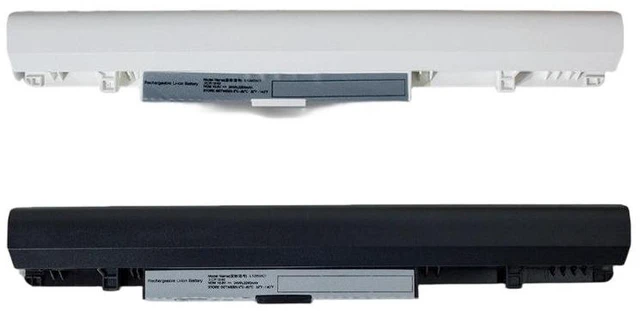
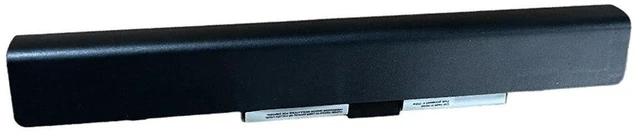
Battery for Lenovo S210 S215T S210 Touch L12S3F01 L12C3A01 L12M3A01 11.4V 30Wh Li-ion Laptop Battery (2-Year Warranty)
- High Compatibility: Perfectly fits Lenovo S210, S215T, S210 Touch, and IdeaPad S210 series laptops.
- Premium Cells & Safety: Built with Grade A lithium-ion cells, featuring overcharge, over-discharge, and short circuit protection.
- Exact Replacement: Directly replaces OEM models L12S3F01, L12C3A01, L12M3A01 no driver or software modification needed.
- Reliable Capacity: 30Wh / 2600mAh (11.4V) provides stable power for daily work, browsing, and streaming.
- Year Warranty & Support: Backed by a full 2-year warranty and responsive customer service for peace of mind.
+
+
Overview
Specs
Reviews
**Product Description**
Upgrade or replace your worn-out laptop battery with this high-performance 11.4V 30Wh Li-ion battery, specifically designed for Lenovo S210, S215T, and S210 Touch series. Whether your original battery no longer holds a charge or you need a reliable spare, this battery delivers consistent power and long-lasting performance.
**Important Voltage Warning**
Please confirm your original battery voltage is ** 11.4V ** before purchasing. Using an incorrect voltage battery may cause system instability or damage. This battery is NOT compatible with 7.6V or 14.8V models.
**Compatibility List**
- Lenovo S210 (all configurations)
- Lenovo S215T
- Lenovo S210 Touch
- Lenovo IdeaPad S210 series
**Replaces OEM Part Numbers**
L12S3F01, L12C3A01, L12M3A01
**Specifications**
| Model | Replacement Battery |
|-------|---------------------|
| Voltage | 11.4V |
| Capacity | 30Wh / 2600mAh |
| Cell Type | Li-ion (Grade A) |
| Color | Black |
| Weight | Approx. 200g |
| Warranty | 2 Years |
**Comparison Table**
| Feature | Our Battery | Generic/Used Battery |
|---------|-------------|----------------------|
| Cell Grade | Grade A | Mixed or recycled cells |
| Protection Circuit | Yes (overcharge/discharge/short circuit) | Often missing or basic |
| Capacity Accuracy | 100% rated | May degrade quickly |
| Warranty | 2 Years | 6 months or less |
**Installation Tips**
1. Power off your laptop and disconnect the AC adapter.
2. Remove the battery by sliding the release latch (if external) or unscrewing the back cover (if internal).
3. Insert the new battery until it clicks into place.
4. Charge the battery fully before first use for optimal performance.
5. If the battery is not detected, restart your laptop once.
**Package Includes**
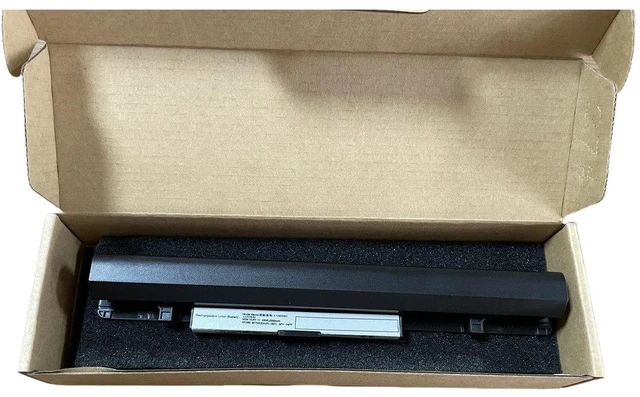
- 1 x Replacement Battery
**Note**
This is a third-party replacement battery, not an OEM product. It is fully tested and guaranteed to meet or exceed original specifications.
Upgrade or replace your worn-out laptop battery with this high-performance 11.4V 30Wh Li-ion battery, specifically designed for Lenovo S210, S215T, and S210 Touch series. Whether your original battery no longer holds a charge or you need a reliable spare, this battery delivers consistent power and long-lasting performance.
**Important Voltage Warning**
Please confirm your original battery voltage is ** 11.4V ** before purchasing. Using an incorrect voltage battery may cause system instability or damage. This battery is NOT compatible with 7.6V or 14.8V models.
**Compatibility List**
- Lenovo S210 (all configurations)
- Lenovo S215T
- Lenovo S210 Touch
- Lenovo IdeaPad S210 series
**Replaces OEM Part Numbers**
L12S3F01, L12C3A01, L12M3A01
**Specifications**
| Model | Replacement Battery |
|-------|---------------------|
| Voltage | 11.4V |
| Capacity | 30Wh / 2600mAh |
| Cell Type | Li-ion (Grade A) |
| Color | Black |
| Weight | Approx. 200g |
| Warranty | 2 Years |
**Comparison Table**
| Feature | Our Battery | Generic/Used Battery |
|---------|-------------|----------------------|
| Cell Grade | Grade A | Mixed or recycled cells |
| Protection Circuit | Yes (overcharge/discharge/short circuit) | Often missing or basic |
| Capacity Accuracy | 100% rated | May degrade quickly |
| Warranty | 2 Years | 6 months or less |
**Installation Tips**
1. Power off your laptop and disconnect the AC adapter.
2. Remove the battery by sliding the release latch (if external) or unscrewing the back cover (if internal).
3. Insert the new battery until it clicks into place.
4. Charge the battery fully before first use for optimal performance.
5. If the battery is not detected, restart your laptop once.
**Package Includes**
- 1 x Replacement Battery
**Note**
This is a third-party replacement battery, not an OEM product. It is fully tested and guaranteed to meet or exceed original specifications.
Warranty & Returns
Warranty, Returns, And Additional Information
Warranty
- Please contact the Seller directly for warranty information. Warranty information may also be found on the Manufacturer's website.
- CONTACT
Return Policies
- Return for refund within: 30 days
- Return for replacement within: 90 days
- This item is covered by xuanlan Return Policy
Manufacturer Contact Info
- For a directory of all our manufacturers, please click below.
- Manufacturers Directory
LOADING...