


- Free 30-day Returns
$46.89
Ships from China.

Meet Your Seller



Visit Xuanlan Store
FOLLOW
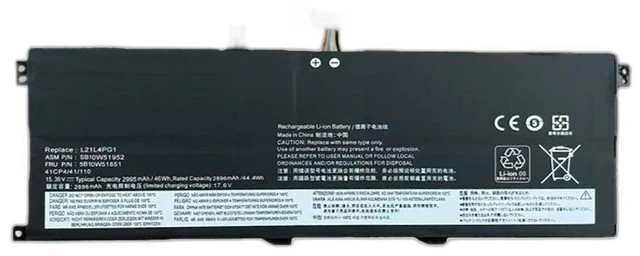
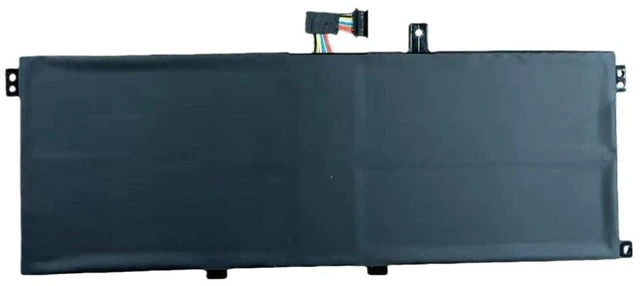
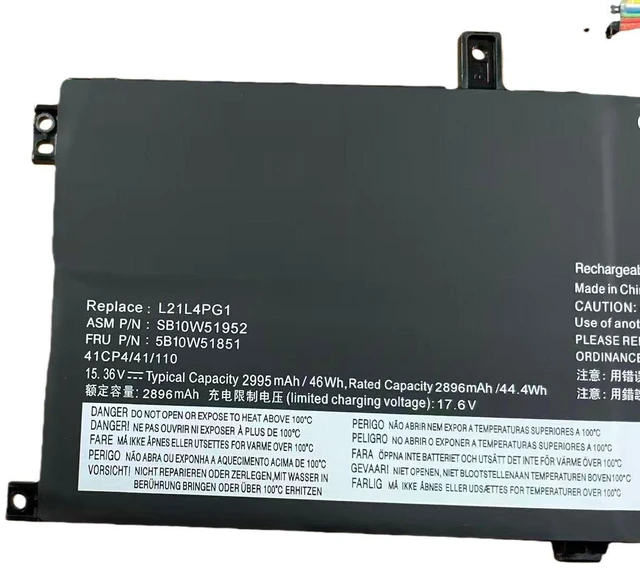
Battery for Lenovo TP00137A L13 Yoga Gen 3 L21L4PG1 11.55V 46Wh, High Capacity, Fast Shipping, 12-Month Warranty
- Premium 46Wh capacity ensures longer runtime for your Lenovo L13 Yoga Gen 3, reducing frequent recharging.
- % compatible with original TP00137A, L21L4PG1, and L21M4PG1 models plug-and-play installation.
- Built-in overcharge, over-discharge, and short-circuit protection for safe daily use.
- Rigorously tested for stable voltage output (11.55V) to prevent system shutdowns or battery errors.
- Backed by 12-month warranty and fast dispatch from US/EU warehouse.
+
+
Overview
Specs
Reviews
**Important
Voltage Warning: **
This battery is designed specifically for Lenovo L13 Yoga Gen 3 series. Please confirm your original battery voltage is ** 11.55V ** before purchasing. Using an incorrect voltage (e. g., 7.6V or 14.4V ) may cause device damage or failure to charge.
**Compatible Models & Part Numbers: **
- Original battery part numbers: TP00137A, L21L4PG1, L21M4PG1
- Compatible laptop models: Lenovo ThinkPad L13 Yoga Gen 3, L13 Yoga Gen 3 (Intel/AMD variants)
- Also fits: Lenovo L13 Yoga Gen 2 (please check voltage first)
**Specifications: **
| Parameter | Value |
|-----------|-------|
| Battery Type | Li-ion |
| Voltage | 11.55V |
| Capacity | 46Wh / 4000mAh |
| Cells | 4-cell |
| Color | Black |
| Weight | Approx. 250g |
| Warranty | 12 months |
**Comparison Table (OEM vs Replacement): **
| Feature | OEM Battery | Our Replacement |
|---------|-------------|----------------|
| Price | High | Affordable |
| Capacity | 46Wh | 46Wh (same) |
| Safety Certifications | Yes | Yes (CE, RoHS) |
| Warranty | 12 months | 12 months |
| Availability | Often discontinued | In stock, fast shipping |
**Installation Tips: **
1. Power off your laptop and unplug the AC adapter.
2. Remove the bottom cover using a suitable screwdriver (Phillips #0).
3. Disconnect the old battery cable gently from the motherboard.
4. Remove screws securing the old battery and lift it out.
5. Insert the new battery, reconnect the cable, and secure with screws.
6. Replace the bottom cover, plug in power, and charge fully before first use.
7. If the battery is not detected, perform
a power reset: hold the power button for 15 seconds with the battery disconnected.
**Note: ** This is a third-party compatible battery, not an OEM Lenovo product. It is designed to meet or exceed original specifications. For best performance, calibrate the battery once a month by fully charging and then discharging to 5%.
Voltage Warning: **
This battery is designed specifically for Lenovo L13 Yoga Gen 3 series. Please confirm your original battery voltage is ** 11.55V ** before purchasing. Using an incorrect voltage (e. g., 7.6V or 14.4V ) may cause device damage or failure to charge.
**Compatible Models & Part Numbers: **
- Original battery part numbers: TP00137A, L21L4PG1, L21M4PG1
- Compatible laptop models: Lenovo ThinkPad L13 Yoga Gen 3, L13 Yoga Gen 3 (Intel/AMD variants)
- Also fits: Lenovo L13 Yoga Gen 2 (please check voltage first)
**Specifications: **
| Parameter | Value |
|-----------|-------|
| Battery Type | Li-ion |
| Voltage | 11.55V |
| Capacity | 46Wh / 4000mAh |
| Cells | 4-cell |
| Color | Black |
| Weight | Approx. 250g |
| Warranty | 12 months |
**Comparison Table (OEM vs Replacement): **
| Feature | OEM Battery | Our Replacement |
|---------|-------------|----------------|
| Price | High | Affordable |
| Capacity | 46Wh | 46Wh (same) |
| Safety Certifications | Yes | Yes (CE, RoHS) |
| Warranty | 12 months | 12 months |
| Availability | Often discontinued | In stock, fast shipping |
**Installation Tips: **
1. Power off your laptop and unplug the AC adapter.
2. Remove the bottom cover using a suitable screwdriver (Phillips #0).
3. Disconnect the old battery cable gently from the motherboard.
4. Remove screws securing the old battery and lift it out.
5. Insert the new battery, reconnect the cable, and secure with screws.
6. Replace the bottom cover, plug in power, and charge fully before first use.
7. If the battery is not detected, perform
a power reset: hold the power button for 15 seconds with the battery disconnected.
**Note: ** This is a third-party compatible battery, not an OEM Lenovo product. It is designed to meet or exceed original specifications. For best performance, calibrate the battery once a month by fully charging and then discharging to 5%.
Warranty & Returns
Warranty, Returns, And Additional Information
Warranty
- Please contact the Seller directly for warranty information. Warranty information may also be found on the Manufacturer's website.
- CONTACT
Return Policies
- Return for refund within: 30 days
- Return for replacement within: 90 days
- This item is covered by xuanlan Return Policy
Manufacturer Contact Info
- For a directory of all our manufacturers, please click below.
- Manufacturers Directory
LOADING...