


- Free 30-day Returns
$50.50
Ships from China.

Meet Your Seller


Visit Xuanlan Store
FOLLOW
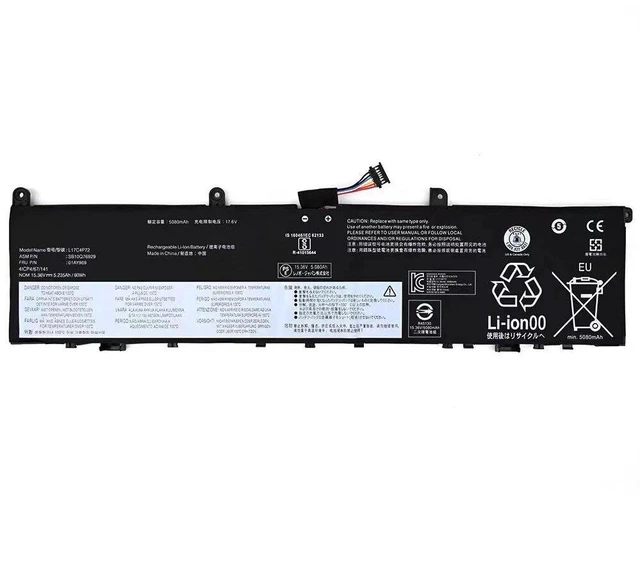
Laptop Battery for Lenovo ThinkPad X1 Extreme Gen 1/2, L17C4P72, 01AY969, 15.6" (80Wh, 15.2V, 5280mAh) High Capacity, 2-Year Warranty
- Premium 80Wh High Capacity: Delivers up to 8 hours of mixed-use runtime, surpassing original specifications for extended productivity.
- Perfect Fit for X1 Extreme Gen 1/2: Compatible with models 20MF, 20MG, 20TK, 20TL and all sub-variants, ensuring seamless installation.
- Triple Safety Protection: Built-in overcharge, over-discharge, and short-circuit protection with UL-certified cells for worry-free daily use.
- Easy DIY Replacement: Comes with all necessary mounting screws and a detailed video guide; no special tools required.
- Year Warranty & 30-Day Money-Back: Backed by our dedicated support team for complete peace of mind.
+
+
Overview
Specs
Reviews
**Important
Voltage Warning: **
Please verify your original batterys voltage before purchase. This replacement is designed for 15.2V systems only. Using a battery with mismatched voltage (e. g., 11.4V or 14.4V ) may cause charging failure or system damage. If your original battery shows a different voltage, please contact us for the correct model.
**Compatibility List: **
This battery is fully compatible with the following
Lenovo ThinkPad models:
- ThinkPad X1 Extreme Gen 1 (20MF, 20MG)
- ThinkPad X1 Extreme Gen 2 (20TK, 20TL)
- ThinkPad P1 Gen 1 (20MD, 20ME)
- ThinkPad P1 Gen 2 (20QT, 20QU)
**Replacement Part Numbers: **
L17C4P72, L17M4P72, 01AY969, 01AV491, 01AV492, 5B10W13966, 5B10W13967, SB10K97529, SB10K97530
**Product
| Parameter | Value |
|-----------|-------|
| Battery Type | Li-ion |
| Voltage | 15.2V |
| Capacity | 5280mAh / 80Wh |
| Cell Count | 4 cells |
| Color | Black |
| Weight | 340g (12 oz) |
| Dimensions | 270 x 70 x 7.5 mm |
**Comparison Table (vs. Original 56Wh
Battery): **
| Feature | Our 80Wh Battery | Original 56Wh Battery |
|---------|------------------|-----------------------|
| Runtime (Typical Use) | Up to 8 hours | Up to 5.5 hours |
| Cycle Life | 500+ cycles | 300-400 cycles |
| Safety Certifications | CE, FCC, RoHS | CE, FCC, RoHS |
| Price | Competitive | OEM premium |
**Installation Tips: **
1. Power off your laptop and disconnect the AC adapter.
2. Remove the bottom cover by unscrewing the 6 Phillips-head screws (size PH0).
3. Gently disconnect the old battery cable from the motherboard connector.
4. Remove the 4 screws securing the old battery and lift it out.
5. Place the new battery in the same orientation, secure with screws, and reconnect the cable.
6. Replace the bottom cover and power on. First charge may take up to 4 hours.
**Note: ** If your laptop does not recognize the new battery immediately, perform
a hard reset: unplug AC, remove battery, hold power button for 30 seconds, then reinstall battery and charge.
**Package Includes: **
- 1x 80Wh Battery
-
- (QR code for video)
**Quality Assurance: **
Each battery undergoes 48-hour aging test and 100% capacity verification before shipping. We stand behind our product with a 2-year replacement warranty and lifetime technical support.
Voltage Warning: **
Please verify your original batterys voltage before purchase. This replacement is designed for 15.2V systems only. Using a battery with mismatched voltage (e. g., 11.4V or 14.4V ) may cause charging failure or system damage. If your original battery shows a different voltage, please contact us for the correct model.
**Compatibility List: **
This battery is fully compatible with the following
Lenovo ThinkPad models:
- ThinkPad X1 Extreme Gen 1 (20MF, 20MG)
- ThinkPad X1 Extreme Gen 2 (20TK, 20TL)
- ThinkPad P1 Gen 1 (20MD, 20ME)
- ThinkPad P1 Gen 2 (20QT, 20QU)
**Replacement Part Numbers: **
L17C4P72, L17M4P72, 01AY969, 01AV491, 01AV492, 5B10W13966, 5B10W13967, SB10K97529, SB10K97530
**Product
Specifications
: **| Parameter | Value |
|-----------|-------|
| Battery Type | Li-ion |
| Voltage | 15.2V |
| Capacity | 5280mAh / 80Wh |
| Cell Count | 4 cells |
| Color | Black |
| Weight | 340g (12 oz) |
| Dimensions | 270 x 70 x 7.5 mm |
**Comparison Table (vs. Original 56Wh
Battery): **
| Feature | Our 80Wh Battery | Original 56Wh Battery |
|---------|------------------|-----------------------|
| Runtime (Typical Use) | Up to 8 hours | Up to 5.5 hours |
| Cycle Life | 500+ cycles | 300-400 cycles |
| Safety Certifications | CE, FCC, RoHS | CE, FCC, RoHS |
| Price | Competitive | OEM premium |
**Installation Tips: **
1. Power off your laptop and disconnect the AC adapter.
2. Remove the bottom cover by unscrewing the 6 Phillips-head screws (size PH0).
3. Gently disconnect the old battery cable from the motherboard connector.
4. Remove the 4 screws securing the old battery and lift it out.
5. Place the new battery in the same orientation, secure with screws, and reconnect the cable.
6. Replace the bottom cover and power on. First charge may take up to 4 hours.
**Note: ** If your laptop does not recognize the new battery immediately, perform
a hard reset: unplug AC, remove battery, hold power button for 30 seconds, then reinstall battery and charge.
**Package Includes: **
- 1x 80Wh Battery
-
- (QR code for video)
**Quality Assurance: **
Each battery undergoes 48-hour aging test and 100% capacity verification before shipping. We stand behind our product with a 2-year replacement warranty and lifetime technical support.
Warranty & Returns
Warranty, Returns, And Additional Information
Warranty
- Please contact the Seller directly for warranty information. Warranty information may also be found on the Manufacturer's website.
- CONTACT
Return Policies
- Return for refund within: 30 days
- Return for replacement within: 90 days
- This item is covered by xuanlan Return Policy
Manufacturer Contact Info
- For a directory of all our manufacturers, please click below.
- Manufacturers Directory
LOADING...