
Your Browsing History
- Free 30-day Returns
$66.13
Ships from China.

Meet Your Seller


Visit Xuanlan Store
FOLLOW
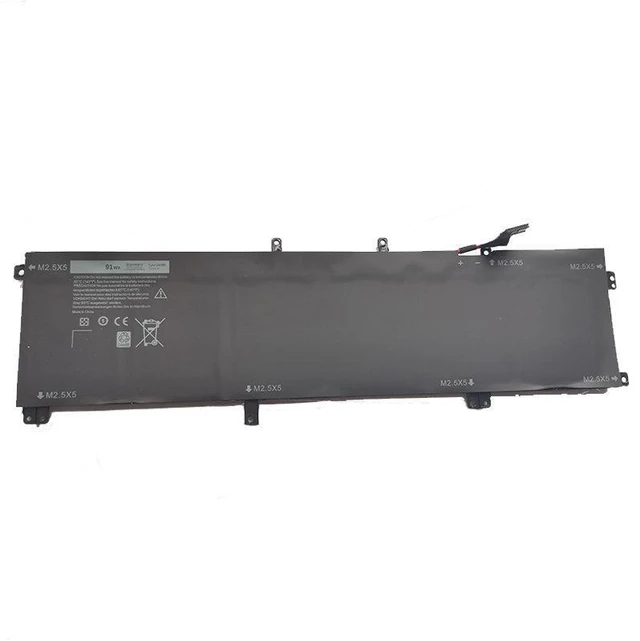
91Wh Battery for DELL XPS15 9530 9535 245RR P31F Laptop 11.4V, 8000mAh, Compatible with 0X0R9P, 0M2G3R, 0VW3R3 2-Year Warranty
- High-Capacity 91Wh (8000mAh) 11.4V Li-ion Battery Restores original runtime, outperforms standard 56Wh/84Wh options for heavy multitasking and travel.
- Perfect Fit for DELL XPS 15 9530 & 9535 Direct replacement for models 245RR, P31F, and all variants including 0X0R9P, 0M2G3R, 0VW3R3.
- Premium Grade A Cells & Smart IC Built-in overcharge, over-discharge, and short-circuit protection ensures safe, stable charging and long cycle life.
- Easy Plug-and-Play Installation No driver or BIOS update required; exact OEM dimensions and connector design for hassle-free swap.
- Year Warranty & 30-Day Money-Back Backed by dedicated customer support and rigorous quality testing for peace of mind.
+
+
Overview
Specs
Reviews
**Important
Voltage Warning: **
Please verify your original battery voltage is ** 11.4V ** before purchase. This replacement is designed for 11.4V systems only. Using an incorrect voltage may cause system damage or battery failure. If your original battery is 7.6V or 15.2V, this unit is NOT compatible.
**Compatibility List: **
This battery is compatible with the following DELL XPS 15 models and part numbers:
- DELL XPS 15 9530 (all configurations)
- DELL XPS 15 9535 (all configurations)
- Model Number: 245RR, P31F
- Replacement Part Numbers: 0X0R9P, X0R9P, 0M2G3R, M2G3R, 0VW3R3, VW3R3, 0F2G8C, F2G8C, 0J3R4T, J3R4T
**Specifications Table: **
| Parameter | Value |
|-----------|-------|
| Battery Type | Li-ion |
| Voltage | 11.4V |
| Capacity | 8000mAh / 91Wh |
| Cell Count | 6 cells |
| Color | Black |
| Weight | Approx. 380g |
| Dimensions | 280 x 80 x 10 mm (exact OEM fit) |
| Warranty | 2 Years |
**Comparison Table Why Choose 91Wh? **
| Feature | 56Wh Battery | 84Wh Battery | **Our 91Wh Battery** |
|---------|--------------|--------------|----------------------|
| Runtime (Typical Use) | ~4-5 hours | ~6-7 hours | **~7-8 hours** |
| Capacity | 56Wh | 84Wh | **91Wh** |
| Weight | ~300g | ~360g | **~380g** |
| Price Value | Lower | Medium | **Best value per Wh** |
| Warranty | 1 year | 1 year | **2 years** |
**Installation Tips: **
1. Power off your laptop and disconnect the AC adapter.
2. Remove the bottom panel screws (Phillips #0) and gently lift the cover.
3. Disconnect the old battery cable from the motherboard (pull by the connector, not the wires).
4. Remove the old battery screws and lift it out.
5. Insert the new battery, align screw holes, and tighten screws.
6. Reconnect the battery cable firmly until it clicks.
7. Replace the bottom panel and screws.
8. Plug in the AC adapter and charge fully before first use (allow 4-5 hours for initial charge).
**Note: ** If your laptop does not recognize the new battery immediately, perform
a power drain: run the laptop on battery until it shuts down, then charge to 100% without interruption. This resets the battery gauge.
**Package Includes: **
- 1x 91Wh Replacement Battery
-
-
**Quality Assurance: **
Each battery undergoes 100% capacity and safety testing before shipping. CE, FCC, and RoHS certified. Manufactured in an ISO9001 facility.
**Customer Support: **
We offer 24/7 email support and a hassle-free 30-day return policy. If you have any questions about compatibility or installation, please contact us before purchasing.
Voltage Warning: **
Please verify your original battery voltage is ** 11.4V ** before purchase. This replacement is designed for 11.4V systems only. Using an incorrect voltage may cause system damage or battery failure. If your original battery is 7.6V or 15.2V, this unit is NOT compatible.
**Compatibility List: **
This battery is compatible with the following DELL XPS 15 models and part numbers:
- DELL XPS 15 9530 (all configurations)
- DELL XPS 15 9535 (all configurations)
- Model Number: 245RR, P31F
- Replacement Part Numbers: 0X0R9P, X0R9P, 0M2G3R, M2G3R, 0VW3R3, VW3R3, 0F2G8C, F2G8C, 0J3R4T, J3R4T
**Specifications Table: **
| Parameter | Value |
|-----------|-------|
| Battery Type | Li-ion |
| Voltage | 11.4V |
| Capacity | 8000mAh / 91Wh |
| Cell Count | 6 cells |
| Color | Black |
| Weight | Approx. 380g |
| Dimensions | 280 x 80 x 10 mm (exact OEM fit) |
| Warranty | 2 Years |
**Comparison Table Why Choose 91Wh? **
| Feature | 56Wh Battery | 84Wh Battery | **Our 91Wh Battery** |
|---------|--------------|--------------|----------------------|
| Runtime (Typical Use) | ~4-5 hours | ~6-7 hours | **~7-8 hours** |
| Capacity | 56Wh | 84Wh | **91Wh** |
| Weight | ~300g | ~360g | **~380g** |
| Price Value | Lower | Medium | **Best value per Wh** |
| Warranty | 1 year | 1 year | **2 years** |
**Installation Tips: **
1. Power off your laptop and disconnect the AC adapter.
2. Remove the bottom panel screws (Phillips #0) and gently lift the cover.
3. Disconnect the old battery cable from the motherboard (pull by the connector, not the wires).
4. Remove the old battery screws and lift it out.
5. Insert the new battery, align screw holes, and tighten screws.
6. Reconnect the battery cable firmly until it clicks.
7. Replace the bottom panel and screws.
8. Plug in the AC adapter and charge fully before first use (allow 4-5 hours for initial charge).
**Note: ** If your laptop does not recognize the new battery immediately, perform
a power drain: run the laptop on battery until it shuts down, then charge to 100% without interruption. This resets the battery gauge.
**Package Includes: **
- 1x 91Wh Replacement Battery
-
-
**Quality Assurance: **
Each battery undergoes 100% capacity and safety testing before shipping. CE, FCC, and RoHS certified. Manufactured in an ISO9001 facility.
**Customer Support: **
We offer 24/7 email support and a hassle-free 30-day return policy. If you have any questions about compatibility or installation, please contact us before purchasing.
Warranty & Returns
Warranty, Returns, And Additional Information
Warranty
- Please contact the Seller directly for warranty information. Warranty information may also be found on the Manufacturer's website.
- CONTACT
Return Policies
- Return for refund within: 30 days
- Return for replacement within: 90 days
- This item is covered by xuanlan Return Policy
Manufacturer Contact Info
- For a directory of all our manufacturers, please click below.
- Manufacturers Directory
LOADING...