
Your Browsing History
- Free 30-day Returns
$64.93
Ships from China.

Meet Your Seller


Visit Xuanlan Store
FOLLOW
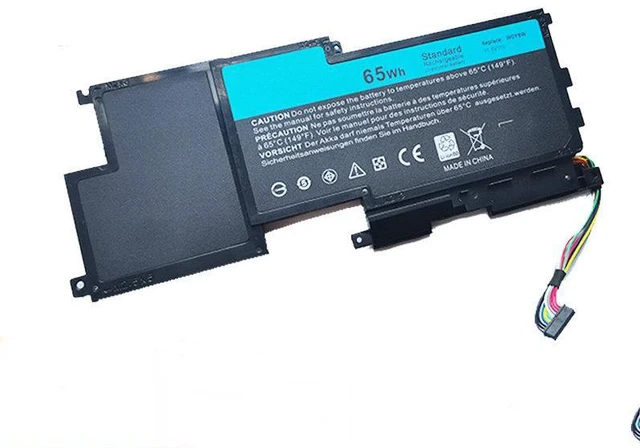
Battery for Dell XPS 15 L521X, W0Y6W, XPS L521X 11.1V 56Wh, 6-Cell, Compatible with Dell XPS 15 L521X Series, 1-Year Warranty
- High-Capacity 56Wh 6-Cell Li-ion Battery: Provides reliable power for your Dell XPS 15 L521X, ensuring longer work and entertainment sessions without frequent recharging.
- Exact Fit & Easy Installation: Designed as a direct OEM replacement for Dell W0Y6W, XPS L521X, with pre-installed internal connectors and screw holes for a hassle-free swap in minutes.
- Multi-Layer Safety Protection: Built-in overcharge, over-discharge, short circuit, and over-temperature protection circuits ensure safe operation and extend battery lifespan.
- Wide Compatibility: Fully compatible with Dell XPS 15 L521X series laptops, including models using the same 11.1V 56Wh 6-cell battery specification.
- Year Warranty & 30-Day Money-Back Guarantee: Buy with confidence we stand behind the quality and performance of every battery.
+
+
Overview
Specs
Reviews
**Important
Voltage Warning: **
Please verify that your original battery is rated at ** 11.1V ** before purchasing. Using an incorrect voltage battery may cause damage to your laptop or battery. This replacement is designed for 11.1V systems only.
**Compatibility List: **
This battery is compatible with the following Dell laptop models (please confirm your model number before ordering):
- Dell XPS 15 L521X
- Dell XPS 15 L521X Series (all sub-models using the W0Y6W battery)
- Dell XPS 15 L521X-xxxx (check your system label for exact compatibility)
**Replacement Part Numbers: **
- Dell W0Y6W
- Dell XPS L521X Battery
- Dell 0W0Y6W
**Specifications: **
- Battery Type: Li-ion (Lithium-ion)
- Voltage: 11.1V
- Capacity: 56Wh (typical)
- Cell Count: 6 cells
- Color: Black
- Connector: 6-pin (compatible with original)
- Dimensions: 270mm x 70mm x 10mm (approx. )
- Weight: 320g (approx. )
**Comparison Table: **
| Feature | This Battery | Original Dell W0Y6W |
|---------|--------------|---------------------|
| Voltage | 11.1V | 11.1V |
| Capacity | 56Wh | 56Wh |
| Cell Count | 6 cells | 6 cells |
| Safety Protection | Overcharge, Over-discharge, Short Circuit, Over-Temperature | Same |
| Warranty | 1 Year | 1 Year (OEM) |
| Price | Competitive | Higher |
**Installation Tips: **
1. **Power
Off & Unplug: ** Shut down your laptop completely and disconnect the AC adapter.
2. **Remove
Back Cover: ** Use a small Phillips screwdriver to remove the screws on the bottom panel. Gently pry open the cover.
3. **Disconnect
Old Battery: ** Locate the battery connector (near the center of the motherboard). Gently pull the connector straight out do not yank the wires.
4. **Remove
Old Battery: ** Unscrew the battery from the chassis (usually 4-6 screws). Lift it out carefully.
5. **Install
New Battery: ** Place the new battery in the same position, align the screw holes, and tighten screws.
6. **Reconnect
Connector: ** Firmly press the battery connector into the motherboard socket until it clicks.
7. **Replace
Cover & Test: ** Reattach the back cover, plug in the AC adapter, and power on. The system should recognize the new battery automatically.
**Note: ** If your laptop does not detect the battery after installation, try
a hard reset: disconnect AC power, remove the battery, hold the power button for 15 seconds, then reinstall the battery and AC adapter.
**Package Includes: **
- 1 x Replacement Battery for Dell XPS 15 L521X / W0Y6W
-
**Warranty & Support: **
We offer a 1-year warranty against manufacturing defects and a 30-day money-back guarantee. If you have any questions or issues, please contact us via eBay/Newegg messaging we respond within 24 hours.
**Note: ** This is a third-party replacement battery, not an original Dell product. It is designed to meet or exceed OEM specifications for performance and safety.
Voltage Warning: **
Please verify that your original battery is rated at ** 11.1V ** before purchasing. Using an incorrect voltage battery may cause damage to your laptop or battery. This replacement is designed for 11.1V systems only.
**Compatibility List: **
This battery is compatible with the following Dell laptop models (please confirm your model number before ordering):
- Dell XPS 15 L521X
- Dell XPS 15 L521X Series (all sub-models using the W0Y6W battery)
- Dell XPS 15 L521X-xxxx (check your system label for exact compatibility)
**Replacement Part Numbers: **
- Dell W0Y6W
- Dell XPS L521X Battery
- Dell 0W0Y6W
**Specifications: **
- Battery Type: Li-ion (Lithium-ion)
- Voltage: 11.1V
- Capacity: 56Wh (typical)
- Cell Count: 6 cells
- Color: Black
- Connector: 6-pin (compatible with original)
- Dimensions: 270mm x 70mm x 10mm (approx. )
- Weight: 320g (approx. )
**Comparison Table: **
| Feature | This Battery | Original Dell W0Y6W |
|---------|--------------|---------------------|
| Voltage | 11.1V | 11.1V |
| Capacity | 56Wh | 56Wh |
| Cell Count | 6 cells | 6 cells |
| Safety Protection | Overcharge, Over-discharge, Short Circuit, Over-Temperature | Same |
| Warranty | 1 Year | 1 Year (OEM) |
| Price | Competitive | Higher |
**Installation Tips: **
1. **Power
Off & Unplug: ** Shut down your laptop completely and disconnect the AC adapter.
2. **Remove
Back Cover: ** Use a small Phillips screwdriver to remove the screws on the bottom panel. Gently pry open the cover.
3. **Disconnect
Old Battery: ** Locate the battery connector (near the center of the motherboard). Gently pull the connector straight out do not yank the wires.
4. **Remove
Old Battery: ** Unscrew the battery from the chassis (usually 4-6 screws). Lift it out carefully.
5. **Install
New Battery: ** Place the new battery in the same position, align the screw holes, and tighten screws.
6. **Reconnect
Connector: ** Firmly press the battery connector into the motherboard socket until it clicks.
7. **Replace
Cover & Test: ** Reattach the back cover, plug in the AC adapter, and power on. The system should recognize the new battery automatically.
**Note: ** If your laptop does not detect the battery after installation, try
a hard reset: disconnect AC power, remove the battery, hold the power button for 15 seconds, then reinstall the battery and AC adapter.
**Package Includes: **
- 1 x Replacement Battery for Dell XPS 15 L521X / W0Y6W
-
**Warranty & Support: **
We offer a 1-year warranty against manufacturing defects and a 30-day money-back guarantee. If you have any questions or issues, please contact us via eBay/Newegg messaging we respond within 24 hours.
**Note: ** This is a third-party replacement battery, not an original Dell product. It is designed to meet or exceed OEM specifications for performance and safety.
Warranty & Returns
Warranty, Returns, And Additional Information
Warranty
- Please contact the Seller directly for warranty information. Warranty information may also be found on the Manufacturer's website.
- CONTACT
Return Policies
- Return for refund within: 30 days
- Return for replacement within: 90 days
- This item is covered by xuanlan Return Policy
Manufacturer Contact Info
- For a directory of all our manufacturers, please click below.
- Manufacturers Directory
LOADING...