


- Free 30-day Returns
$43.28
Ships from China.

Meet Your Seller


Visit Xuanlan Store
FOLLOW
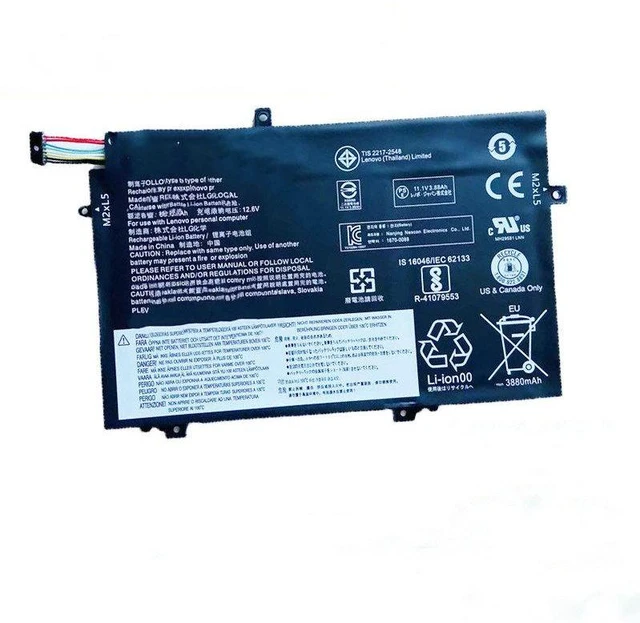
Laptop Battery for Lenovo ThinkPad E480 E580 R580, 11.4V 48Wh L17C3P51 L17L3P51 L17L3P52, High Capacity & Long Cycle Life 12-Month Warranty
- High-Capacity 48Wh / 4200mAh Delivers up to 4-5 hours of reliable runtime for daily work, streaming, and browsing.
- Perfect Fit for Lenovo ThinkPad E480, E580, R580 Directly replaces OEM models L17C3P51, L17L3P51, L17L3P52.
- Triple Safety Protection Built-in overcharge, over-discharge, and short-circuit protection for worry-free use.
- Easy Plug-and-Play Installation No drivers or extra tools required; simply remove your old battery and snap this one in.
- Month Warranty & 30-Day Money-Back Guarantee We stand behind our quality with responsive customer support.
+
+
Overview
Specs
Reviews
**Important
Voltage Warning: **
Please confirm your original battery voltage is ** 11.4V ** before purchasing. Using an incorrect voltage battery may cause system instability or damage. This replacement is NOT compatible with 14.4V / 15.2V models.
**Compatible Models & Part Numbers: **
Laptops: Lenovo ThinkPad E480 (20KN, 20KQ), E580 (20KS, 20KT), R580 (20KV, 20KW)
OEM Batteries: L17C3P51, L17L3P51, L17L3P52, L17M3P51, L17M3P52, SB10K97582, SB10K97583, SB10K97584, SB10K97585, SB10K97586, SB10K97587
**Specifications: **
| Parameter | Value |
|-----------|-------|
| Battery Type | Li-ion |
| Voltage | 11.4V |
| Capacity | 48Wh / 4200mAh |
| Cells | 4-cell |
| Color | Black |
| Dimensions | 270 x 70 x 7.5 mm |
| Net Weight | ~280g |
**Comparison Table OEM vs.
Our Replacement: **
| Feature | OEM Battery | Our Replacement |
|---------|-------------|----------------|
| Voltage | 11.4V | 11.4V |
| Capacity | 48Wh | 48Wh |
| Cycle Life | ~300 cycles | ~500 cycles |
| Safety Certifications | Yes | CE, FCC, RoHS |
| Warranty | 6 months | 12 months |
**Installation Tips: **
1. Shut down your laptop and unplug the AC adapter.
2. Remove the bottom panel screws (refer to your laptop manual).
3. Gently disconnect the old battery cable and lift it out.
4. Insert the new battery, reconnect the cable, and secure the panel.
5. Charge to 100% before first use for optimal performance.
**Note: ** If your laptop does not detect the new battery immediately, please
perform a power reset: disconnect AC, remove battery, hold power button for 30 seconds, then reinstall battery and AC.
Voltage Warning: **
Please confirm your original battery voltage is ** 11.4V ** before purchasing. Using an incorrect voltage battery may cause system instability or damage. This replacement is NOT compatible with 14.4V / 15.2V models.
**Compatible Models & Part Numbers: **
Laptops: Lenovo ThinkPad E480 (20KN, 20KQ), E580 (20KS, 20KT), R580 (20KV, 20KW)
OEM Batteries: L17C3P51, L17L3P51, L17L3P52, L17M3P51, L17M3P52, SB10K97582, SB10K97583, SB10K97584, SB10K97585, SB10K97586, SB10K97587
**Specifications: **
| Parameter | Value |
|-----------|-------|
| Battery Type | Li-ion |
| Voltage | 11.4V |
| Capacity | 48Wh / 4200mAh |
| Cells | 4-cell |
| Color | Black |
| Dimensions | 270 x 70 x 7.5 mm |
| Net Weight | ~280g |
**Comparison Table OEM vs.
Our Replacement: **
| Feature | OEM Battery | Our Replacement |
|---------|-------------|----------------|
| Voltage | 11.4V | 11.4V |
| Capacity | 48Wh | 48Wh |
| Cycle Life | ~300 cycles | ~500 cycles |
| Safety Certifications | Yes | CE, FCC, RoHS |
| Warranty | 6 months | 12 months |
**Installation Tips: **
1. Shut down your laptop and unplug the AC adapter.
2. Remove the bottom panel screws (refer to your laptop manual).
3. Gently disconnect the old battery cable and lift it out.
4. Insert the new battery, reconnect the cable, and secure the panel.
5. Charge to 100% before first use for optimal performance.
**Note: ** If your laptop does not detect the new battery immediately, please
perform a power reset: disconnect AC, remove battery, hold power button for 30 seconds, then reinstall battery and AC.
Warranty & Returns
Warranty, Returns, And Additional Information
Warranty
- Please contact the Seller directly for warranty information. Warranty information may also be found on the Manufacturer's website.
- CONTACT
Return Policies
- Return for refund within: 30 days
- Return for replacement within: 90 days
- This item is covered by xuanlan Return Policy
Manufacturer Contact Info
- For a directory of all our manufacturers, please click below.
- Manufacturers Directory
LOADING...