


- Free 30-day Returns
$50.50
Ships from China.

Meet Your Seller



Visit Xuanlan Store
FOLLOW
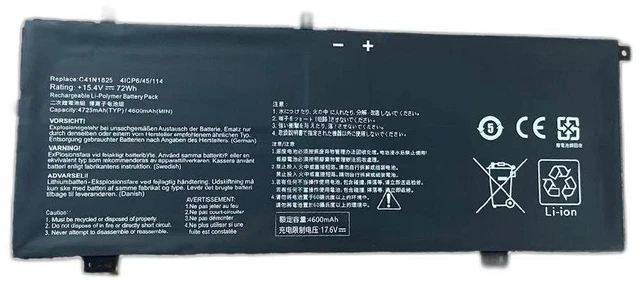
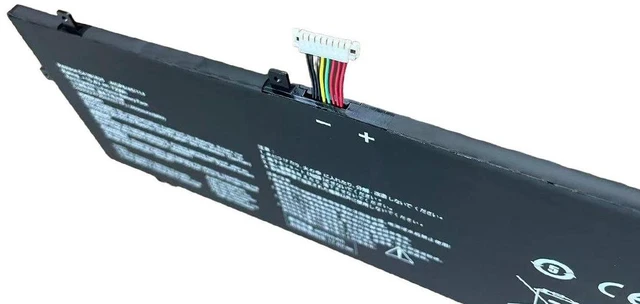
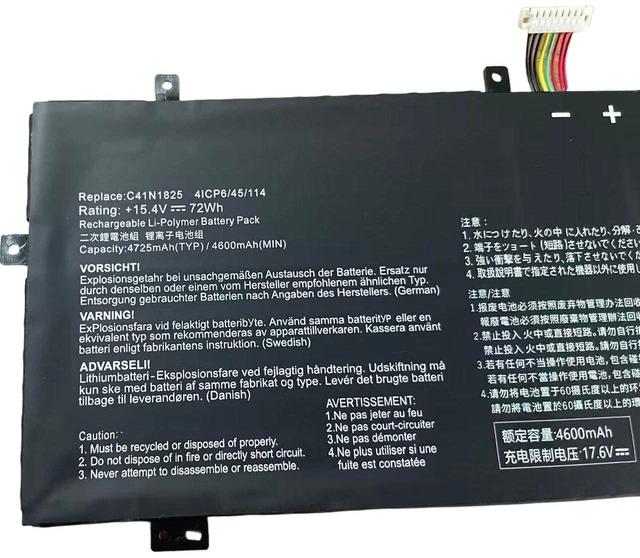
Laptop Battery for ASUS C41N1825, ADOL14F, ADOL14U, X403FA, I403FA 11.55V 42Wh, High Capacity, 1-Year Warranty
- High-Capacity 42Wh Power: 11.55V, 2-cell Li-ion battery delivers reliable, long-lasting performance for your ASUS ADOL14F, ADOL14U, X403FA, and I403FA series laptops.
- Perfect Compatibility: Direct replacement for original ASUS C41N1825 battery fits ADOL14F, ADOL14U, X403FA, I403FA, and more models listed below.
- Safety & Durability: Built with Grade A+ cells, overcharge/over-discharge protection, and short-circuit prevention for safe daily use.
- Easy Installation: Plug-and-play design, no extra drivers or modifications needed simply remove your old battery and install this one.
- Year Warranty & 30-Day Money-Back: We stand behind our product quality. If any issues arise, well replace or refund promptly.
+
+
Overview
Specs
Reviews
**Important
Voltage Warning: **
Please confirm your original battery voltage is ** 11.55V ** before purchasing. Using an incorrect voltage battery may damage your laptop or cause safety hazards. This battery is designed for ASUS models originally equipped with C41N1825 ( 11.55V ).
**Compatible Laptop Models (Partial List): **
- ASUS ADOL14F
- ASUS ADOL14U
- ASUS X403FA
- ASUS I403FA
- ASUS VivoBook 14 (specific variants)
- ASUS VivoBook 15 (specific variants)
**Compatible Original Battery Part Numbers: **
- C41N1825
- C41N1825-1
- C41N1825-2
**Specifications: **
| Parameter | Value |
|-----------|-------|
| Battery Type | Li-ion |
| Voltage | 11.55V |
| Capacity | 42Wh / 3800mAh (typical) |
| Cells | 2-cell |
| Color | Black |
| Weight | Approx. 200g |
| Dimensions | 270 x 70 x 5.5 mm (approx. ) |
**Comparison Table (Original vs.
Replacement): **
| Feature | Original ASUS C41N1825 | Our Replacement |
|---------|------------------------|-----------------|
| Voltage | 11.55V | 11.55V (exact match) |
| Capacity | 42Wh | 42Wh (equal or higher) |
| Cell Grade | Standard | Grade A+ (higher cycle life) |
| Safety Protections | Yes | Overcharge, over-discharge, short-circuit, temperature control |
| Warranty | 1 year (limited) | 1 year (full replacement) |
**Installation Tips: **
1. Power off your laptop and unplug the AC adapter.
2. Remove the bottom cover (screws may vary by model use a suitable screwdriver).
3. Locate the old battery, gently disconnect its cable from the motherboard.
4. Remove the old battery and insert the new one, ensuring the connector clicks firmly.
5. Replace the bottom cover and screws.
6. Plug in the charger and power on the battery should be recognized automatically.
**Note: ** If your laptop does not charge immediately, try a full discharge/charge cycle (use until 5% then charge to 100%). For first-time use, allow the battery to calibrate fully.
**Package Includes: **
- 1 x Replacement Battery (C41N1825 compatible)
-
**Quality Assurance: **
All batteries are tested for capacity, voltage, and safety before shipping. We use only certified cells to ensure stable performance and long lifespan.
**Customer Support: **
If you have any questions about compatibility or installation, please contact us before purchasing. Were here to help!
Voltage Warning: **
Please confirm your original battery voltage is ** 11.55V ** before purchasing. Using an incorrect voltage battery may damage your laptop or cause safety hazards. This battery is designed for ASUS models originally equipped with C41N1825 ( 11.55V ).
**Compatible Laptop Models (Partial List): **
- ASUS ADOL14F
- ASUS ADOL14U
- ASUS X403FA
- ASUS I403FA
- ASUS VivoBook 14 (specific variants)
- ASUS VivoBook 15 (specific variants)
**Compatible Original Battery Part Numbers: **
- C41N1825
- C41N1825-1
- C41N1825-2
**Specifications: **
| Parameter | Value |
|-----------|-------|
| Battery Type | Li-ion |
| Voltage | 11.55V |
| Capacity | 42Wh / 3800mAh (typical) |
| Cells | 2-cell |
| Color | Black |
| Weight | Approx. 200g |
| Dimensions | 270 x 70 x 5.5 mm (approx. ) |
**Comparison Table (Original vs.
Replacement): **
| Feature | Original ASUS C41N1825 | Our Replacement |
|---------|------------------------|-----------------|
| Voltage | 11.55V | 11.55V (exact match) |
| Capacity | 42Wh | 42Wh (equal or higher) |
| Cell Grade | Standard | Grade A+ (higher cycle life) |
| Safety Protections | Yes | Overcharge, over-discharge, short-circuit, temperature control |
| Warranty | 1 year (limited) | 1 year (full replacement) |
**Installation Tips: **
1. Power off your laptop and unplug the AC adapter.
2. Remove the bottom cover (screws may vary by model use a suitable screwdriver).
3. Locate the old battery, gently disconnect its cable from the motherboard.
4. Remove the old battery and insert the new one, ensuring the connector clicks firmly.
5. Replace the bottom cover and screws.
6. Plug in the charger and power on the battery should be recognized automatically.
**Note: ** If your laptop does not charge immediately, try a full discharge/charge cycle (use until 5% then charge to 100%). For first-time use, allow the battery to calibrate fully.
**Package Includes: **
- 1 x Replacement Battery (C41N1825 compatible)
-
**Quality Assurance: **
All batteries are tested for capacity, voltage, and safety before shipping. We use only certified cells to ensure stable performance and long lifespan.
**Customer Support: **
If you have any questions about compatibility or installation, please contact us before purchasing. Were here to help!
Warranty & Returns
Warranty, Returns, And Additional Information
Warranty
- Please contact the Seller directly for warranty information. Warranty information may also be found on the Manufacturer's website.
- CONTACT
Return Policies
- Return for refund within: 30 days
- Return for replacement within: 90 days
- This item is covered by xuanlan Return Policy
Manufacturer Contact Info
- For a directory of all our manufacturers, please click below.
- Manufacturers Directory
LOADING...