


- Free 30-day Returns
$73.34
Ships from China.

Meet Your Seller



Visit Xuanlan Store
FOLLOW
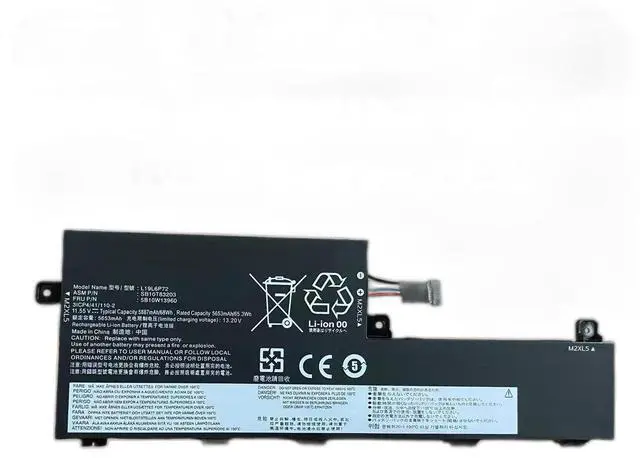
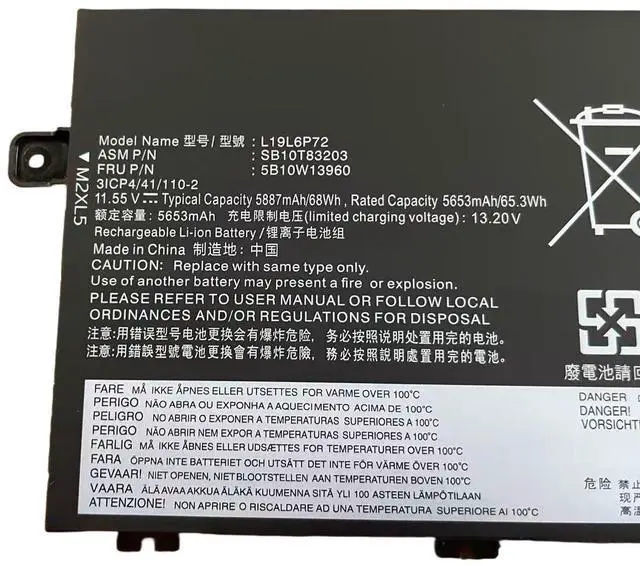
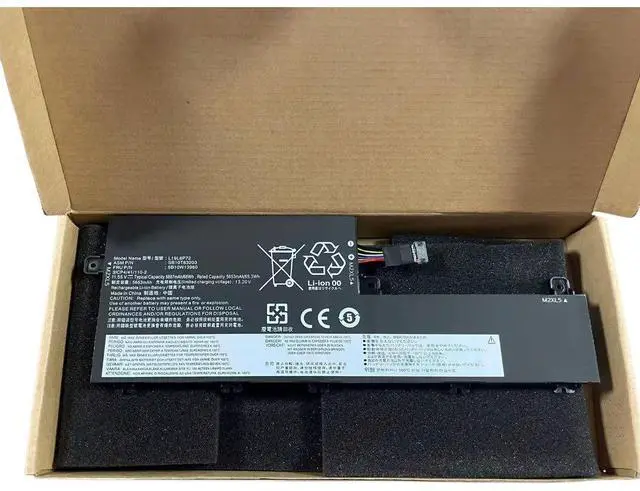
Laptop Battery for Lenovo ThinkPad P15V T15 Gen 1 TP00119A TP00119C TP00119D L19L6P72 11.55V 68Wh, High Capacity
- High-Capacity 68Wh/5900mAh 11.55V Li-ion battery, exceeds OEM standard for longer work sessions.
- Direct replacement for Lenovo TP00119A, TP00119C, TP00119D, L19L6P72, and L19C6P72 models.
- Compatible with Lenovo ThinkPad P15V Gen 1, T15 Gen 1, and T15p Gen 1 series laptops.
- Built-in overcharge, over-discharge, and short-circuit protection for safe and stable performance.
- month warranty and 30-day money-back guarantee for peace of mind.
+
+
Overview
Specs
Reviews
**Important
Voltage Warning: **
Please confirm your original battery voltage is ** 11.55V ** before purchasing. Using an incorrect voltage battery may cause charging failure or damage to your device. This battery is NOT compatible with 11.1V or 14.4V models.
**Compatibility List: **
- Lenovo ThinkPad P15V Gen 1 (all configurations)
- Lenovo ThinkPad T15 Gen 1 (all configurations)
- Lenovo ThinkPad T15p Gen 1 (all configurations)
**Replacement Part Numbers: **
TP00119A, TP00119C, TP00119D, L19L6P72, L19C6P72, SB10S97531, SB10S97533, SB10S97535, 5B10W13929, 5B10W13930
**Specifications Table: **
| Parameter | Value |
|-----------|-------|
| Battery Type | Li-ion |
| Voltage | 11.55V |
| Capacity | 68Wh / 5900mAh |
| Cell Count | 6 cells |
| Color | Black |
| Weight | Approx. 350g |
| Certification | CE, FCC, RoHS |
**Comparison Table (OEM vs Replacement): **
| Feature | Original Lenovo Battery | Our Replacement Battery |
|---------|-------------------------|-------------------------|
| Voltage | 11.55V | 11.55V (exact match) |
| Capacity | 68Wh | 68Wh (same or higher) |
| Safety Protection | Yes | Yes (overcharge, over-discharge, short-circuit, over-temperature) |
| Warranty | 12 months (limited) | 12 months (full replacement) |
| Price | High | Affordable |
**Installation Tips: **
1. Power off your laptop and unplug the AC adapter before installation.
2. Remove the old battery by sliding the release latches (if applicable) or unscrewing the bottom panel.
3. Align the new battery connector with the motherboard port and press gently until it clicks into place.
4. Secure the battery with screws (if any) and close the bottom cover.
5. Charge the battery fully (3-4 hours) before first use for optimal performance.
6. If the battery is not detected, try
a hard reset: disconnect AC, remove battery, hold power button for 30 seconds, then reinstall battery and AC.
**Note: ** This is a compatible replacement, not an original Lenovo product. All trademarks are property of their respective owners.
Voltage Warning: **
Please confirm your original battery voltage is ** 11.55V ** before purchasing. Using an incorrect voltage battery may cause charging failure or damage to your device. This battery is NOT compatible with 11.1V or 14.4V models.
**Compatibility List: **
- Lenovo ThinkPad P15V Gen 1 (all configurations)
- Lenovo ThinkPad T15 Gen 1 (all configurations)
- Lenovo ThinkPad T15p Gen 1 (all configurations)
**Replacement Part Numbers: **
TP00119A, TP00119C, TP00119D, L19L6P72, L19C6P72, SB10S97531, SB10S97533, SB10S97535, 5B10W13929, 5B10W13930
**Specifications Table: **
| Parameter | Value |
|-----------|-------|
| Battery Type | Li-ion |
| Voltage | 11.55V |
| Capacity | 68Wh / 5900mAh |
| Cell Count | 6 cells |
| Color | Black |
| Weight | Approx. 350g |
| Certification | CE, FCC, RoHS |
**Comparison Table (OEM vs Replacement): **
| Feature | Original Lenovo Battery | Our Replacement Battery |
|---------|-------------------------|-------------------------|
| Voltage | 11.55V | 11.55V (exact match) |
| Capacity | 68Wh | 68Wh (same or higher) |
| Safety Protection | Yes | Yes (overcharge, over-discharge, short-circuit, over-temperature) |
| Warranty | 12 months (limited) | 12 months (full replacement) |
| Price | High | Affordable |
**Installation Tips: **
1. Power off your laptop and unplug the AC adapter before installation.
2. Remove the old battery by sliding the release latches (if applicable) or unscrewing the bottom panel.
3. Align the new battery connector with the motherboard port and press gently until it clicks into place.
4. Secure the battery with screws (if any) and close the bottom cover.
5. Charge the battery fully (3-4 hours) before first use for optimal performance.
6. If the battery is not detected, try
a hard reset: disconnect AC, remove battery, hold power button for 30 seconds, then reinstall battery and AC.
**Note: ** This is a compatible replacement, not an original Lenovo product. All trademarks are property of their respective owners.
Warranty & Returns
Warranty, Returns, And Additional Information
Warranty
- Please contact the Seller directly for warranty information. Warranty information may also be found on the Manufacturer's website.
- CONTACT
Return Policies
- Return for refund within: 30 days
- Return for replacement within: 90 days
- This item is covered by xuanlan Return Policy
Manufacturer Contact Info
- For a directory of all our manufacturers, please click below.
- Manufacturers Directory
LOADING...