


- Free 30-day Returns
$43.28
Ships from China.

Meet Your Seller


Visit Xuanlan Store
FOLLOW
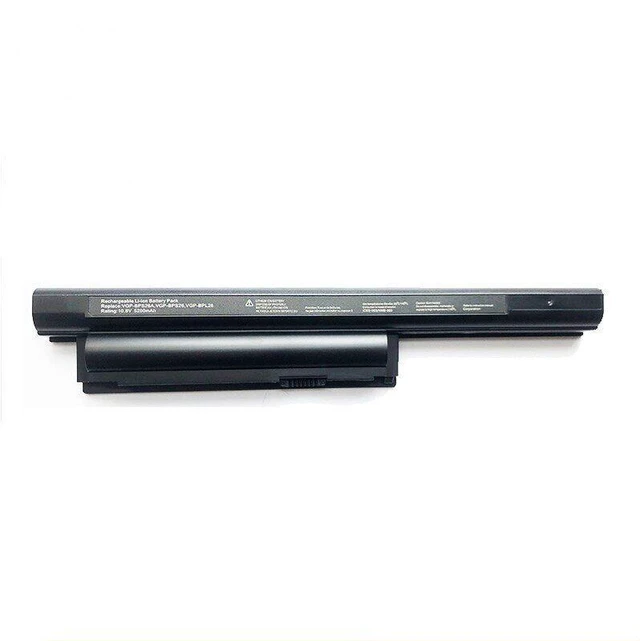
Laptop Battery for Sony VGP-BPS26, Compatible with VPCEG-211T/111T/212T, VPCEH Series, 11.1V 4400mAh 48Wh Li-ion, High Capacity
- High Capacity & Long Life: 4400mAh / 48Wh Li-ion battery delivers reliable power for extended work and entertainment sessions.
- Perfect Fit Compatibility: Designed for Sony VGP-BPS26 series, fully compatible with VPCEG-211T, VPCEG-111T, VPCEG-212T, VPCEH models.
- Safety & Protection: Built-in overcharge, over-discharge, short circuit, and overheat protection circuits ensure safe daily use.
- Easy Installation: Direct drop-in replacement with no extra tools or drivers required; factory-tested for plug-and-play performance.
- Month Warranty & Support: Backed by a 12-month replacement warranty and responsive customer service for peace of mind.
+
+
Overview
Specs
Reviews
**Important
Voltage Warning: **
Please confirm that your original battery voltage is ** 11.1V **. Using an incorrect voltage battery may cause system damage or fire hazard. This replacement is strictly for 11.1V Sony laptops.
**Compatibility List (Not exhaustive): **
- Sony VAIO VPCEG-211T
- Sony VAIO VPCEG-111T
- Sony VAIO VPCEG-212T
- Sony VAIO VPCEH Series (e. g., VPCEH1S1E, VPCEH2M1E, VPCEH3J1E, etc. )
- Sony VGP-BPS26 (Original Part Number)
**Specifications Table: **
| Parameter | Value |
|-----------|-------|
| Battery Type | Li-ion |
| Voltage | 11.1V |
| Capacity | 4400mAh / 48Wh |
| Cells | 6-cell |
| Color | Black |
| Weight | Approx. 320g |
| Warranty | 12 Months |
**Comparison Table (Replacement vs Original): **
| Feature | Our Replacement | Original Sony VGP-BPS26 |
|---------|----------------|------------------------|
| Voltage | 11.1V | 11.1V |
| Capacity | 4400mAh | 4400mAh |
| Safety Circuits | Overcharge/Discharge/Short Circuit/Overheat | Overcharge/Discharge/Short Circuit/Overheat |
| Price | Affordable | Premium |
| Warranty | 12 Months | Varies |
**Installation Tips: **
1. Power off your laptop and unplug the AC adapter.
2. Remove the battery latch or slide lock (if applicable).
3. Gently slide out the old battery.
4. Insert the new battery until it clicks into place.
5. Charge the battery fully before first use (about 4-6 hours).
6. For optimal lifespan, avoid deep discharge (below 10%) and store in a cool, dry place.
**Note: ** This is a third-party replacement battery, not an original Sony product. It is fully tested for compatibility and performance. If you experience any issues, please contact us for immediate support.
Voltage Warning: **
Please confirm that your original battery voltage is ** 11.1V **. Using an incorrect voltage battery may cause system damage or fire hazard. This replacement is strictly for 11.1V Sony laptops.
**Compatibility List (Not exhaustive): **
- Sony VAIO VPCEG-211T
- Sony VAIO VPCEG-111T
- Sony VAIO VPCEG-212T
- Sony VAIO VPCEH Series (e. g., VPCEH1S1E, VPCEH2M1E, VPCEH3J1E, etc. )
- Sony VGP-BPS26 (Original Part Number)
**Specifications Table: **
| Parameter | Value |
|-----------|-------|
| Battery Type | Li-ion |
| Voltage | 11.1V |
| Capacity | 4400mAh / 48Wh |
| Cells | 6-cell |
| Color | Black |
| Weight | Approx. 320g |
| Warranty | 12 Months |
**Comparison Table (Replacement vs Original): **
| Feature | Our Replacement | Original Sony VGP-BPS26 |
|---------|----------------|------------------------|
| Voltage | 11.1V | 11.1V |
| Capacity | 4400mAh | 4400mAh |
| Safety Circuits | Overcharge/Discharge/Short Circuit/Overheat | Overcharge/Discharge/Short Circuit/Overheat |
| Price | Affordable | Premium |
| Warranty | 12 Months | Varies |
**Installation Tips: **
1. Power off your laptop and unplug the AC adapter.
2. Remove the battery latch or slide lock (if applicable).
3. Gently slide out the old battery.
4. Insert the new battery until it clicks into place.
5. Charge the battery fully before first use (about 4-6 hours).
6. For optimal lifespan, avoid deep discharge (below 10%) and store in a cool, dry place.
**Note: ** This is a third-party replacement battery, not an original Sony product. It is fully tested for compatibility and performance. If you experience any issues, please contact us for immediate support.
Warranty & Returns
Warranty, Returns, And Additional Information
Warranty
- Please contact the Seller directly for warranty information. Warranty information may also be found on the Manufacturer's website.
- CONTACT
Return Policies
- Return for refund within: 30 days
- Return for replacement within: 90 days
- This item is covered by xuanlan Return Policy
Manufacturer Contact Info
- For a directory of all our manufacturers, please click below.
- Manufacturers Directory
LOADING...