


- Free 30-day Returns
$38.47
Ships from China.

Meet Your Seller


Visit Xuanlan Store
FOLLOW
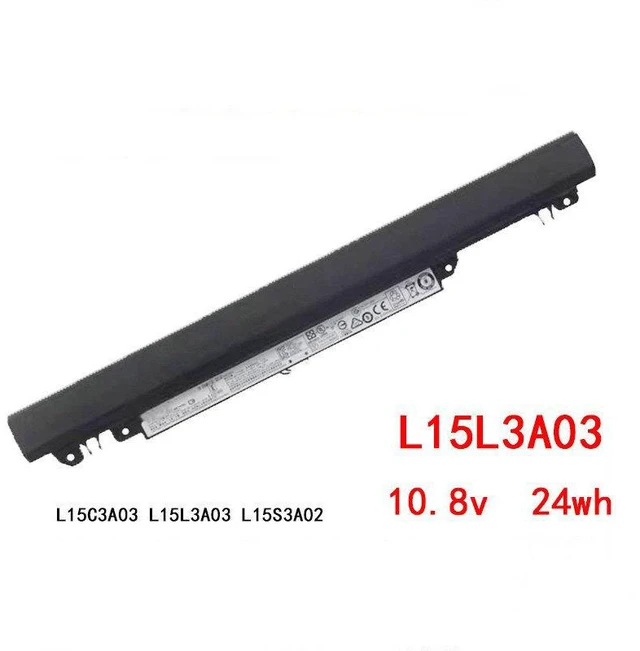
Battery for Lenovo Ideapad 110-15ACL 110-14 L15L3A03 L15S3A02, 11.4V 32Wh Li-ion, High Capacity, 1-Year Warranty
- Perfect Fit for Lenovo Ideapad 110-15ACL, 110-14, 110-15IKB, 110-15IBR Series
- Compatible with Original Models: L15L3A03, L15S3A02, L15M3A02, L15L2A02, L15M2A02
- High-Capacity 32Wh / 2800mAh 11.4V Li-ion Battery Longer Runtime & Stable Power
- Built-in Smart IC Chip Prevents Overcharge, Overheat, and Short Circuit
- Year Warranty & 30-Day Money-Back Guarantee Risk-Free Purchase
+
+
Overview
Specs
Reviews
**Important
Voltage Warning: **
Please confirm your original battery voltage is ** 11.4V ** before purchasing. Using an incorrect voltage may damage your device. This battery is NOT compatible with 7.6V or 14.4V models.
**Compatible Lenovo Laptop Models (Partial List): **
- Ideapad 110-14IBR
- Ideapad 110-15ACL
- Ideapad 110-15IKB
- Ideapad 110-15IBR
- Ideapad 110-15AST
- Ideapad 110-17ACL
- Ideapad 110-17IKB
**Replaces Original Part Numbers: **
L15L3A03, L15S3A02, L15M3A02, L15L2A02, L15M2A02, L15C3A02, L15C2A02, L15S2A02, L15L2A03, L15M2A03, L15S3A03, L15L3A02, L15M3A03, L15C3A03, L15C2A03, L15S2A03, L15L2A04, L15M2A04, L15S2A04, L15C2A04, L15L3A04, L15M3A04, L15S3A04, L15C3A04
**Product
| Specification |
|---------------|---------|
| Battery Type | Li-ion (Lithium-ion) |
| Voltage | 11.4V |
| Capacity | 32Wh / 2800mAh |
| Color | Black |
| Cell Quality | Grade A+ Certified Cells |
| Protection | Overcharge, Over-discharge, Overheat, Short Circuit |
| Certification | CE, FCC, RoHS |
**Comparison Table Original vs Replacement: **
| Feature | Original Battery | Our Replacement |
|----------|------------------|----------------|
| Voltage | 11.4V | 11.4V (Exact Match) |
| Capacity | 32Wh | 32Wh (Same or Higher) |
| Cell Grade | Standard | Grade A+ (Longer Life) |
| Protection IC | Yes | Yes (Upgraded Smart IC) |
| Warranty | Limited | 1-Year Full Warranty |
**Installation Tips: **
1. Power off your laptop and unplug the AC adapter.
2. Remove the back cover carefully using a plastic pry tool.
3. Disconnect the old battery cable from the motherboard.
4. Remove the screws securing the old battery.
5. Insert the new battery, tighten screws, reconnect cable.
6. Replace the back cover and charge fully before first use.
**Note: ** If your laptop does not detect the battery immediately, please
perform a hard reset:
- Unplug AC adapter, remove battery, press and hold power button for 30 seconds, then reinstall battery and plug in.
**Package Includes: **
1 x Replacement Battery
1 x Installation Guide (digital copy available upon request)
**Quality Assurance: **
Every battery undergoes strict testing for voltage, capacity, and safety before shipping. We stand behind our product with a 1-year warranty and 30-day hassle-free return policy.
**Why Choose Us? **
- Direct factory source competitive price without sacrificing quality
- Fast shipping from local warehouse
- Responsive customer support we reply within 24 hours
Order with confidence your Lenovo Ideapad will run like new again!
Voltage Warning: **
Please confirm your original battery voltage is ** 11.4V ** before purchasing. Using an incorrect voltage may damage your device. This battery is NOT compatible with 7.6V or 14.4V models.
**Compatible Lenovo Laptop Models (Partial List): **
- Ideapad 110-14IBR
- Ideapad 110-15ACL
- Ideapad 110-15IKB
- Ideapad 110-15IBR
- Ideapad 110-15AST
- Ideapad 110-17ACL
- Ideapad 110-17IKB
**Replaces Original Part Numbers: **
L15L3A03, L15S3A02, L15M3A02, L15L2A02, L15M2A02, L15C3A02, L15C2A02, L15S2A02, L15L2A03, L15M2A03, L15S3A03, L15L3A02, L15M3A03, L15C3A03, L15C2A03, L15S2A03, L15L2A04, L15M2A04, L15S2A04, L15C2A04, L15L3A04, L15M3A04, L15S3A04, L15C3A04
**Product
Specifications
: **| Specification |
Details
||---------------|---------|
| Battery Type | Li-ion (Lithium-ion) |
| Voltage | 11.4V |
| Capacity | 32Wh / 2800mAh |
| Color | Black |
| Cell Quality | Grade A+ Certified Cells |
| Protection | Overcharge, Over-discharge, Overheat, Short Circuit |
| Certification | CE, FCC, RoHS |
**Comparison Table Original vs Replacement: **
| Feature | Original Battery | Our Replacement |
|----------|------------------|----------------|
| Voltage | 11.4V | 11.4V (Exact Match) |
| Capacity | 32Wh | 32Wh (Same or Higher) |
| Cell Grade | Standard | Grade A+ (Longer Life) |
| Protection IC | Yes | Yes (Upgraded Smart IC) |
| Warranty | Limited | 1-Year Full Warranty |
**Installation Tips: **
1. Power off your laptop and unplug the AC adapter.
2. Remove the back cover carefully using a plastic pry tool.
3. Disconnect the old battery cable from the motherboard.
4. Remove the screws securing the old battery.
5. Insert the new battery, tighten screws, reconnect cable.
6. Replace the back cover and charge fully before first use.
**Note: ** If your laptop does not detect the battery immediately, please
perform a hard reset:
- Unplug AC adapter, remove battery, press and hold power button for 30 seconds, then reinstall battery and plug in.
**Package Includes: **
1 x Replacement Battery
1 x Installation Guide (digital copy available upon request)
**Quality Assurance: **
Every battery undergoes strict testing for voltage, capacity, and safety before shipping. We stand behind our product with a 1-year warranty and 30-day hassle-free return policy.
**Why Choose Us? **
- Direct factory source competitive price without sacrificing quality
- Fast shipping from local warehouse
- Responsive customer support we reply within 24 hours
Order with confidence your Lenovo Ideapad will run like new again!
Warranty & Returns
Warranty, Returns, And Additional Information
Warranty
- Please contact the Seller directly for warranty information. Warranty information may also be found on the Manufacturer's website.
- CONTACT
Return Policies
- Return for refund within: 30 days
- Return for replacement within: 90 days
- This item is covered by xuanlan Return Policy
Manufacturer Contact Info
- For a directory of all our manufacturers, please click below.
- Manufacturers Directory
LOADING...