


- Free 30-day Returns
$56.51
Ships from China.

Meet Your Seller



Visit Xuanlan Store
FOLLOW
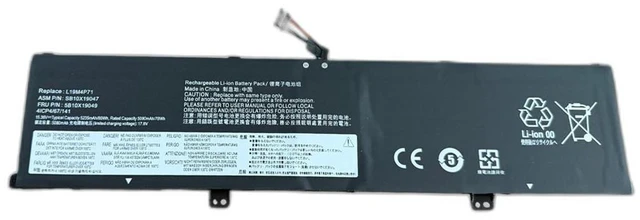
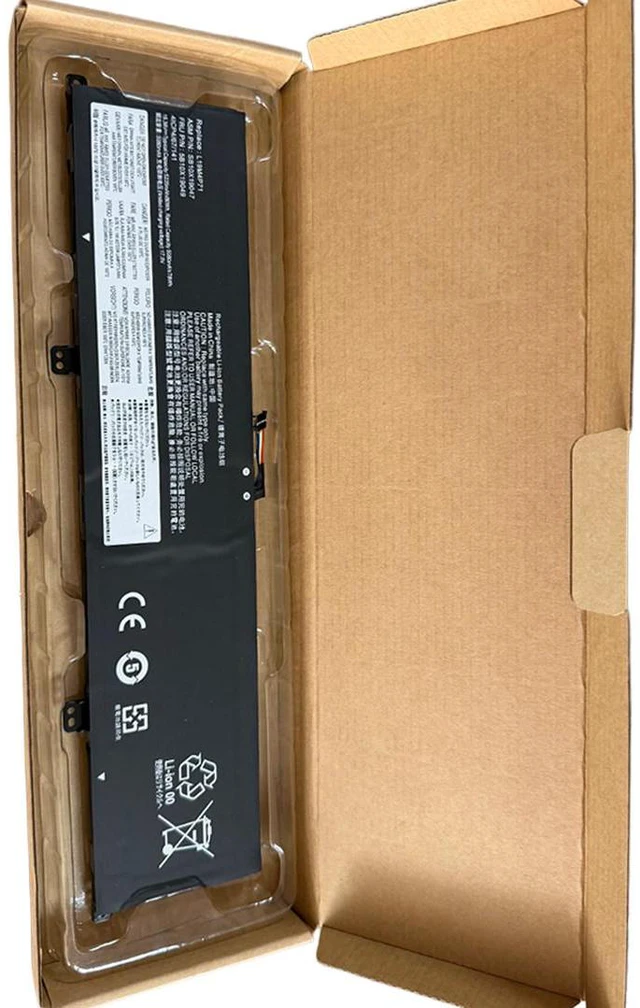
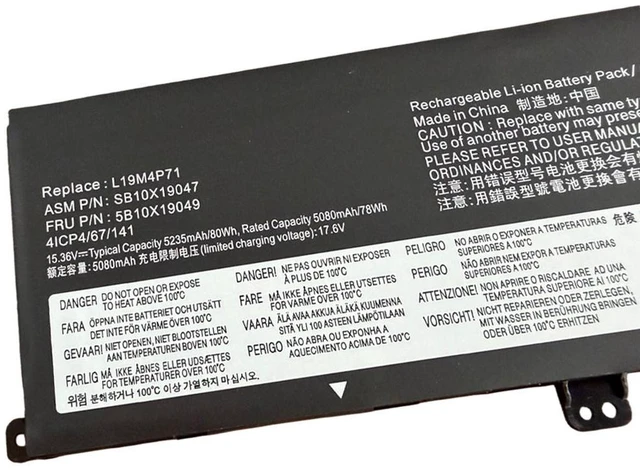
New L19M4P71 Laptop Battery, 15.36V 80Wh 4Cell Liion, Compatible with Lenovo ThinkPad X1 Extreme Gen 3, P1 Gen 3 TP00099D Notebook, PN:5B10X19049 SB10X19047
- **Perfect Fit for ThinkPad X1 Extreme Gen 3 & P1 Gen 3** Direct replacement for OEM models L19M4P71 and TP00099D, ensuring seamless compatibility and easy installation.
- **High Capacity 80Wh / 15.36V** Delivers reliable, long-lasting power for your demanding workflow, from design rendering to data analysis.
- **Grade A+ Battery Cells** Built with premium lithium-ion cells for stable voltage output, overcharge protection, and extended cycle life.
- **Rigorous Safety Testing** Passes CE, FCC, and RoHS certifications; built-in protection against short circuit, overheat, and overcurrent.
- **12-Month Warranty & 30-Day Money-Back Guarantee** Buy with confidence; we stand behind every battery we sell.
+
+
Overview
Specs
Reviews
**Compatible Models & Part Numbers**
This battery is specifically designed for:
- Lenovo ThinkPad X1 Extreme Gen 3 (X1E3)
- Lenovo ThinkPad P1 Gen 3
- OEM Part Numbers: L19M4P71, TP00099D, L19L4P71, 5B10W13980, 5B10W13981
** Important Voltage Warning**
Please verify your original battery voltage before purchasing. This battery is ** 15.6V / 56Wh**. Using an incorrect voltage battery may cause system instability or damage. If your original battery is 11.4V or 14.4V, this product is **not compatible**.
**Product Specifications**
| Specification |
Details
|
|---------------|---------|
| Battery Type | Li-ion (Lithium-ion) |
| Voltage | 15.6V |
| Capacity | 80Wh / |
| Cell Quality | Grade A+ |
| Color | Black |
| Weight | Approx. 350g |
| Dimensions | 280 x 80 x 8 mm (approx. ) |
| Certifications | CE, FCC, RoHS |
**Compatibility Comparison Table**
| Feature | Our Battery ( 15.6V 56Wh) | Original Lenovo Battery |
|---------|--------------------------|-------------------------|
| Voltage | 15.6V | 15.6V |
| Capacity | 80Wh | 56Wh |
| Cell Grade | Grade A+ | OEM Grade |
| Safety Protections | Overcharge, Overdischarge, Short Circuit, Overheat | Same |
| Warranty | 12 Months | 12 Months (original) |
| Price | Competitive | Higher |
**Installation Tips**
1. **Power off your laptop** and disconnect the AC adapter.
2. Remove the bottom cover using a Phillips #0 screwdriver.
3. Locate the battery connector and gently disconnect the cable from the motherboard.
4. Remove the screws securing the old battery, then lift it out.
5. Insert the new battery, reconnect the cable, and secure with screws.
6. Replace the bottom cover, plug in the charger, and let the battery charge to 100% before first use.
7. For best performance, calibrate the battery once a month: fully charge, then discharge to 10% and recharge.
**Why Choose Our Battery? **
- **100% Compatibility** Tested to work flawlessly with ThinkPad X1 Extreme Gen 3 and P1 Gen 3.
- **Longer Lifespan** High-quality cells reduce degradation, giving you 500+ charge cycles.
- **Safe & Reliable** Built-in BMS (Battery Management System) prevents overcharging and overheating.
- **Fast Shipping** Orders processed within 24 hours, shipped from local warehouse.
- **Customer Support** We reply within 24 hours for any questions or issues.
**Package Includes**
- 1x Replacement Battery (L19M4P71 / TP00099D)
-
- (digital)
**Note: ** This is a third-party replacement battery, not an original Lenovo product. It is fully compatible and meets or exceeds OEM specifications. Please check your laptop model and original battery part number before ordering.
**Order with confidence we guarantee your satisfaction! **
Warranty & Returns
Warranty, Returns, And Additional Information
Warranty
- Please contact the Seller directly for warranty information. Warranty information may also be found on the Manufacturer's website.
- CONTACT
Return Policies
- Return for refund within: 30 days
- Return for replacement within: 90 days
- This item is covered by xuanlan Return Policy
Manufacturer Contact Info
- For a directory of all our manufacturers, please click below.
- Manufacturers Directory
LOADING...