


- Free 30-day Returns
$49.30
Ships from China.

Meet Your Seller


Visit Xuanlan Store
FOLLOW
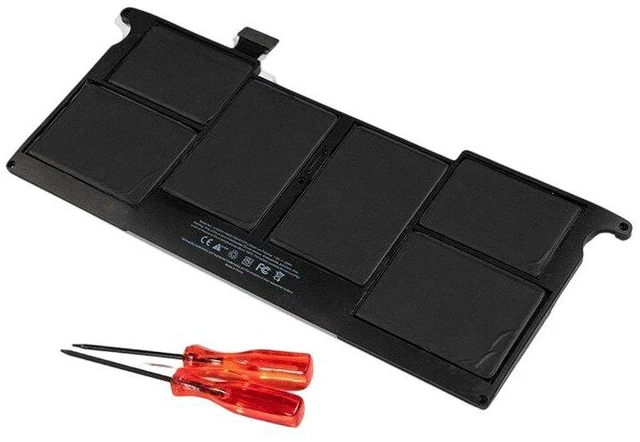
Battery for Apple MacBook Air 11" A1465 2013-2015 A1495, 7.6V 38Wh, Compatible with MD711LL/A MD712LL/A MJVP2LL/A, 1-Year Warranty
- High-Capacity 38Wh / 5020mAh Li-Polymer Core: Delivers up to 9 hours of web browsing or 8 hours of video playback, matching original runtime for your MacBook Air 11" (2013-2015).
- Precision Fit for A1465 & A1495 Models: Designed specifically for 11-inch MacBook Air (Mid 2013, Early 2014, Early 2015), including MD711LL/A, MD712LL/A, MJVP2LL/A.
- Multi-Layer Safety Protection: Built-in overcharge, over-discharge, short circuit, and temperature protection circuits, certified with CE, FCC, and RoHS standards.
- Easy DIY Installation: Includes necessary screwdrivers and spudger tool, with step-by-step video guide available. No technical experience required.
- Month Warranty & 30-Day Money-Back: Risk-free purchase with responsive customer support and fast replacement or refund if any issue arises.
+
+
Overview
Specs
Reviews
**Important
Voltage & Compatibility Warning: **
Please verify your original battery voltage is 7.6V (not 7.2V or 11.4V ). This battery is ONLY compatible with MacBook Air 11" models A1465 (2013-2015) and A1495. It will NOT fit 13-inch MacBook Air, MacBook Pro, or any other model. Check your laptops bottom case for model number before ordering.
**Compatible Models & Part Numbers: **
- Apple MacBook Air 11" A1465 (Mid 2013, Early 2014, Early 2015)
- Apple MacBook Air 11" A1495 (Mid 2013, Early 2014, Early 2015)
- Replaces original battery part numbers: A1465, A1495, 020-7851, 020-7852, 020-7853, 616-0616, 616-0617, 616-0618
- Compatible with laptop models: MD711LL/A, MD712LL/A, MJVP2LL/A, MJVP2LL/A, MJVP2LL/A
**Specifications: **
| Parameter | Value |
|-----------|-------|
| Battery Type | Li-Polymer (Rechargeable) |
| Voltage | 7.6V |
| Capacity | 38Wh / 5020mAh |
| Cell Count | 4 cells |
| Color | Black |
| Weight | Approx. 220g |
| Dimensions | 27.3 x 19.5 x 0.6 cm |
| Cycle Life | 500+ charge cycles (80% capacity retention) |
| Certifications | CE, FCC, RoHS, UL |
**Comparison Table: Original vs. This Replacement**
| Feature | Original Apple Battery | This Replacement |
|---------|-----------------------|------------------|
| Voltage | 7.6V | 7.6V (exact match) |
| Capacity | 38Wh | 38Wh (same) |
| Cell Quality | OEM | Grade A+ Li-Polymer |
| Safety Protections | Yes | Yes (overcharge, short circuit, etc. ) |
| Warranty | 1 year (limited) | 12 months (full coverage) |
| Price | High | Affordable |
**Installation Tips: **
1. Power off your MacBook Air and disconnect the charger.
2. Remove the 10 P5 pentalobe screws on the bottom case (screwdriver included).
3. Gently lift the bottom case and locate the battery connector.
4. Carefully disconnect the battery cable from the logic board (use the spudger tool if needed).
5. Remove the 4 Phillips screws securing the battery (keep screws safe).
6. Lift out the old battery and place the new battery in the same position.
7. Reconnect the battery cable, then replace the bottom case and screws.
8. Charge the battery to 100% before first use for optimal calibration.
**Note: ** If your MacBook Air shows a Service Battery warning after installation, reset the SMC (System
Management Controller):
- Shut down, plug in MagSafe charger, press Shift+Control+Option+Power for 10 seconds, then release all keys and press Power to start.
**Package Includes: **
- 1 x Replacement Battery
- 1 x P5 Pentalobe Screwdriver
- 1 x Phillips Screwdriver
- 1 x Spudger Tool
(with QR code for video guide)
**Quality Assurance: **
Each battery undergoes 48-hour aging test, capacity test, and voltage stability test before shipping. We stand behind our product with a 12-month warranty and 30-day hassle-free return policy. If you have any questions, our support team will respond within 24 hours.
**Order with confidence give your MacBook Air 11" a new life today! **
Voltage & Compatibility Warning: **
Please verify your original battery voltage is 7.6V (not 7.2V or 11.4V ). This battery is ONLY compatible with MacBook Air 11" models A1465 (2013-2015) and A1495. It will NOT fit 13-inch MacBook Air, MacBook Pro, or any other model. Check your laptops bottom case for model number before ordering.
**Compatible Models & Part Numbers: **
- Apple MacBook Air 11" A1465 (Mid 2013, Early 2014, Early 2015)
- Apple MacBook Air 11" A1495 (Mid 2013, Early 2014, Early 2015)
- Replaces original battery part numbers: A1465, A1495, 020-7851, 020-7852, 020-7853, 616-0616, 616-0617, 616-0618
- Compatible with laptop models: MD711LL/A, MD712LL/A, MJVP2LL/A, MJVP2LL/A, MJVP2LL/A
**Specifications: **
| Parameter | Value |
|-----------|-------|
| Battery Type | Li-Polymer (Rechargeable) |
| Voltage | 7.6V |
| Capacity | 38Wh / 5020mAh |
| Cell Count | 4 cells |
| Color | Black |
| Weight | Approx. 220g |
| Dimensions | 27.3 x 19.5 x 0.6 cm |
| Cycle Life | 500+ charge cycles (80% capacity retention) |
| Certifications | CE, FCC, RoHS, UL |
**Comparison Table: Original vs. This Replacement**
| Feature | Original Apple Battery | This Replacement |
|---------|-----------------------|------------------|
| Voltage | 7.6V | 7.6V (exact match) |
| Capacity | 38Wh | 38Wh (same) |
| Cell Quality | OEM | Grade A+ Li-Polymer |
| Safety Protections | Yes | Yes (overcharge, short circuit, etc. ) |
| Warranty | 1 year (limited) | 12 months (full coverage) |
| Price | High | Affordable |
**Installation Tips: **
1. Power off your MacBook Air and disconnect the charger.
2. Remove the 10 P5 pentalobe screws on the bottom case (screwdriver included).
3. Gently lift the bottom case and locate the battery connector.
4. Carefully disconnect the battery cable from the logic board (use the spudger tool if needed).
5. Remove the 4 Phillips screws securing the battery (keep screws safe).
6. Lift out the old battery and place the new battery in the same position.
7. Reconnect the battery cable, then replace the bottom case and screws.
8. Charge the battery to 100% before first use for optimal calibration.
**Note: ** If your MacBook Air shows a Service Battery warning after installation, reset the SMC (System
Management Controller):
- Shut down, plug in MagSafe charger, press Shift+Control+Option+Power for 10 seconds, then release all keys and press Power to start.
**Package Includes: **
- 1 x Replacement Battery
- 1 x P5 Pentalobe Screwdriver
- 1 x Phillips Screwdriver
- 1 x Spudger Tool
(with QR code for video guide)
**Quality Assurance: **
Each battery undergoes 48-hour aging test, capacity test, and voltage stability test before shipping. We stand behind our product with a 12-month warranty and 30-day hassle-free return policy. If you have any questions, our support team will respond within 24 hours.
**Order with confidence give your MacBook Air 11" a new life today! **
Warranty & Returns
Warranty, Returns, And Additional Information
Warranty
- Please contact the Seller directly for warranty information. Warranty information may also be found on the Manufacturer's website.
- CONTACT
Return Policies
- Return for refund within: 30 days
- Return for replacement within: 90 days
- This item is covered by xuanlan Return Policy
Manufacturer Contact Info
- For a directory of all our manufacturers, please click below.
- Manufacturers Directory
LOADING...