
Your Browsing History
- Free 30-day Returns
$57.71
Ships from China.

Meet Your Seller


Visit Xuanlan Store
FOLLOW
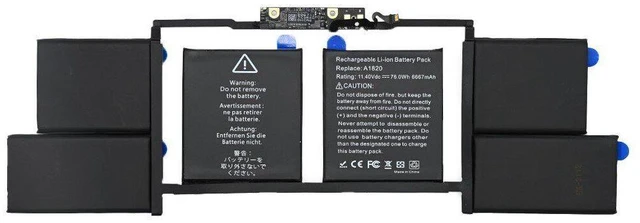
11.4V 76Wh Li-Polymer Battery for Apple MacBook Pro 15" Retina 2017 A1707/A1820 & MPT Series 12-Month Warranty
- High-Capacity 76Wh / 11.4V Li-Polymer Cell Restores your original runtime, outperforming degraded OEM batteries for all-day productivity.
- Precision Fit for MacBook Pro 15" Retina 2017 (A1707) Exact replacement for model A1820, no modification required, easy drop-in installation.
- Advanced Safety Protection Built-in overcharge, over-discharge, short circuit, and temperature control circuits for worry-free daily use.
- % Compatibility with macOS Supports battery health management, cycle count tracking, and accurate remaining charge display.
- Month Warranty & Dedicated Support Risk-free purchase with fast replacement or refund if any issues arise within the warranty period.
+
+
Overview
Specs
Reviews
**Important Voltage & Compatibility Warning**
This battery is specifically designed for the **Apple MacBook Pro 15" Retina (Mid 2017, Model A1707)** with original battery part number **A1820**.
**Do NOT use this battery in any other MacBook model** (e. g., A1398, A1618, A1990, A2141) incorrect voltage or connector may cause permanent damage.
Please verify your laptops model number on the bottom case (e. g., A1707) before ordering.
**Compatible Model Numbers**
- Laptop Models: A1707 (MacBook Pro 15" Retina 2017)
- Battery Part Numbers: A1820
- Specific Configurations: MPTT2LL/A, MPTV2LL/A, MPTU2LL/A, MPTX2LL/A, MPTP2LL/A, MPTR2LL/A, MPTS2LL/A, MPTW2LL/A
**Technical Specifications**
| Parameter | Value |
|-----------|-------|
| Voltage | 11.4V (nominal) |
| Capacity | 76Wh (6600mAh typical) |
| Cell Type | Li-Polymer (Lithium Polymer) |
| Battery Part Number | A1820 |
| Compatible Laptop Model | Apple MacBook Pro 15" Retina 2017 (A1707) |
| Cycle Life | 500+ cycles (under normal use) |
| Operating Temperature | 0°C ~ 45°C (charging) / -10°C ~ 60°C (discharging) |
| Safety Certifications | CE, FCC, RoHS, UL (cell-level) |
| Warranty | 12 months |
**Why Choose This Replacement Battery? **
- **Restore Full Performance** If your current battery shows Service Recommended or Replace Now in macOS, or lasts less than 2 hours, this 76Wh replacement will bring back your original runtime (up to 8-10 hours of web browsing).
- **Premium Grade A Cells** We use high-quality Li-Polymer cells with strict voltage matching, ensuring stable power delivery and minimal swelling risk.
- **Easy Installation** Comes with the necessary adhesive strips and a detailed video guide. Installation takes about 15-20 minutes with basic tools (P5 Pentalobe and Tri-point Y00 screwdrivers).
- **Full macOS Integration** The battery communicates correctly with the system, so youll see accurate percentage, cycle count, and health status in the menu bar and System Report.
**Installation Tips**
1. Power off your MacBook completely and disconnect the charger.
2. Remove the bottom case (10 P5 Pentalobe screws).
3. Disconnect the old battery connector from the logic board (use a plastic spudger to lift the connector).
4. Remove the old battery (carefully peel adhesive strips do not pry with metal tools).
5. Install the new battery, connect the cable, and secure the bottom case.
6. Charge to 100% once before first use for optimal calibration.
**Whats Included**
- 1x Replacement Battery (A1820)
- 1x Set of adhesive strips
- (QR code for video)
**Customer Satisfaction Guarantee**
We stand behind our product with a 12-month hassle-free warranty. If you encounter any defect, swelling, or compatibility issue within one year, contact us for a free replacement or full refund.
**Note: ** This is a third-party replacement battery, not an original Apple product. It is fully tested to meet or exceed OEM specifications.
**Order with confidence revive your MacBook Pro 15" 2017 today! **
This battery is specifically designed for the **Apple MacBook Pro 15" Retina (Mid 2017, Model A1707)** with original battery part number **A1820**.
**Do NOT use this battery in any other MacBook model** (e. g., A1398, A1618, A1990, A2141) incorrect voltage or connector may cause permanent damage.
Please verify your laptops model number on the bottom case (e. g., A1707) before ordering.
**Compatible Model Numbers**
- Laptop Models: A1707 (MacBook Pro 15" Retina 2017)
- Battery Part Numbers: A1820
- Specific Configurations: MPTT2LL/A, MPTV2LL/A, MPTU2LL/A, MPTX2LL/A, MPTP2LL/A, MPTR2LL/A, MPTS2LL/A, MPTW2LL/A
**Technical Specifications**
| Parameter | Value |
|-----------|-------|
| Voltage | 11.4V (nominal) |
| Capacity | 76Wh (6600mAh typical) |
| Cell Type | Li-Polymer (Lithium Polymer) |
| Battery Part Number | A1820 |
| Compatible Laptop Model | Apple MacBook Pro 15" Retina 2017 (A1707) |
| Cycle Life | 500+ cycles (under normal use) |
| Operating Temperature | 0°C ~ 45°C (charging) / -10°C ~ 60°C (discharging) |
| Safety Certifications | CE, FCC, RoHS, UL (cell-level) |
| Warranty | 12 months |
**Why Choose This Replacement Battery? **
- **Restore Full Performance** If your current battery shows Service Recommended or Replace Now in macOS, or lasts less than 2 hours, this 76Wh replacement will bring back your original runtime (up to 8-10 hours of web browsing).
- **Premium Grade A Cells** We use high-quality Li-Polymer cells with strict voltage matching, ensuring stable power delivery and minimal swelling risk.
- **Easy Installation** Comes with the necessary adhesive strips and a detailed video guide. Installation takes about 15-20 minutes with basic tools (P5 Pentalobe and Tri-point Y00 screwdrivers).
- **Full macOS Integration** The battery communicates correctly with the system, so youll see accurate percentage, cycle count, and health status in the menu bar and System Report.
**Installation Tips**
1. Power off your MacBook completely and disconnect the charger.
2. Remove the bottom case (10 P5 Pentalobe screws).
3. Disconnect the old battery connector from the logic board (use a plastic spudger to lift the connector).
4. Remove the old battery (carefully peel adhesive strips do not pry with metal tools).
5. Install the new battery, connect the cable, and secure the bottom case.
6. Charge to 100% once before first use for optimal calibration.
**Whats Included**
- 1x Replacement Battery (A1820)
- 1x Set of adhesive strips
- (QR code for video)
**Customer Satisfaction Guarantee**
We stand behind our product with a 12-month hassle-free warranty. If you encounter any defect, swelling, or compatibility issue within one year, contact us for a free replacement or full refund.
**Note: ** This is a third-party replacement battery, not an original Apple product. It is fully tested to meet or exceed OEM specifications.
**Order with confidence revive your MacBook Pro 15" 2017 today! **
Warranty & Returns
Warranty, Returns, And Additional Information
Warranty
- Please contact the Seller directly for warranty information. Warranty information may also be found on the Manufacturer's website.
- CONTACT
Return Policies
- Return for refund within: 30 days
- Return for replacement within: 90 days
- This item is covered by xuanlan Return Policy
Manufacturer Contact Info
- For a directory of all our manufacturers, please click below.
- Manufacturers Directory
LOADING...