


- Free 30-day Returns
$59.99
Ships from Hong Kong.


Meet Your Seller

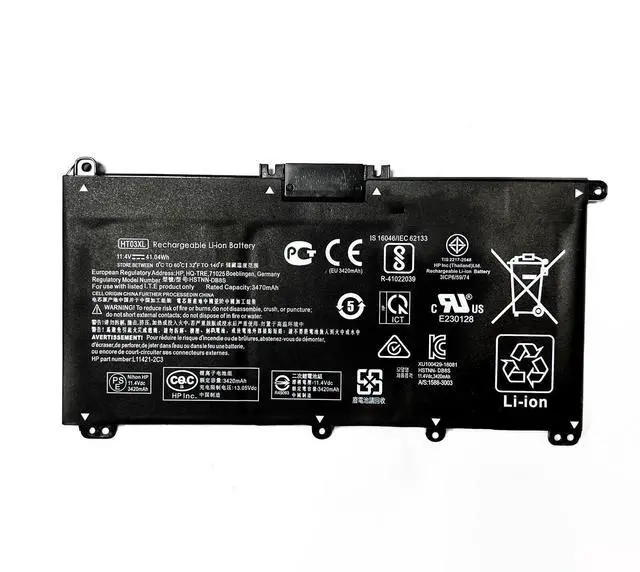
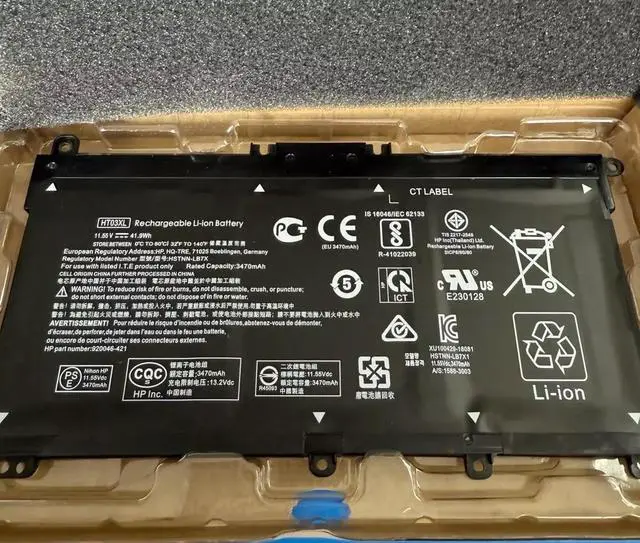
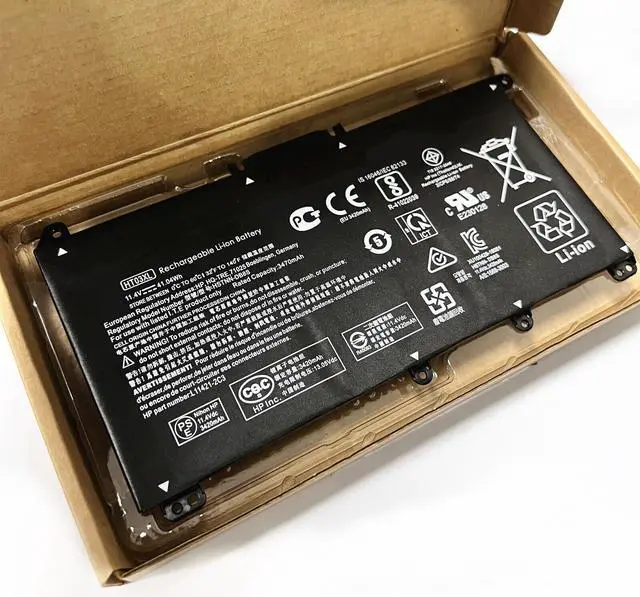
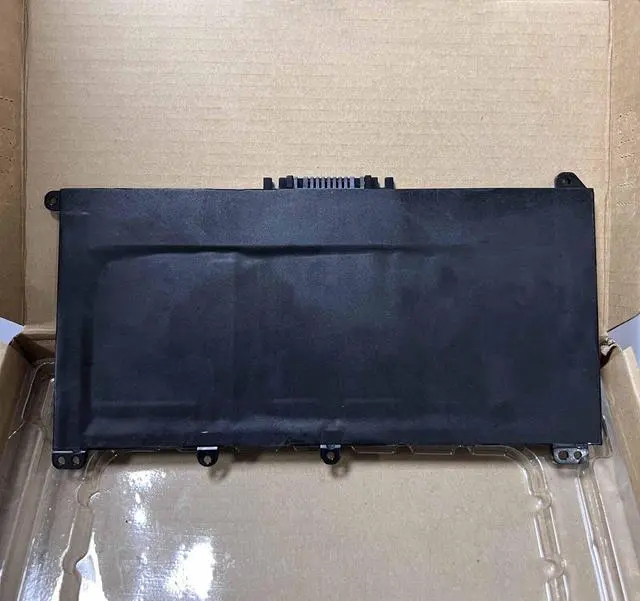
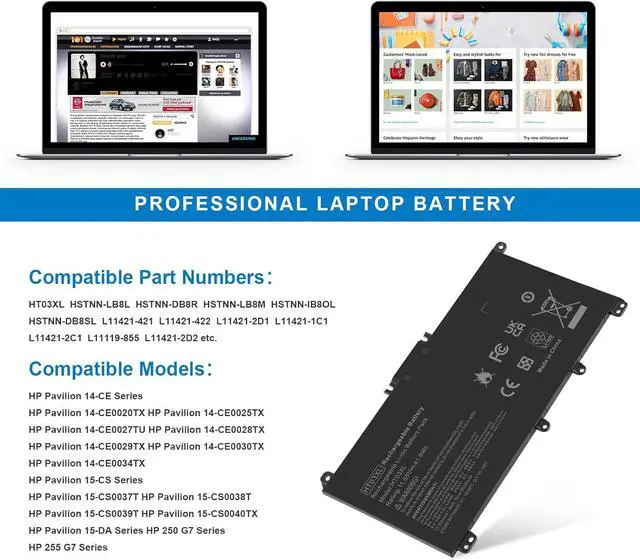


HT03XL L11119-855 HTO3XL Battery for HP 14M-DH0003DX 14M-DH1003DX 15T-DA000 15T-CS200 15-CW1XXX 15T-CS300 LPD1071 15-DB0004DX 15-DA0014DX Pavilion 15-DA 15-DB 15-DW 15-DY 14-CE 14-CF 14-DF 17-BY 17-CA
- Battery Model: HT03XL HTO3XL,Battery Type:Polymer. Voltage: 11.55V Capacity: 41.9WH ; Cells: 3-cell; Color: Black, Packages includes: 1x HT03XL battery , with two auxiliary installation tool and user manual;ht03xl for l11119-855 hp battery,for hp spare l11119-855 battery,for hp pavilion 15 battery replacement
- Compatible devices: HP Pavilion 14-CE 14-CF 14-CK 14-cm 14-DF 14-DH 14-MA 14Q-CS 14Q-CY 14S-CF 14S-CR 15-CS 15-CW 15-DA 15-DB 15G-DR 15T-DA 15T-DB 17-by 17-CA Series
- COMPATIBLE MODELS: HP Pavilion 14-CE 14-CF 14-CK 14-CM 14-DF 14-MA 14Q-CS 14Q-CY 14S-CF 14S-CR 14-FQ Series, HP Pavilion 14-DF0XX 14-CE0005 14-CE0025TU 14-CE0034TX14-DQ2035CL 14-CM0020NR 14-CM0012NR 14Q-CS0006TU 14-FQ0032MS 14-FQ0037NR 14-CK0013LA 14-CK2098LA, HP Pavilion x360 Convertible 14m-dh0001dx 14m-dh1003dx 14-DH2011NR ,HP 240 G7, 245 G7, 250 G7, 255 G7, 340S G7, 470 G7, 340 G5, 348 G5 Series and more.
+
+
Overview
Specs
Reviews
You can use "Ctrl+F" to find your own model or part number.
Replacement Part Numbers: HT03XL/HT03041XL/HSTNN-UB7J/HSTNN-DB8R HSTNN-LB8L/HSTNN-IB80/HSTNN-IB8X/HSTNN-DB8S HSTNN-LB8M /HSTNN-IB8O/ L11119-855/ L11421-542 L11421-1C3 /L11421-1C1 /L11421 -1C2 /L11421-2C1 L11421-2C2/ L11421-2C3/ L11421-2D1 /L11421-2D2 /L11421-421 L11421-422/ L11421-423 /L11421-544/ L11421-545/ TPN-C136 TPN-I130 /TPN-I131/ TPN-I132/ TPN-I133 /TPN-I134 /TPN-Q207/ TPN-Q208 /TPN-Q209 /TPN-Q210
Compatible with HP Laptop Models: for for HP Pavilion 14-CE0000
Series: 14-CE3065ST 14-CE1058WM 14-CE0068ST 14-CE2068ST 14-CE1056WM 14-CE0064ST 14-CE0006DX and more for HP Pavilion 14-CF0000 14S-CF0000
Series: 14-CF0006DX 14-CF0013DX 14-CF1015CL 14-CF0012DX 14-CF1051OD 14-CF2074LA 14-CF2051LA 14-CF0023CL 14-CF0018WM 14-CF0014DX 14S-CF3074TU 14S-CF0043TX and more for HP Pavilion 14-CK0000
Series: 14-CK0013LA 14-CK2098LA 14-CK2091LA 14-CK0001LA 14-CK0061ST and more for HP Pavilion 14-CM0000
Series: 14-CM0020NR 14-CM0012NR 14-CM1025LA and more for HP Pavilion 14-DF0000
Series: 14-DF0023CL 14-DF0018WM and more for HP Pavilion X360 14-DH0000 14M-DH0000
Series: 14-DH2011NR 14-DH2085CL 14-DH2075CL 14-DH2034NR 14-DH2051WM 14-DH2097NR 14-DH2671CL 14-DH1021NR 14M-DH0001DX 14-DH1010LA 14M-DH1003DX and more for HP Pavilion 14-DQ0000
Series: 14-DQ0070NR 14-DQ2055WM 14-DQ2013DX 14-DQ0011DX 14-DQ1043CL 14-DQ2045CL 14-DQ1033CL 14-DQ0013DX 14-DQ2033CL 14-DQ0004DX 14-DQ2035CL and more for HP Pavilion 14-DK0000 14S-DK0000
Series: 14-DK1003DX 14-DK0002DX 14-DK1013DX 14-DK0028WM 14-DK1022WM 14-DK0075NR 14-DK1025WM 14-DK0736MS 14-DK1031DX 14S-DK0002AU and more for HP Pavilion 14-FQ0000
Series: 14-FQ0032MS 14-FQ0037NR 14-FQ1021NR 14-FQ0013DX 14-FQ0075NR and more for HP Pavilion 14Q-CS0000
Series: 14Q-CS0006TU and more for HP Pavilion 15
Series: for HP Pavilion 15-CS0000
Series: 15-CS0064ST 15-CS3019NR 15-CS3073CL 15-CS3672CL 15-CS3153CL 15-CS2010NR 15-CS025CL 15-CS2073CL 15-CS2079NR 15-CS1063CL 15-CS0072WM 15-CS0051WM 15-CS1065CL and more for HP Pavilion 15-CW0000
Series: 15-CW1068WM 15-CW0002LA 15-CW1063WM 15-CW1XXX 15-CW1004LA 15-CW0008CY 15-CW1085NR 15-CW1001LA and more for HP Pavilion 15-CU0000
Series: 15-CU0058NR and more for HP Pavilion 15-DA0000
Series: 15-DA0066CL 15-DA0002DX 15-DA0079NR 15-DA1005DX 15-DA0032WM 15-DA0033WM 15-DA0073MS 15-DA0012DX 15-DA0071MS 15-DA0086OD 15-DA0014DX 15-DA0053WM and more for HP Pavilion 15-DB0000
Series: 15-DB0015DX 15-DB0031NR 15-DB0011DX 15-DB0066WM 15-DB0005DX 15-DB0048NR 15-DB0049NR 15-DB0051OD 15-DB0048CA 15-DB0083NR 15-DB0091NR 15-DB1011CY and more for HP Pavilion 15-DW0000
Series: 15-DW0081WM 15-DW0037WM 15-DW0046NR 15-DW0083WM 15-DW1083WM 15-DW2025CL 15-DW2065ST 15-DW0021CL 15-DW2025OD 15-DW20250D 15-DW2638CL 15-DW3013DX 15-DW3015CL 15-DW2057CL 15-DW1024WM 15-DW3065ST 15-DW2048NR 15-DW3056CL 15-DW2072CL 15-DW3031CL 15-DW3025CL and more for HP Pavilion 15-DY0000
Series: 15-DY2087NR 15-DY1031WM 15-DY1036NR 15-DY1059MS 15-DY1005LA 15-DY1024WM 15-DY1751MS 15-DY1023DX 15-DY1731MS 15-DY1771MS 15-DY1124NR 15-DY1755CL 15-DY1020NR 15-DY1086NR 15-DY1095OD 15-DY1051WM 15-DY1076NR 15-DY1078NR 15-DY1087NR 15-DY1971CL 15-DY0013DX 15-DY2021NR 15-DY1043DX 15-DY1091WM 15-DY2074NR 15-DY1071WM and more for HP Pavlion 15-EF0000
Series: 15-ef0022nr 15-ef1013dx 15-ef1040nr 15-ef0025wm 15-ef0021nr 15-ef1073od 15-ef1001ds 15-ef1072wm for HP Pavilion 15Q 15S
Series: 15Q-DS0019TU 15Q-DY0002AU 15S-FQ0000UR 15S-FQ0020UR 15S-FQ2535TU 15S-FQ2008NJ and more for HP Pavilion 17-BY0000
Series: 17-BY1053DX 17-BY1033DX 17-BY0060NR 17-BY0021DX 17-BY0053CL 17-BY0021CY 17-BY1055CL 17-BY0089CL 17-BY1071CL 17-BY4075CL 17-BY3056CL 17-BY3065ST 17-BY4063CL 17-BY1955CL 17-BY4633DX and more for HP Pavilion 17-CA0000
Series: 17-CA2097NR 17-CA3035CL 17-CA2020NR 17-CA3055CL 17-CA0064CL 17-CA1065CL 17-CA2096NR 17-CA0009DS 17-CA0011DS 17-CA0056NR and more for HP Pavilion 240 G7, 245 G7, 250 G7, 255 G7, 340 G5, 348 G5
Install A New Battery:
1. You need to turn off your laptop and disconnect the power.
2. Remove the old battery, carefully install the new battery on the battery case, and connect the wiring of the new battery.
3. If you don't understand the above steps, you can search for the video about laptop battery installation on YouTube. Maybe it will help you.
Laptop Maintenance Tips:
1.
New battery: For use a new battery, youd better try a few cycles of discharging to 5%. then charging up to 95%. So that it can be activated completely
2.
Overuse: Do not always run out of a battery to 0%, this would make it damaged or usage life shortened
3.
Charging sequence: when charging, first install the battery, then turn on the power, when fully charged, first cut off the power, then pull the power plug.
4.
Long-term storage: Please store the unused battery fully charged. (Charge it once a month) Do not store at low power to prevent reduce the lifespan of a battery
5.
Charger: Do not replace the laptop adapter casually. If the original adapter cannot be applied due to malfunction or damage, please replace the models, so as not to reduce the service life of the battery due to incompatibility.
Replacement Part Numbers: HT03XL/HT03041XL/HSTNN-UB7J/HSTNN-DB8R HSTNN-LB8L/HSTNN-IB80/HSTNN-IB8X/HSTNN-DB8S HSTNN-LB8M /HSTNN-IB8O/ L11119-855/ L11421-542 L11421-1C3 /L11421-1C1 /L11421 -1C2 /L11421-2C1 L11421-2C2/ L11421-2C3/ L11421-2D1 /L11421-2D2 /L11421-421 L11421-422/ L11421-423 /L11421-544/ L11421-545/ TPN-C136 TPN-I130 /TPN-I131/ TPN-I132/ TPN-I133 /TPN-I134 /TPN-Q207/ TPN-Q208 /TPN-Q209 /TPN-Q210
Compatible with HP Laptop Models: for for HP Pavilion 14-CE0000
Series: 14-CE3065ST 14-CE1058WM 14-CE0068ST 14-CE2068ST 14-CE1056WM 14-CE0064ST 14-CE0006DX and more for HP Pavilion 14-CF0000 14S-CF0000
Series: 14-CF0006DX 14-CF0013DX 14-CF1015CL 14-CF0012DX 14-CF1051OD 14-CF2074LA 14-CF2051LA 14-CF0023CL 14-CF0018WM 14-CF0014DX 14S-CF3074TU 14S-CF0043TX and more for HP Pavilion 14-CK0000
Series: 14-CK0013LA 14-CK2098LA 14-CK2091LA 14-CK0001LA 14-CK0061ST and more for HP Pavilion 14-CM0000
Series: 14-CM0020NR 14-CM0012NR 14-CM1025LA and more for HP Pavilion 14-DF0000
Series: 14-DF0023CL 14-DF0018WM and more for HP Pavilion X360 14-DH0000 14M-DH0000
Series: 14-DH2011NR 14-DH2085CL 14-DH2075CL 14-DH2034NR 14-DH2051WM 14-DH2097NR 14-DH2671CL 14-DH1021NR 14M-DH0001DX 14-DH1010LA 14M-DH1003DX and more for HP Pavilion 14-DQ0000
Series: 14-DQ0070NR 14-DQ2055WM 14-DQ2013DX 14-DQ0011DX 14-DQ1043CL 14-DQ2045CL 14-DQ1033CL 14-DQ0013DX 14-DQ2033CL 14-DQ0004DX 14-DQ2035CL and more for HP Pavilion 14-DK0000 14S-DK0000
Series: 14-DK1003DX 14-DK0002DX 14-DK1013DX 14-DK0028WM 14-DK1022WM 14-DK0075NR 14-DK1025WM 14-DK0736MS 14-DK1031DX 14S-DK0002AU and more for HP Pavilion 14-FQ0000
Series: 14-FQ0032MS 14-FQ0037NR 14-FQ1021NR 14-FQ0013DX 14-FQ0075NR and more for HP Pavilion 14Q-CS0000
Series: 14Q-CS0006TU and more for HP Pavilion 15
Series: for HP Pavilion 15-CS0000
Series: 15-CS0064ST 15-CS3019NR 15-CS3073CL 15-CS3672CL 15-CS3153CL 15-CS2010NR 15-CS025CL 15-CS2073CL 15-CS2079NR 15-CS1063CL 15-CS0072WM 15-CS0051WM 15-CS1065CL and more for HP Pavilion 15-CW0000
Series: 15-CW1068WM 15-CW0002LA 15-CW1063WM 15-CW1XXX 15-CW1004LA 15-CW0008CY 15-CW1085NR 15-CW1001LA and more for HP Pavilion 15-CU0000
Series: 15-CU0058NR and more for HP Pavilion 15-DA0000
Series: 15-DA0066CL 15-DA0002DX 15-DA0079NR 15-DA1005DX 15-DA0032WM 15-DA0033WM 15-DA0073MS 15-DA0012DX 15-DA0071MS 15-DA0086OD 15-DA0014DX 15-DA0053WM and more for HP Pavilion 15-DB0000
Series: 15-DB0015DX 15-DB0031NR 15-DB0011DX 15-DB0066WM 15-DB0005DX 15-DB0048NR 15-DB0049NR 15-DB0051OD 15-DB0048CA 15-DB0083NR 15-DB0091NR 15-DB1011CY and more for HP Pavilion 15-DW0000
Series: 15-DW0081WM 15-DW0037WM 15-DW0046NR 15-DW0083WM 15-DW1083WM 15-DW2025CL 15-DW2065ST 15-DW0021CL 15-DW2025OD 15-DW20250D 15-DW2638CL 15-DW3013DX 15-DW3015CL 15-DW2057CL 15-DW1024WM 15-DW3065ST 15-DW2048NR 15-DW3056CL 15-DW2072CL 15-DW3031CL 15-DW3025CL and more for HP Pavilion 15-DY0000
Series: 15-DY2087NR 15-DY1031WM 15-DY1036NR 15-DY1059MS 15-DY1005LA 15-DY1024WM 15-DY1751MS 15-DY1023DX 15-DY1731MS 15-DY1771MS 15-DY1124NR 15-DY1755CL 15-DY1020NR 15-DY1086NR 15-DY1095OD 15-DY1051WM 15-DY1076NR 15-DY1078NR 15-DY1087NR 15-DY1971CL 15-DY0013DX 15-DY2021NR 15-DY1043DX 15-DY1091WM 15-DY2074NR 15-DY1071WM and more for HP Pavlion 15-EF0000
Series: 15-ef0022nr 15-ef1013dx 15-ef1040nr 15-ef0025wm 15-ef0021nr 15-ef1073od 15-ef1001ds 15-ef1072wm for HP Pavilion 15Q 15S
Series: 15Q-DS0019TU 15Q-DY0002AU 15S-FQ0000UR 15S-FQ0020UR 15S-FQ2535TU 15S-FQ2008NJ and more for HP Pavilion 17-BY0000
Series: 17-BY1053DX 17-BY1033DX 17-BY0060NR 17-BY0021DX 17-BY0053CL 17-BY0021CY 17-BY1055CL 17-BY0089CL 17-BY1071CL 17-BY4075CL 17-BY3056CL 17-BY3065ST 17-BY4063CL 17-BY1955CL 17-BY4633DX and more for HP Pavilion 17-CA0000
Series: 17-CA2097NR 17-CA3035CL 17-CA2020NR 17-CA3055CL 17-CA0064CL 17-CA1065CL 17-CA2096NR 17-CA0009DS 17-CA0011DS 17-CA0056NR and more for HP Pavilion 240 G7, 245 G7, 250 G7, 255 G7, 340 G5, 348 G5
Install A New Battery:
1. You need to turn off your laptop and disconnect the power.
2. Remove the old battery, carefully install the new battery on the battery case, and connect the wiring of the new battery.
3. If you don't understand the above steps, you can search for the video about laptop battery installation on YouTube. Maybe it will help you.
Laptop Maintenance Tips:
1.
New battery: For use a new battery, youd better try a few cycles of discharging to 5%. then charging up to 95%. So that it can be activated completely
2.
Overuse: Do not always run out of a battery to 0%, this would make it damaged or usage life shortened
3.
Charging sequence: when charging, first install the battery, then turn on the power, when fully charged, first cut off the power, then pull the power plug.
4.
Long-term storage: Please store the unused battery fully charged. (Charge it once a month) Do not store at low power to prevent reduce the lifespan of a battery
5.
Charger: Do not replace the laptop adapter casually. If the original adapter cannot be applied due to malfunction or damage, please replace the models, so as not to reduce the service life of the battery due to incompatibility.
Warranty & Returns
Warranty, Returns, And Additional Information
Warranty
- Please contact the Seller directly for warranty information. Warranty information may also be found on the Manufacturer's website.
- CONTACT
Return Policies
- Return for refund within: 30 days
- Return for replacement within: 90 days
- This item is covered by Corn Electronics Return Policy
Manufacturer Contact Info
- For a directory of all our manufacturers, please click below.
- Manufacturers Directory
LOADING...