


- Free 30-day Returns
$124.56
Ships from China.
Sold by StarVelocity Technology
Shipped by StarVelocity Technology

Meet Your Seller





Wireless Remote Control for CYBERTAKE Portable Air Conditioner, Portable AC for Camping Tent, Magnetic Force
Limited time offer, ends 11/08 By StarVelocity Technology
- 1.BUTTONS
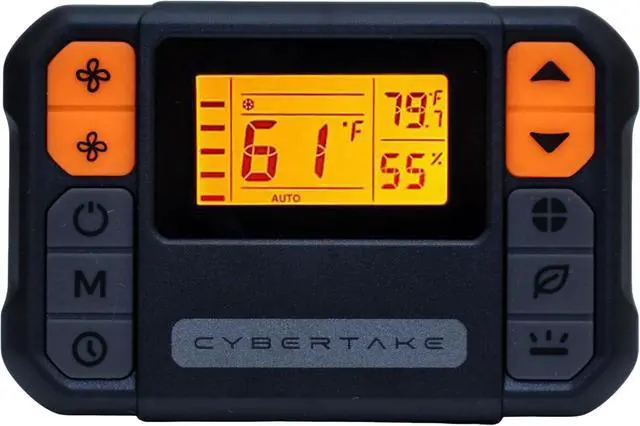
- Increase wind speed: Boosts the airflow intensity. Reduce wind speed: Decreases the airflow intensity. Power switch: Turns the air conditioner on or off. Max mode: Activates maximum cooling . Timing button: Sets delay for automatic shut off/on. Increase temperature: Raises the temperature setting.
- Reduce temperature:Lowers the temperature setting. Function mode:Cycles through various modes(cooling,heating). ECO mode: Actives energy-efficient operation.
- ECO+ mode:Enhanced energy saving mode. Light button:Controls the backlight of the display.
- 2.DISPLAY ICONS
- Wind speed display:shows current airflow level. Max mode:indicates when max mode active. Auto mode: Display automatic operation status. ECO and ECO+ modes:Indicates energy saving operations. Timing display: shows timer setting.
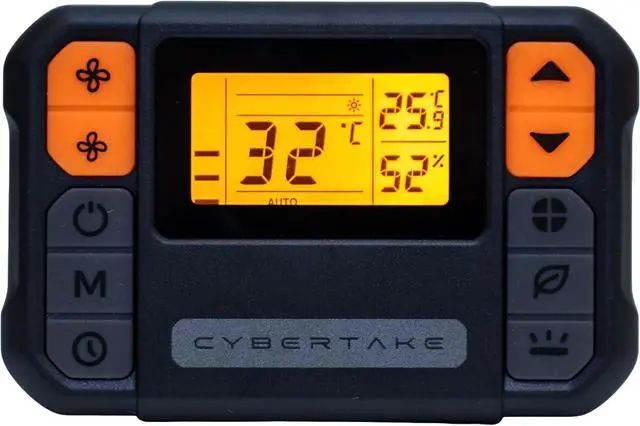
- Refrigeration function icon: Indicates cooling mode. Dehumidification function icon:indicates dehumidifying mode. Air supply function icon:shows air circulation mode. Heating function icon:Displays heating mode status. Ambient temperature display: shows current room temperature. Celsius/Fahrenheit Toggle:Indicates temperature unit setting.
- Set Temperature Display:Shows the desired temperature setting. Ambient Humidity Display: Indicates current humidity level.(batteries not included) Press and hold the light button for three seconds to switch to Fahrenheit.
+
+
Overview
Specs
Reviews
- 1.BUTTONS
- Increase wind speed: Boosts the airflow intensity. Reduce wind speed: Decreases the airflow intensity. Power switch: Turns the air conditioner on or off. Max mode: Activates maximum cooling . Timing button: Sets delay for automatic shut off/on. Increase temperature: Raises the temperature setting.
- Reduce temperature:Lowers the temperature setting. Function mode:Cycles through various modes(cooling,heating). ECO mode: Actives energy-efficient operation.
- ECO+ mode:Enhanced energy saving mode. Light button:Controls the backlight of the display.
- 2.DISPLAY ICONS
- Wind speed display:shows current airflow level. Max mode:indicates when max mode active. Auto mode: Display automatic operation status. ECO and ECO+ modes:Indicates energy saving operations. Timing display: shows timer setting.
- Refrigeration function icon: Indicates cooling mode. Dehumidification function icon:indicates dehumidifying mode. Air supply function icon:shows air circulation mode. Heating function icon:Displays heating mode status. Ambient temperature display: shows current room temperature. Celsius/Fahrenheit Toggle:Indicates temperature unit setting.
- Set Temperature Display:Shows the desired temperature setting. Ambient Humidity Display: Indicates current humidity level.(batteries not included) Press and hold the light button for three seconds to switch to Fahrenheit.
Warranty & Returns
Warranty, Returns, And Additional Information
Warranty
- Please contact the Seller directly for warranty information. Warranty information may also be found on the Manufacturer's website.
- CONTACT
Return Policies
- Return for refund within: 30 days
- Return for replacement within: 90 days
- This item is covered by StarVelocity Technology Return Policy
Manufacturer Contact Info
- For a directory of all our manufacturers, please click below.
- Manufacturers Directory
LOADING...