





Out of stock
This item is currently out of stock and it may or may not be restocked.
Ships from China.
Most customers receive within 7-17 days.
Add to wish list(Found on 2 wish lists)
NAS Builder
Shop it at NeweggBusiness.

ORICO Portable 2 Bay M.2 SATA SSD Dock with RAID Support PM/Raid0/Raid1/JBOD Mode , Tool Free USB Type C to M.2 NGFF SATA SSD Adapter, USB3.1 Data Storage Backup for SSD Size 2230/2242/2260/2280

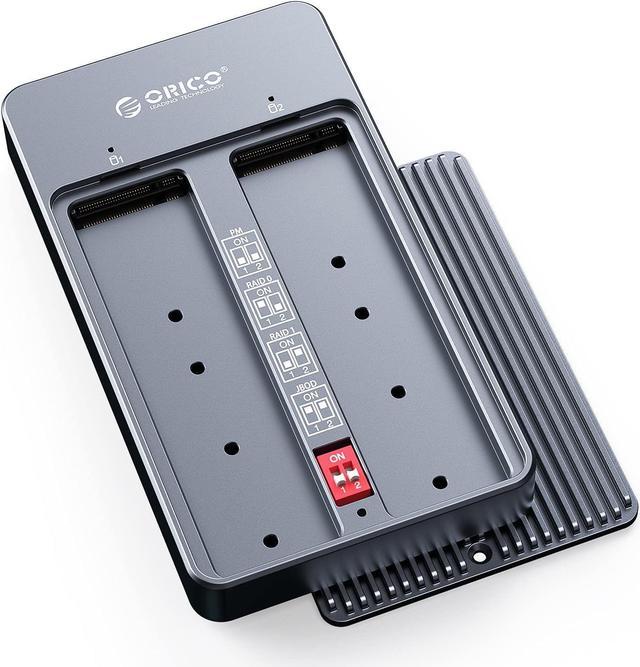
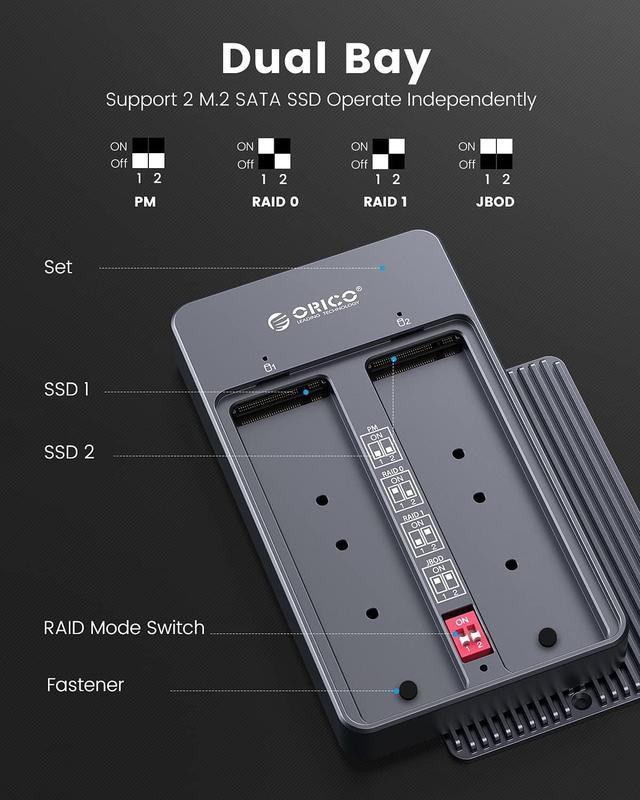
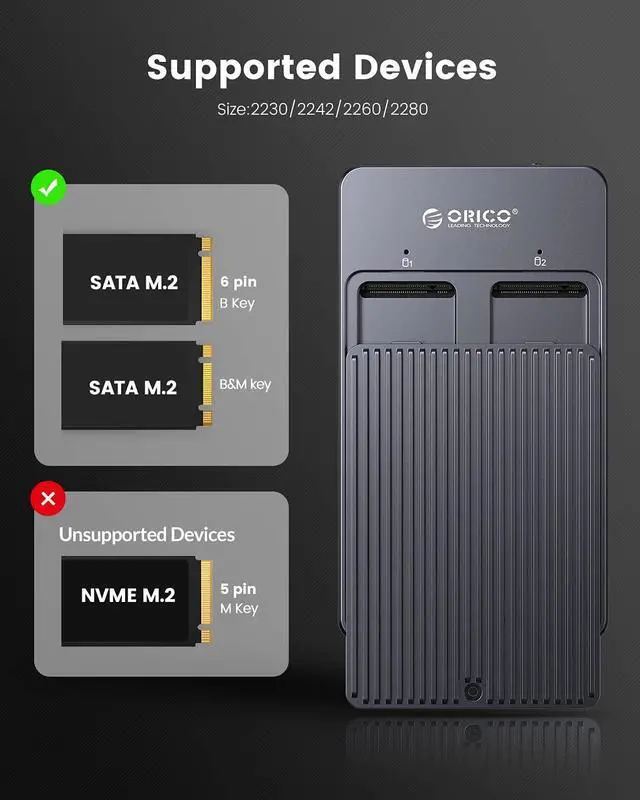
  • The M2N210 SSD enclosure supports 2 x 4TB M.2 SATA SSDs to operate independently at the same time, for M.2 SATA B key/B&M Key 2230/2242/2260/2280 SSDs. This enclosure does not support M.2 PCIe NVMe/AHCI SSDs.
  • The Solid State Drive Adapter supports PM normal mode, RAID0 acceleration mode, RAID1 mirroring mode, and JBOD combined mode.
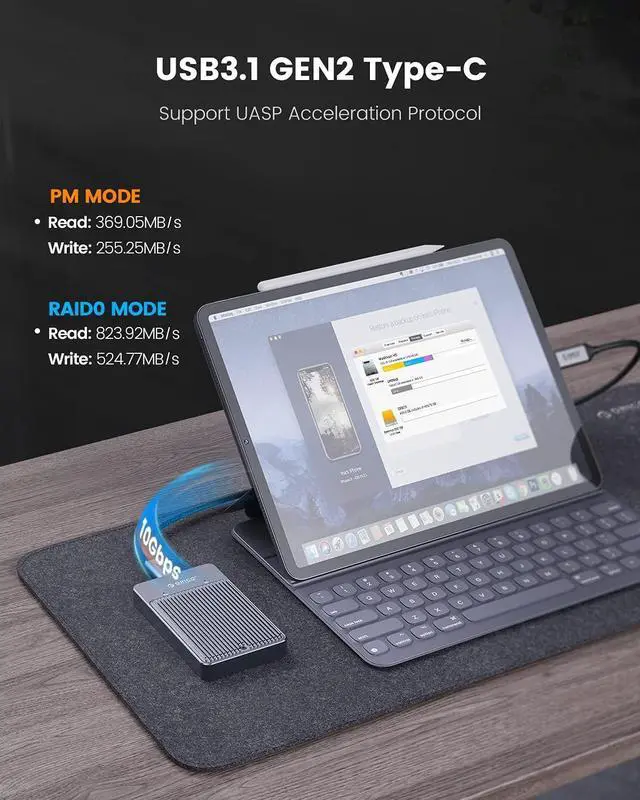
  • USB 3.1 Gen 2 output Interface supports up to 10Gbps,supports UASP acceleration protocol. The LED indicator monitor monitors the working status of the hard disk at any time.
  • This SSD box is compatible with Windows/MAC OS/Linux and other operating systems. Equipped with 1* USB-A to USB-C cable and 1*USB-C to USB-C cable.
  • All aluminum alloy body, the product size is smaller than a mobile phone, very safe and portable. No need for power adapter, no drive, support plug and play.
Overview
Specs
Reviews (2)
image for this item
ORICO Dual-Slot M.2 SATA NGFF SSD Enclosure USB 3.1 Gen 2 Support UASP

1. PM mode: Normal mode-6Gbps Max. It supports two SSDs to work independently at the same time without affecting each other, making it easier and more convenient to use.

2. RAID0 mode: Acceleration mode-10Gbps Max.Represents the highest storage performance among all RAID levels. At least 2 hard disks are required, and the speed is twice that of a single disk. The larger the amount of data, the better the performance.

3. RAID1: Mirror mode-6Gbps Max. The two hard disks are filed for each other. When the original data is busy, the data can be read directly from the mirror backup with the strongest security and availability.

4. JBOD: Joint model-6Gbps Max. The capacity of the two hard drives is combined to create a large data storage space.

image for this item
ORICO Dual Bay M.2 SATA NGFF SSD Enclosure

1.Product number:ORICO M2N210

2.Product material:Aluminum alloy

3.Product size:115mm(L)*65mm(W)*16.5mm(H)

4.Output interface:USB 3.1 GEN 2 Type-C 

5.Transmission rate:10Gbps(Raid 0 Mode)

6.Support capacity:4TB

image for this item
Sleep Function

Features 10-min Auto Sleep Mode to let your SSDs stop spinning to have a rest. It prolongs the service life of the solid state drives.
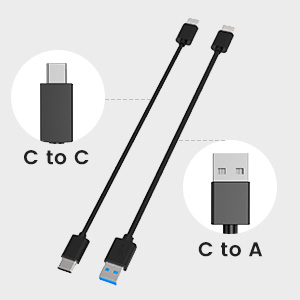
image for this item
Cables Included

Comes with 50cm USB-A to USB-C Cable and USB-C to USB-C Cable for super-fast data transferring, no need to buy extra cable.

image for this item
LED smart sleep

Compatible with Windows/MAC OS/Linux/Chrome OS.Help you work, study, and play at any time.
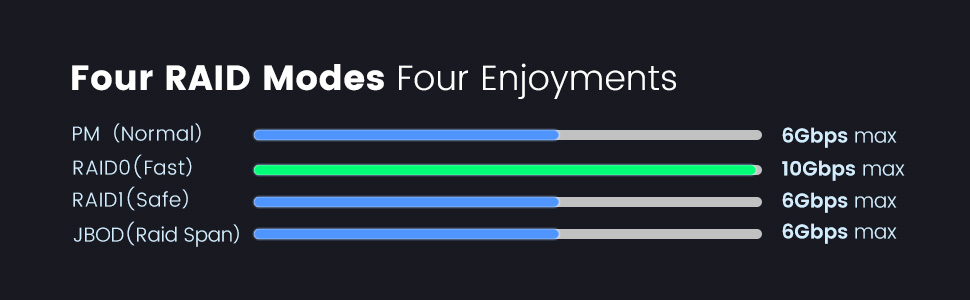
image for this item

Warm note - If your computer does not recognize the SSD box. Please follow the steps:

For a new SSD, you must first go to Disk Management and initialize the SSD. Then it can be recognized and used normally. Please complete the hard drive initialization by following the steps below.

How do I start Disk Management?

Right click on Computer - Manage - Disk Management. Find your unallocated hard drive, right click on Unallocated and choose New Simple Volume Wizard.

How do I start Disk Management (in Windows 10)?

Click Start - Run - type compmgmt.msc - click OK. You can also right-click the My Computer icon and select Manage. In the console tree, click Disk Management.

Does the case get hot?

The case is treated with heat during operation, but this is due to the nature of the drive. The NVME drive is working at extreme speeds and is getting hot. The aluminum housing acts as a heat sink and has an overheating protection function.

If your SSD overheats while transferring large amounts of data, the case will automatically protect against overheating and enter read-only mode or stop the transfer or reduce the data transfer speed. Avoid damaging your SSD from overheating and improve the lifespan of your SSD.

About this item
Dual BayThe M2N210 SSD enclosure supports 2 x 4TB M.2 SATA SSDs to operate independently at the same time, for M.2 SATA B key/B&M Key 2230/2242/2260/2280 SSDs. This enclosure does not support M.2 PCIe NVMe/AHCI SSDs.
Multiple ModesThe Solid State Drive Adapter supports PM normal mode, RAID0 acceleration mode, RAID1 mirroring mode, and JBOD combined mode. Help you accelerate, expand, and back up your data.
High-Speed: USB 3.1 Gen2 output Interface supports up to 10Gbps,supports UASP acceleration protocol.It only takes 2-5 seconds to transfer a 3GB compressed file.The theoretical maximum transfer rate of SATA protocol SSD is 6Gbps.No waiting time. The LED indicator monitor monitors the working status of the hard disk at any time.
Widely Compatible This SSD box is compatible with Windows/MAC OS/Linux and other operating systems. Equipped with 1* USB-A to USB-C cable and 1*USB-C to USB-C cable.It can be connected to smart phones, computers, TVs, XBOX, PS4, PS5, cameras, etc.
Safe and Portable All aluminum alloy body, the product size is smaller than a mobile phone, very safe and portable. No need for power adapter, no drive, support plug and play. Support smart hibernation technology, enter hibernation after 10 minutes of inactivity, extending the life of the hard disk.
Specifacations:

Model:M2N210-RC3
Material:Aluminum Alloy
Color:Gray
Dimensions:115*65*16.5mm
Output Interface:USB3.1 GEN2 Type-C
Support System:Windows/Mac OS/Linux
Transmission Rate:10Gbps
Compatible system: Windows / Mac OS / Linux

What in the Box:

USB Type-A to USB Type-C x1
USB Type-C to USB Type-C x1
USB to DC 5V power cable X1
Silicone pad x2
Screwdriver X1
Silicone plug X2
Manual X1
Thanks Card X1

Warranty & Returns

Warranty, Returns, And Additional Information

Warranty

  • Please contact the Seller directly for warranty information. Warranty information may also be found on the Manufacturer's website.
  • Read full details
  • CONTACT

Return Policies

Manufacturer Contact Info

LOADING...