


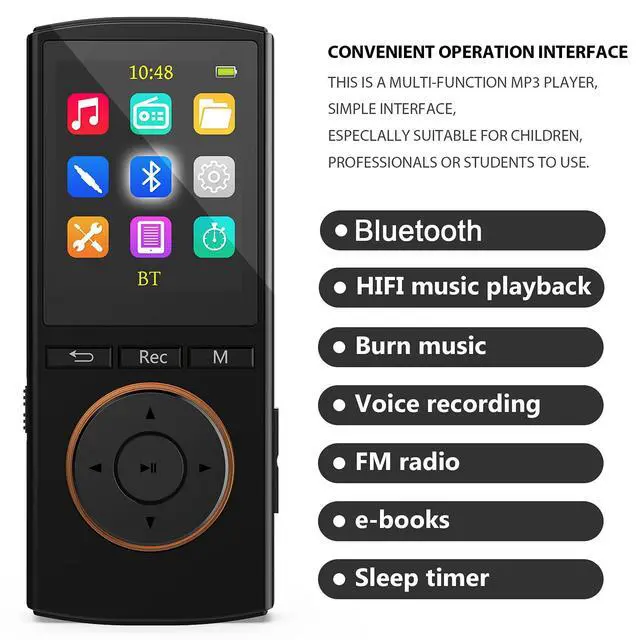


MusRun’s teams love music and devote to design different music devices. We engineer the innovation process from the initiate idea and design to the final implementation, approaching it from the clients' requirements. MUSRUN always offer you awesome products. This Mp3 music player is the one you need if you have trouble on download songs on internet, Its unique “BURNING MUSIC “ function,will help you burn the songs you like on line without any restrictions. This is MUSRUN, make you do what you want.
MusRun's new version Mp3 players music players featured as below:
Born for Sports: Weight only 0.9 oz, small shape, light and tiny. You can enjoy music when doing exercise without any trouble, especially when you running, jogging, traveling and hiking.
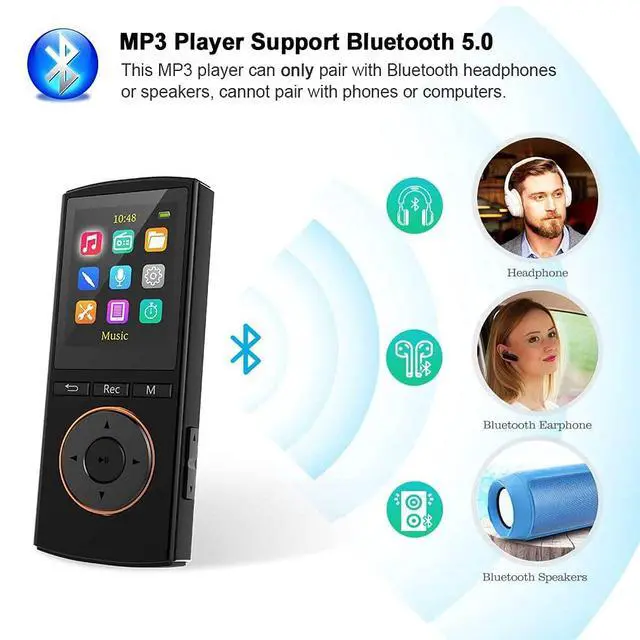
Enhanced Bluetooth, longer receving distance.
Sleep timer function: Perfect for listening to a radio while falling asleep or for the bedtime story for your baby.
Dictation with noise reduction:
20h recording (with memory card): Talk your ideas to the player and save them directly.
 Matte Red |  Matte Black |  Matte White | |
|---|---|---|---|
| Customer Reviews | — | — | — |
| Bluetooth | ? | ? | ? |
| FM Record | ? | ? | ? |
| Voice record | ? | ? | ? |
| Line-in Record | ? | ? | ? |
| Micro sd card | 64GB | 64GB | 64GB |

Small and Light
Compact shape,light and tiny.enjoy music without difficulty while exercising especially MP3 player for running,jogging,traveling,and hiking.It is wonderful for mp3 player!

Enhanced Bluetooth
Better compatibility, lower power consumption, longer receiving distance.

Enhanced Bluetooth Better compatibility, lower power consumption, longer receiving distance. One-click Voice Rec
Easily Use with One click Recording Design. With the MP3 recorder, easily record meetings, lectures, and more high-quality audio.

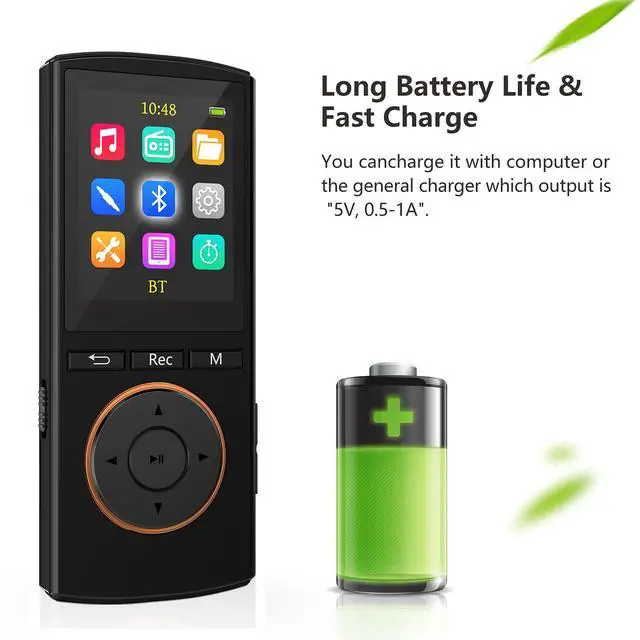
Fast charging and long battery life
This media player after charging for 3 hours,it can support up to 50 hours of playing time(middle volume play light music).
You can use the sleep timer and screen brightness adjustment features to extend playback time.
You can charge it with your computer cell phone charger or charge it with a universal charger with a "5 V, 0.5 - 1 A" output.

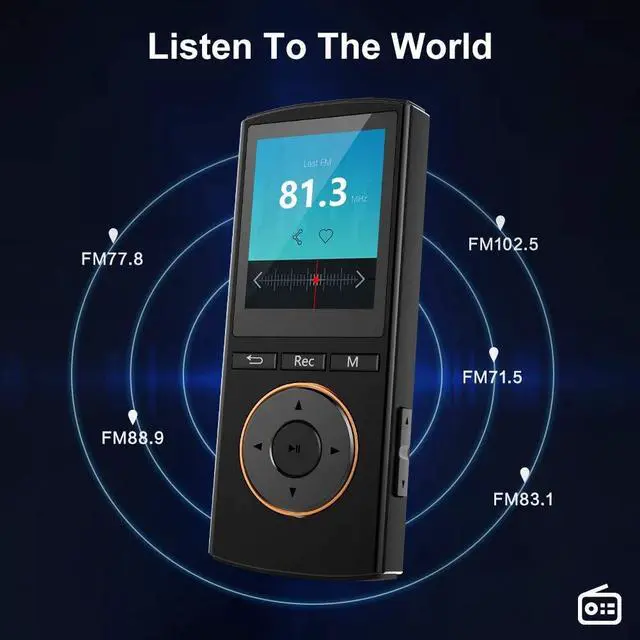
mp3 player with FM radio and FM record
Enjoy FM Radio While Plug in an Earphone. (87.5 MHz ~ 108 MHz)

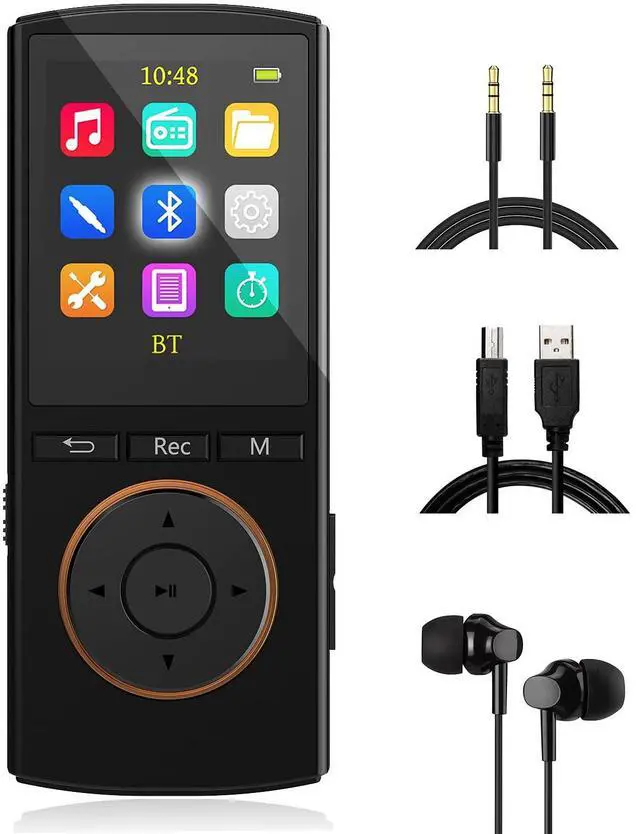
Packing list
- mp3 player
- Quality wired earhpones
- 3.5mm AUX cable
- Micro USB cable
- User manual

FAQ:
1. Why I can't hear anything when I plug in my wired headphones?
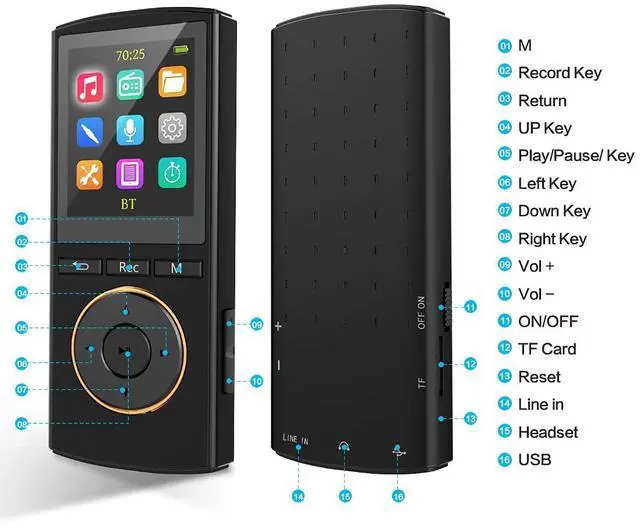
Please notice there are two headphone jacks, one for the line-in (which is used to burn music) and one for the headphone plug. Make sure your wired earphones plugged into the correct jact.
2. How to pair a bluetooth device?
please open the bluetooth speaker keep them waitting to pair(press button of the bluetooth speaker let it into pair mode, if it necessary). open the bluetooth of the mp3 player, go into search mode, find the bluetooth speaker and pair it.
If still failed, please unpair all of bluetooth records list of mp3 player, and try again. (please close your smart phone bluetooth in case they will pair immediately)
please use a needle to press the reset button in the mic hole at the bottom of the mp3 player, it can resolve most of programe problem.
3. How do I charge the MP3 player?
Please use USB cable to connect the computer / laptop to charge it. Or use standard smart phone charger 5V 1A, 5V 2A electrical appliances to charge (charger sold separately).
4. There are no songs in the MP3 player, how can I download music?
Basically, it is a traditional MP3 player, it works as like as a USB stick, connected it with computer via a USB cable, drag and drop some songs from the computer to the MP3 player.
When you connect the MP3 player to the computer with a USB cable, two options appear on the MP3 player screen: Charge and Transfer, Charge and Play. Select options: charge and Transfer
Copy some music files from the computer to the MP3 player (ex. File format: MP3, WMA, APE, FLAC, WAV)
5. Did the MP3 player remember the song I last played?
Press the music icon and then the back icon, you will see that the second function is the playback breakpoint. Breakpoint refers to the last time
the currently playing song ends.
6. FM radio does not work.
Please make sure to connect wired headphones before using the FM function, regardless of whether you are using the bluetooth function or not. This is important because the wired headset is the antenna of the FM radio.
After searching channels automatically, use the up and down buttons to switch channels (important) and use the M button to perform other operations.
7. How can I play my favorite singer's songs?
Please open the music function, you will see: artists, albums, genres. Use the function of playlists.
Or please connect the MP3 player to the PC with a USB cable, create some folders on the MP3 player by PC, put in the songs you loved the most. Each folder can be a playlist. Back to the MP3 player, open a folder, play a song, it will play the entire folder.
8. How do I find Shuffle Play?
Play any song --- press the M button --- play mode --- select shuffle or other play mode.
9. Why can't I find my audio book / songs?
Our products only support the following formats: MP3, WMA, APE, FLAC, WAV, AAC-LC, ACELP, OGG. Please make sure that your audio book corresponds to one of the formats mentioned.
10. Does it have a sleep timer function to turn off after track is finished
please open the shutdown setting in the set, you will see there are two opitions: sleep timer and auto off.
sleep timer usually used before you sleeping, set time (max 99 minutes)then press OK button, it will off according to your setting time, no matter still song playing or not.
auto off means under no song playing, auto off if no opreate in minutes (3 minutes 10 minutes or 30 minutes) to save power.
if you use sleep timer, please close the auto off better, or set it the longest opition 30 minutes.
11. All of my songs will be gone when factory settings?
No, all songs are retained unless you use a format disk.
12. program problem or player does not work
Please use a needle to press the reset button in the microphone hole at the left side of the mp3 player. This can fix most of software problems.
13. Why the number of songs or files is incorrect, some deleted but still there, some new songs not displayed.
Please use the refresh function under the music icon.
14. Mp3 player scan take minutes, why such long time.
Please note: If you reinsert the memory card when the device is on, or if you use the refresh function after adding or deleting songs, the full scan program will be activated once.
The player needs to scan the memory card again. The more tracks you save, the longer it will take to scan. It takes seconds or several minutes; For example, a 20 GB file takes about 90 seconds.
If the contents of the memory card do not change, a full scan is not required.
15. Does it support Itunes Wifi Android or Any app ?
It's a traditional mp3 player, Sorry for not supporting these features.
16. It has frozen and will not work
please use a needle to press the reset button in the mic hole at the left side of the mp3 player, it can fix most of program problem.
MusRun’s teams love music and devote to design different music devices. We engineer the innovation process from the initiate idea and design to the final implementation, approaching it from the clients' requirements. MUSRUN always offer you awesome products. This Mp3 music player is the one you need if you have trouble on download songs on internet, Its unique “BURNING MUSIC “ function,will help you burn the songs you like on line without any restrictions. This is MUSRUN, make you do what you want.
MusRun's new version Mp3 players music players featured as below:
Born for Sports: Weight only 0.9 oz, small shape, light and tiny. You can enjoy music when doing exercise without any trouble, especially when you running, jogging, traveling and hiking.
Enhanced Bluetooth, longer receving distance.
Sleep timer function: Perfect for listening to a radio while falling asleep or for the bedtime story for your baby.
Dictation with noise reduction:
20h recording (with memory card): Talk your ideas to the player and save them directly.
 Matte Red | Matte Black | Matte White | |
|---|---|---|---|
| Customer Reviews | — | — | — |
| Bluetooth | ? | ? | ? |
| FM Record | ? | ? | ? |
| Voice record | ? | ? | ? |
| Line-in Record | ? | ? | ? |
| Micro sd card | 64GB | 64GB | 64GB |
Small and Light
Compact shape,light and tiny.enjoy music without difficulty while exercising especially MP3 player for running,jogging,traveling,and hiking.It is wonderful for mp3 player!
Enhanced Bluetooth
Better compatibility, lower power consumption, longer receiving distance.
Enhanced Bluetooth Better compatibility, lower power consumption, longer receiving distance. One-click Voice Rec
Easily Use with One click Recording Design. With the MP3 recorder, easily record meetings, lectures, and more high-quality audio.
Fast charging and long battery life
This media player after charging for 3 hours,it can support up to 50 hours of playing time(middle volume play light music).
You can use the sleep timer and screen brightness adjustment features to extend playback time.
You can charge it with your computer cell phone charger or charge it with a universal charger with a "5 V, 0.5 - 1 A" output.
mp3 player with FM radio and FM record
Enjoy FM Radio While Plug in an Earphone. (87.5 MHz ~ 108 MHz)
Packing list
- mp3 player
- Quality wired earhpones
- 3.5mm AUX cable
- Micro USB cable
- User manual
FAQ:
1. Why I can't hear anything when I plug in my wired headphones?
Please notice there are two headphone jacks, one for the line-in (which is used to burn music) and one for the headphone plug. Make sure your wired earphones plugged into the correct jact.
2. How to pair a bluetooth device?
please open the bluetooth speaker keep them waitting to pair(press button of the bluetooth speaker let it into pair mode, if it necessary). open the bluetooth of the mp3 player, go into search mode, find the bluetooth speaker and pair it.
If still failed, please unpair all of bluetooth records list of mp3 player, and try again. (please close your smart phone bluetooth in case they will pair immediately)
please use a needle to press the reset button in the mic hole at the bottom of the mp3 player, it can resolve most of programe problem.
3. How do I charge the MP3 player?
Please use USB cable to connect the computer / laptop to charge it. Or use standard smart phone charger 5V 1A, 5V 2A electrical appliances to charge (charger sold separately).
4. There are no songs in the MP3 player, how can I download music?
Basically, it is a traditional MP3 player, it works as like as a USB stick, connected it with computer via a USB cable, drag and drop some songs from the computer to the MP3 player.
When you connect the MP3 player to the computer with a USB cable, two options appear on the MP3 player screen: Charge and Transfer, Charge and Play. Select options: charge and Transfer
Copy some music files from the computer to the MP3 player (ex. File format: MP3, WMA, APE, FLAC, WAV)
5. Did the MP3 player remember the song I last played?
Press the music icon and then the back icon, you will see that the second function is the playback breakpoint. Breakpoint refers to the last time
the currently playing song ends.
6. FM radio does not work.
Please make sure to connect wired headphones before using the FM function, regardless of whether you are using the bluetooth function or not. This is important because the wired headset is the antenna of the FM radio.
After searching channels automatically, use the up and down buttons to switch channels (important) and use the M button to perform other operations.
7. How can I play my favorite singer's songs?
Please open the music function, you will see: artists, albums, genres. Use the function of playlists.
Or please connect the MP3 player to the PC with a USB cable, create some folders on the MP3 player by PC, put in the songs you loved the most. Each folder can be a playlist. Back to the MP3 player, open a folder, play a song, it will play the entire folder.
8. How do I find Shuffle Play?
Play any song --- press the M button --- play mode --- select shuffle or other play mode.
9. Why can't I find my audio book / songs?
Our products only support the following formats: MP3, WMA, APE, FLAC, WAV, AAC-LC, ACELP, OGG. Please make sure that your audio book corresponds to one of the formats mentioned.
10. Does it have a sleep timer function to turn off after track is finished
please open the shutdown setting in the set, you will see there are two opitions: sleep timer and auto off.
sleep timer usually used before you sleeping, set time (max 99 minutes)then press OK button, it will off according to your setting time, no matter still song playing or not.
auto off means under no song playing, auto off if no opreate in minutes (3 minutes 10 minutes or 30 minutes) to save power.
if you use sleep timer, please close the auto off better, or set it the longest opition 30 minutes.
11. All of my songs will be gone when factory settings?
No, all songs are retained unless you use a format disk.
12. program problem or player does not work
Please use a needle to press the reset button in the microphone hole at the left side of the mp3 player. This can fix most of software problems.
13. Why the number of songs or files is incorrect, some deleted but still there, some new songs not displayed.
Please use the refresh function under the music icon.
14. Mp3 player scan take minutes, why such long time.
Please note: If you reinsert the memory card when the device is on, or if you use the refresh function after adding or deleting songs, the full scan program will be activated once.
The player needs to scan the memory card again. The more tracks you save, the longer it will take to scan. It takes seconds or several minutes; For example, a 20 GB file takes about 90 seconds.
If the contents of the memory card do not change, a full scan is not required.
15. Does it support Itunes Wifi Android or Any app ?
It's a traditional mp3 player, Sorry for not supporting these features.
16. It has frozen and will not work
please use a needle to press the reset button in the mic hole at the left side of the mp3 player, it can fix most of program problem.