


- This item is not returnable
$179.00
Sold by Newegg
Shipped by Newegg
Add to Wish List(Found on 982 wish lists)





Microsoft Windows 11 Home 64-bit, DVD - OEM
- Windows OEM is to be installed on a new PC with no prior version of Windows installed and cannot be transferred to another machine.
- OEM does not provide support | To acquire product with Microsoft support, obtain the full packaged “Retail” version.
- Product ships in a plain envelope | Activation key is located under scratch-off area on label.
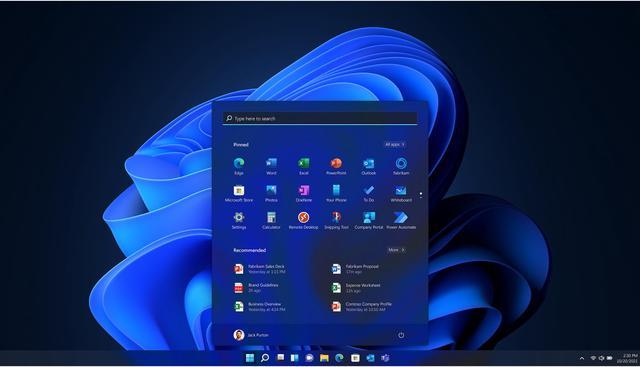
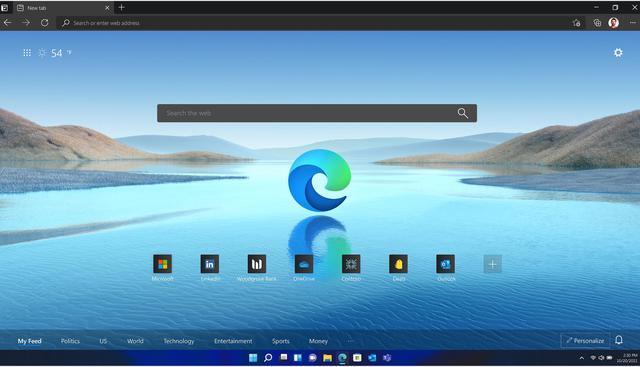
- Less chaos, more calm. The refreshed design of Windows 11 enables you to do what you want effortlessly.
- Biometric logins.**. Encrypted authentication. And, of course, advanced antivirus defenses. Everything you need, plus more, to protect you against the latest cyberthreats.
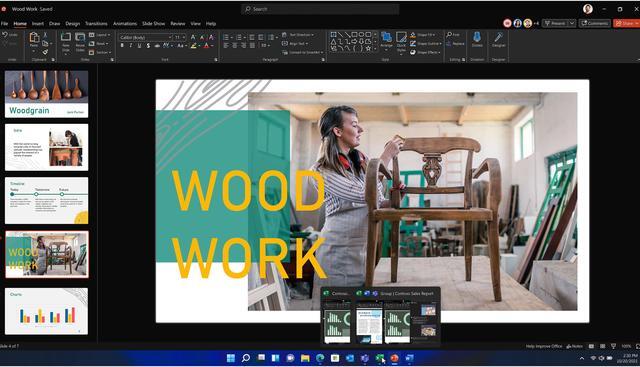
- Make the most of your screen space with snap layouts, desktops, and seamless redocking.
- Widgets makes staying up-to-date with the content you love and the news you care about, simple.
- Play the latest games with graphics that rival reality. DirectX 12 Ultimate comes ready to maximize your hardware.**
+
+
Overview
Specs
Reviews (1,039)
Warranty & Returns
Warranty, Returns, And Additional Information
Return Policies
- Return for refund within: non-refundable
- Return for replacement within: non-replaceable
- This item is covered by Newegg.ca's Digital Products Return Policy.
- Read full return policy for details.
Manufacturer Contact Info
- Manufacturer Product Page
- Manufacturer Website
- Support Phone: 1-800-642-7676
- Support Website
- View other products from Microsoft
LOADING...
Microsoft Windows 11 Home 64-bit OEM is a DVD-based operating system for a compatible new PC, suited to home users who want Windows features for everyday computing, multitasking, and gaming. The OEM license is intended for a new computer and cannot be transferred to another machine after installation.
Recommended For
- PC builders installing Windows on a new, compatible computer who are comfortable with an OEM license intended for one device.
- People who regularly work with several open apps—such as a browser, documents, and messaging—and want built-in window layouts to organize a desktop or external monitor.
- Home PC gamers setting up a compatible modern system who want Windows support for DirectX 12 games; independent benchmarks find gaming performance versus Windows 10 is generally close, with results varying by hardware and game.
- Users who want separate desktop spaces for different routines, such as keeping personal apps apart from work or study windows.
Real-World Use Scenarios
- Installing Windows on a new compatible PC: use the included DVD and activation key to set up Windows 11 Home on a new system; this OEM license is intended for that PC and is not transferable to another machine.
- Working with several apps on one screen: keep a document beside a browser or meeting window using Snap layouts, so you can refer to information without repeatedly switching windows.
- Separating work, study, and personal tasks: create separate desktops for different activities, then switch between them to keep open apps and windows more organized.
- Playing PC games on a compatible gaming computer: use Windows’ broad PC game support and DirectX features, with the actual graphics quality and frame rate depending on the PC’s hardware and the game.
- Organizing or making simple photo and video projects: use Windows apps such as Photos or Clipchamp to view and edit personal media; available features can vary, and some Clipchamp options require a subscription.
Spec Summary
| Attribute | Value |
|---|---|
| Best For | Preinstalling Windows 11 Home 64-bit on a new PC |
| Edition And Platform | Windows 11 Home, 64-bit, for PC |
| System Requirements And Compatibility | Requires a compatible 64-bit processor at 1 GHz or faster with 2 or more cores, 4 GB RAM, and 64 GB or more storage; UEFI firmware with Secure Boot capability; TPM 2.0; DirectX 12-compatible graphics with a WDDM 2.0 driver; and a 720p display larger than 9 inches with 8 bits per color channel. Windows 11 Home requires internet connectivity and a Microsoft account; internet access is also required for updates and some features |
| OEM License And Support | For preinstallation on a new PC; cannot be transferred to another computer after installation. The assembler is responsible for end-user support; Microsoft support is available with the Retail version |
| Packaging And Format | OEM DVD-ROM; package quantity: 1 |
| Model Identifiers | KW9-00633 |
Reference Q&A
Q: Should I buy Windows 11 Home or Windows 11 Pro?
A: Choose this Windows 11 Home edition for a new personal PC used for everyday tasks, gaming, and general productivity. Choose Windows 11 Pro if you need features such as BitLocker Drive Encryption, Remote Desktop hosting, or joining a work domain or Microsoft Entra ID. Microsoft lists these as Pro features; the product’s OEM license is intended for installation on a new PC.
Q: Is this Windows 11 Home OEM license or a retail license better for a new PC?
A: This OEM edition fits a new PC build if you plan to keep the license with that computer and do not need Microsoft-provided product support. The listing states that the installed OEM license cannot be transferred to another machine and that OEM support is provided by the system builder. Consider a retail license instead if transfer rights or Microsoft support matter to you.
Q: Should I install this Windows 11 Home edition or keep using Windows 10?
A: For a new PC, choose Windows 11 Home if you want a supported Windows version. Standard support for Windows 10 ended on October 14, 2025, while Windows 11 Home remains in support. Keep Windows 10 only if a specific compatibility need requires it and you have a support plan for that device.
Q: Is the DVD version worth choosing over USB installation media?
A: Choose this DVD package if the PC has a DVD drive and you want the included physical installation disc. If the new PC lacks an optical drive, Microsoft provides a tool to create Windows 11 installation media on a USB drive; check that you select the Home edition and use this product’s activation key.
Q: Can I use this OEM version to upgrade my existing PC?
A: This OEM license is intended for installation on a new PC with no prior version of Windows installed, so it is not the suitable choice for upgrading an existing Windows installation. Check the license terms for the version you plan to buy.
Q: Can I transfer this Windows license to another computer later?
A: No. This OEM license cannot be transferred to another machine once installed. It is best suited to a PC you expect to keep using with this license.
Q: Does this version include a DVD and an activation key?
A: Yes. This is the DVD version, and the activation key is under a scratch-off area on the label. You will need a way to read the DVD to install from it.
Q: What should I check before installing it on my PC?
A: Check that the PC meets Windows 11’s requirements, including a compatible 64-bit processor, at least 4 GB of RAM and 64 GB of storage, UEFI with Secure Boot capability, and TPM 2.0. Windows 11 Home also requires an internet connection and a Microsoft account during setup.
Q: Is this Windows 11 DVD usable on a new PC without an optical drive?
A: Yes. Reddit discussions describe creating Windows installation media on a USB drive and using the key supplied with the DVD. You will need access to a computer and USB drive to prepare the installer.
Q: Who is this Windows 11 Home OEM license suitable for?
A: It is intended for installation on a new PC and is best suited to someone who plans to keep the license with that computer. The product information says it cannot be transferred to another machine after installation and that the OEM assembler, not Microsoft, provides end-user support.
Q: Is this OEM version worth choosing over Windows 11 Retail?
A: It may suit buyers who only need Windows for one new PC. The trade-off is that this OEM license cannot be transferred to another machine and does not include Microsoft support; choose Retail if transferability or Microsoft-provided support matters to you. The product listing does not provide a price comparison.