
Your Browsing History


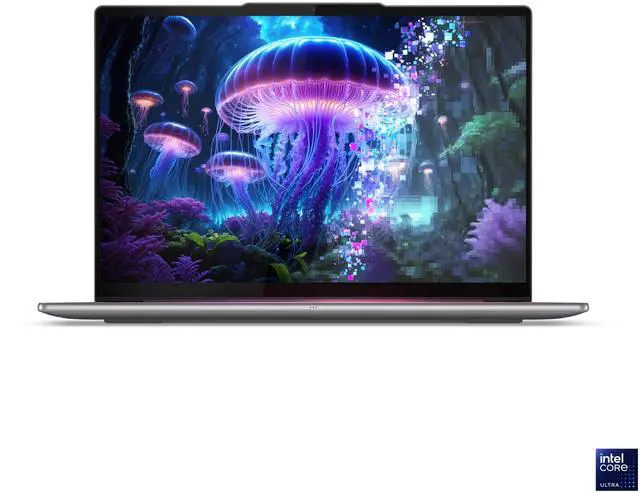
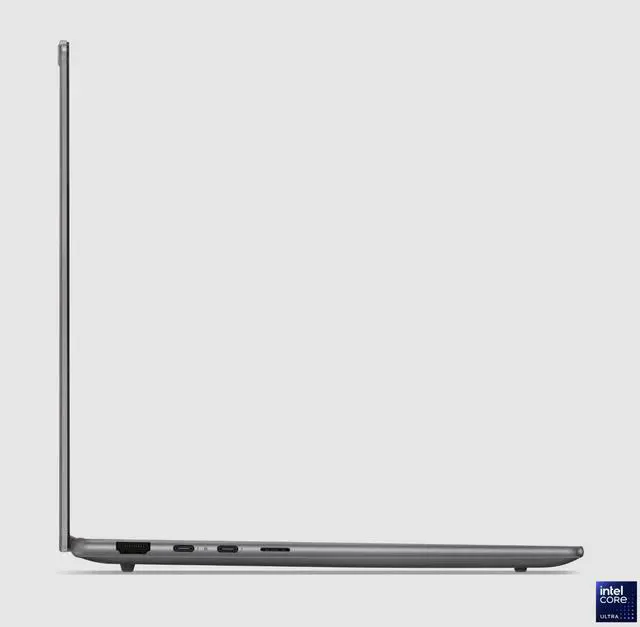
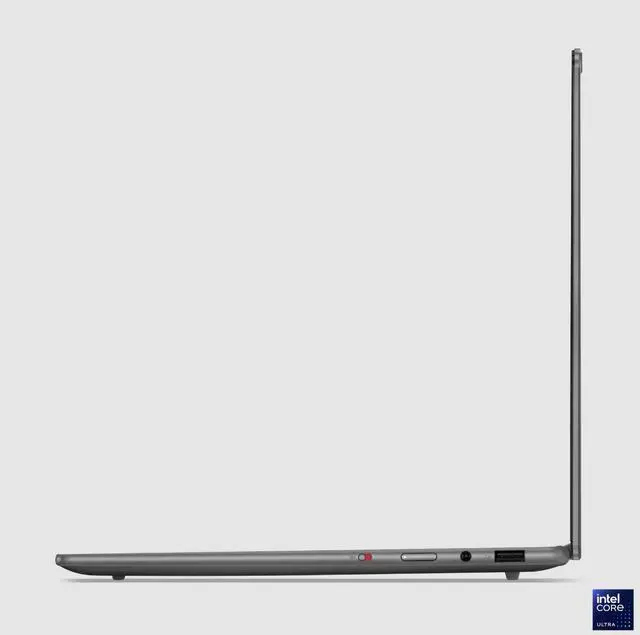


Lenovo Slim 7 14.0" Intel Core Ultra 7 256V 16GB Memory 1TB PCIe SSD 83MC0001US
- Intel Core Ultra 7 256V
- 16GB Memory / 1TB PCIe SSD
- Intel Arc 140V
- Non-Touch Screen
- 1920 x 1200
Overview
Specs
Reviews
Slim 7i 14" U7 16G 1T W11H
Warranty & Returns
Warranty, Returns, And Additional Information
Warranty
- Limited Warranty period (parts): 1 year
- Limited Warranty period (labor): 1 year
- Read full details
Return Policies
- Return for refund within: 15 days
- Return for replacement within: 15 days
- This item is covered by Newegg.ca's 15-Day Return Policy.
- Read full return policy for details.
Manufacturer Contact Info
LOADING...
Learn about this product
The Lenovo Slim 7 14-inch is a thin-and-light Copilot+ PC built for everyday productivity, travel, and media use, pairing an Intel Core Ultra 7 256V processor, 16GB memory, and 1TB PCIe SSD with a sharp 1920 x 1200 OLED display. It suits students, professionals, and home users who want portability and fast daily performance in an integrated-graphics laptop.
Recommended For
- Commuters and hybrid workers who want a light 14-inch laptop for Office apps, web work, video calls, and frequent travel. Reviews and Lenovo positioning consistently frame this Slim 7 class as a thin-and-light productivity machine with strong portability, good battery life, and practical port selection for everyday work.
- Students or mobile professionals who care more about screen quality and quiet day-to-day use than touchscreen features. The 14-inch OLED panel, thin chassis, and non-gaming focus make it a fit for note-taking, reading, streaming, writing, and long sessions away from a desk.
- Users who want a premium everyday Windows laptop with some light creative headroom, such as photo edits, many browser tabs, Figma, Canva, or lighter 1080p media work. Community testing and reviews point to Intel Arc 140V being well suited to casual GPU-accelerated tasks without moving into workstation territory.
- Buyers specifically shopping for a Copilot+ PC for local AI features, modern Intel efficiency, and a clean ultraportable form factor. Lenovo and PSREF materials position this model family around on-device AI capability alongside mainstream productivity use.
Real-World Use Scenarios
- For everyday work like Chrome with many tabs, Microsoft 365, Slack, Zoom, and streaming music, this 14-inch Slim 7 is typically used as a lightweight daily laptop and should feel responsive without much fan noise in normal office-style use.
- For travel, commuting, or working around the house, users commonly choose this kind of Slim 7 for its thin 14-inch design; it is easier to carry than a larger laptop and better suited to moving between meetings, flights, and coffee-shop sessions.
- For watching movies, YouTube, or doing photo-heavy browsing, the OLED display is the main real-world benefit: users can expect better contrast and richer-looking visuals than a typical budget IPS panel, which makes media use more enjoyable.
- For light creative work such as editing photos, making presentations, trimming short videos, or handling social-media assets, it should be comfortable for casual creator tasks, but it is not the machine most users would pick for long 4K video exports or heavier pro workflows.
- For casual gaming after work, community testing around the Core Ultra 7 256V and Arc 140V suggests older games, esports titles, and lighter 1080p settings are realistic, while newer AAA games usually need lower settings and should not be the main reason to buy this laptop.
Spec Summary
| Attribute | Value |
|---|---|
| Best For | 14.0" thin-and-light home/personal laptop for everyday productivity and multimedia with an Intel Core Ultra 7 CPU and Intel Arc 140V graphics |
| Processor And Core Count | Intel Core Ultra 7 256V — 8-core (4P+4E) processor, up to 4.8 GHz maximum clock, 12 MB L3 cache |
| GPU And VRAM | Intel Arc 140V integrated graphics with shared system memory |
| Display Spec | 14.0" OLED, 1920 x 1200 native resolution, 60 Hz refresh rate, non-touch; Eyesafe, One Glass Solution (OGS) panel, anti-fingerprint, low blue light and flicker-free, up to 600 nit max brightness |
| Memory Configuration | 16 GB RAM (reported LPDDR5X, 8533 MHz) |
| Storage And Expansion | 1 TB PCIe SSD (M.2 form factor) |
| High Speed I O | 2 × Thunderbolt 4 / USB4, 1 × USB 3.2 Gen 1 Type-A (USB-A), 1 × HDMI 2.1, 1 × headphone/microphone combo jack |
| Battery And Power | Built-in lithium‑polymer battery (reported 4000 mAh), 3 cells, battery weight ~250 g; battery included and installed |
| Wired And Wireless Networking | Wi‑Fi (reported 802.11.be) and Bluetooth wireless; connectivity also via USB and HDMI |
| Webcam And Privacy | Front-facing webcam (webcam capability present) |
| Keyboard And Control | QWERTY keyboard; non-touch display (no touchscreen control) |
| Audio Setup | Headphone/microphone combo jack for audio I/O |
| Portability | Thin-and-light notebook — 12.28" x 8.63" x 0.55"; weight 2.82 lbs |
| External Display And Docking Fit | Supports external displays and docking via HDMI 2.1 and two Thunderbolt 4 / USB4 ports |
| Model Identifiers | Lenovo Slim 7 (Slim 7 14ILL10), model 83MC0001US; manufacturer Lenovo Group Limited; Windows 11 Home; Copilot+ PC AI feature included |
| Special Features | Reported display and chassis features: anti-fingerprint, low blue light, One Glass Solution (OGS) panel, flicker-free |
Reference Q&A
Q: Should I choose the Lenovo Slim 7 14 with Core Ultra 7 256V or a Core Ultra 5 version of the same laptop?
A: Choose this Core Ultra 7 256V model if you want the stronger integrated graphics option in the Slim 7 line for light gaming, photo work, and more headroom in GPU-accelerated apps. Across Lenovo specs and review coverage of Lunar Lake systems, Core Ultra 7 models pair with Intel Arc 140V graphics, while lower Core Ultra 5 models use Arc 130V. For everyday web, Office, streaming, and general school or work use, a Core Ultra 5 Slim 7 can still be the more practical value choice if priced meaningfully lower.
Q: Is the Lenovo Slim 7 14 a better fit than an older Core Ultra 7 155H thin-and-light laptop?
A: This Slim 7 is the better fit if you care more about battery efficiency, lower heat, and a quieter thin-and-light experience than peak multicore throughput. Review data around Lunar Lake consistently positions the Core Ultra 7 256V as an efficiency-first platform, while Core Ultra 7 155H systems are typically stronger for heavier sustained multicore workloads such as large code builds or longer creator exports. For everyday productivity, travel, and unplugged use, the 256V configuration is usually the more balanced choice.
Q: Lenovo Slim 7 14 with Intel Core Ultra 7 256V or a Snapdragon X Elite laptop?
A: Choose the Lenovo Slim 7 14 with Intel if you want the safer pick for broad Windows app compatibility, x86 software, and light gaming on Intel Arc 140V graphics. Choose a Snapdragon X Elite alternative if your priority is ARM-based Copilot+ battery-focused use and your apps are known to run well natively or through emulation. Review comparisons generally show Snapdragon ahead in some multicore and battery scenarios, while Lunar Lake remains the simpler choice for mixed legacy apps, peripherals, and game compatibility.
Q: Should I buy this Lenovo Slim 7 14 for portability, or move up to a more performance-first laptop?
A: Buy this Slim 7 14 if your priority is a lighter travel-friendly laptop with an OLED display, modern ports, and enough performance for office work, media, coding, and light creative tasks. Move up to a performance-first laptop if you expect sustained rendering, heavier video editing, or more demanding gaming, because this model uses integrated Arc 140V graphics and a low-power efficiency-oriented CPU design. In short: this Lenovo is the better choice for premium mobility, while larger H-series or discrete-GPU laptops are the better choice for heavier workloads.
Q: Is the Lenovo Slim 7 14 worth choosing over another 14-inch OLED thin-and-light like the ASUS Zenbook 14?
A: Choose the Lenovo Slim 7 14 if you want a straightforward premium thin-and-light with a 16:10 OLED display, 2.82 lb travel weight, Thunderbolt 4 support, and a configuration that emphasizes efficiency and daily usability. Choose a competing 14-inch OLED laptop like the Zenbook 14 if a specific rival offers more RAM, a higher-resolution panel, or a faster processor at a similar price. Community discussions around this class of laptops often frame the decision around battery life, fan behavior, screen preference, and price rather than large everyday usability differences.
Q: Is this Lenovo Slim 7 a good travel work laptop?
A: Yes for portable office use. At 2.82 lbs and 0.55 inches thick, this model is easy to carry, and its 14-inch OLED 1920x1200 screen, 1TB SSD, and Core Ultra 7 256V are well suited to web work, documents, meetings, and multitasking on the go. The main trade-offs are that this specific Newegg configuration is non-touch, the RAM is fixed at 16GB, and real-world battery life is likely closer to a full workday than Lenovo's maximum lab figure.
Q: Is 16GB of memory enough for meetings, note-taking, and everyday office work?
A: Yes. For Teams or Zoom calls, browser tabs, Office apps, email, note-taking, and normal multitasking, 16GB is generally enough on a thin-and-light laptop like this. It is less ideal if you expect heavy creative workloads, large local AI workloads, or very demanding multitasking over several years, because the memory is not upgradeable.
Q: Who is this laptop best suited for?
A: This model fits buyers who want a premium 14-inch Windows laptop for productivity first: students, remote workers, frequent travelers, and home users who value low weight, a sharp OLED display, and modern ports. It is a weaker fit for buyers who need touch or pen input, upgradeable memory, or workstation-class performance for sustained video editing, 3D work, or gaming.
Q: What are the main trade-offs versus a similar Snapdragon Copilot+ laptop?
A: The Lenovo Slim 7 is the safer choice if you want standard Windows x86 compatibility and a practical port mix with USB-A, HDMI 2.1, and two Thunderbolt 4 ports. A comparable Snapdragon Copilot+ laptop may offer stronger battery life, but can involve more app-compatibility questions depending on the software you use. The trade-off here is that Lenovo's Intel-based model is more predictable for peripherals and legacy apps, while ARM-based alternatives may appeal more to buyers prioritizing battery life over compatibility certainty.
Q: Can you dock it and use it as a desk setup with external monitors?
A: Yes. This configuration includes two Thunderbolt 4/USB4 ports and one HDMI 2.1 port, which makes it suitable for a simple desk setup with modern docks, external displays, and standard accessories. It is a strong fit for hybrid work users who want one laptop for travel and office docking without stepping up to a larger business-class model.
Q: Is the Lenovo Slim 7 14 with Core Ultra 7 256V a good buy for everyday work and travel?
A: Yes, it is a sensible choice for portable everyday use if you want a light 14-inch laptop with an OLED display, 1TB storage, and strong efficiency. Based on repeated Reddit discussions around this Slim 7 / Yoga Slim 7 14ILL10 class, buyers mainly value battery life, portability, and office-use performance. The trade-off is that this configuration is better for productivity and media use than for demanding gaming or heavy workstation tasks.
Q: Who is this Lenovo Slim 7 best suited for?
A: It is best suited for students, office users, remote workers, and frequent travelers who want a thin-and-light Windows laptop with a good screen and enough storage for daily use. The 16GB memory and integrated Intel Arc graphics are enough for productivity, web work, media consumption, and light creative tasks, but this is not the best fit for users who need upgradeable RAM, dedicated graphics, or sustained heavy rendering performance.
Q: Is it good for light gaming or creative work?
A: It is suitable for light gaming, photo work, and lighter creative workloads, but not ideal for AAA gaming or heavy video editing. The Intel Arc 140V integrated graphics are a step up from basic integrated graphics, yet performance still depends on shared memory and thin-and-light cooling limits. Buyers choosing this model should view graphics capability as a bonus, not the main reason to buy it.
Q: What are the main trade-offs of this configuration?
A: The main trade-offs are non-touch input, 60Hz display refresh, integrated rather than dedicated graphics, and 16GB of non-upgrade-focused memory for a premium thin-and-light class. In practice, that means it is optimized more for mobility, battery life, and everyday responsiveness than for gaming, pen use, or long-term hardware flexibility.