


Best Sellers
- $168.67
- + FREE SHIPPING
 Top Rated
- $183.99
- + FREE SHIPPING

Get Educated
Make informed decisions with expert advice. Learn More
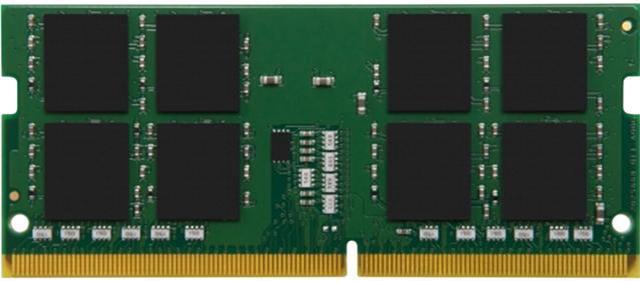

Kingston 8GB 260-Pin DDR4 SO-DIMM DDR4 3200 (PC4 25600) Laptop Memory Model KCP432SS8/8
- DDR4 3200 (PC4 25600)
- CAS Latency CL22
- 1.20V
+
+
Specs
Reviews (2)
Learn more about the Kingston Technology Corp. KCP432SS8/8
| Best Seller Ranking | #45 in Laptop Memory |
|---|
| Brand | Kingston |
|---|---|
| Model | KCP432SS8/8 |
| Capacity | 8GB |
|---|---|
| Type | 260-Pin DDR4 SO-DIMM |
| Speed | DDR4 3200 (PC4 25600) |
| CAS Latency | CL22 |
| Voltage | 1.20V |
| ECC | No |
| Buffered/Registered | Unbuffered |
| Heat Spreader | No |
| First Listed on Newegg | October 02, 2020 |
|---|
Warranty & Returns
Warranty, Returns, And Additional Information
Warranty
- Limited Warranty period (parts): Lifetime
- Limited Warranty period (labor): Lifetime
- Read full details
Return Policies
- Return for refund until: January 31, 2027
- Return for replacement until: January 31, 2027
- This item is covered by Newegg.ca's Extended Holiday Return Policy.
- Read full return policy for details.
We want to ensure your holiday shopping this year is hassle-free. That’s why we’re automatically extending our return policies on almost every product! For purchases placed between November 1st, 2026 and December 31, 2026 you will have until January 31, 2027 to return your product.
Manufacturer Contact Info
- Manufacturer Product Page
- Manufacturer Website
- Support Phone: 1-877-546-4786
- Support Website
- View other products from Kingston Technology Corp.
LOADING...
LOADING...
Kingston KCP432SS8/8 is an 8GB DDR4-3200 laptop memory module with a 260-pin SO-DIMM form factor, CL22 latency, and 1.20V operation. It suits users upgrading laptops that support these memory specifications.
Recommended For
- Laptop owners with a compatible DDR4 SO-DIMM slot and 8 GB already installed who want to add another 8 GB for a 16 GB configuration; confirm the laptop supports the module and the pairing.
- Owners of a Kingston-validated laptop who need an 8 GB replacement for a failed or missing DDR4-3200 SO-DIMM and want a standard, non-ECC, unbuffered module.
- Users upgrading a compatible 4 GB laptop for light workloads such as basic documents, email, and a modest number of browser tabs, where an 8 GB total-memory target fits their needs.
Real-World Use Scenarios
- A laptop owner with 8GB installed adds this module to a compatible, available memory slot to reach 16GB; having more memory headroom can help when switching among browser tabs, documents, video calls, and other everyday apps.
- Someone replacing a faulty or undersized laptop memory stick can use this 8GB module in a system that supports this memory type; the practical result is a replacement or capacity increase, not a guaranteed speed boost.
- A student or home-office user adding memory to a compatible laptop can keep common work open together—such as web research, a document, music, and streaming—while reducing the chance that limited memory becomes a bottleneck; results depend on the laptop and workload.
- A casual gamer upgrading a compatible laptop from 8GB to 16GB can give games and background apps more memory to share; smoother play is possible when the original system was short on RAM, but this module alone does not guarantee higher frame rates.
Spec Summary
| Attribute | Value |
|---|---|
| Best For | Laptop upgrades requiring an 8GB DDR4 SO-DIMM memory module |
| Memory Capacity | 8GB |
| Memory Type And Form Factor | DDR4, 260-pin SO-DIMM; single-rank x8 configuration |
| Speed And Latency | 3200 MT/s (DDR4-3200, PC4-25600) with CL22 latency |
| Voltage And Reliability | 1.20V, non-ECC, unbuffered |
| Model Identifiers | Kingston KCP432SS8/8 |
Reference Q&A
Q: Should I add this 8GB stick to my laptop’s existing 8GB RAM, or replace it with a 16GB stick?
A: Add this Kingston module if your laptop has an open DDR4 SO-DIMM slot and supports the module; that can bring total memory to 16GB and may enable dual-channel operation with a matching 8GB module. Choose a single 16GB stick instead if the laptop has only one usable slot or its compatibility limits call for that configuration. Check the laptop’s supported capacity and memory configuration before buying.
Q: Is this 8GB DDR4-3200 module enough, or should I upgrade to 16GB?
A: Choose this 8GB module for light workloads or to add 8GB to a compatible laptop that already has a suitable module. Prefer 16GB total if you regularly multitask, keep many browser tabs open, or use memory-intensive applications. In one tested laptop comparison, Tom’s Hardware found that 16GB handled demanding multitasking better than 8GB; results vary by laptop and workload.
Q: Does this DDR4-3200 module perform better than an 8GB DDR4-2666 module?
A: This Kingston module is rated for DDR4-3200, but the laptop’s processor and memory support determine the speed it actually runs at. If the system supports only DDR4-2666, the module may run at that lower speed; if it supports DDR4-3200, the higher rated speed can help in some workloads. The real-world difference depends on the laptop and task, so check the system specifications before choosing based on speed alone.
Q: How can I tell whether this memory will work in my laptop?
A: Check the laptop’s manual or specifications for support for 8GB DDR4 260-pin SO-DIMM memory, and confirm it has an available memory slot and supports the module’s speed. This module is DDR4-3200, non-ECC, unbuffered, and 1.20V; laptops with soldered memory or a different memory type may not accept it.
Q: Can I add this 8GB module to the RAM already in my laptop?
A: Possibly, if the laptop has an open SO-DIMM slot and supports the added capacity. Before buying, check the laptop’s maximum memory and existing module configuration. The product is one 8GB module; the provided specifications do not establish whether it will work alongside a particular existing module.
Q: Will this memory run at 3200 MHz in my laptop?
A: Only if the laptop supports DDR4-3200 memory. The module is rated DDR4-3200 (PC4-25600), but the laptop’s supported memory speed and configuration determine the speed it can use. Check the laptop specifications before purchase.
Q: Can I use this laptop memory in a desktop computer?
A: This module is a 260-pin SO-DIMM, the compact memory form factor used in many laptops. It is not a standard desktop DIMM, so check the computer’s required memory form factor before buying.
Q: Can I add this 8GB module to my laptop’s existing 8GB DDR4-3200 RAM?
A: It may be a suitable match if the laptop has an available SO-DIMM slot and supports 8GB DDR4-3200 modules. Check the laptop’s memory limits and existing module specifications before buying; matching capacity and speed does not guarantee compatibility with every laptop.
Q: Does this need to match my existing RAM brand or part number for dual-channel use?
A: The discussion concerns pairing an existing laptop module with Kingston memory and raises dual-channel compatibility. This module is an 8GB DDR4-3200 SO-DIMM, but the laptop and both modules determine whether dual-channel operation is supported; check the laptop’s specifications and existing RAM before purchasing.
Q: Will this RAM actually run at 3200 MT/s in my laptop?
A: The module is rated for DDR4-3200, but its operating speed depends on the laptop’s supported memory speeds and configuration. A laptop may run memory below its rated speed, so confirm the system’s specifications before choosing it.